
Android 开源项目android-open-project解析之(四) ColorPickView,GraphView,UI Style,Other
十三、ColorPickView
ColorPickerView
颜色选择器,支持PopupWindows或新的Activity中打开
项目地址:https://code.google.com/p/color-picker-view/
效果图:HoloColorPicker
颜色选择器
项目地址:https://github.com/LarsWerkman/HoloColorPicker
Demo地址:https://docs.google.com/file/d/0BwclyDTlLrdXRzVnTGJvTlRfU2s/editColorPickerPreference
颜色选择器
项目地址:https://github.com/attenzione/android-ColorPickerPreference
效果图:
ColorPicker
颜色选择器(Google Agenda中的样式风格)
项目地址:https://github.com/flavienlaurent/colorpicker
Demo地址:https://raw.github.com/biboune/colorpicker/master/colorpicker-sample.apk
效果图:
十四、GraphView
MPAndroidChart
强大的图表绘制工具,支持折线图、面积图、散点图、时间图、柱状图、条图、饼图、气泡图、圆环图、范围(高至低)条形图、网状图及各种图的结合;支持图的拖拽缩放。支持 Android 2.2 以上。支持横纵轴缩放。多指缩放,展现动画、高亮、保存到 sdcard、从文件读取图表
项目地址:https://github.com/PhilJay/MPAndroidChart
Demo地址:https://play.google.com/store/apps/details?id=com.xxmassdeveloper.mpchartexample
Demo项目:https://github.com/PhilJay/MPAndroidChart/tree/master/MPChartExample
效果图:
在线演示:https://www.youtube.com/watch?v=ufaK_Hd6BpIachartengine
强大的图表绘制工具,支持折线图、面积图、散点图、时间图、柱状图、条图、饼图、气泡图、圆环图、范围(高至低)条形图、拨号图/表、立方线图及各种图的结合
项目地址:https://code.google.com/p/achartengine/
效果图:
http://www.achartengine.org/dimages/sales_line_and_area_chart.png
http://www.achartengine.org/dimages/temperature_range_chart.png
http://www.achartengine.org/dimages/combined_chart.png
http://www.achartengine.org/dimages/budget_chart.png
官网网址:http://www.achartengine.org/
APP演示样例:Wordpress Android,Google AnalyticsGraphView
绘制图表和曲线图的View,可用于Android上的曲形图、柱状图、波浪图展示
项目地址:https://github.com/jjoe64/GraphView
Demo项目:https://github.com/jjoe64/GraphView-Demos
APP演示样例:Wordpress Android,Google AnalyticsHoloGraphLibrary
绘制现状图、柱状图、饼状图
项目地址:https://bitbucket.org/danielnadeau/holographlibrary/src
文档介绍:https://bitbucket.org/danielnadeau/holographlibrary/wiki/HomeXCL-Charts
XCL-Charts基于原生的Canvas来绘制各种图表,在设计时,尽量在保证开发效率的同一时候,给使用者提供足够多的定制化能力。因此使用简便,同一时候具有相当灵活的定制能力。眼下支持3D/非3D柱形图(Bar Chart)、3D/非3D饼图(Pie Chart)、堆积图(Stacked Bar Chart)、面积图(Area Chart)、 折线图(Line Chart)、曲线图(Spline Chart)、环形图(Dount Chart)、南丁格尔玫瑰图(Rose Chart)、仪表盘(Dial Chart)、刻度盘(Gauge
Chart)、雷达图(Radar Chart)、圆形图(Circle Chart)等图表。其他特性还包含支持图表缩放、手势移动、动画显示效果、高密度柱形显示、图表分界定制线、多图表的混合显示及同数据源不同类型图表切换等。
项目地址:https://github.com/xcltapestry/XCL-Charts
Demo地址:https://github.com/xcltapestry/XCL-Charts/blob/master/XCL-Charts-demo/bin/XCL-Charts-demo.apk?raw=trueEazeGraph
Android 图表库。支持柱状图、分层柱状图、饼状图、线性图
项目地址:https://github.com/blackfizz/EazeGraph
Demo地址:https://play.google.com/store/apps/details?id=org.eazegraph.appWilliamChart
绘制图表的库,支持LineChartView、BarChartView和StackBarChartView三中图表类型。而且支持 Android 2.2及以上的系统。项目地址:https://github.com/diogobernardino/WilliamChart
Demo地址:https://play.google.com/store/apps/details?id=com.db.williamchartdemo
Demo项目:https://github.com/diogobernardino/WilliamChart/tree/master/sample
效果图:


HelloCharts for Android
支持折线图、柱状图、饼图、气泡图、组合图;支持预览、放大缩小,滚动,部分图表支持动画;支持 Android 2.2 以上
项目地址:https://github.com/lecho/hellocharts-android
Demo地址:https://play.google.com/store/apps/details?id=lecho.lib.hellocharts.samples
在线演示:v=xbSBjyjH2SY">https://www.youtube.com/watch?v=xbSBjyjH2SY


十五、UI Style
不相同式的系统UI风格。如IOS、Bootstrap风格
UITableView
ios风格控件。包含Button、ListView、TableView
项目地址:https://github.com/thiagolocatelli/android-uitableview
Demo地址:https://github.com/Trinea/TrineaDownload/blob/master/ui-tableview-demo.apk?raw=trueATableView
ios风格控件
项目地址:https://github.com/dmacosta/ATableView
Demo地址:https://play.google.com/store/apps/details?id=com.nakardo.atableview.demo
Cards-UI
卡片式View,支持单个卡片,item为卡片的ListView
项目地址:https://github.com/afollestad/Cards-UI
Demo地址:https://github.com/Trinea/TrineaDownload/blob/master/cards-ui-demo.apk?raw=true
cardslib
卡片式View,支持单个卡片。item为卡片的ListView和GridView
项目地址:https://github.com/gabrielemariotti/cardslib
Demo地址:https://play.google.com/store/apps/details?id=it.gmariotti.cardslib.demoAndroid-Bootstrap
Bootstrap 风格的button
项目地址:https://github.com/Bearded-Hen/Android-Bootstrap
效果图:Material Design Android Library
Android L 中 Material Design 风格的组件适配到 Android 2.2+
项目地址:https://github.com/navasmdc/MaterialDesignLibraryAndroid FlatUI
Android 扁平化风格的组件,支持一些自己定义样式
项目地址:https://github.com/eluleci/FlatUI
效果图:
十六、其它
SwipeBackLayout
左右或向上滑动返回的Activity
项目地址:https://github.com/Issacw0ng/SwipeBackLayout
Demo地址:https://play.google.com/store/apps/details?id=me.imid.swipebacklayout.demo
APP演示样例:知乎android-styled-dialogs
可自己定义样式的dialog,默认与Holo主题样式一致。在Android2.2以上同一样式
项目地址:https://github.com/inmite/android-styled-dialogs
Demo地址:raw=true">https://github.com/Trinea/TrineaDownload/blob/master/styled-dialogs-demo.apk?raw=true
Android Sliding Up Panel
可拖动的View。能在当前Activity上扶起一个可拖动的Panel
项目地址:https://github.com/umano/AndroidSlidingUpPanel
Demo地址:id=com.sothree.umano">https://play.google.com/store/apps/details?
id=com.sothree.umano
APP演示样例:Google Music精简播放栏AndroidWheel
Android Wheel支持城市、多种日期时间、password、图片
项目地址:https://code.google.com/p/android-wheel/
效果图:TableFixHeaders
第一列固定的Table
项目地址:https://github.com/InQBarna/TableFixHeaders
Demo地址:http://bit.ly/13buAIqInscription
可用于展示应用change和new feature信息
项目地址:https://github.com/MartinvanZ/InscriptionActivityTransition
Activity切换动画,包含渐变、flip、某个位置进入等等
项目地址:https://github.com/ophilbert/ActivityTransition
效果图:类似桌面左右切换的各种效果。只是桌面并不是用ViewPager实现而已
文档介绍:https://github.com/jfeinstein10/JazzyViewPager/blob/master/JazzyViewPager.apk?raw=true
EasyAndroidAnimations
针对View的各种动画
项目地址:https://github.com/2359media/EasyAndroidAnimationsGlowPadBackport
将Android4.2的锁屏界面解锁扩展到Android1.6及1.6+
项目地址:https://github.com/rock3r/GlowPadBackport
Demo地址:https://play.google.com/store/apps/details?id=net.sebastianopoggi.samples.ui.GlowPadSample
效果图:GlowPadView
Android4锁屏界面解锁
项目地址:https://github.com/nadavfima/GlowPadView
效果图:https://raw.github.com/nadavfima/GlowPadView/master/example.pngandroid-lockpattern
Android的图案password解锁
项目地址:https://code.google.com/p/android-lockpattern/
Demo地址:https://play.google.com/store/apps/details?id=group.pals.android.lib.ui.lockpattern.demo
文档介绍:https://code.google.com/p/android-lockpattern/wiki/QuickUse
APP演示样例:Android开机的图案password解锁,支付宝的password解锁PatternLock
还有一个 Android 图案解锁库
项目地址:https://github.com/DreaminginCodeZH/PatternLock
Demo 地址:https://github.com/DreaminginCodeZH/PatternLock/raw/master/dist/sample.apk
效果图:
APP演示样例:Android开机的图案password解锁。支付宝的password解锁RangeBar
类似于SeekBar,不同的是能够选择一个范围内的值而不是单个值
项目地址:https://github.com/edmodo/range-bar
Demo地址:https://github.com/Trinea/TrineaDownload/blob/master/range-bar-demo.apk?raw=true
效果图:ChromeView
利用Chromium实现的WebView。解决各个Android版本号WebView不同的问题,同一时候利用最新Chrome代码
项目地址:https://github.com/pwnall/chromeviewandroid-phased-seek-bar
支持预先定义状态的SeekBar
项目地址:https://github.com/ademar111190/android-phased-seek-bar
效果图: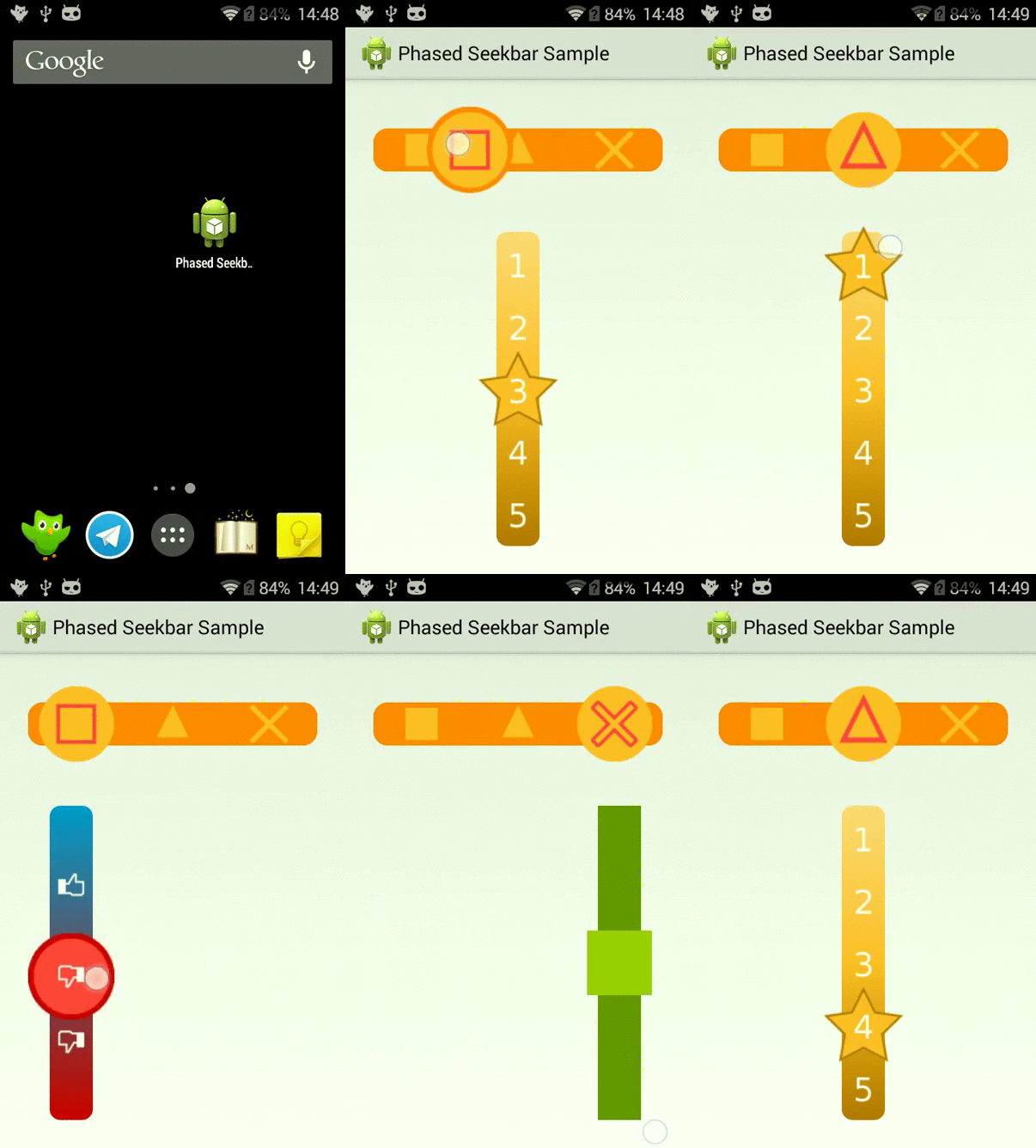
Android Slider Preference Library
可加入到设置中的基于对话框的RankBar小部件
项目地址:https://github.com/jayschwa/AndroidSliderPreferenceShowcaseView library
用于高亮显示应用程序的特定部分,从而突出突出重点
项目地址:https://github.com/amlcurran/ShowcaseViewandroid-segmented-control
Android上的Segmented Controls。相当于RadioButton组
项目地址:https://github.com/hoang8f/android-segmented-controlSwipeable Cards
类似Tinder的卡片效果,能够载入图片并动画效果展示,向左滑动表示喜欢。向右表示不喜欢
项目地址:https://github.com/kikoso/Swipeable-Cards
Demo地址:https://play.google.com/store/apps/details?id=info.hoang8f.fbutton.demoEdgeEffectOverride
改变ScrollView, ListView, ExpandableListView, GridView, ViewPager等滚动控件滚动到边缘的颜色效果
项目地址:https://github.com/AndroidAlliance/EdgeEffectOverrideandroid-pinned-header-listviews
使ExpandListView的Group滑动到顶端时会固定不动直到另外一个Group到达顶端
项目地址:https://github.com/rtyley/android-pinned-header-listviewsAndroidSwipeLayout
滑动Layout,支持单个View,ListView,GridView
项目地址:https://github.com/daimajia/AndroidSwipeLayout
Demo地址:Download Demo
效果图:DynamicCardLayout
在Android中实现的类似Windows8的瓷片布局
项目地址:https://github.com/dodola/DynamicCardLayout
效果图:
Emoticons-Keyboard
带表情情符号的自己定义键盘
项目地址:https://github.com/chiragjain/Emoticons-Keyboard
效果图:
Android Typeface Helper
能够帮你轻松实现自己定义字体的库
项目地址:https://github.com/norbsoft/android-typeface-helper
效果图:Android-Anim-Playground
几个动画效果,当中第二个基于android-svg的绘制效果很好
项目地址:https://github.com/Tibolte/Android-Anim-Playground
效果图: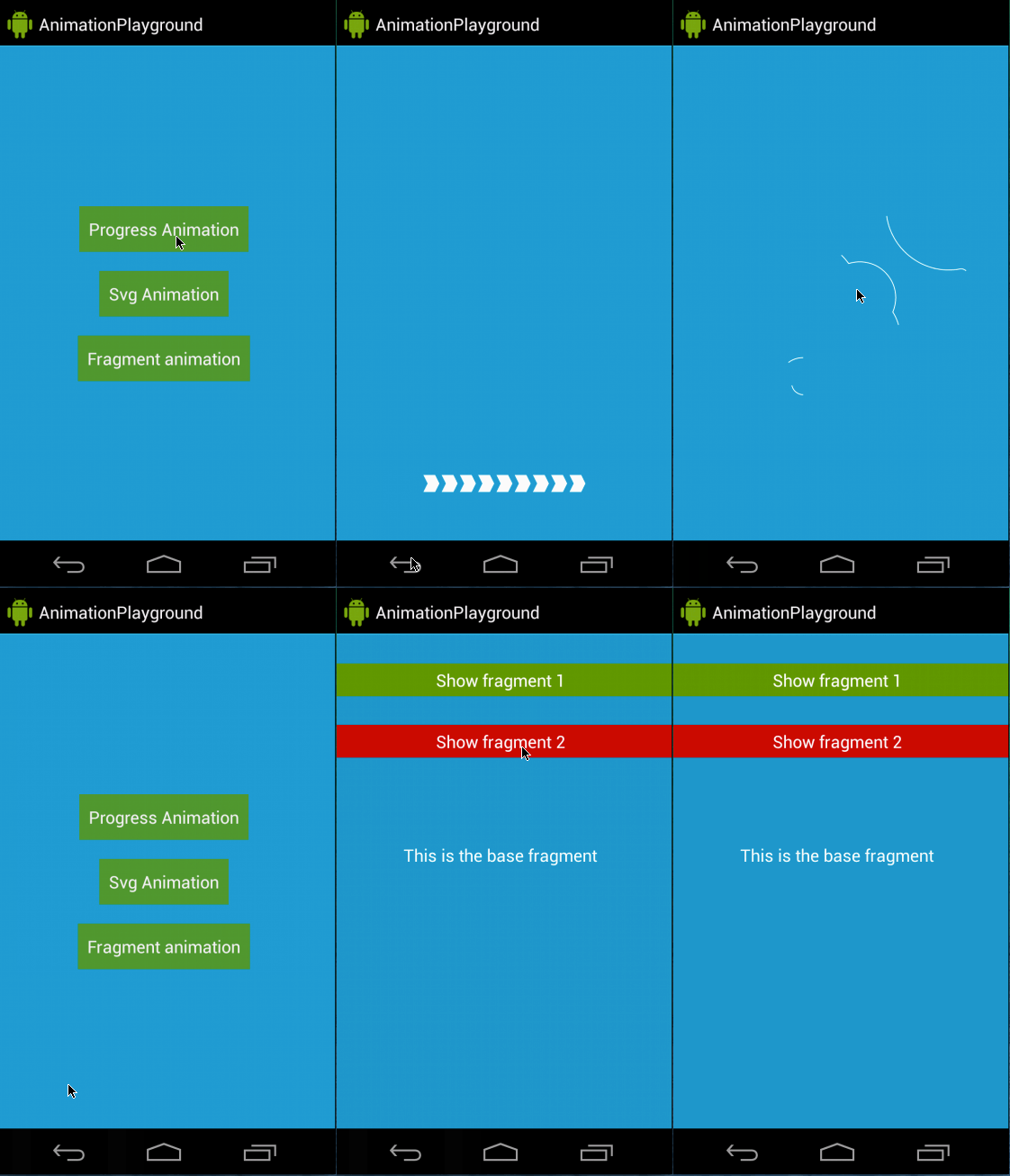
NiftyDialogEffects
支持自己定义飞入动画样式的 Dialog
项目地址:https://github.com/sd6352051/NiftyDialogEffects
效果图:
在线演示:http://tympanus.net/Development/ModalWindowEffects/PostOffice
创建 Holo 及 Material Design 样式的 Dialog
项目地址:https://github.com/r0adkll/PostOffice
效果图:
Swipecards
类似Tinder的卡片效果,能够载入图片并动画效果展示。向左滑动表示喜欢,向右表示不喜欢,依据 Kikoso's Swipeable-Cards 改造而来
项目地址:https://github.com/Diolor/SwipecardsSeekArc
圆形的 SeekBar
项目地址:https://github.com/TriggerTrap/SeekArc
效果图:BlurDialogFragment
显示 DialogFragment 时背景模糊效果
项目地址:https://github.com/tvbarthel/BlurDialogFragment
Demo地址:https://play.google.com/store/apps/details?id=fr.tvbarthel.lib.blurdialogfragment.samplerange-seek-bar
随机值选取的 SeekBar
项目地址:https://github.com/yahoo/android-range-seek-bar
效果图:
MaterialRangeBar
能够选择一个范围内的值而不是单个值的 SeekBar。RangeBar 的 Material Design 风格适配
项目地址:https://github.com/oli107/material-range-bar
效果图:
MaterialList
Material Design 风格的 CardView
项目地址:https://github.com/dexafree/MaterialList
Demo地址:https://play.google.com/store/apps/details?id=com.dexafree.materiallistviewexample
效果图:
road-trip
设置path的各种动画效果,以及怎样实现复杂路径动画,类似于ios中的指纹注冊界面的指纹动画效果
项目地址:https://github.com/romainguy/road-trip
效果图:
dialogplus
一个简单的Android对话框。支持不同的弹出模式
项目地址:https://github.com/orhanobut/dialogplus
效果图:
FlowLayout
一个简单的流式布局,使用方法类似 LinearLayout,可是可以让子元素依据宽度自己主动换行
项目地址:FLowLayout
效果图:

Android 开源项目android-open-project解析之(四) ColorPickView,GraphView,UI Style,Other的更多相关文章
- Android 开源项目android-open-project工具库解析之(一) 依赖注入,图片缓存,网络相关,数据库orm工具包,Android公共库
一.依赖注入DI 通过依赖注入降低View.服务.资源简化初始化.事件绑定等反复繁琐工作 AndroidAnnotations(Code Diet) android高速开发框架 项目地址:https: ...
- Android 开源项目及其学习
Android 系统研究:http://blog.csdn.net/luoshengyang/article/details/8923485 Android 腾讯技术人员博客 http://hukai ...
- 【原】Android热更新开源项目Tinker源码解析系列之三:so热更新
本系列将从以下三个方面对Tinker进行源码解析: Android热更新开源项目Tinker源码解析系列之一:Dex热更新 Android热更新开源项目Tinker源码解析系列之二:资源文件热更新 A ...
- 【原】Android热更新开源项目Tinker源码解析系列之一:Dex热更新
[原]Android热更新开源项目Tinker源码解析系列之一:Dex热更新 Tinker是微信的第一个开源项目,主要用于安卓应用bug的热修复和功能的迭代. Tinker github地址:http ...
- 【原】Android热更新开源项目Tinker源码解析系列之二:资源文件热更新
上一篇文章介绍了Dex文件的热更新流程,本文将会分析Tinker中对资源文件的热更新流程. 同Dex,资源文件的热更新同样包括三个部分:资源补丁生成,资源补丁合成及资源补丁加载. 本系列将从以下三个方 ...
- Android 开源项目源码解析(第二期)
Android 开源项目源码解析(第二期) 阅读目录 android-Ultra-Pull-To-Refresh 源码解析 DynamicLoadApk 源码解析 NineOldAnimations ...
- 直接拿来用!最火的Android开源项目(完结篇)
直接拿来用!最火的Android开源项目(完结篇) 2014-01-06 19:59 4785人阅读 评论(1) 收藏 举报 分类: android 高手进阶教程(100) 摘要:截至目前,在GitH ...
- 直接拿来用!最火的Android开源项目(完结篇)(转)
摘要:截至目前,在GitHub“最受欢迎的开源项目”系列文章中我们已介绍了40个Android开源项目,对于如此众多的项目,你是Mark.和码友分享经验还是慨叹“活到老要学到老”?今天我们将继续介绍另 ...
- GitHub 优秀的 Android 开源项目(转)
今天查找资源时看到的一篇文章,总结了很多实用资源,十分感谢原作者分享. 转自:http://blog.csdn.net/shulianghan/article/details/18046021 主要介 ...
随机推荐
- 5.Python3标准库-日期和时间
''' 不同于int,str,float,Python没有包含对应日期和时间的原生类型,不过提供了3个相应的模块,可以采用多种表示来管理日期和时间值 time模块由底层C库提供与时间相关的函数.它包含 ...
- Java开发必用的工具包
Java是最流行的开源语言之一. 有赖于Java的开源,涌现出一大批优秀的开源框架,基本涵盖了开发中的方方面面,让程序员可以专注于自己的业务逻辑. 今天,我们就来聊聊在开发中,经常被我们所忽略的[ ...
- HDU 1079 Calendar Game(博弈找规律)
题目链接:http://acm.hdu.edu.cn/showproblem.php?pid=1079 题目大意:给你一个日期(包含年月日),这里我表示成year,month,day,两人轮流操作,每 ...
- jekyll简单使用
jekyll build # => 当前文件夹中的内容将会生成到 ./site 文件夹中. jekyll build –destination <destination> # =&g ...
- 远程连接 mysql 数据库连接不上的解决方案
今天用Navicat访问虚拟机上的mysql,无法访问报cannot connect(10038). 首先看是否可以telnet,本机cmd,telnet 10.10.10.10 3306,结果是连接 ...
- Python 的十个自然语言处理工具
原文 先mark,后续尝试. 1.NLTK NLTK 在用 Python 处理自然语言的工具中处于领先的地位.它提供了 WordNet 这种方便处理词汇资源的借口,还有分类.分词.除茎.标注.语法分析 ...
- php简明学习教程
1.变量 <?php //变量声明(php变量无需单独创建,变量会在第一次赋值时创建) $a = 1; //弱类型(php变量会根据其值自动转换为相应的数据类型) $a = "a&qu ...
- ref:Spring Integration Zip 不安全解压(CVE-2018-1261)漏洞分析
ref:https://mp.weixin.qq.com/s/SJPXdZWNKypvWmL-roIE0Q 0x00 漏洞概览 漏洞名称:Spring Integration Zip不安全解压 漏洞编 ...
- JAVA编程思想读书笔记(四)--对象的克隆
接上篇JAVA编程思想读书笔记(三)--RTTI No1: 类的克隆 public class MyObject implements Cloneable { int i; public MyObje ...
- 为什么ArrayList remove报错
不报错 List<String> userNames = new ArrayList<String>() {{ add("Hollis"); add(&qu ...