
Introducing ASP.NET Core: The New ASP.NET in Town!
The new version of ASP.NET is called ASP.NET Core (a.k.a ASP.NET 5) and it has the most significant architectural redesign of ASP.NET. This article will highlight the new features and concepts in the new ASP.NET.
What is ASP.NET Core?
ASP.NET Core 1.0 is a new open-source and cross-platform framework for building modern cloud-based web apps It has been built from the ground up to provide an optimized development framework for web apps that are either deployed to the cloud or in your local servers. Adding to that, it was redesigned to make ASP.NET leaner, modular (so you can just add features that your application requires), cross-platform (so you can easily develop and run your app on Windows, Mac or Linux that is pretty awesome) and cloud optimized (so you can deploy and debug apps over the cloud). (Read more here)
Previous Versions
What does that mean for us that work on previous versions of ASP.NET?
If you are using the past versions of ASP.NET or if you are coming from a WebForms development background then you might find ASP.NET Core completely new. It's like the feeling of moving from classic ASP to the ASP.NET world or perhaps the feeling of my dog looking into my screen monitor while I am programming:

Now let's get Cracking!
Here are the lists of the core significant changes in ASP.NET Core 1.0.
Cross-Platform Runtime
For the first time in the history of ASP.NET, you can run ASP.NET Core applications on OSX and Linux. Yes, ASP.NET Core apps can run on Windows, OSX and Linux. This fact opens up ASP.NET to an entirely new audience of developers and designers. ASP.NET Core comes with two flavors of runtime environments when running your app. This means that you can choose from two runtime environments to provide you greater flexibility when deploying your app as in the following.
ASP.NET Core 1.0 is a refactored version of ASP.NET and runs on top of .NET Core. It was redesigned to be modular that allows developers to plug in components that are only required for your project, most features will be available as plugins via NuGet. One of the good things about being modular is the ability to upgrade features without impacting the other features that your application uses. Adding to that, .NET Core is a cross-platform runtime that enables you to deploy apps in OSX or Linux operating systems. It also is a cloud-optimized runtime that enables you to deploy and debug apps in the cloud. The .NET Core can be bin-deployed along with your app, allowing you to run ASP.NET Core apps on the same server that targets multiple versions of the .NET Core.
You can also create an ASP.NET Core app for Windows only that runs on .NET full framework.
ASP.NET 4.6 is the latest release of .NET Full Framework which enables you to utilize all .NET components that are available and supports backward compatibility. If you plan on migrating apps to run on .NET Core then you may need to do some modifications since the .NET Core is currently limited compared to the full .NET Framework.
To be clear, ASP.NET 4.6 is the more mature platform. It's battle-tested and released and available today. ASP.NET Core 1.0 is a 1.0 release that includes Web API and MVC but doesn't yet have SignalR or Web Pages. It doesn't yet support VB or F#.
ASP.NET Core is Not All About using Visual Studio
ASP.NET Core is not all about using Visual Studio. Enabling ASP.NET Core to run on Windows, OSX and Linux changes everything. For the first time, developers and designers can start building apps with ASP.NET Core using their favorite development environments such as Sublime Text and WebStorm when working with ASP.NET. That's pretty awesome!
New Project Solution Structure
If you create an empty ASP.NET Core project in Visual Studio 2015 then you will be surprised seeing this (unless if you have not done creating any project using a previous version of ASP.NET):

Surprised? Yes, the new project structure is totally different. The project template is completely new and now includes the following new files:
- global.json: this is where you put solution-level settings and allows you to do project-to-project references.
- Program.cs: this file contains the Main method of an ASP.NET Core RC2 app, which is responsible for configuring and running the app.
- src folder: contains all the projects that contain source code that make up your application.
- wwwroot: is a folder in which all your static files will be placed. These are the assets that your ASP.NET app will serve directly to the client, including HTML, CSS, Images and JavaScript files.
- project.json: contains project settings. In ASP.NET Core you manage dependencies by adding Nuget packages using the NuGet Package Manager (NPM) or the new project.json file. This file enables you to easily manage dependencies in your application because you can edit it using any text editors. It would be easier to work with this file because in Visual Studio 2015, Intellisense will assist you in finding the available NuGet packages that you can add as dependencies. Here's who the project.json looks like:

- startup.cs – this is where you put your startup and configuration code for your ASP.NET Core App. To give you a quick view, here's what the startup class would look like:
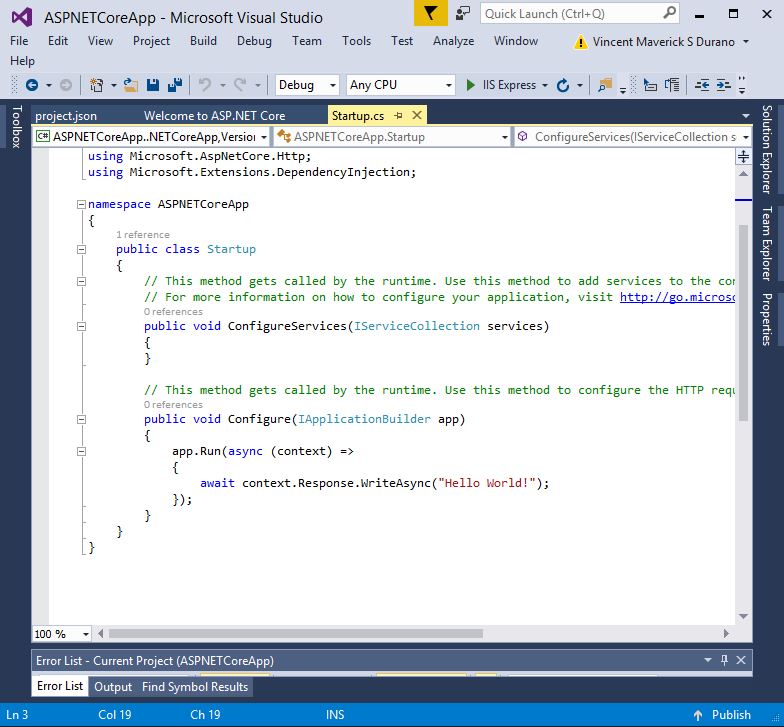
The ConfigureServices method defines the services used by your application and the Configure method is used to define what middleware makes up your request pipeline.
- References: it contains the .NETCoreApp Version 1 runtime references.
WebForms
Yes, it's a sad fact that WebForms is not part of ASP.NET 5. You can still continue to build Web Forms apps in Visual Studio 2015 by targeting the framework .NET 4.6. However, Web Forms apps cannot take advantage of the new features of ASP.NET 5.
I've spent years building WebForms applications from small to large enterprise app. I love Web Forms, in fact I still continue supporting the community that uses WebForms at various forums such as http://forums.asp.net. However, it's time to move forward, learn the new stuff and it's finally time for you to learn ASP.NET MVC. Like so many things in the past, times are changing and you either adapt or you become extinct.
Aside from WebForms, the .NET Core in general will not include Windows Forms, WCF, WPF, Silverlight and so on.
VB.NET and F#
At the moment, with the current realase of ASP.NET Core 1.0 RC2, VB.NET and F# isn't supported.
ASP.NET Core the Unified Framework

The newASP.NET will see MVC, Web API and probably Web Pages combined into one framework called ASP.NET Core. Though at the current release, Web Pages and SignalR are not yet included.
In previous versions of ASP.NET MVC, MVC controllers were different from Web API controllers. An MVC controller used the System.Web.MVC.Controller base class and a Web API controller used the System.Web.Http.ApiController base class. In MVC Core, there is only one Controller base class for both MVC and Web API controllers that is the Microsoft.AspNetCore.Mvc.Controller class.
The merge is possibly true for HTML helpers in both MVC and Web Pages that are implemented differently before. The Web Pages programming model isn't available yet for the current release so we can never really tell what will be the other features that they're going to merge, but we can assume that the traditional MVC model-binding will be available to it.
View Components
In previous versions of ASP.NET MVC, the Html.Action() helper is typically used to invoke a sub-controller. ASP.NET MVC Core introduced the new View Component to replace widgets that use Html.Action().
View Components supports fully async allowing you to make view component asynchronous. Here's a sample view component that returns person profiles based on some status:
 Copy Code
using Microsoft.AspNetCore.Mvc;
using MVC6Demo.Models;
using System.Threading.Tasks;
using System.Collections.Generic; namespace MVC6Demo.ViewComponents
{
public class PersonListViewComponent : ViewComponent
{
public async Task<iviewcomponentresult> InvokeAsync(string status) {
string viewToUse = "Default";
bool isFiltered = false; PersonModel model = new PersonModel(); if (status.ToLower().Equals("registered")) {
viewToUse = "Registered"; isFiltered = true;
} var p = await GetPersonAsync(status, isFiltered);
return View(viewToUse,p);
} private Task<ienumerable<person>> GetPersonAsync(string status, bool isFiltered) {
return Task.FromResult(GetPerson(status,isFiltered));
}
private IEnumerable<person> GetPerson(string status, bool isFiltered) {
PersonModel model = new PersonModel(); if (isFiltered)
return model.GetPersonsByStatus(status);
else
return model.GetAll; }
}
} </person>
And here's the view for the View Component:
<h3>Person List</h3>

<ul>

    @foreach (var p in Model) {

        <li>@string.Format("{0} {1}",p.FirstName,p.LastName)</li>

    }

</ul>
And here's how you call the View Components in the main view:
<div>

    @await Component.InvokeAsync("PersonList", new { type = "Registered" })

</div>
New Directives: @inject, @using, @inherits
ASP.NET MVC Core has few new directives that we can use in our application. Here we'll have a look at how to use @inject. The @inject directive allows you to inject some method calls from a class directly into your view. Here's a simple class that exposes some async methods:
using System.Threading.Tasks;

using System.Linq;

namespace MVC6Demo.Models

{

    public class Stats

    {

        private PersonModel _persons = new PersonModel();

        public async Task<int> GetPersonCount() {

            return await Task.FromResult(_persons.GetAll.Count());

        }

        public async Task<int> GetRegisteredPersonCount() {

            return await Task.FromResult(

                      _persons.GetAll.Where(o => o.Status.ToLower().Equals("registered")).Count());

        }

        public async Task<int> GetUnRegisteredPersonCount() {

            return await Task.FromResult(

                     _persons.GetAll.Where(o => o.Status.ToLower().Equals("")).Count());

        }

    }

}
Now we can call those methods in the view using @inject like:
@inject MVC6Demo.Models.Stats Stats

@{

    ViewBag.Title = "Stats";

}

<div>

    <p>Registered: @await Stats.GetRegisteredPersonCount()</p>
That's pretty cool! Isn't it? 
Check out my article about ASP.NET MVC Core for detailed example of the new features here: Getting Started with ASP.NET MVC Core
Tag Helpers
Another cool thing in ASP.NET MVC Core is the tag helpers. Tag helpers are optional replacements for the previous HTML Helpers.
So instead of doing this:
@using (Html.BeginForm("Login", "Account", FormMethod.Post,

        new { @class = "form-horizontal", role = "form" }))

            {

                @Html.AntiForgeryToken()

                <h4>Use a local account to log in.</h4>

                <hr />

                @Html.ValidationSummary(true, "", new { @class = "text-danger" })

                <div class="form-group">

                    @Html.LabelFor(m => m.UserName, new { @class = "col-md-2 control-label" })

                    <div class="col-md-10">

                        @Html.TextBoxFor(m => m.UserName, new { @class = "form-control" })

                        @Html.ValidationMessageFor(m => m.UserName, "", new { @class = "text-danger" })

                    </div>

                </div>

}
You can instead do this:
<form asp-controller="Account" asp-action="Login" method="post" class="form-horizontal" role="form">

    <h4>Use a local account to log in.</h4>

    <hr />

    <div asp-validation-summary="ValidationSummary.ModelOnly" class="text-danger"></div>

    <div class="form-group">

        <label asp-for="UserName" class="col-md-2 control-label"></label>

        <div class="col-md-10">

            <input asp-for="UserName" class="col-md-2 control-label" />

            <span asp-validation-for="UserName" class="text-danger"></span>

        </div>

    </div>

</form>
ASP.NET Core is not all about IIS
14 years ago, there was basically one web server for ASP.NET platforms and that was IIS. A few years later the Visual Studio Development Web Server (a.k.a “Cassini”) came along as a dev-only server. All of them ultimately used System.Web as the hosting layer between the application and the web server. The System.Web host is tightly coupled to IIS and is very difficult to run on another host.
Later on OWIN came around as an interface between applications and web servers. Microsoft wrote Katana as one OWIN implementation that could host ASP.NET Web API, SignalR and other third-party frameworks on top of several servers, including IIS and IIS Express, Katana's self-host server and custom hosts.
ASP.NET Core is host-agnostic in the same manner as Katana and OWIN and any ASP.NET Core application can be hosted on IIS, IIS Express or self-hosted in your own process. Adding to that ASP.NET Core will include a web server for iOS and Linux based operating systems called Kestrel built on libuv.
New HTTP Request Pipeline
ASP.NET Core introduces a new HTTP request pipeline that is modular so you can add only the components that you need. The pipeline is also no longer dependent on System.Web. By reducing the overhead in the pipeline, your app can experience better performance and better-tuned HTTP stacks. The new pipeline is based on much of what was learned from the Katana project and also supports OWIN.
Dynamic Web Development
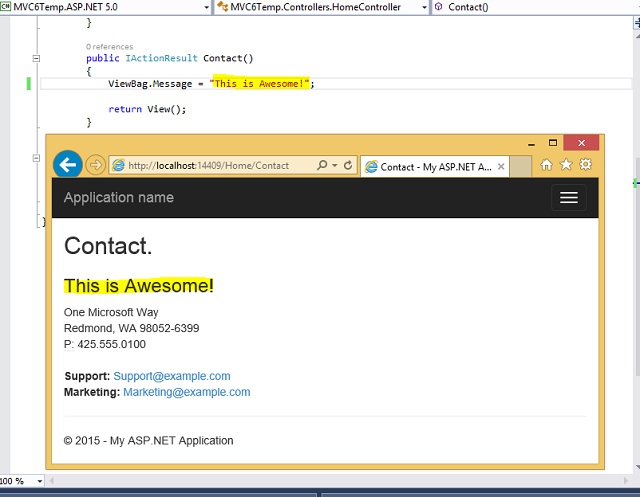
Another cool feature in Visual Studio 2015 is the ability to do dynamic compilation. In the previous versions of ASP.NET, when we change code in our application, we are required to compile and build the application every time we want to see the changes. In the new version of Visual Studio there's no need to do those extra steps anymore, instead you just need to save the file that you are modifying and then refresh the browser to see the changes.

Here's the output after refreshing the browser:
Attribute Routing: the [controller] and [action] tokens
In previous versions of MVC and Web API, working with attribute routing may cause some troubles, especially if you are doing some code refactoring. This is because the route always had to be specified as a string, so whenever you changed the name of the controller you would always need to change the string in the route attribute too.
MVC Core introduces the new [controller] and [action] tokens that can resolve this kind of issue. Here's an excellent article that highlights the use of these new tokens: ASP.NET MVC 6 Attribute Routing.
Integrated Dependency Injection (DI)
ASP.NET Core has built-in support for Dependency Injection and the Service Locator pattern. This means that you no longer need to rely on third-party Dependency Injection frameworks such as Ninject or AutoFac.
Integration with Grunt, Gulp and Bower
Visual Studio 2015 has built-in support for these popular open-source web development tools. Grunt and Gulp are task runners that help you automate your web development work flow. You can use both for compiling or minifying JavaScript files. Bower is a package manager for client-side libraries, including CSS and JavaScript libraries.
Built-in Templates for AngularJs
AngularJs is one of the most popular client-side frameworks for building Single Page Applications (SPAs). Visual Studio 2015 includes templates for creating AngularJs modules, controllers, directives and factories.

The support in ASP.NET Core for GruntJS makes ASP.NET an excellent server-side framework for building client-side AngularJs apps. You can combine and minify all of your AngularJs files automatically whenever you do a build. Check my examples about getting started with Angular and Angular2 in ASP.NET Core:
- ASP.NET 5: Jump Start to AngularJS with MVC 6 Web API
- ASP.NET Core: Getting Started with AngularJS 2
SignalR 3
ASP.NET Core will also be the basis for SignalR 3. This enables you to add real time functionality to cloud connected applications. Check my previous SignalR example here: ASP.Net SignalR: Building a Simple Real-Time Chat Application
Web.Config
In ASP.NET Core, the messy web.config file is being replaced with the new cloud-ready configuration file called “config.json”. Microsoft wanted us developers to deploy apps in the cloud easier and have the app automatically read the correct configuration values for specific environment. Here's an example of how the new config file looks like:
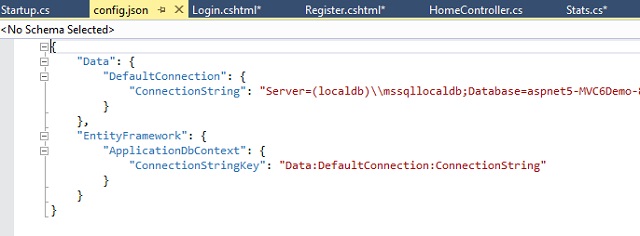
Since everything in ASP.NET Core is pluggable you need to configure the source for the configuration at the Startup class like:
        public Startup(IHostingEnvironment env)

        {

            var builder = new ConfigurationBuilder()

                .SetBasePath(env.ContentRootPath);

            builder.AddEnvironmentVariables();

            Configuration = builder.Build();

        }

        public IConfigurationRoot Configuration { get; }

        public void ConfigureServices(IServiceCollection services)

        {

            services.AddMvc();

            services.AddTransient<MVC6Demo.Models.HeroStats>();

        }

        public void Configure(IApplicationBuilder app)

        {

            app.UseDeveloperExceptionPage();

            app.UseMvc(m => {

                m.MapRoute(

                    name: "default",

                    template: "{controller}/{action}/{id?}",

                    defaults: new { controller = "Home", action="Index"});

            });

        }
xUnit.Net: The New Unit Test Tool for .NET
In previous versions of ASP.NET MVC, the default testing framework was the Visual Studio Unit Testing Framework (sometimes called mstest). This framework uses the [TestClass] and [TestMethod] attributes to describe a unit test.
ASP.NET Core uses xUnit.net as its unit test framework. This framework uses the [Fact] attribute instead of the [TestMethod] attribute and eliminates the need for the [TestClass] attribute.
Absolutely Free and Open Source
Yes, ASP.NET Core as an open source project on GitHub. You can view the code, see when changes were made, download the code and submit changes.
I would agree that open-sourcing .NET makes good sense. It makes good business sense and good community sense. A big thanks to Microsoft. Job well done!
I hope someone find this article useful. 
Summary
In this article we've learned some of the new cool features and concepts in ASP.NET Core 1.0.
History
License
This article, along with any associated source code and files, is licensed under The Code Project Open License (CPOL)
Introducing ASP.NET Core: The New ASP.NET in Town!的更多相关文章
- .NET跨平台之旅:ASP.NET Core从传统ASP.NET的Cookie中读取用户登录信息
在解决了asp.net core中访问memcached缓存的问题后,我们开始大踏步地向.net core进军——将更多站点向asp.net core迁移,在迁移涉及获取用户登录信息的站点时,我们遇到 ...
- ASP.NET Core: 全新的ASP.NET !
背景 最新版本的 ASP.NET 叫做 ASP.NET Core (也被称为 ASP.NET 5) 它颠覆了过去的 ASP.NET. 什么是 ASP.NET Core? ASP.NET Core ...
- ASP.NET Core 新增用户 - ASP.NET Core 基础教程 - 简单教程,简单编程
原文:ASP.NET Core 新增用户 - ASP.NET Core 基础教程 - 简单教程,简单编程 ASP.NET Core 新增用户 上一章节我们实现了一个注册表单,但也留了一些东西还没完成, ...
- ASP.NET Core Identity 配置 - ASP.NET Core 基础教程 - 简单教程,简单编程
原文:ASP.NET Core Identity 配置 - ASP.NET Core 基础教程 - 简单教程,简单编程 ASP.NET Core Identity 配置 上一章节我们简单介绍了下 Id ...
- ASP.NET Core Identity 框架 - ASP.NET Core 基础教程 - 简单教程,简单编程
原文:ASP.NET Core Identity 框架 - ASP.NET Core 基础教程 - 简单教程,简单编程 ASP.NET Core Identity 框架 前面我们使用了 N 多个章节, ...
- ASP.NET Core 数据库上下文 - ASP.NET Core 基础教程 - 简单教程,简单编程
原文:ASP.NET Core 数据库上下文 - ASP.NET Core 基础教程 - 简单教程,简单编程 ASP.NET Core 数据库上下文 上一章节中我们了解了 Entity Framewo ...
- ASP.NET Core 动作结果 - ASP.NET Core 基础教程 - 简单教程,简单编程
原文:ASP.NET Core 动作结果 - ASP.NET Core 基础教程 - 简单教程,简单编程 ASP.NET Core 动作结果 前面的章节中,我们一直使用简单的 C# 类作为控制器. 虽 ...
- ASP.NET Core 属性路由 - ASP.NET Core 基础教程 - 简单教程,简单编程
原文:ASP.NET Core 属性路由 - ASP.NET Core 基础教程 - 简单教程,简单编程 ASP.NET Core 属性路由 经过前面章节的学习,想必你已经对 ASP.NET Core ...
- ASP.NET Core MVC 设计模式 - ASP.NET Core 基础教程 - 简单教程,简单编程
原文:ASP.NET Core MVC 设计模式 - ASP.NET Core 基础教程 - 简单教程,简单编程 ASP.NET Core MVC 设计模式 上一章节中,我们提到 ASP.NET Co ...
- ASP.NET Core 配置 MVC - ASP.NET Core 基础教程 - 简单教程,简单编程
原文:ASP.NET Core 配置 MVC - ASP.NET Core 基础教程 - 简单教程,简单编程 ASP.NET Core 配置 MVC 前面几章节中,我们都是基于 ASP.NET 空项目 ...
随机推荐
- mongodb与mysql传统的关系数据库区别
转自:易百教程 MongoDB中的数据具有灵活的模式.文档在同一集合,但它们不需要具有相同的字段或结构集合,集合文档中的公共字段可以包含不同类型的数据. MongoDB中的数据具有灵活的模式.与SQL ...
- c++ primer 9 顺序容器
定义: #include <vector> #include <list> #include <deque> vector<int> svec; lis ...
- [实战]MVC5+EF6+MySql企业网盘实战(5)——页面模板
写在前面 上篇文章更新了网盘的登录界面,以及用户头像的等比例压缩功能.今天折腾一下页面的样式,将从网上找的一个模板套用在项目中. 系列文章 [EF]vs15+ef6+mysql code first方 ...
- ceph笔记(一)
一.ceph概述本质上是rados:可靠的.自动的.分布式对象存储特性:高效性(大型的网络raid,性能无限接近raid).统一性(支持文件存储.块存储.对象存储).可扩展性数据库的一个弱点:查表ce ...
- KVM调整cpu和内存
一.修改kvm虚拟机的配置 1.virsh edit centos7 找到“memory”和“vcpu”标签,将 <name>centos7</name> <uuid&g ...
- 洛谷P2704 [NOI2001]炮兵阵地 [状压DP]
题目传送门 炮兵阵地 题目描述 司令部的将军们打算在N*M的网格地图上部署他们的炮兵部队.一个N*M的地图由N行M列组成,地图的每一格可能是山地(用“H” 表示),也可能是平原(用“P”表示),如下图 ...
- Android之 内容提供器(1)——使用内容提供器访问其它程序共享的数据
(下面内容是阅读郭霖大神的<第一行代码>总结的) 1 概述 内容提供器是Android实现跨程序共享数据的标准方式. 内容提供器的的使用方法有两种, 一是使用已有的内容提供器对其他程序的数 ...
- shell top解析
top命令是Linux下常用的性能分析工具,能够实时显示系统中各个进程的资源占用状况,类似于Windows的任务管理器. top显示系统当前的进程和其他状况,是一个动态显示过程,即可以通过用户按键来不 ...
- Arduino可穿戴教程之第一个程序——Blink(一)
Arduino可穿戴教程之第一个程序——Blink(一) 至此我们的硬件和软件部分都准备好了,是时候测试一下他们是否可以和谐地合作了.当然,第一个程序我们并不需要自己来写,因为我们还没有了解过Ardu ...
- HDU 6084 寻找母串(卡特兰数)
[题目链接] http://acm.hdu.edu.cn/showproblem.php?pid=6084 [题目大意] 对于一个串S,当它同时满足如下条件时,它就是一个01偏串: 1.只由0和1两种 ...