
NetCore在Centos7上部署和Nginx集群部署访问
NetCore在Linux上部署
工具:WMWare虚拟机,Wmware12,CentOS7ISO镜像,VS2017
1、安装虚拟机,过程略,网上一搜一大把
2、用VS2017建一个NetCore的Web项目,用命令行生成也可以,然后发布
3、搭建Linux下的NetCore运行环境
Linux下访问这个网站:https://www.microsoft.com/net/download/windows
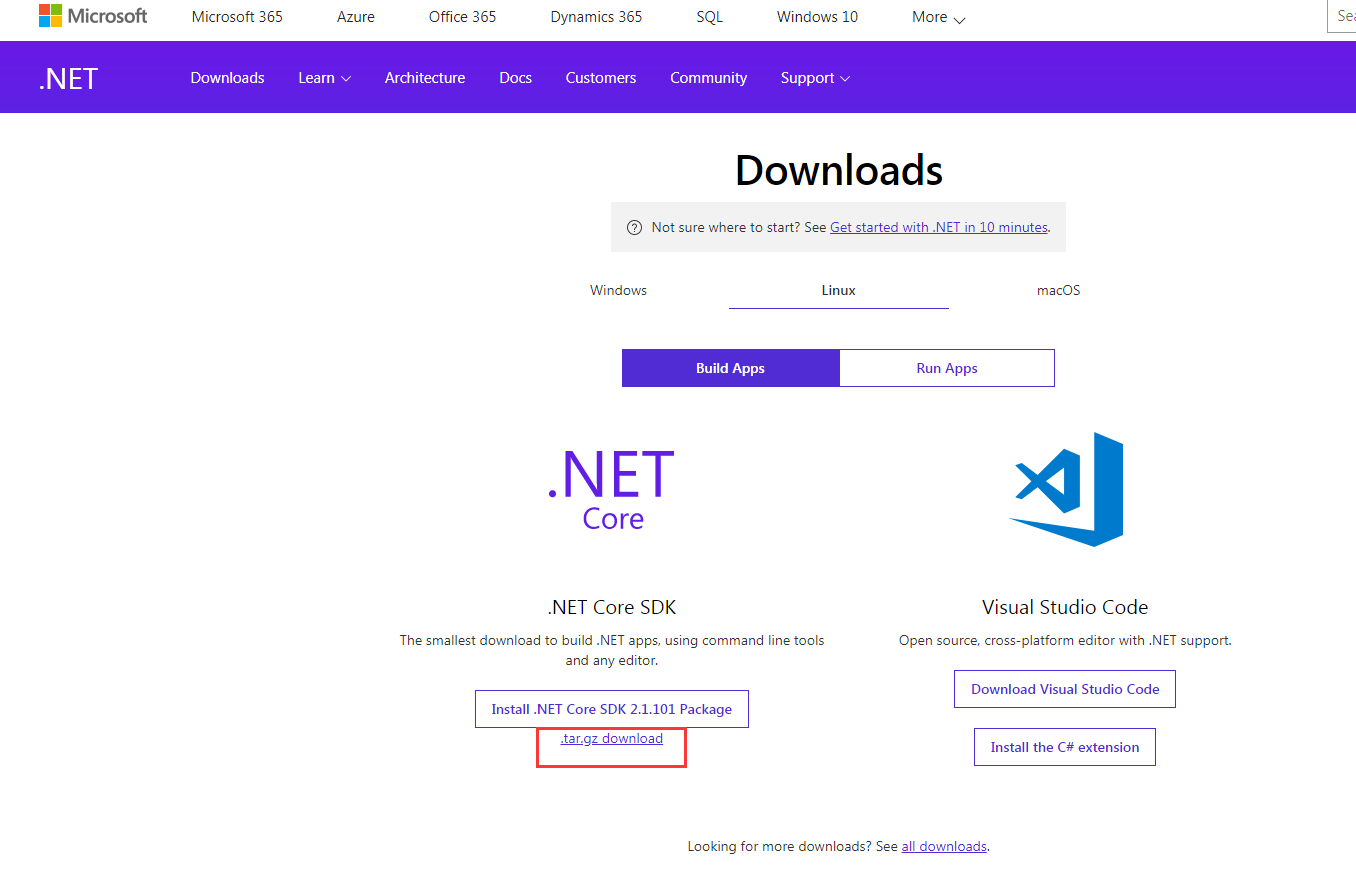
点击红色的部分,然后跳转到另一个页面,同时下载文件
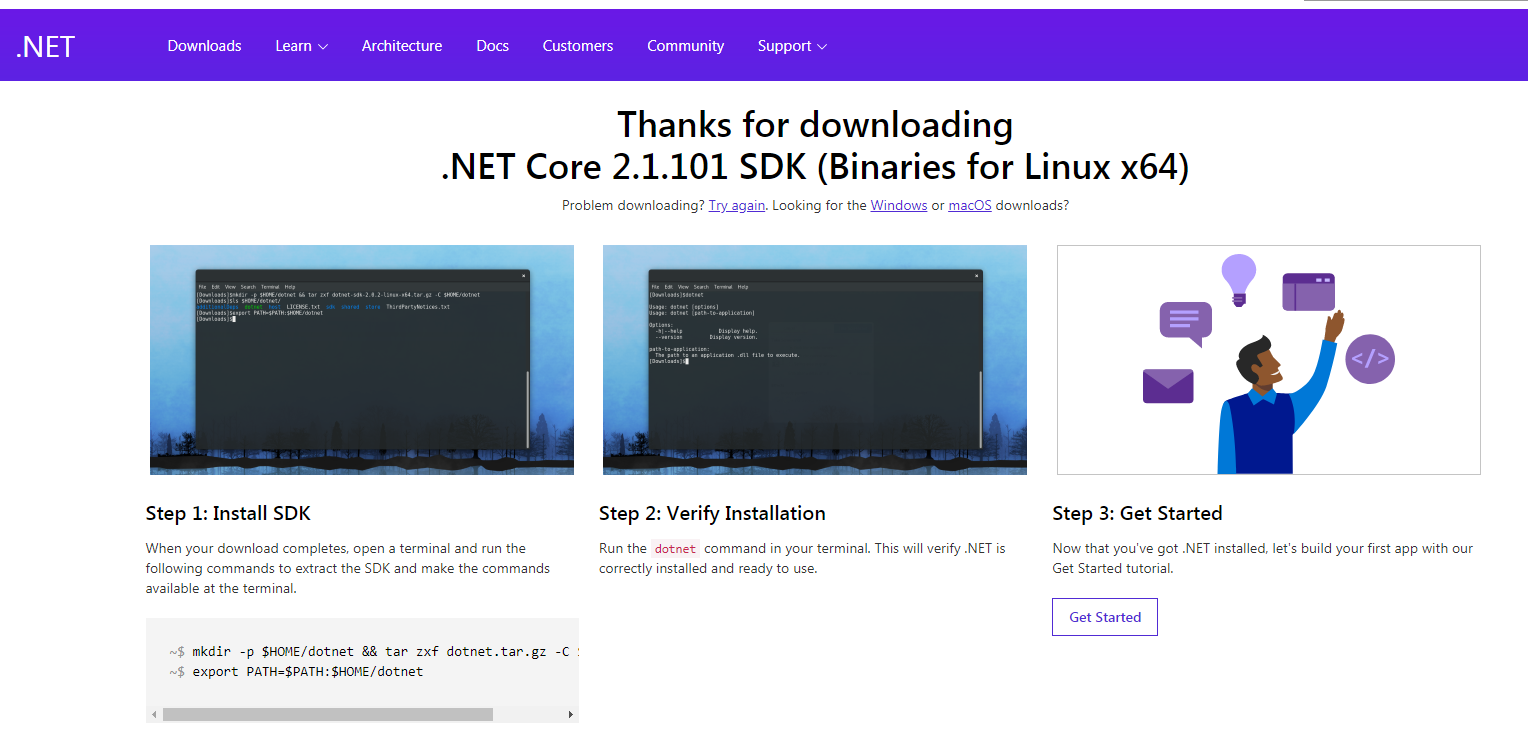
按照上面的步骤配置好NetCore SDK。(个人认为使用Binaries方式简单些,如果你想换另一种方式,我没有异议)
4、windows下的发布包直接复制到主文件夹里面(home目录),然后进入复制过来的发布目录下,直接dotnet 项目名称.dll就可以访问5000端口了。
5、如果出现错误,请自己排查,大部分都是NetCore版本问题,也就是你VS生成的项目的NetCore版本和Linux上NetCore的版本不匹配
Nginx集群部署
1、这就需要在Home/Index文件上动手脚了,下面是我的代码
 using Cluster.Models;

 using Microsoft.AspNetCore.Mvc;

 using System.Diagnostics;

 namespace Cluster.Controllers

 {

     public class HomeController : Controller

     {

         public IActionResult Index()

         {

             ViewBag.RemoteIpAddress = Request.HttpContext.Connection.RemoteIpAddress;

             ViewBag.Header = Request.Headers["X-Forwarded-For"];

             ViewBag.LocalIpAddress = HttpContext.GetClientUserIp();

             ViewBag.RequestHeaders = Request.Headers;

             return View();

         }

         public IActionResult About()

         {

             ViewData["Message"] = "Your application description page.";

             return View();

         }

         public IActionResult Contact()

         {

             ViewData["Message"] = "Your contact page.";

             return View();

         }

         public IActionResult Error()

         {

             return View(new ErrorViewModel { RequestId = Activity.Current?.Id ?? HttpContext.TraceIdentifier });

         }

     }

 }
 using Microsoft.AspNetCore.Http;

 using System.Linq;

 namespace Cluster.Models

 {

     public static class IPExtension

     {

         public static string GetClientUserIp(this HttpContext context)

         {

             var ip = context.Request.Headers["X-Forwarded-For"].FirstOrDefault();

             if (string.IsNullOrEmpty(ip))

             {

                 ip = context.Connection.LocalIpAddress.ToString();

             }

             return ip;

         }

     }

 }
 using System;

 using System.Collections.Generic;

 using System.Linq;

 using System.Threading.Tasks;

 using Microsoft.AspNetCore.Builder;

 using Microsoft.AspNetCore.Hosting;

 using Microsoft.Extensions.Configuration;

 using Microsoft.Extensions.DependencyInjection;

 namespace Cluster

 {

     public class Startup

     {

         public Startup(IConfiguration configuration)

         {

             Configuration = configuration;

         }

         public IConfiguration Configuration { get; }

         // This method gets called by the runtime. Use this method to add services to the container.

         public void ConfigureServices(IServiceCollection services)

         {

             services.AddMvc();

         }

         // This method gets called by the runtime. Use this method to configure the HTTP request pipeline.

         public void Configure(IApplicationBuilder app, IHostingEnvironment env)

         {

             if (env.IsDevelopment())

             {

                 app.UseBrowserLink();

                 app.UseDeveloperExceptionPage();

             }

             else

             {

                 app.UseExceptionHandler("/Home/Error");

             }

             //添加转发设置

             app.UseForwardedHeaders(new ForwardedHeadersOptions {

                 ForwardedHeaders = Microsoft.AspNetCore.HttpOverrides.ForwardedHeaders.XForwardedFor | Microsoft.AspNetCore.HttpOverrides.ForwardedHeaders.XForwardedProto

             });

             app.UseStaticFiles();

             app.UseMvc(routes =>

             {

                 routes.MapRoute(

                     name: "default",

                     template: "{controller=Home}/{action=Index}/{id?}");

             });

         }

     }

 }
 @{

     ViewData["Title"] = "Home Page";

 }

 客户端:<br />

 Request.HttpContext获取访问ip: @ViewBag.RemoteIpAddress

 <br />

 Request.Headers获取访问ip:@ViewBag.Header

 <br />

 服务端:<br />

 Request.HttpContext获取响应服务所在服务器的ip:@ViewBag.LocalIpAddress

 <table class="table">

     <thead>

         <tr>

             <th>key</th>

             <th>value</th>

         </tr>

     </thead>

     <tbody>

         @foreach (var item in ViewBag.RequestHeaders)

         {

             <tr>

                 <td>@item.Key</td>

                 <td>@item.Value</td>

             </tr>

         }

     </tbody>

 </table>
我的是:Windows下把发布包挂到了IIS上,然后有个访问地址,Linux下直接dotnet命令启动,还是本地访问,所以上面的代码,对我来说没啥用
2、Linux安装Nginx,Nginx作为反向代理服务器会把接受的请求转发给对应的Server,不过是随机的,Nginx安装过程略
3、修改Nginx配置文件
 #集群站点配置

 upstream xxx.services{

     server IP地址1:端口1 fail_timeout=60s;

     server IP地址2:端口2 fail_timeout=60s;

 }

 server {

     #代理监听端口

     listen  default_server;

     listen [::]: default_server;

     root /var/www/html;

     server_name _;   #_默认ip+端口访问,_可以替换成访问域名如:shenniu.core.com

     #缓存文件路由

     location ~ .*(\.(js|css|jpg|svg)).* {

         proxy_pass http://shenniu.services;

         proxy_cache_valid ;

         proxy_cache my_cache;

         expires 3d;

     }

     #集群站点路由

     location / {

         proxy_pass http://xxx.services;

         #对应upstream后面的名称

         proxy_http_version 1.1;

         proxy_set_header Upgrade $http_upgrade;

         proxy_set_header Connection keep-alive;

         proxy_set_header Host $host;

         proxy_set_header X-Real-IP $remote_addr;

         proxy_cache_bypass $http_upgrade;

         proxy_set_header X-Forwarded-For

         $proxy_add_x_forwarded_for;

     }

 }
注意用Root用户修改,有的Nginx.Conf文件是只读的,修改完之后 Nginx -r reload一下
然后访问Nginx吧,不出意外的话你就可以看到效果了
备注:部署集群是为了提高性能的,Nginx作为一个反向代理服务器在集群部署方面还是很不错的
NetCore在Centos7上部署和Nginx集群部署访问的更多相关文章
- Nginx 集群部署(Keepalived)
# Nginx集群部署 # 当我们的用户同时访问量达到一定量的时候,一台服务器是不够用的 # 这个时候我们需要解决这个问题肯定是要添加新的服务器去处理用户访问 # 多台服务器处理用户访问就需要我们集群 ...
- Linux Centos7.5中的RocketMQ集群部署
系统环境 Docker > centos7.5 此镜像已经安装了jdk1.8和maven3.6.0 如果你想知道这个基础镜像的具体情况, 参考此文: https://www.cnblogs.co ...
- .netcore consul实现服务注册与发现-集群部署
一.Consul的集群介绍 Consul Agent有两种运行模式:Server和Client.这里的Server和Client只是Consul集群层面的区分,与搭建在Cluster之上的应用服务无关 ...
- Windows上搭个Nginx集群环境玩玩
一.在windows上安装nginx 1.从这里下载nginx的windows版本 2.把压缩文件解压至c盘根目录,并将文件夹重命名成nginx 3.在conf目录下的nginx.conf文件中,指定 ...
- Kubernetes集群部署之三ETCD集群部署
kuberntes 系统使用 etcd 存储所有数据,本文档介绍部署一个三节点高可用 etcd 集群的步骤,这三个节点复用 kubernetes 集群机器k8s-master.k8s-node-1.k ...
- docker 部署 HFish(集群部署)
主节点部署: docker run -d --name hfish-master -p : -p : -p : -p : -p : -p : -p : -p : -p : -p : -p : -p : ...
- Linux之FineBI集群部署
在企业应用中,通常单个计算机的配置是有限的,而企业应用又是高并发的需求,这个时候会通过计算机集群的方式来提高并发数,从而提高整体应用服务的性能.集群是将多台计算机作为一个整体来提供相关应用的服务.Fi ...
- kubernetes kubeadm部署高可用集群
k8s kubeadm部署高可用集群 kubeadm是官方推出的部署工具,旨在降低kubernetes使用门槛与提高集群部署的便捷性. 同时越来越多的官方文档,围绕kubernetes容器化部署为环境 ...
- 分布式监控工具Ganglia 介绍 与 集群部署.
如果你目的很明确就是冲着标题来的,不爱看我唠叨,请直接进入第二个分割线之后的内容. 其实之前就是有做Swift监控平台的打算的,但是因为没什么硬性需求么,也不要紧的,就一直搁置了.最近实验室来了个大二 ...
随机推荐
- 782C. Andryusha and Colored Balloons DFS
Link 题意: 给出一棵树,要求为其染色,并且使任意节点都不与距离2以下的节点颜色相同 思路: 直接DFS.由某节点出发的DFS序列,对于其个儿子的cnt数+1,那么因为DFS遍历的性质可保证兄弟结 ...
- 庞老师集群.ziw
2017年2月17日, 星期五 庞老师集群 链接:http://pan.baidu.com/s/1mhSw2TE 密码:hzz4 更改子网IP,及网关: null
- html跑马灯效果
实现跑马灯的方法很多,其中最简单的是采用一句Html代码来实现,我们在需要出现跑马灯效果的地方插入“<marquee>滚动的文字</marquee>”语句,它的效果如下所示: ...
- 【POJ】3177 Redundant Paths
[算法]边双连通分量 [题意&题解]http://blog.csdn.net/geniusluzh/article/details/6619575 (注意第一份代码是错误的) 一些细节: 1. ...
- 【CodeForces】827 D. Best Edge Weight 最小生成树+倍增LCA+并查集
[题目]D. Best Edge Weight [题意]给定n个点m条边的带边权无向连通图,对每条边求最大边权,满足其他边权不变的前提下图的任意最小生成树都经过它.n,m<=2*10^5,1&l ...
- 2017ACM暑期多校联合训练 - Team 4 1004 HDU 6070 Dirt Ratio (线段树)
题目链接 Problem Description In ACM/ICPC contest, the ''Dirt Ratio'' of a team is calculated in the foll ...
- L - SOS Gym - 101775L 博弈
题目链接:https://cn.vjudge.net/contest/274151#problem/L 题目大意:给你一个1*n的方格,两个人轮流放字母,每一次可以放"S"或者&q ...
- WordPress友情链接插件的安装
插件:link manager 这样就安装成功! 在外观小工具里 把右边即可 这样在前台页面上就可看见添加的友情链接了!!!
- 利用Jsoup模拟跳过登录爬虫获取数据
今天在学习爬虫的时候想着学习一下利用jsoup模拟登录.下面分为有验证码和无验证码的情况进行讨论. ---------------------------无验证码的情况---------------- ...
- java类中访问属性
package first; public class for_protect { private int age=10; int number = 100; public void show(){ ...