
PS 滤镜— —Twirl Filter
    clc;

    clear all;

    close all;

    addpath('E:\PhotoShop Algortihm\Image Processing\PS Algorithm');

    I=imread('4.jpg');

    I=double(I);

    Image=I/255;

    [height, width, depth]=size(Image);

     angle=pi/2;

     centreX = 0.5;

     centreY = 0.5;

     radius=200;

     icentreX=width*centreX;

     icentreY=height*centreY;

     radius2=radius*radius;

     Image_new=Image;

     for ii=1:height

        for jj=1:width

             dx=jj-icentreX;

             dy=ii-icentreY;

             distance2=dx*dx+dy*dy;

             if (distance2>radius2)

                 x=jj;

                 y=ii;

             else

                 distance=sqrt(distance2);

                 a = atan2(dy, dx) + angle * (radius-distance) / radius;

                 x = icentreX + distance*cos(a);

                 y = icentreY + distance*sin(a);

             end

    % %         if (x<=1)     x=1;  end

    % %         if (x>=width)   x=width-1; end;

    % %         if (y>=height)  y=height-1; end;

    % %         if (y<1)  y=1;     end;

            if (x<=1)     continue;  end

            if (x>=width)   continue; end;

            if (y>=height)  continue; end;

            if (y<1)  continue;     end;

            x1=floor(x);

            y1=floor(y);

            p=x-x1;

            q=y-y1;

            Image_new(ii,jj,:)=(1-p)*(1-q)*Image(y1,x1,:)+p*(1-q)*Image(y1,x1+1,:)...

                +q*(1-p)*Image(y1+1,x1,:)+p*q*Image(y1+1,x1+1,:);

        end

     end

     imshow(Image_new);

imwrite(Image_new, 'out.jpg');参考来源:http://www.jhlabs.com/index.html
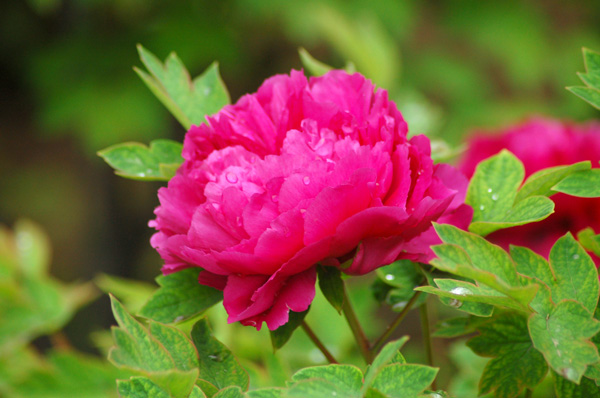
原图:
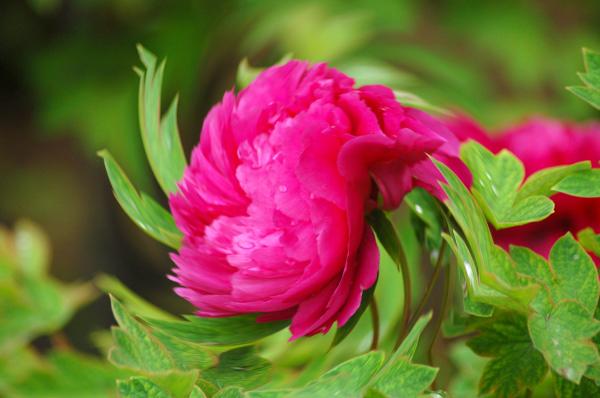
效果图:
PS 滤镜— —Twirl Filter的更多相关文章
- Python: PS 滤镜特效 -- Marble Filter
本文用 Python 实现 PS 滤镜特效,Marble Filter, 这种滤镜使图像产生不规则的扭曲,看起来像某种玻璃条纹, 具体的代码如下: import numpy as np import ...
- ffdshow 源代码分析 4: 位图覆盖滤镜(滤镜部分Filter)
===================================================== ffdshow源代码分析系列文章列表: ffdshow 源代码分析 1: 整体结构 ffds ...
- OpenCV——PS 滤镜, 浮雕效果
具体的算法原理可以参考: PS 滤镜, 浮雕效果 // define head function #ifndef PS_ALGORITHM_H_INCLUDED #define PS_ALGORITH ...
- OpenCV——PS 滤镜, 曝光过度
算法原理可以参考: PS 滤镜,曝光过度 #ifndef PS_ALGORITHM_H_INCLUDED #define PS_ALGORITHM_H_INCLUDED #include <io ...
- Python: PS 滤镜--水波特效
本文用 Python 实现 PS 滤镜中的 水波特效 import numpy as np from skimage import img_as_float import matplotlib.pyp ...
- Python: PS 滤镜--旋涡特效
本文用Python 实现 PS 滤镜的旋涡特效,具体的算法原理和效果可以参考之前的博客: http://blog.csdn.net/matrix_space/article/details/42215 ...
- Python: PS 滤镜--USM 锐化
本文用 Python 实现 PS 滤镜中的 USM 锐化效果,具体的算法原理和效果可以参考之前的博客: http://blog.csdn.net/matrix_space/article/detail ...
- Python: PS 滤镜--素描
本文用 Python 实现 PS 滤镜中的素描特效,具体的算法原理和效果可以参考之前的博客: http://blog.csdn.net/matrix_space/article/details/386 ...
- Python: PS 滤镜--表面模糊
本文用 Python 实现 PS 滤镜中的表面模糊,具体的算法原理和效果可以参考之前的博客: http://blog.csdn.net/matrix_space/article/details/528 ...
随机推荐
- html5小趣味知识点系列(二)tabindex
<!DOCTYPE html> <html lang="en"> <head> <meta charset="UTF-8&quo ...
- php扩展安装phpize
安装php(fastcgi模式)的时候,常常有这样一句命令:/usr/local/webserver/php/bin/phpize 一.phpize是干嘛的? phpize是什么东西呢?php官方的说 ...
- Java图形界面实战案例——实现打字母游戏
实现打字母的游戏 这次这个案例能够说是头几次所讲的内容的一个技术汇总,主要是 运用了几大块的知识.我们先来定义一下案例的背景:在一个300*400的窗口上.有10个随机产生的字母下落,在键盘上敲击字母 ...
- mysql慢查询日志分析工具(python写的)
D:\NormalSoftware>python mysql_filter_slow_log.py ./mysql1-slow.log --no-duplicates --sort-avg-qu ...
- centos7.0 安装php
1:去php官网下载对应版本的php包 2:解压php包 3:进入解压后的php包 ./configure --with-apxs2=/usr/local/apache2/bin/apxs --wit ...
- jquery 使用笔记
一下是在做项目中用到jquery涉及到的一些知识点,把源码复制过来,省得以后忘记了: <link href="<%=request.getContextPath()%>/c ...
- Eureka集群搭建
服务注册.发现是微服务架构的关键原理之一,由于微服务架构是由一系列职责单一的细粒度服务构成的网状结构,服务之间通过轻量机制进行通信,这就必然引入一个服务注册发现的问题,也就是说服务提供方要注册报告服务 ...
- tomcat日志按天切分
1. 下载工具cronolog wget http://cronolog.org/download/cronolog-1.6.2.tar.gz 这是网上流传的下载地址,好像没用,所以需要自己去网上找. ...
- Android笔记之自定义的RadioGroup、RadioButton,以及View实例状态的保存与恢复
效果图 activity_main.xml <?xml version="1.0" encoding="utf-8"?> <LinearLay ...
- 4.对urls.py的解释
解释: 路由配置文件(URL分发器),它的本质是URL模式以及要为该URL模式调用的视图函数之间的映射表.就是以这种方式告诉Django对于每个URL的处理类.Django启动的时候回去加载urls. ...