
3.Netty的粘包、拆包(二)
Netty提供的TCP数据拆包、粘包解决方案
1.前言
关于TCP的数据拆包、粘包的介绍,我在上一篇文章里面已经有过介绍。
想要了解一下的,请点击这里 Chick Here!
今天我们要讲解的是Netty提供的两种解决方案:
- DelimiterBasedFrameDecoder
- FixedLengthFrameDecoder
2.关于Decoder
先观察下两段代码的不同
(1)使用StringDecoder之前
@Override

	public void channelRead(ChannelHandlerContext ctx, Object msg) throws Exception {

		try {

			ByteBuf in = (ByteBuf) msg;

			String str = in.toString(CharsetUtil.UTF_8);

			System.out.println("Client:"+str);

		} finally {

			ReferenceCountUtil.release(msg);

		}

	}
(2)使用StringDecoder之后
@Override

	public void channelRead(ChannelHandlerContext ctx, Object msg) throws Exception {

		try {

			String str = (String) msg;

			System.out.println("Client:"+str);

		} finally {

			ReferenceCountUtil.release(msg);

		}

	}
关于Decoder
decoder:n. 解码器
在我看来,Netty数据的解析方式大概为:
发送过程:Buffer------>数据报------>比特流
接受过程:Buffer<------数据报<------比特流
所以我们接受到的msg是一个ButeBuf
使用了Decoder(这里使用StringDecoder举例)之后:
发送过程:Buffer------>数据报------>比特流
接受过程:String<------Buffer<------数据报<------比特流
相当于ByteBuf按照StringDecoder的解码规则,把msg翻译成为了一个字符串。
如何使用Decoder
(1)实际代码演示:
package com.xm.netty.demo02;

import java.net.InetSocketAddress;

import io.netty.bootstrap.ServerBootstrap;

import io.netty.channel.Channel;

import io.netty.channel.ChannelFuture;

import io.netty.channel.ChannelInitializer;

import io.netty.channel.EventLoopGroup;

import io.netty.channel.nio.NioEventLoopGroup;

import io.netty.channel.socket.nio.NioServerSocketChannel;

import io.netty.handler.codec.string.StringDecoder;

public class Server {

	private final int port;

	public Server(int port) {

		this.port = port;

	}

	public static void main(String[] args) {

		int port = 8989;

		try {

			new Server(port).start();

		} catch (InterruptedException e) {

			// TODO Auto-generated catch block

			e.printStackTrace();

		}

	}

	private void start() throws InterruptedException {

		EventLoopGroup g1 = new NioEventLoopGroup();

		EventLoopGroup g2 = new NioEventLoopGroup();

		try {

			ServerBootstrap bootstrap = new ServerBootstrap();

			 bootstrap

			 		.group(g1,g2)

			 		.channel(NioServerSocketChannel.class)

			 		.localAddress(new InetSocketAddress( port))

			 		.childHandler(new ChannelInitializer() {

			 			@Override

			 			protected void initChannel(Channel ch) throws Exception {

			 				ch.pipeline().addLast(new StringDecoder());

			 				ch.pipeline().addLast(new ServerHandler());

			 			}

					});

			 ChannelFuture future = bootstrap.bind().sync();

			 future.channel().closeFuture().sync();

		} finally {

			g1.shutdownGracefully().sync();

			g2.shutdownGracefully().sync();

		}

	}

}
代码改动:
ch.pipeline().addLast(new StringDecoder());
ch.pipeline().addLast(new ServerHandler());
(2)多个Decoder的使用顺序:
从前往后,依次解码
假设我们有个通过字符串变化为时间的TimeDecoder:
ch.pipeline().addLast(new StringDecoder());
ch.pipeline().addLast(new TimeDecoder());
ch.pipeline().addLast(new ServerHandler());
解析规则为:
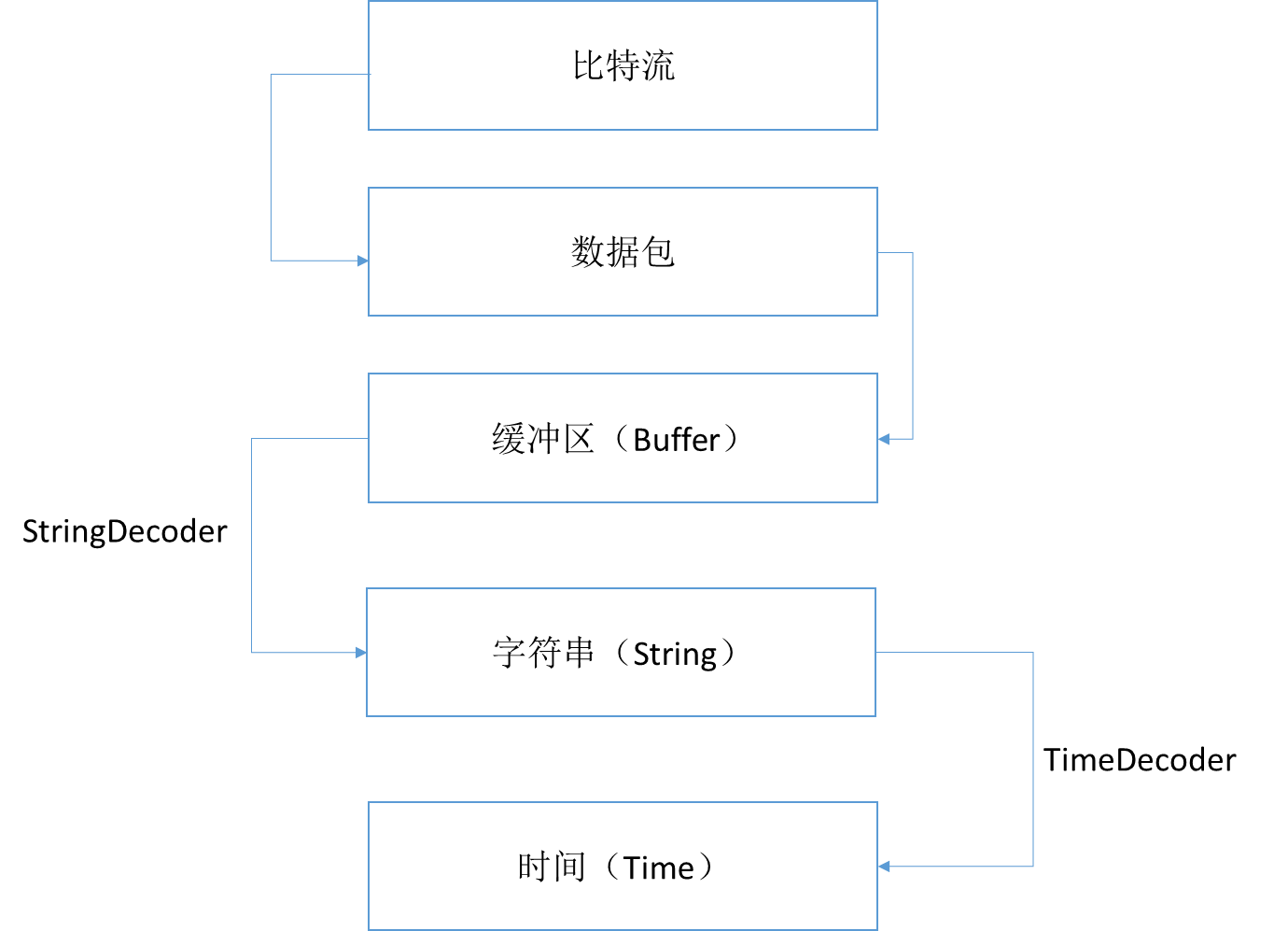
3.DelimiterBasedFrameDecoder
关于DelimiterBasedFrameDecoder
其实很简单,就是在一个缓冲区的末尾添加一个结束字符。
在规定了最大长度的缓冲区里,遇到一个特殊字符,就截取一次。
原理类似于String的split()方法。
代码实现
(1)服务端Server
package com.xm.netty.demo03;

import java.net.InetSocketAddress;

import io.netty.bootstrap.ServerBootstrap;

import io.netty.buffer.ByteBuf;

import io.netty.buffer.Unpooled;

import io.netty.channel.Channel;

import io.netty.channel.ChannelFuture;

import io.netty.channel.ChannelInitializer;

import io.netty.channel.EventLoopGroup;

import io.netty.channel.nio.NioEventLoopGroup;

import io.netty.channel.socket.nio.NioServerSocketChannel;

import io.netty.handler.codec.DelimiterBasedFrameDecoder;

import io.netty.handler.codec.string.StringDecoder;

public class Server {

	private final int port;

	public Server(int port) {

		this.port = port;

	}

	public static void main(String[] args) {

		int port = 8989;

		try {

			new Server(port).start();

		} catch (InterruptedException e) {

			// TODO Auto-generated catch block

			e.printStackTrace();

		}

	}

	private void start() throws InterruptedException {

		EventLoopGroup g1 = new NioEventLoopGroup();

		EventLoopGroup g2 = new NioEventLoopGroup();

		try {

			ServerBootstrap bootstrap = new ServerBootstrap();

			 bootstrap

			 		.group(g1,g2)

			 		.channel(NioServerSocketChannel.class)

			 		.localAddress(new InetSocketAddress( port))

			 		.childHandler(new ChannelInitializer() {

			 			@Override

			 			protected void initChannel(Channel ch) throws Exception {

			 				ByteBuf buf = Unpooled.copiedBuffer("$".getBytes());

			 				ch.pipeline().addLast(new DelimiterBasedFrameDecoder(1024,buf));

			 				ch.pipeline().addLast(new StringDecoder());

			 				ch.pipeline().addLast(new ServerHandler());

			 			}

					});

			 ChannelFuture future = bootstrap.bind().sync();

			 future.channel().closeFuture().sync();

		} finally {

			g1.shutdownGracefully().sync();

			g2.shutdownGracefully().sync();

		}

	}

}
(2)服务端ServerHandler
package com.xm.netty.demo03;

import java.time.LocalDateTime;

import java.time.format.DateTimeFormatter;

import io.netty.buffer.ByteBuf;

import io.netty.buffer.Unpooled;

import io.netty.channel.ChannelHandlerAdapter;

import io.netty.channel.ChannelHandlerContext;

import io.netty.util.CharsetUtil;

public class ServerHandler extends ChannelHandlerAdapter {

	@Override

	public void channelRead(ChannelHandlerContext ctx, Object msg) throws Exception {

		String str = (String) msg;

		System.out.println("Server:"+str);

		str = "服务器返回--->"+ str+"$";

		ctx.writeAndFlush(Unpooled.copiedBuffer(str.getBytes()));

	}

	@Override

	public void exceptionCaught(ChannelHandlerContext ctx, Throwable cause) throws Exception {

		cause.printStackTrace();

		ctx.close();

	}

	@Override

	public void channelActive(ChannelHandlerContext ctx) throws Exception {

		System.out.println(DateTimeFormatter.ISO_LOCAL_DATE_TIME.format(LocalDateTime.now())+"一个客户端连接上服务器!");

	}

}
(3)客户端Client
package com.xm.netty.demo03;

import java.time.LocalDateTime;

import java.time.format.DateTimeFormatter;

import io.netty.bootstrap.Bootstrap;

import io.netty.buffer.ByteBuf;

import io.netty.buffer.Unpooled;

import io.netty.channel.ChannelFuture;

import io.netty.channel.ChannelInitializer;

import io.netty.channel.EventLoopGroup;

import io.netty.channel.nio.NioEventLoopGroup;

import io.netty.channel.socket.SocketChannel;

import io.netty.channel.socket.nio.NioSocketChannel;

import io.netty.handler.codec.DelimiterBasedFrameDecoder;

import io.netty.handler.codec.string.StringDecoder;

public class Client {

	private final int port;

	private final String host;

	public Client(int port, String host) {

		this.port = port;

		this.host = host;

	}

	public static void main(String[] args) {

		String host = "127.0.0.1";

		int port = 8989;

		try {

			new Client(port, host).start();

		} catch (InterruptedException e) {

			// TODO Auto-generated catch block

			e.printStackTrace();

		}

	}

	private void start() throws InterruptedException {

		EventLoopGroup group = new NioEventLoopGroup();

		try {

			Bootstrap bootstrap = new Bootstrap();

			bootstrap

					.group(group)

					.channel(NioSocketChannel.class)

					.remoteAddress(host, port)

					.handler(new ChannelInitializer<SocketChannel>() {

						@Override

						protected void initChannel(SocketChannel ch) throws Exception {

							ByteBuf buf = Unpooled.copiedBuffer("$".getBytes());

			 				ch.pipeline().addLast(new DelimiterBasedFrameDecoder(1024,buf));

							ch.pipeline().addLast(new StringDecoder());

							ch.pipeline().addLast(new ClientHandler());

						}

					});

			ChannelFuture future = bootstrap.connect().sync();

			for(int i=10;i<20;i++) {

				String str = DateTimeFormatter.ISO_LOCAL_DATE_TIME.format(LocalDateTime.now()) + "---- " +i+"<<<$";

				future.channel().write(Unpooled.copiedBuffer(str.getBytes()));

			}

			future.channel().flush();

			//future.channel().writeAndFlush(Unpooled.copiedBuffer("Hello Netty!".getBytes()));

			future.channel().closeFuture().sync();

		} finally {

			group.shutdownGracefully().sync();

		}

	}

}
(4)客户端ClientHandler
package com.xm.netty.demo03;

import java.time.LocalDateTime;

import java.time.format.DateTimeFormatter;

import io.netty.buffer.ByteBuf;

import io.netty.buffer.Unpooled;

import io.netty.channel.ChannelHandlerAdapter;

import io.netty.channel.ChannelHandlerContext;

import io.netty.util.CharsetUtil;

import io.netty.util.ReferenceCountUtil;

public class ClientHandler extends ChannelHandlerAdapter {

	@Override

	public void channelRead(ChannelHandlerContext ctx, Object msg) throws Exception {

		try {

			String str = (String) msg;

			System.out.println("Client:"+str);

		} finally {

			ReferenceCountUtil.release(msg);

		}

	}

	@Override

	public void exceptionCaught(ChannelHandlerContext ctx, Throwable cause) throws Exception {

		cause.printStackTrace();

		ctx.close();

	}

	@Override

	public void channelActive(ChannelHandlerContext ctx) throws Exception {

		System.out.println(DateTimeFormatter.ISO_LOCAL_DATE_TIME.format(LocalDateTime.now())+"已连接服务器!");

	}

}
运行结果截图
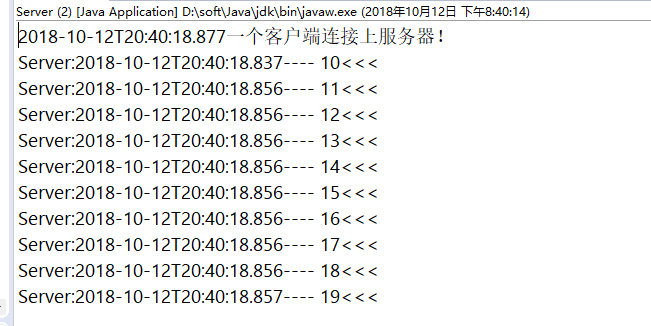
(1)服务端运行结果:
(2)客户端运行结果:

4.FixedLengthFrameDecoder
关于FixedLengthFrameDecoder
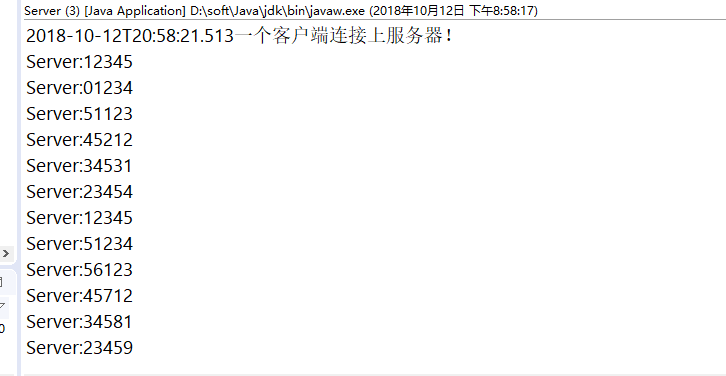
其实很简单,就是对规定的发送的数据进行限制长度,
当符合这个长度的情况下,就可以解析。
假设你发送一个’123456‘,’654321‘
那么解析的状况为’12345‘,’66543‘
代码实现
(1)服务端Server
package com.xm.netty.demo04;

import java.net.InetSocketAddress;

import io.netty.bootstrap.ServerBootstrap;

import io.netty.channel.Channel;

import io.netty.channel.ChannelFuture;

import io.netty.channel.ChannelInitializer;

import io.netty.channel.EventLoopGroup;

import io.netty.channel.nio.NioEventLoopGroup;

import io.netty.channel.socket.nio.NioServerSocketChannel;

import io.netty.handler.codec.FixedLengthFrameDecoder;

import io.netty.handler.codec.string.StringDecoder;

public class Server {

	private final int port;

	public Server(int port) {

		this.port = port;

	}

	public static void main(String[] args) {

		int port = 8989;

		try {

			new Server(port).start();

		} catch (InterruptedException e) {

			// TODO Auto-generated catch block

			e.printStackTrace();

		}

	}

	private void start() throws InterruptedException {

		EventLoopGroup g1 = new NioEventLoopGroup();

		EventLoopGroup g2 = new NioEventLoopGroup();

		try {

			ServerBootstrap bootstrap = new ServerBootstrap();

			 bootstrap

			 		.group(g1,g2)

			 		.channel(NioServerSocketChannel.class)

			 		.localAddress(new InetSocketAddress( port))

			 		.childHandler(new ChannelInitializer() {

			 			@Override

			 			protected void initChannel(Channel ch) throws Exception {

			 				ch.pipeline().addLast(new FixedLengthFrameDecoder(5));

			 				ch.pipeline().addLast(new StringDecoder());

			 				ch.pipeline().addLast(new ServerHandler());

			 			}

					});

			 ChannelFuture future = bootstrap.bind().sync();

			 future.channel().closeFuture().sync();

		} finally {

			g1.shutdownGracefully().sync();

			g2.shutdownGracefully().sync();

		}

	}

}
(2)服务端ServerHandler
package com.xm.netty.demo04;

import java.time.LocalDateTime;

import java.time.format.DateTimeFormatter;

import io.netty.buffer.ByteBuf;

import io.netty.buffer.Unpooled;

import io.netty.channel.ChannelHandlerAdapter;

import io.netty.channel.ChannelHandlerContext;

import io.netty.util.CharsetUtil;

public class ServerHandler extends ChannelHandlerAdapter {

	@Override

	public void channelRead(ChannelHandlerContext ctx, Object msg) throws Exception {

		String str = (String) msg;

		System.out.println("Server:"+str);

		ctx.writeAndFlush(Unpooled.copiedBuffer(str.getBytes()));

	}

	@Override

	public void exceptionCaught(ChannelHandlerContext ctx, Throwable cause) throws Exception {

		cause.printStackTrace();

		ctx.close();

	}

	@Override

	public void channelActive(ChannelHandlerContext ctx) throws Exception {

		System.out.println(DateTimeFormatter.ISO_LOCAL_DATE_TIME.format(LocalDateTime.now())+"一个客户端连接上服务器!");

	}

}
(3)客户端Client
package com.xm.netty.demo04;

import java.time.LocalDateTime;

import java.time.format.DateTimeFormatter;

import io.netty.bootstrap.Bootstrap;

import io.netty.buffer.Unpooled;

import io.netty.channel.ChannelFuture;

import io.netty.channel.ChannelInitializer;

import io.netty.channel.EventLoopGroup;

import io.netty.channel.nio.NioEventLoopGroup;

import io.netty.channel.socket.SocketChannel;

import io.netty.channel.socket.nio.NioSocketChannel;

import io.netty.handler.codec.FixedLengthFrameDecoder;

import io.netty.handler.codec.string.StringDecoder;

public class Client {

	private final int port;

	private final String host;

	public Client(int port, String host) {

		this.port = port;

		this.host = host;

	}

	public static void main(String[] args) {

		String host = "127.0.0.1";

		int port = 8989;

		try {

			new Client(port, host).start();

		} catch (InterruptedException e) {

			// TODO Auto-generated catch block

			e.printStackTrace();

		}

	}

	private void start() throws InterruptedException {

		EventLoopGroup group = new NioEventLoopGroup();

		try {

			Bootstrap bootstrap = new Bootstrap();

			bootstrap

					.group(group)

					.channel(NioSocketChannel.class)

					.remoteAddress(host, port)

					.handler(new ChannelInitializer<SocketChannel>() {

						@Override

						protected void initChannel(SocketChannel ch) throws Exception {

							ch.pipeline().addLast(new FixedLengthFrameDecoder(5));

							ch.pipeline().addLast(new StringDecoder());

							ch.pipeline().addLast(new ClientHandler());

						}

					});

			ChannelFuture future = bootstrap.connect().sync();

			for(int i=123450;i<123460;i++) {

				String str = ""+i;

				future.channel().write(Unpooled.copiedBuffer(str.getBytes()));

			}

			future.channel().flush();

			//future.channel().writeAndFlush(Unpooled.copiedBuffer("Hello Netty!".getBytes()));

			future.channel().closeFuture().sync();

		} finally {

			group.shutdownGracefully().sync();

		}

	}

}
(4)客户端ClientHandler
package com.xm.netty.demo04;

import java.time.LocalDateTime;

import java.time.format.DateTimeFormatter;

import io.netty.buffer.ByteBuf;

import io.netty.buffer.Unpooled;

import io.netty.channel.ChannelHandlerAdapter;

import io.netty.channel.ChannelHandlerContext;

import io.netty.util.CharsetUtil;

import io.netty.util.ReferenceCountUtil;

public class ClientHandler extends ChannelHandlerAdapter {

	@Override

	public void channelRead(ChannelHandlerContext ctx, Object msg) throws Exception {

		try {

			String str = (String) msg;

			System.out.println("Client:"+str);

		} finally {

			ReferenceCountUtil.release(msg);

		}

	}

	@Override

	public void exceptionCaught(ChannelHandlerContext ctx, Throwable cause) throws Exception {

		cause.printStackTrace();

		ctx.close();

	}

	@Override

	public void channelActive(ChannelHandlerContext ctx) throws Exception {

		System.out.println(DateTimeFormatter.ISO_LOCAL_DATE_TIME.format(LocalDateTime.now())+"已连接服务器!");

	}

}
运行结果截图
(1)服务端运行结果:
(2)客户端运行结果:

3.Netty的粘包、拆包(二)的更多相关文章
- Netty TCP粘包/拆包问题《二》
1.DelimiterBasedFrameDecoder:是以分隔符作为结束标志进行解决粘包/拆包问题 代码: EchoClient:客户端 /* * Copyright 2012 The Netty ...
- netty 解决粘包拆包问题
netty server TimeServer package com.zhaowb.netty.ch4_3; import io.netty.bootstrap.ServerBootstrap; i ...
- Netty TCP粘包/拆包问题《一》
1.使用LineBasedFrameDecoder,StringDecoder解析器进行解决TCP粘包/拆包问题 2.代码搞起: TimeClient:客户端 /* * Copyright 2013- ...
- netty: 解决粘包拆包: 分隔符DelimiterBasedFrameDecoder,定长消息FixedLengthFrameDecoder
DelimiterBasedFrameDecoder 自定义分隔符 给Server发送多条信息,但是server会讲多条信息合并为一条.这时候我们需要对发生的消息指定分割,让client和server ...
- Netty入门系列(2) --使用Netty解决粘包和拆包问题
前言 上一篇我们介绍了如果使用Netty来开发一个简单的服务端和客户端,接下来我们来讨论如何使用解码器来解决TCP的粘包和拆包问题 TCP为什么会粘包/拆包 我们知道,TCP是以一种流的方式来进行网络 ...
- 《精通并发与Netty》学习笔记(14 - 解决TCP粘包拆包(二)Netty自定义协议解决粘包拆包)
一.Netty粘包和拆包解决方案 Netty提供了多个解码器,可以进行分包的操作,分别是: * LineBasedFrameDecoder (换行) LineBasedFrameDecoder是回 ...
- Netty(二)——TCP粘包/拆包
转载请注明出处:http://www.cnblogs.com/Joanna-Yan/p/7814644.html 前面讲到:Netty(一)--Netty入门程序 主要内容: TCP粘包/拆包的基础知 ...
- 1. Netty解决Tcp粘包拆包
一. TCP粘包问题 实际发送的消息, 可能会被TCP拆分成很多数据包发送, 也可能把很多消息组合成一个数据包发送 粘包拆包发生的原因 (1) 应用程序一次写的字节大小超过socket发送缓冲区大小 ...
- TCP粘包/拆包 ByteBuf和channel 如果没有Netty? 传统的多线程服务器,这个也是Apache处理请求的模式
通俗地讲,Netty 能做什么? - 知乎 https://www.zhihu.com/question/24322387 谢邀.netty是一套在java NIO的基础上封装的便于用户开发网络应用程 ...
- 《精通并发与Netty》学习笔记(13 - 解决TCP粘包拆包(一)概念及实例演示)
一.粘包/拆包概念 TCP是一个“流”协议,所谓流,就是没有界限的一长串二进制数据.TCP作为传输层协议并不不了解上层业务数据的具体含义,它会根据TCP缓冲区的实际情况进行数据包的划分,所以在业务上认 ...
随机推荐
- 获取tomcat路径
String serverPath = System.getProperty("catalina.home");
- 监听outlook新邮件
using System; using System.Linq; using Microsoft.Office.Interop.Outlook; using System.Collections.Ge ...
- The function getUserId must be used with a prefix when a default namespace is not specified 解决办法
The function getUserId must be used with a prefix when a default namespace is not specified 解决方法: 1. ...
- php spl数据结构
1.双链表SplDoublyLinkedList 结构如图: 类定义: SplDoublyLinkedList implements Iterator , ArrayAccess , Countabl ...
- 如何解读IL代码
如何解读IL代码 关于IL代码,我有将从三个方面去揭开它神秘的面纱.IL代码是什么?我们为什么要去读懂IL代码?我们如何去读懂IL代码?这三个问题的解答,将是我解读IL代码的整体思路. IL代码是什么 ...
- Akka探索第一个例子by fsharp 1
如何构建一套分布式程序一直是我想知道的问题. Akka就是一套用来开发分布式系统的开发库.当然开发分布式系统只是它的能力之一.除此之外高度抽象的并行运算能力,轻量级的消息系统,容错能力都是该库的特点. ...
- 反向代理总结-reverse-proxy-with-url-rewrite
iis 反向代理 : 1. 微软文档 https://docs.microsoft.com/en-us/iis/extensions/url-rewrite-module/reverse-proxy- ...
- 在 Excel 中设置图片
package com.smbea.demo.excel; import java.awt.image.BufferedImage; import java.io.ByteArrayOutputStr ...
- Python基础 整形、布尔值、if条件判断、while循环、运算符、格式化输出
1,计算机基础.2,python历史. 宏观上:python2 与 python3 区别: python2 源码不标准,混乱,重复代码太多, python3 统一 标准,去除重复代码.3,python ...
- foxmail6.5 不能收取电子邮件,反复提示输入密码?
使用foxmail时候报错:-err system resource error,system close connect,code=<1014>,id=<1>重新输入密码吗? ...