
Cg shadow of sphere
参考自:https://en.wikibooks.org/wiki/GLSL_Programming/Unity/Soft_Shadows_of_Spheres
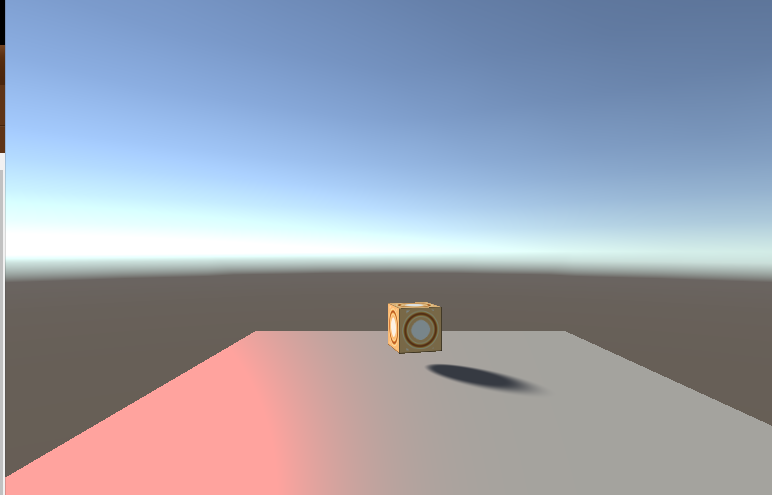
using UnityEngine;

using System.Collections;

[ExecuteInEditMode]

public class TestShadowOfSphere : MonoBehaviour {

    public GameObject occluder;

    // Use this for initialization

    void Start () {

	}

	// Update is called once per frame

	void Update () {

        if (null != occluder)

        {

            GetComponent<Renderer>().sharedMaterial.SetVector("_SpherePosition",

               occluder.transform.position);

            GetComponent<Renderer>().sharedMaterial.SetFloat("_SphereRadius",

               occluder.transform.localScale.x / 2.0f);

        }

    }

}
Shader "Cg shadow of sphere" {

	Properties{

		_Color("Diffuse Material Color", Color) = (1,1,1,1)

		_SpecColor("Specular Material Color", Color) = (1,1,1,1)

		_Shininess("Shininess", Float) = 10

		_SpherePosition("Sphere Position", Vector) = (0,0,0,1)

		_SphereRadius("Sphere Radius", Float) = 1

		_LightSourceRadius("Light Source Radius", Float) = 0.005

	}

	SubShader{

		Pass{

			Tags{ "LightMode" = "ForwardBase" }

		// pass for ambient light and first light source

		CGPROGRAM

		#pragma vertex vert

		#pragma fragment frag

		#pragma target 3.0

		#include "UnityCG.cginc"

		uniform float4 _LightColor0;

		// color of light source (from "Lighting.cginc")

		// User-specified properties

		uniform float4 _Color;

		uniform float4 _SpecColor;

		uniform float _Shininess;

		uniform float4 _SpherePosition;

		// center of shadow-casting sphere in world coordinates

		uniform float _SphereRadius;

		// radius of shadow-casting sphere

		uniform float _LightSourceRadius;

		// in radians for directional light sources

		struct vertexInput {

			float4 vertex : POSITION;

			float3 normal : NORMAL;

		};

		struct vertexOutput {

			float4 pos : SV_POSITION;

			float4 posWorld : TEXCOORD0;

			float3 normalDir : TEXCOORD1;

		};

		vertexOutput vert(vertexInput input){

			vertexOutput output;

			float4x4 modelMatrix = _Object2World;

			float4x4 modelMatrixInverse = _World2Object;

			output.posWorld = mul(modelMatrix, input.vertex);

			output.normalDir = normalize(

				mul(float4(input.normal, 0.0), modelMatrixInverse).xyz);

			output.pos = mul(UNITY_MATRIX_MVP, input.vertex);

			return output;

		}

		float4 frag(vertexOutput input) : COLOR{

			float3 normalDirection = normalize(input.normalDir);

			float3 viewDirection = normalize(

				_WorldSpaceCameraPos - input.posWorld.xyz);

			float3 lightDirection;

			float lightDistance;

			float attenuation;

			if (0.0 == _WorldSpaceLightPos0.w) // directional light?

			{

				attenuation = 1.0; // no attenuation

				lightDirection =

					normalize(_WorldSpaceLightPos0.xyz);

				lightDistance = 1.0;

			}

			else // point or spot light

			{

				lightDirection =

					_WorldSpaceLightPos0.xyz - input.posWorld.xyz;

				lightDistance = length(lightDirection);

				attenuation = 1.0 / lightDistance; // linear attenuation

				lightDirection = lightDirection / lightDistance;

			}

			// computation of level of shadowing w

			float3 sphereDirection =

				_SpherePosition.xyz - input.posWorld.xyz;

			float sphereDistance = length(sphereDirection);

			sphereDirection = sphereDirection / sphereDistance;

			float d = lightDistance

				* (asin(min(1.0,

					length(cross(lightDirection, sphereDirection))))

					- asin(min(1.0, _SphereRadius / sphereDistance)));

			float w = smoothstep(-1.0, 1.0, -d / _LightSourceRadius);

			w = w * smoothstep(0.0, 0.2,

				dot(lightDirection, sphereDirection));

			if (0.0 != _WorldSpaceLightPos0.w) // point light source?

			{

				w = w * smoothstep(0.0, _SphereRadius,

					lightDistance - sphereDistance);

			}

			float3 ambientLighting =

				UNITY_LIGHTMODEL_AMBIENT.rgb * _Color.rgb;

			float3 diffuseReflection =

				attenuation * _LightColor0.rgb * _Color.rgb

				* max(0.0, dot(normalDirection, lightDirection));

			float3 specularReflection;

			if (dot(normalDirection, lightDirection) < 0.0)

				// light source on the wrong side?

			{

				specularReflection = float3(0.0, 0.0, 0.0);

				// no specular reflection

			}

			else // light source on the right side

			{

				specularReflection = attenuation * _LightColor0.rgb

					* _SpecColor.rgb * pow(max(0.0, dot(

						reflect(-lightDirection, normalDirection),

						viewDirection)), _Shininess);

			}

				return float4(ambientLighting

					+ (1.0 - w) * (diffuseReflection + specularReflection),

					1.0);

			}

			ENDCG

		}

		Pass{

			Tags{ "LightMode" = "ForwardAdd" }

			// pass for additional light sources

			Blend One One // additive blending

			CGPROGRAM

			#pragma vertex vert

			#pragma fragment frag

			#pragma target 3.0

			#include "UnityCG.cginc"

			uniform float4 _LightColor0;

			// color of light source (from "Lighting.cginc")

			// User-specified properties

			uniform float4 _Color;

			uniform float4 _SpecColor;

			uniform float _Shininess;

			uniform float4 _SpherePosition;

			// center of shadow-casting sphere in world coordinates

			uniform float _SphereRadius;

			// radius of shadow-casting sphere

			uniform float _LightSourceRadius;

			// in radians for directional light sources

			struct vertexInput {

				float4 vertex : POSITION;

				float3 normal : NORMAL;

			};

			struct vertexOutput {

				float4 pos : SV_POSITION;

				float4 posWorld : TEXCOORD0;

				float3 normalDir : TEXCOORD1;

			};

			vertexOutput vert(vertexInput input)

			{

				vertexOutput output;

				float4x4 modelMatrix = _Object2World;

				float4x4 modelMatrixInverse = _World2Object;

				output.posWorld = mul(modelMatrix, input.vertex);

				output.normalDir = normalize(

					mul(float4(input.normal, 0.0), modelMatrixInverse).xyz);

				output.pos = mul(UNITY_MATRIX_MVP, input.vertex);

				return output;

			}

			float4 frag(vertexOutput input) : COLOR

			{

				float3 normalDirection = normalize(input.normalDir);

				float3 viewDirection = normalize(

					_WorldSpaceCameraPos - input.posWorld.xyz);

				float3 lightDirection;

				float lightDistance;

				float attenuation;

				if (0.0 == _WorldSpaceLightPos0.w) // directional light?

				{

					attenuation = 1.0; // no attenuation

					lightDirection = normalize(_WorldSpaceLightPos0.xyz);

					lightDistance = 1.0;

				}

				else // point or spot light

				{

					lightDirection =

						_WorldSpaceLightPos0.xyz - input.posWorld.xyz;

					lightDistance = length(lightDirection);

					attenuation = 1.0 / lightDistance; // linear attenuation

					lightDirection = lightDirection / lightDistance;

				}

				// computation of level of shadowing w

				float3 sphereDirection =

					_SpherePosition.xyz - input.posWorld.xyz;

				float sphereDistance = length(sphereDirection);

				sphereDirection = sphereDirection / sphereDistance;

				float d = lightDistance

					* (asin(min(1.0,

						length(cross(lightDirection, sphereDirection))))

						- asin(min(1.0, _SphereRadius / sphereDistance)));

				float w = smoothstep(-1.0, 1.0, -d / _LightSourceRadius);

				w = w * smoothstep(0.0, 0.2,

					dot(lightDirection, sphereDirection));

				if (0.0 != _WorldSpaceLightPos0.w) // point light source?

				{

					w = w * smoothstep(0.0, _SphereRadius,

						lightDistance - sphereDistance);

				}

				float3 diffuseReflection =

					attenuation * _LightColor0.rgb * _Color.rgb

					* max(0.0, dot(normalDirection, lightDirection));

				float3 specularReflection;

				if (dot(normalDirection, lightDirection) < 0.0)

					// light source on the wrong side?

				{

					specularReflection = float3(0.0, 0.0, 0.0);

					// no specular reflection

				}

				else // light source on the right side

				{

					specularReflection = attenuation * _LightColor0.rgb

						* _SpecColor.rgb * pow(max(0.0, dot(

							reflect(-lightDirection, normalDirection),

							viewDirection)), _Shininess);

				}

				return float4((1.0 - w) * (diffuseReflection + specularReflection), 1.0);

			}

			ENDCG

		}

	}

	Fallback "Specular"

}
Cg shadow of sphere的更多相关文章
- WikiBooks/Cg Programming
https://en.wikibooks.org/wiki/Cg_Programming Basics Minimal Shader(about shaders, materials, and gam ...
- Digests from CG articales
Turtle Talk Prior to the on-set motion capture, the team had the actors perform expressions while be ...
- CG&CAD resource
Computational Geometry The Geometry Center (UIUC) Computational Geometry Pages (UIUC) Geometry in Ac ...
- 【HAPPY FOREST】用Unreal Engine4绘制实时CG影像
用Unreal Engine绘制实时CG影像 近年来,对实时CG的关心热度越来越高,但要想弥补与预渲染方式的差异并不是那么容易.这里就有影像业界的先锋进行挑战的MARZA ANIMATION PLAN ...
- CG&Game资源(转)
cg教程下载: http://cgpeers.com http://cgpersia.com http://bbs.ideasr.com/forum-328-1.html http://bbs.ide ...
- 【Unity Shaders】Lighting Models —— 光照模型之Lit Sphere
本系列主要参考<Unity Shaders and Effects Cookbook>一书(感谢原书作者),同时会加上一点个人理解或拓展. 这里是本书所有的插图.这里是本书所需的代码和资源 ...
- Signed Distance Field Shadow in Unity
0x00 前言 最近读到了一个今年GDC上很棒的分享,是Sebastian Aaltonen带来的利用Ray-tracing实现一些有趣的效果的分享. 其中有一段他介绍到了对Signed Distan ...
- OpenGL 阴影之Shadow Mapping和Shadow Volumes
先说下开发环境.VS2013,C++空项目,引用glut,glew.glut包含基本窗口操作,免去我们自己新建win32窗口一些操作.glew使我们能使用最新opengl的API,因winodw本身只 ...
- (转)Shadow Mapping
原文:丢失,十分抱歉,这篇是在笔记上发现的.SmaEngine 阴影和级联部分是模仿UE的结构设计 This tutorial will cover how to implement shadow ...
随机推荐
- window安装配置 zookeeper 单机模式
1.zookeeper简单介绍 zookeeper是一个分布式的,开放源码的分布式应用程序协调服务,我所了解到的主要的使用场景有两个 (1).微服务注册中心(Dubbo较常用Zookeeper做注册中 ...
- [C/C++语言标准] ISO C99/ ISO C11/ ISO C++11/ ISO C++14/ISO C++17 Downloads
语言法典,C/C++社区人手一份,技术讨(hu)论(peng)必备 ISO IEC C99 https://files.cnblogs.com/files/racaljk/ISO_C99.pdf IS ...
- Kbuild、Kconfig、make menuconfig、.config、Makefile之间的关系
今天突发奇想,想在这里分享下比喻分析Kbuild ---->去饭店吃饭的过程. 1.Kconfig --->饭店的菜单 2.条件编译选项--->菜单中的每一盘菜,可以选择这个菜的 ...
- 洛谷P1894 [USACO4.2]完美的牛栏The Perfect Stall
题目描述 农夫约翰上个星期刚刚建好了他的新牛棚,他使用了最新的挤奶技术.不幸的是,由于工程问题,每个牛栏都不一样.第一个星期,农夫约翰随便地让奶牛们进入牛栏,但是问题很快地显露出来:每头奶牛都只愿意在 ...
- 使用nexus 搭建本地 maven 服务器
1.下载安装nexus oos https://www.sonatype.com/download-oss-sonatype ,选择2.x 版本. 2. 配置maven <server> ...
- JTAG与JLink说明
JTAG接口解读 通常所说的JTAG大致分两类,一类用于测试芯片的电气特性,检测芯片是否有问题:一类用于Debug:一般支持JTAG的CPU内都包含了这两个模块. 一个含有JTAG Debug接口模块 ...
- 2016"百度之星" - 资格赛(Astar Round1) A
链接:http://bestcoder.hdu.edu.cn/contests/contest_showproblem.php?cid=690&pid=1001 我用线段树过的~可能要注意a, ...
- Codeforces - 151C 质因子分解
显然只需要能跑到第二个因子就赢了 需要特判非平凡因子 常数优化:不用求出所有因子,跑完第二个素数就行了 #include<bits/stdc++.h> using namespace st ...
- redis备份恢复
redis的几种数据导入导出方式[转] 环境说明:202.102.221.11 redis源实例202.102.221.12 redis目标实例202.102.221.13 任意linux系统 一 ...
- kafkaconsumer SimpleExample
package kafka.simple; import java.nio.ByteBuffer; import java.util.ArrayList; import java.util.Colle ...