
TensorFlow卷积神经网络实现手写数字识别以及可视化
边学习边笔记
https://www.cnblogs.com/felixwang2/p/9190602.html
 # https://www.cnblogs.com/felixwang2/p/9190602.html

 # TensorFlow(十):卷积神经网络实现手写数字识别以及可视化

 import tensorflow as tf

 from tensorflow.examples.tutorials.mnist import input_data

 mnist = input_data.read_data_sets('MNIST_data', one_hot=True)

 # 每个批次的大小

 batch_size = 100

 # 计算一共有多少个批次

 n_batch = mnist.train.num_examples // batch_size

 # 参数概要

 def variable_summaries(var):

     with tf.name_scope('summaries'):

         mean = tf.reduce_mean(var)

         tf.summary.scalar('mean', mean)  # 平均值

         with tf.name_scope('stddev'):

             stddev = tf.sqrt(tf.reduce_mean(tf.square(var - mean)))

         tf.summary.scalar('stddev', stddev)  # 标准差

         tf.summary.scalar('max', tf.reduce_max(var))  # 最大值

         tf.summary.scalar('min', tf.reduce_min(var))  # 最小值

         tf.summary.histogram('histogram', var)  # 直方图

 # 初始化权值

 def weight_variable(shape, name):

     initial = tf.truncated_normal(shape, stddev=0.1)  # 生成一个截断的正态分布

     return tf.Variable(initial, name=name)

 # 初始化偏置

 def bias_variable(shape, name):

     initial = tf.constant(0.1, shape=shape)

     return tf.Variable(initial, name=name)

 # 卷积层

 def conv2d(x, W):

     # x input tensor of shape `[batch, in_height, in_width, in_channels]`

     # W filter / kernel tensor of shape [filter_height, filter_width, in_channels, out_channels]

     # `strides[0] = strides[3] = 1`. strides[1]代表x方向的步长,strides[2]代表y方向的步长

     # padding: A `string` from: `"SAME", "VALID"`

     return tf.nn.conv2d(x, W, strides=[1, 1, 1, 1], padding='SAME')

 # 池化层

 def max_pool_2x2(x):

     # ksize [1,x,y,1]

     return tf.nn.max_pool(x, ksize=[1, 2, 2, 1], strides=[1, 2, 2, 1], padding='SAME')

 # 命名空间

 with tf.name_scope('input'):

     # 定义两个placeholder

     x = tf.placeholder(tf.float32, [None, 784], name='x-input')

     y = tf.placeholder(tf.float32, [None, 10], name='y-input')

     with tf.name_scope('x_image'):

         # 改变x的格式转为4D的向量[batch, in_height, in_width, in_channels]`

         x_image = tf.reshape(x, [-1, 28, 28, 1], name='x_image')

 with tf.name_scope('Conv1'):

     # 初始化第一个卷积层的权值和偏置

     with tf.name_scope('W_conv1'):

         W_conv1 = weight_variable([5, 5, 1, 32], name='W_conv1')  # 5*5的采样窗口,32个卷积核从1个平面抽取特征

     with tf.name_scope('b_conv1'):

         b_conv1 = bias_variable([32], name='b_conv1')  # 每一个卷积核一个偏置值

     # 把x_image和权值向量进行卷积,再加上偏置值,然后应用于relu激活函数

     with tf.name_scope('conv2d_1'):

         conv2d_1 = conv2d(x_image, W_conv1) + b_conv1

     with tf.name_scope('relu'):

         h_conv1 = tf.nn.relu(conv2d_1)

     with tf.name_scope('h_pool1'):

         h_pool1 = max_pool_2x2(h_conv1)  # 进行max-pooling

 with tf.name_scope('Conv2'):

     # 初始化第二个卷积层的权值和偏置

     with tf.name_scope('W_conv2'):

         W_conv2 = weight_variable([5, 5, 32, 64], name='W_conv2')  # 5*5的采样窗口,64个卷积核从32个平面抽取特征

     with tf.name_scope('b_conv2'):

         b_conv2 = bias_variable([64], name='b_conv2')  # 每一个卷积核一个偏置值

     # 把h_pool1和权值向量进行卷积,再加上偏置值,然后应用于relu激活函数

     with tf.name_scope('conv2d_2'):

         conv2d_2 = conv2d(h_pool1, W_conv2) + b_conv2

     with tf.name_scope('relu'):

         h_conv2 = tf.nn.relu(conv2d_2)

     with tf.name_scope('h_pool2'):

         h_pool2 = max_pool_2x2(h_conv2)  # 进行max-pooling

 # 28*28的图片第一次卷积后还是28*28,第一次池化后变为14*14

 # 第二次卷积后为14*14,第二次池化后变为了7*7

 # 经过上面操作后得到64张7*7的平面

 with tf.name_scope('fc1'):

     # 初始化第一个全连接层的权值

     with tf.name_scope('W_fc1'):

         W_fc1 = weight_variable([7 * 7 * 64, 1024], name='W_fc1')  # 上一场有7*7*64个神经元,全连接层有1024个神经元

     with tf.name_scope('b_fc1'):

         b_fc1 = bias_variable([1024], name='b_fc1')  # 1024个节点

     # 把池化层2的输出扁平化为1维

     with tf.name_scope('h_pool2_flat'):

         h_pool2_flat = tf.reshape(h_pool2, [-1, 7 * 7 * 64], name='h_pool2_flat')

     # 求第一个全连接层的输出

     with tf.name_scope('wx_plus_b1'):

         wx_plus_b1 = tf.matmul(h_pool2_flat, W_fc1) + b_fc1

     with tf.name_scope('relu'):

         h_fc1 = tf.nn.relu(wx_plus_b1)

     # keep_prob用来表示神经元的输出概率

     with tf.name_scope('keep_prob'):

         keep_prob = tf.placeholder(tf.float32, name='keep_prob')

     with tf.name_scope('h_fc1_drop'):

         h_fc1_drop = tf.nn.dropout(h_fc1, keep_prob, name='h_fc1_drop')

 with tf.name_scope('fc2'):

     # 初始化第二个全连接层

     with tf.name_scope('W_fc2'):

         W_fc2 = weight_variable([1024, 10], name='W_fc2')

     with tf.name_scope('b_fc2'):

         b_fc2 = bias_variable([10], name='b_fc2')

     with tf.name_scope('wx_plus_b2'):

         wx_plus_b2 = tf.matmul(h_fc1_drop, W_fc2) + b_fc2

     with tf.name_scope('softmax'):

         # 计算输出

         prediction = tf.nn.softmax(wx_plus_b2)

 # 交叉熵代价函数

 with tf.name_scope('cross_entropy'):

     cross_entropy = tf.reduce_mean(tf.nn.softmax_cross_entropy_with_logits_v2(labels=y, logits=prediction),

                                    name='cross_entropy')

     tf.summary.scalar('cross_entropy', cross_entropy)

 # 使用AdamOptimizer进行优化

 with tf.name_scope('train'):

     train_step = tf.train.AdamOptimizer(1e-4).minimize(cross_entropy)

 # 求准确率

 with tf.name_scope('accuracy'):

     with tf.name_scope('correct_prediction'):

         # 结果存放在一个布尔列表中

         correct_prediction = tf.equal(tf.argmax(prediction, 1), tf.argmax(y, 1))  # argmax返回一维张量中最大的值所在的位置

     with tf.name_scope('accuracy'):

         # 求准确率

         accuracy = tf.reduce_mean(tf.cast(correct_prediction, tf.float32))

         tf.summary.scalar('accuracy', accuracy)

 # 合并所有的summary

 merged = tf.summary.merge_all()

 gpu_options = tf.GPUOptions(allow_growth=True)

 with tf.Session(config=tf.ConfigProto(gpu_options=gpu_options)) as sess:

     sess.run(tf.global_variables_initializer())

     train_writer = tf.summary.FileWriter('logs/train', sess.graph)

     test_writer = tf.summary.FileWriter('logs/test', sess.graph)

     for i in range(1001):

         # 训练模型

         batch_xs, batch_ys = mnist.train.next_batch(batch_size)

         sess.run(train_step, feed_dict={x: batch_xs, y: batch_ys, keep_prob: 0.5})

         # 记录训练集计算的参数

         summary = sess.run(merged, feed_dict={x: batch_xs, y: batch_ys, keep_prob: 1.0})

         train_writer.add_summary(summary, i)

         # 记录测试集计算的参数

         batch_xs, batch_ys = mnist.test.next_batch(batch_size)

         summary = sess.run(merged, feed_dict={x: batch_xs, y: batch_ys, keep_prob: 1.0})

         test_writer.add_summary(summary, i)

         if i % 100 == 0:

             test_acc = sess.run(accuracy, feed_dict={x: mnist.test.images, y: mnist.test.labels, keep_prob: 1.0})

             train_acc = sess.run(accuracy, feed_dict={x: mnist.train.images[:10000], y: mnist.train.labels[:10000],

                                                       keep_prob: 1.0})

             print("Iter " + str(i) + ", Testing Accuracy= " + str(test_acc) + ", Training Accuracy= " + str(train_acc))
应该是随便在某个路径下,右键,打开powershell窗口,输入如下命令:
tensorboard --logdir=F:\document\PyCharm\temp\logs
之后会在窗口输出:
TensorBoard 1.10. at http://KOTIN:6006 (Press CTRL+C to quit)
然后在浏览器输入
http://KOTIN:6006
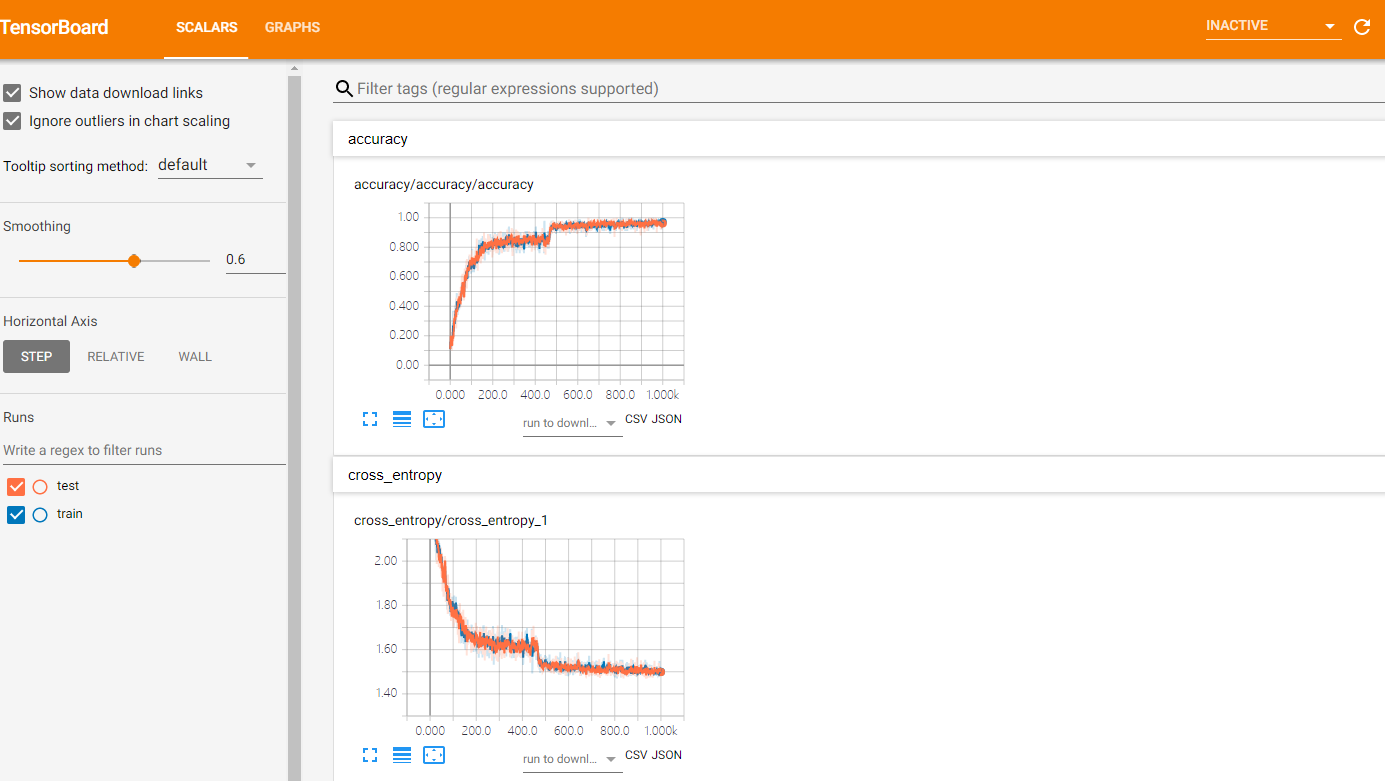
就可以进入tensorboard查看参数的可视化信息:

TensorFlow卷积神经网络实现手写数字识别以及可视化的更多相关文章
- TensorFlow(十):卷积神经网络实现手写数字识别以及可视化
上代码: import tensorflow as tf from tensorflow.examples.tutorials.mnist import input_data mnist = inpu ...
- 卷积神经网络CNN 手写数字识别
1. 知识点准备 在了解 CNN 网络神经之前有两个概念要理解,第一是二维图像上卷积的概念,第二是 pooling 的概念. a. 卷积 关于卷积的概念和细节可以参考这里,卷积运算有两个非常重要特性, ...
- 基于卷积神经网络的手写数字识别分类(Tensorflow)
import numpy as np import tensorflow as tf from tensorflow.examples.tutorials.mnist import input_dat ...
- 莫烦pytorch学习笔记(八)——卷积神经网络(手写数字识别实现)
莫烦视频网址 这个代码实现了预测和可视化 import os # third-party library import torch import torch.nn as nn import torch ...
- BP神经网络的手写数字识别
BP神经网络的手写数字识别 ANN 人工神经网络算法在实践中往往给人难以琢磨的印象,有句老话叫“出来混总是要还的”,大概是由于具有很强的非线性模拟和处理能力,因此作为代价上帝让它“黑盒”化了.作为一种 ...
- 利用c++编写bp神经网络实现手写数字识别详解
利用c++编写bp神经网络实现手写数字识别 写在前面 从大一入学开始,本菜菜就一直想学习一下神经网络算法,但由于时间和资源所限,一直未展开比较透彻的学习.大二下人工智能课的修习,给了我一个学习的契机. ...
- 第三节,TensorFlow 使用CNN实现手写数字识别(卷积函数tf.nn.convd介绍)
上一节,我们已经讲解了使用全连接网络实现手写数字识别,其正确率大概能达到98%,这一节我们使用卷积神经网络来实现手写数字识别, 其准确率可以超过99%,程序主要包括以下几块内容 [1]: 导入数据,即 ...
- 第二节,TensorFlow 使用前馈神经网络实现手写数字识别
一 感知器 感知器学习笔记:https://blog.csdn.net/liyuanbhu/article/details/51622695 感知器(Perceptron)是二分类的线性分类模型,其输 ...
- TensorFlow.NET机器学习入门【5】采用神经网络实现手写数字识别(MNIST)
从这篇文章开始,终于要干点正儿八经的工作了,前面都是准备工作.这次我们要解决机器学习的经典问题,MNIST手写数字识别. 首先介绍一下数据集.请首先解压:TF_Net\Asset\mnist_png. ...
随机推荐
- PHP pdf 转 图片
function pdf2png($pdf,$path,$page=-1) { if(!extension_loaded('imagick')) { return false; } if(!file_ ...
- Mybatis- 基础知识
mybatis是一个java持久层框架,java中操作关系型 数据库用的是jdbc,mybatis是对jdbc的一个封装. 简介 iBATIS一词来源于"internet" ...
- docker使用nginx实现ssl(https)反向代理其他容器应用
安装nginx容器 搜索nginx镜像 docker search nginx 拉取最新版nginx docker pull nginx:latest 运行容器 docker run --name=n ...
- LoadRunner使用记录
基本术语 性能测试--通过自动化的测试工具模拟多种正常.峰值以及异常负载条件来对系统的各项性能指标进行测试. 负载测试和压力测试都属于性能测试,两者可以结合进行. 负载测试,确定在各种工作负载下系统的 ...
- django 搭建一个投票类网站(一)
写在最前,之前零零散散的看过django,但是由于比较杂,学的云里雾里的,所以就停了一段落,但是我最近找到了一个django的书,是李建编著的django入门与实践,于是,打算照着书上的步骤来写好一个 ...
- spring boot 运行错误: 找不到或无法加载主类
在项目根目录运行 mvn clean install 进行重新编译 不行的话就删了原有的启动配置,重新配置启动.
- Elasticsearch集群知识笔记
Elasticsearch集群知识笔记 Elasticsearch内部提供了一个rest接口用于查看集群内部的健康状况: curl -XGET http://localhost:9200/_clust ...
- H5 App设计者需要注意的问题
我们通常在做H5 APP设计的过程中,遇到很多看似很小,且很容易被忽略的问题,正是这些小问题,一次次的撩拨用户的耐心,让用户对你的APP心生怨念.现在WeX5君呕血为大家整理出H5 APP设计的21条 ...
- 【14】N的二进制中1的个数
class Solution { public int findKthLargest(int[] nums, int k) { PriorityQueue<Integer> h = new ...
- selenium的错误截图
在自动化测试过程中,测试执行期间需要收集获取截图信息,一方面为了错误调试代码,一方面也为了和开发沟通, 获取当前的截图 save_screenshot是获取当前截图的方法,以百度首页为例,打开百度首页 ...