
微信小程序自定义顶部导航
注释:自定义导航需要自备相应图片
一、设置自定义顶部导航
Navigation是小程序的顶部导航组件,当页面配置navigationStyle设置为custom的时候可以使用此组件替代原生导航栏。
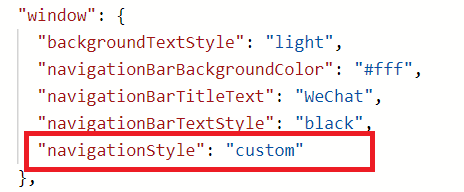
1.全局顶部导航自定义,在app.json的“window”里添加"navigationStyle": "custom"
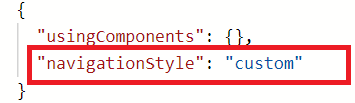
2.只在某一个页面自定义顶部导航,在该页面的json文件里添加"navigationStyle": "custom"
二、获取手机屏幕数据,app.js
//app.js

const Utils = require('./utils/utils')

App({

  onLaunch: function () {

    // 获取屏幕参数

    try {

      const res = wx.getSystemInfoSync()

      if (res.platform == 'ios') {

        this.globalData.platform = 'ios'

      } else if (res.platform == 'android') {

        this.globalData.platform = 'android'

      }

      // 导航高度

      let navHeight = res.statusBarHeight

      // 屏幕宽度/高度,单位px

      this.globalData.screenWidth = res.screenWidth

      this.globalData.screenHeight = res.screenHeight

      // 状态栏的高度,单位px

      this.globalData.statusBarHeight = res.statusBarHeight

      // 设备像素比

      this.globalData.pixelRatio = res.pixelRatio

      // 可使用窗口宽度,单位px

      this.globalData.winWidth = res.windowWidth

      // 安卓时,胶囊距离状态栏8px,iOS距离4px

      if (res.system.indexOf('Android') !== -1) {

        this.globalData.navHeight = navHeight + 14 + 32

        this.globalData.navTitleTop = navHeight + 8

        // 视窗高度 顶部有占位栏时

        this.globalData.winHeight = res.screenHeight - navHeight - 14 - 32

        // tab主页视窗高度

        this.globalData.winHeightTab = res.windowHeight - navHeight - 14 - 32

      } else {

        this.globalData.navHeight = navHeight + 12 + 32

        this.globalData.navTitleTop = navHeight + 4

        // 视窗高度 顶部有占位栏时

        this.globalData.winHeight = res.screenHeight - navHeight - 12 - 32

        // tab主页视窗高度

        this.globalData.winHeightTab = res.windowHeight - navHeight - 12 - 32

      }

      console.log(wx.getSystemInfoSync(), this.globalData.winHeightTab)

    } catch (e) {

      console.log(e)

    }

  },

  globalData: {

    platform: 'ios',

    pixelRatio: 2,

    statusBarHeight: 20,

    navHeight: 64,

    navTitleTop: 26,

    winHeight: 655,

    winWidth: 750,

    screenWidth: 375,

    screenHeight: 812

  }

})
三、封装导航组件,根目录创建components/navbar文件夹,创建Component
<!--navbar.wxml-->

<view>

  <view class="nav-bar {{isWhite=='true'?'nav-bar-white':''}}" style="height: {{navHeight}}px;background-color:{{navColor}};" catchtap="toTop">

    <text class="navbar-title" style="top:{{navTitleTop}}px;color:{{navTitleColor}};">{{navTitle}}</text>

    <view wx:if="{{noArrow=='false'&&isArrowWhite=='false'&&isNavHome=='false'}}" catchtap="navBack" class="navbar-icon-wrap" style="top:{{navTitleTop}}px;">

      <image class="navbar-icon" src="../../images/arrow_left.png"></image>

    </view>

    <view wx:if="{{isArrowWhite=='true'&&isNavHome=='false'&&noArrow=='false'}}"  catchtap="navBack" class="navbar-icon-wrap" style="top:{{navTitleTop}}px;">

      <image src="../../images/arrow_left_white.png" class="navbar-icon"></image>

    </view>

    <view wx:if="{{isNavHome=='true'&&isArrowWhite=='false'&&noArrow=='false'}}" catchtap="navHome" class="navbar-icon-wrap" style="top:{{navTitleTop}}px;">

      <image src="../../images/Home@3x.png" class="navbar-icon"></image>

    </view>

    <view wx:if="{{isNavHome=='true'&&isArrowWhite=='true'&&noArrow=='false'}}"  catchtap="navHome" class="navbar-icon-wrap" style="top:{{navTitleTop}}px;">

      <image src="../../images/Home@3x_white.png" class="navbar-icon"></image>

    </view>

  </view>

  <view wx:if="{{isWhite=='true'}}" class="nav-bar-place" style="height: {{navHeight}}px;background-color:{{navColor}};"></view>

</view>
// navbar.js

const app = getApp()

Component({

  /**

   * 组件的属性列表

   */

  properties: {

    navHeight: {

      type: Number,

      value: 20

    },

    navTitleTop: {

      type: Number,

      value: 26

    },

    navTitle: { // 导航标题 可以为空

      type: String,

      value: ''

    },

    navTitleColor: { // 导航标题颜色 默认黑色

      type: String,

      value: '#000'

    },

    isWhite: { // 是否为白底

      type: String,

      value: 'true'

    },

    noArrow: { // 取消返回箭头

      type: String,

      value: 'false'

    },

    isArrowWhite: {//白色箭头

      type: String,

      value: 'false'

    },

    isNavHome: { // 返回首页

      type: String,

      value: 'false'

    },

    navColor: { // 导航栏背景色 默认白色

      type: String

    },

    backPath: { // 返回页面路径

      type: String,

      default: ''

    },

    backDelta: { // 返回页面层数

      type: Number,

      default: 1

    }

  },

  /**

   * 组件的初始数据

   */

  data: {

    navHeight: 0,

    navTitleTop: 0

  },

  attached() {

    // 在组件实例进入页面节点树时执行

    // 获取顶部导航高度

    this.setData({

      navHeight: app.globalData.navHeight,

      navTitleTop: app.globalData.navTitleTop

    })

  },

  /**

   * 组件的方法列表

   */

  methods: {

    // 回到首页

    navHome:function(){

      wx.switchTab({

        url: '/pages/index/index'

      })

    },

    // 回到顶部

    toTop: function () {

      wx.pageScrollTo({

        scrollTop: 0,

        duration: 300

      })

      this.triggerEvent('scrollEvent', {}) // 可绑定点击标题栏时的事件

    },

    // 返回上一页

    navBack: function () {

      if (this.properties.backPath === '') {

        wx.navigateBack({

          delta: this.properties.backDelta

        })

      } else {

        wx.redirectTo({

          url: this.properties.backPath

        })

      }

      this.triggerEvent('backEvent', {}) // 可绑定点击返回时的事件

    }

  }

})
/* navbar.wxss */

/*自定义导航栏*/

.nav-bar {

  position: fixed;

  top:;

  left:;

  width: 100%;

  z-index:;

}

.nav-bar-white {

  background-color: #fff;

}

.navbar-title {

  position: absolute;

  height: 32px;

  line-height: 32px;

  /* width: 100%; */

  width: 320rpx;

  text-align: center;

  font-size: 16px;

  color: #000;

  overflow: hidden;

  white-space: nowrap;

  text-overflow: ellipsis;

  left: 28%;

}

.navbar-icon-wrap {

  position: absolute;

  left: 9px;

  width: 44px;

  height: 32px;

  display: flex;

  justify-content: center;

  align-items: center;

}

.navbar-icon {

  width: 44px;

  height: 32px;

}

.navbar-scan {

  width: 28px;

  height: 28px;

}
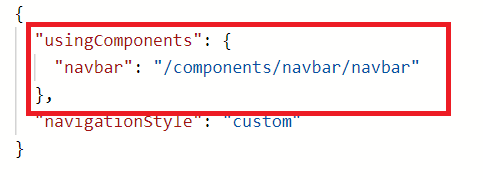
四、引入组件(页面的json文件)
五、使用组件(根据属性可以自由配置导航,这里例举几个样式,也可以根据自己需求更改组件)
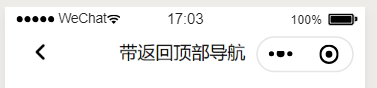
<navbar navTitle="顶部导航demo" style="width:200rpx;"></navbar>
—————————————————————————————————
<navbar navTitle="无返回顶部导航" noArrow="true"></navbar>

—————————————————————————————————
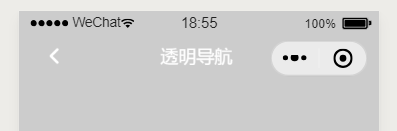
<navbar navTitle="透明导航" isWhite="false" isArrowWhite='true' navTitleColor="#fff"></navbar>
—————————————————————————————————
<navbar navTitle="主页按钮导航" isNavHome='true' isArrowWhite='false' noArrow='false'></navbar>

微信小程序自定义顶部导航的更多相关文章
- 微信小程序-自定义底部导航
代码地址如下:http://www.demodashi.com/demo/14258.html 一.前期准备工作 软件环境:微信开发者工具 官方下载地址:https://mp.weixin.qq.co ...
- 微信小程序-自定义菜单导航(实现楼梯效果)
设计初衷 在开发页面时,往往需要实现,点击页面的导航菜单页面滚动到相应位置,滚动页面实现菜单选项的高亮.在html开发中,我们可以用到a标签锚点实现,jq的动画相结合实现类似效果.在框架中vant U ...
- 微信小程序自定义底部导航栏组件+跳转
微信小程序本来封装有底部导航栏,但对于想自定义样式和方法的开发者来说,这并不是很好. 参考链接:https://github.com/ljybill/miniprogram-utils/tree/ma ...
- 微信小程序 自定义头部导航栏和导航栏背景图片 navigationStyle
这两天因为要做一个带背景的小程序头,哭了,小程序导航栏有背景也就算了,还得让导航栏上的背景顺下来,心态小崩.现在可以单独设置一个页面的小程序头了,但是前提是要微信7.0以上的版本,考虑到兼容性问题 ...
- 微信小程序自定义下导航页面切换效果的合理写法
上图::: 导航模板内容页面的定义: <template name="naviBot"> <view class='navwrap t_cen font_26 ...
- 微信小程序自定义头部导航栏
<!--index.wxml--> <view> <navbar id='index_header' background='{{background}}' pageNa ...
- 微信小程序 自定义顶部状态栏
1>项目的结构如下: 2>组件的index.wxml代码如下: <!--没有按钮的情况--> <view class="custom flex_center&q ...
- 微信小程序自定义顶部
wxml <view style="height:{{titleHeight}}px;background:{{background}}" class="user- ...
- 微信小程序之顶部导航栏
wxml: <!--导航条--><view class="navbar"> <text wx:for="{{navbar}}" d ...
随机推荐
- 学习笔记——python(继承)
学习笔记(Python继承) 有几种叫法(父类-子类.基类-派生类)先拿代码演示一下: class father: def work(self): print("work>>&g ...
- JS正则表达式的创建、匹配字符串、转义、字符类、重复以及常用字符
正则表达式都是操作字符串的 作用:对数据进行查找.替换.有效性验证 创建正则表达式的两种方式: // 字面量方式 /js/ // 构造函数方式 regular expression new RegEx ...
- Redis-位图
关于位图,可能大家不太熟悉, 那么位图能干啥呢?位图的内容其实就是普通的字符串,也就是byte数组,我们都知道 byte 8 位无符号整数 0 到 255 说个场景.比如你处理一些业务时候,往往会存在 ...
- 安装NodeJs和NPM到Ubuntu(APT)
运行环境 系统版本:Ubuntu 16.04.2 LTS 软件版本:node-v10.16.3.npm-6.9.0 硬件要求:无 安装过程 1.安装NPM和NodeJs root@localhost: ...
- 【USACO】JZOJ,Luogu P2690 接苹果 (dp-线性动规)
同步于CSDN:戳这里QAQ 来源:Luogu P2690,JZOJ 题目描述 很少有人知道奶牛爱吃苹果.农夫约翰的农场上有两棵苹果树(编号为 \(1\) 和 \(2\)), 每一棵树上都长满了苹果. ...
- Electron+Vue – 基础学习(2): 项目打包成exe桌面应用
项目创建完成,启动正常,接下来就是项目打包了.将测试Demo打包成exe桌面应用,点击exe文件,运行项目. 书接上文,创建项目有三种方式 Git拷贝.直接创建:通过electron社群提供的命令行工 ...
- cf936B
题意简述:给出一个有向图,问从s出发是否能找到一条长度为奇数的路径并且路径的端点出度为0,存在就输出路径,如果不存在判断图中是否存在环,存在输出Draw,否则输出lose 题解:类似于DP,将每一个点 ...
- Excel_单元格格式_查找替换、定位
不重复! 显示格式:Ctrl+1 1,合并后居中,填充颜色,设置单元格边框,划斜线,格式刷(单击,双击) 2,单元格数字格式,格式不会改变值!自定义(编码规则) 4个 a :只显示星期:周+aaa:周 ...
- WPF 控件功能重写(ComboBox回车搜索)
前言:在我们日常使用软件的时候,Combobox会让用户很方便的选择出需要的东西,但是ComboBox中的下拉行数过多时就不那么好用了. 如果在项目中有很多这样的ComboBox控件的话,我们可以考虑 ...
- Python3标准库:heapq堆排序算法
1. heapq堆排序算法 堆(heap)是一个树形数据结构,其中子节点与父节点有一种有序关系.二叉堆(binary heap)可以使用一个有组织的列表或数组表示,其中元素N的子元素位于2*N+1和2 ...