
spring boot资源文件配置读取
一般业务配置,尽量新建自己的配置文件,来读取,而不是配置在application.properties或application-*.properties或yml/yaml配置中。
application.properties或application-*.properties中如果配置了中文内容,必须得转成Unicode码,否则读取乱码。
转Unicode码可以使用jdk自带工具,cmd切换到jdk下的bin目录,打开native2ascii.exe,然后在下面输入你的中文,回车显示Unicode码,复制到配置文件中来。
整个资源文件中文切换Unicode:cmd切换到jdk下的bin目录,输入native2ascii -encoding utf-8 源文件名.properties 目标文件名.properties
springboot默认properies配置文件内部源代码使用ISO-8859-1编码,即使更改这文件属性编码也是无效的,详细可以参考这篇博文:https://blog.csdn.net/formemorywithyou/article/details/96473169
但yml/yaml中却可以配置中文,正常读取,具体源码也可参考上述地址。
而自定义配置文件,可以指定编码获取,所以,建议业务配置新建自己的配置文件存储,读取。
另外,如果同时存在application yml和properties配置文件,properties中的配置会覆盖yml中相同配置。
分三种方式,读取资源配置
1,通过@value("${key}")获取配置值
在application.properties中,配置:demo.title=\u6d4b\u8bd5\u6d4b\u8bd5
这里因为是springboot默认配置,所以中文要转Unicode码,不然乱码,见上面文字说明。
然后,在test类中的对应属性上通过@value("${demo.title}")加载
注意,如果配置在自定义文件中,还需要指定资源文件位置,这里是直接配置在application.properties默认配置中的。
@RunWith(SpringRunner.class)

@SpringBootTest

public class applicationTest {

    @Value("${demo.title}")

    private String title;

    @Test

    public void testProperties()throws Exception{

        System.out.println(title);

    }

}
2,通过key的前缀,统一获取配置值
继续读取【在application.properties中,配置:demo.title=\u6d4b\u8bd5\u6d4b\u8bd5】
新建个TestPropertis类,类头部通过注解@ConfigurationProperties(prefix="demo")设置properties key的前缀
类内部通过属性key后缀来获取值
@Component
@ConfigurationProperties(prefix="demo")

public class TestPropertis {

    private String title;

    //setter getter...

}
注意:使用注解@ConfigurationProperties需要引入依赖
<dependency>

   <groupId>org.springframework.boot</groupId>

   <artifactId>spring-boot-configuration-processor</artifactId>

   <optional>true</optional>

</dependency>
在读取的类中通过@Resource引入TestProperties
@RunWith(SpringRunner.class)

@SpringBootTest

public class applicationTest {

  @Resource

    private TestPropertis testPropertis;

    @Test

    public void testProperties2()throws Exception{

        System.out.println("TEST----------"+testPropertis.getTitle());

    }

}
3、自定义配置文件,通过key前缀统一获取
在src/main/resources新建一个demo.properties,文件属性确保UTF-8
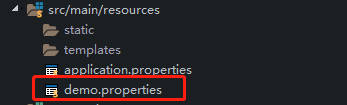
在文件中配置示例:
demo.name=小小灰
demo.sex=M
然后新建一个类:TestDemoPropertis,类头部加入3个注解
@Component //生成实例,方便springboot调用
@ConfigurationProperties(prefix="demo") //统一设置资源文件key的前缀 //类中的每个字段为key的对应后缀
@PropertySource(value={"classpath:demo.properties"},encoding="utf-8")
//指定配置资源文件位置,这里是string数组,可以多个
//encoding必须加上,如果要读取中文,不然乱码,因为springboot源码加载properties是以ISO-8859-1读取的
@Component

@ConfigurationProperties(prefix="demo")

@PropertySource(value={"classpath:demo.properties"},encoding="utf-8")

public class TestDemoPropertis {

    private String name;

    private String sex;

    //setter getter...

}
注意:使用@ConfigurationProperties要引入依赖
<dependency>

   <groupId>org.springframework.boot</groupId>

   <artifactId>spring-boot-configuration-processor</artifactId>

   <optional>true</optional>

</dependency>
最后,同上一种在类中通过Resource引入TestDemoPropertis
@RunWith(SpringRunner.class)

@SpringBootTest

public class applicationTest {

    @Resource

    private TestDemoPropertis testDemoPropertis;

    @Test

    public void testProperties3()throws Exception{

        System.out.println("TEST DEMO----------"+testDemoPropertis.getName()+"-----"+testDemoPropertis.getSex());

    }

}
spring boot资源文件配置读取的更多相关文章
- spring 及 spring boot 资源文件配置
Spring配置文件引入xml文件: <import resource=" " />标签使用总结 https://www.cnblogs.com/javahr/p/83 ...
- Spring Boot属性文件配置文档(全部)
This sample file is meant as a guide only. Do not copy/paste the entire content into your applicatio ...
- spring boot 日志文件配置(logback-spring.xml)亲测可用!
问题描述:如何配置springboot项目,通过日志配置,使之输出自定义日志. 详细文章:https://blog.csdn.net/gebitan505/article/details/701421 ...
- SpringBoot - 资源文件配置读取
Examp1:读取核心配置文件信息application.properties的内容 方法一:使用@Value方式(常用) 1.application.properties中自定义参数 test.ms ...
- Spring读取外部的资源配置文件—@PropertySource和@Value实现资源文件配置
通过@PropertySource可以指定读取的配置文件,通过@Value注解获取值: @PropertySource注解主要是让Spring的Environment接口读取属性配置文件用的,标识在@ ...
- 51. spring boot属性文件之多环境配置【从零开始学Spring Boot】
原本这个章节是要介绍<log4j多环境不同日志级别的控制的>但是没有这篇文章做基础的话,学习起来还是有点难度的,所以我们先一起了解下spring boot属性文件之多环境配置,当然文章中也 ...
- Spring Boot 外部化配置(一)- Environment、ConfigFileApplicationListener
目录 前言 1.起源 2.外部化配置的资源类型 3.外部化配置的核心 3.1 Environment 3.1.1.ConfigFileApplicationListener 3.1.2.关联 Spri ...
- Spring Boot 2.0 配置图文教程
摘要: 原创出处 https://www.bysocket.com 「公众号:泥瓦匠BYSocket 」欢迎关注和转载,保留摘要,谢谢! 本章内容 自定义属性快速入门 外化配置 自动配置 自定义创建 ...
- Spring boot 的自动配置
Xml 配置文件 日志 Spring Boot对各种日志框架都做了支持,我们可以通过配置来修改默认的日志的配置: #设置日志级别 logging.level.org.springframework=D ...
随机推荐
- centos coreseek
下载稳定版 coreseek wget http://www.coreseek.cn/uploads/csft/3.2/coreseek-3.2.14.tar.gz 解压 .tar.gz cd cor ...
- (转)OpenFire源码学习之十四:插件管理
转:http://blog.csdn.net/huwenfeng_2011/article/details/43418433 Plugin管理 Openfire把插件模块加入到容器分为以下步骤: l ...
- Sql生成 Insert 语句
declare @TableName sysname select @TableName = 'T_OOSOrder' declare @result varchar(max) = 'INSERT I ...
- 文件下载java代码
protected void doGet(HttpServletRequest request, HttpServletResponse response) throws ServletExcepti ...
- 文本表征:SoW、BoW、TF-IDF、Hash Trick、doc2vec、DBoW、DM
原文地址:https://www.jianshu.com/p/2f2d5d5e03f8 一.文本特征 (一)基本文本特征提取 词语数量 常,负面情绪评论含有的词语数量比正面情绪评论更多. 字符数量 常 ...
- 5、cesium点击面高亮事件
cesium点击面高亮事件 主要功能:比如你加载了json.geojson或者topojson的数据.加载出来后,分为很多个面,现在要实现点击一个面,这个面变颜色:再点击另一个面,另一个面高亮,之前的 ...
- Java.util.ArrayDeque类
java.util.ArrayDeque 类提供了可调整大小的阵列,并实现了Deque接口.以下是关于阵列双端队列的要点: 数组双端队列没有容量限制,使他们增长为必要支持使用. 它们不是线程安全的;如 ...
- 20140724 菜单制作:制表位(段落->制表位->)
1.菜单制作:制表位(段落->制表位->) 叶轩楠·········· 上海大学 轩楠叶·········· 上海大学 楠轩叶·········· 上海大学 选完后要选“设置” 2.光盘制 ...
- 用户态和内核态&操作系统
用户态和内核态 内核态:cpu可以访问内存的所有数据,包括外围设备,例如硬盘,网卡,cpu也可以将自己从一个程序切换到另一个程序. 用户态:只能受限的访问内存,且不允许访问外围设备,占用cpu的能力被 ...
- 22-3concat
<!DOCTYPE html> <html lang="en"> <head> <meta charset="UTF-8&quo ...