
jQuery的主要使用方法
一、在html中添加jquery,可以使用cdn加载jquery
1、网址:https://www.bootcdn.cn/jquery/
2、推荐使用3.4左右版本的,建议使用min.js后缀的,min后缀是压缩过的,体积比较小

//注册窗口注册是如果输入内容为空则提示内容为空

<!DOCTYPE html>

<html lang="en">

<head>

    <meta charset="UTF-8">

    <title>Title</title>

    <script src="https://cdn.bootcss.com/jquery/3.4.1/jquery.min.js"></script>

</head>

<body>

<form action="">

    <p><label for="i1">username:

        <input type="text" id="i1" name="username">

        <span class="errors"></span>

    </label></p>

    <p><label for="i2">password

        <input type="password" id="i2" name="password">

        <span class="errors"></span>

    </label></p>

    <input type="submit" value="注册" id="d1">

</form>

<script>

    // 获取按钮标签

    var $b1Ele=$("#d1");

    // 给按钮标签绑定事件

    $b1Ele.click(function () {

        var $userName=$('#i1');

        var $passWord=$('#i2');

    //判断用户输入框是否为空

        if ($userName.val().length==0){

            $('.errors').first().text('用户不能为空')

        }

        if ($passWord.val().length==0){

            $('.errors').last().text('棉麻不能为空')

        }

        // 点击注册按钮不提交信息刷新页面

        return false;

    })

</script>

</body>

</html>
//设置属性,根据.attr(‘属性名’)获取对应的值,当输入一个值的时候是获取对应的值,两个值的是都是添加值

<!DOCTYPE html>

<html lang="en">

<head>

    <meta charset="UTF-8">

    <title>Title</title>

    <script src="https://cdn.bootcss.com/jquery/3.4.1/jquery.min.js"></script>

</head>

<body>

<p id="d1">20岁超过30岁,40岁,50岁</p>

<p>衣锦还乡</p>

<p>技多不压身</p>

</body>

</html>

$('#d1');

k.fn.init [p#d1]

$("#d1");

k.fn.init [p#d1]

$("#d1").attr('id');

"d1"

$("#d1").attr('username','yzn');

k.fn.init [p#d1]

$("#d1");

k.fn.init [p#d1]0: p#d1length: 1__proto__: Object(0)

$("#d1").attr('username');

"yzn"

$("#d1").attr({'password':'123','test':'test1'});

k.fn.init [p#d1]
//移除设置好的设置好的标签
$("#d1").attr('username');
"yzn"
$("#d1").attr({'password':'123','test':'test1'});
k.fn.init [p#d1]
删除已经添加好的标签
$('#d1').removeAttr('test');
使用prop4获取类似于checked的标签属性
<!DOCTYPE html>

<html lang="en">

<head>

    <meta charset="UTF-8">

    <title>Title</title>

    <script src="https://cdn.bootcss.com/jquery/3.4.1/jquery.min.js"></script>

</head>

<body>

<p id="d1">20岁超越30岁,40岁,50岁的人</p>

<p>衣锦还乡</p>

<p>技多不压身</p>

<input type="checkbox" name="hobby" id="i1" checked>读书

<input type="checkbox" name="hobby" id="i2">写字

<input type="checkbox" name="hobby" id="i3">吹牛逼

</body>

</html>

//根据返回值获取checked的标签属性,返回true或false
添加新的标签,插入数据
var pEel=document.createElement('p');

undefined

pEel.innerText='我一定要超越前人';

"我一定要超越前人"

var $divEle=$('div');

undefined

$divEle.append(pEel);

//在div标签里面最底部添加一个p标签
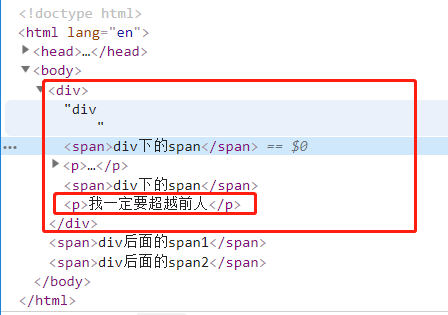
添加新的标签
var pEel=document.createElement('p');

undefined

pEel.innerText='我一定要超越前人';

"我一定要超越前人"

var $divEle=$('div');

undefined

$(pEel).appendTo($divEle);
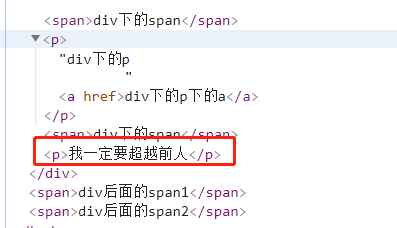
添加标签到指定div标签内部头
var pEle=document.createElement('p');

undefined

pEle.innerText='谦虚';

"谦虚"

var $divEle=$('div');

undefined

$divEle.prepend(pEle);
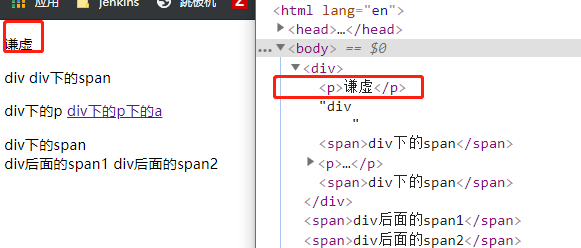
新建标签放在指定标签的前面:before
var pEel=document.createElement('p');

undefined

pEel.innerText='淡定,切勿浮躁!!!';

"淡定,切勿浮躁!!!"

var $divEle=$('div');

undefined

$divEle.before(pEel);

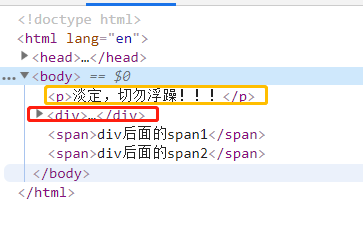
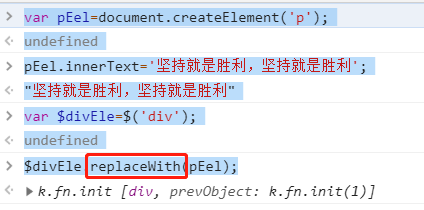
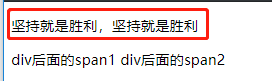
新建标签替换创建好的标签
var pEel=document.createElement('p');

undefined

pEel.innerText='坚持就是胜利,坚持就是胜利';

"坚持就是胜利,坚持就是胜利"

var $divEle=$('div');

undefined

$divEle.replaceWith(pEel);
克隆新的功能
<!DOCTYPE html>

<html lang="en">

<head>

    <meta charset="UTF-8">

    <title>Title</title>

    <script src="https://cdn.bootcss.com/jquery/3.4.1/jquery.min.js"></script>

    <style>

        button{

            background-color: pink;

        }

    </style>

</head>

<body>

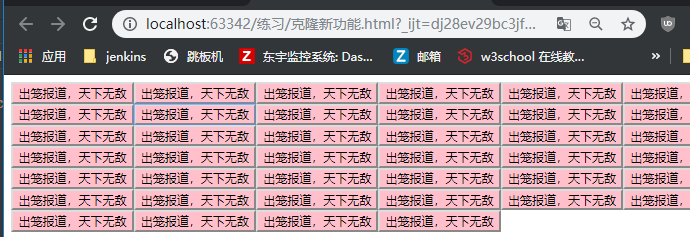
<button>出笼报道,天下无敌</button>

<script>

    $('button').on('click',function () {

        $(this).clone(true).insertAfter(this);

    })

</script>

</body>

</html>
鼠标悬停触发事件
<!DOCTYPE html>

<html lang="en">

<head>

    <meta charset="UTF-8">

    <title>悬浮</title>

    <script src="https://cdn.bootcss.com/jquery/3.4.1/jquery.min.js"></script>

</head>

<body>

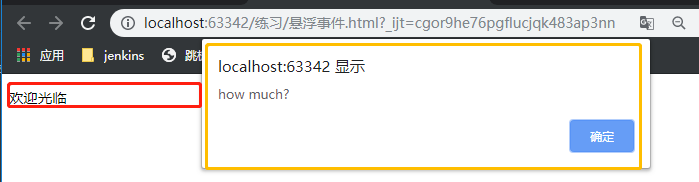
<p>欢迎光临</p>

<script>

    $('p').hover(

        function () {

            alert('how much?')

        },

        function () {

            alert('欢迎下次还来')

        }

    )

</script>

</body>

</html>
获取用户在input框中输入的实时内容
<!DOCTYPE html>

<html lang="en">

<head>

    <meta charset="UTF-8">

    <title>获取用户输入的信息</title>

    <script src="https://cdn.bootcss.com/jquery/3.4.1/jquery.min.js"></script>

</head>

<body>

<input type="text">

<script>

    $('input').on('input',function () {

        console.log(this.value)

    })

</script>

</body>

</html>

取消标签自带的事件(input点击按钮会出现页面刷新)
<!DOCTYPE html>

<html lang="en">

<head>

    <meta charset="UTF-8">

    <title>取消标签自带的事件</title>

    <script src="https://cdn.bootcss.com/jquery/3.4.1/jquery.min.js"></script>

</head>

<body>

<from action="">

    <input type="submit">

</from>

<script>

    $('input').click(function (e) {

        alert(123);

        // 阻止默认事件的发生

        e.preventDefault()

    })

</script>

</body>

</html>

事件冒泡(鼠标点击在设置好的标签内容上触发绑定事件)
<!DOCTYPE html>

<html lang="en">

<head>

    <meta charset="UTF-8">

    <title>时间冒泡</title>

    <script src="https://cdn.bootcss.com/jquery/3.4.1/jquery.min.js"></script>

</head>

<body>

<div>div

    <p>div下的p

        <span>div下的p下的span</span>

    </p>

</div>

<script>

    $('div').click(function () {

        alert('div')

    });

    $('p').click(function (a) {

        alert('p')

        a.stopPropagation()

    });

    $('span').click(function (e) {

        alert('span');

    });

</script>

</body>

</html>
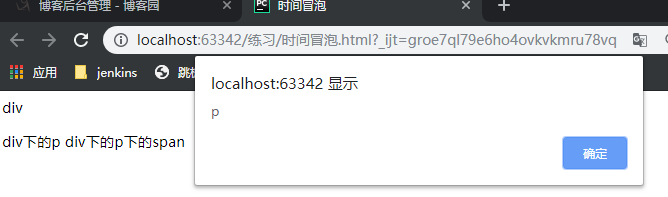
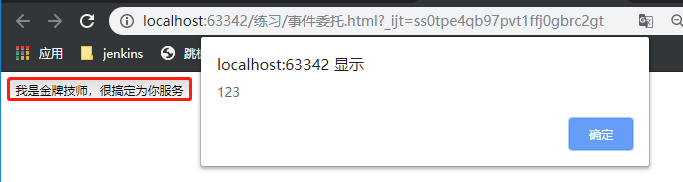
事件冒泡(点击按钮,触发对应事件)
<!DOCTYPE html>

<html lang="en">

<head>

    <meta charset="UTF-8">

    <title>事件委托</title>

    <script src="https://cdn.bootcss.com/jquery/3.4.1/jquery.min.js"></script>

</head>

<body>

<button>我是金牌技师,很搞定为你服务</button>

<script>

    $('body').on('click','button',function () {

        alert(123)

    })

</script>

</body>

</html>
设置图片前台展示动态效果
<!DOCTYPE html>

<html lang="en">

<head>

    <meta charset="UTF-8">

    <title>图片动态效果</title>

    <script src="https://cdn.bootcss.com/jquery/3.4.1/jquery.min.js"></script>

</head>

<body>

<img src="http://hbimg.b0.upaiyun.com/828e72e2855b51a005732f4e007c58c92417a61e1bcb1-61VzNc_fw658" alt="">

</body>

</html>

//图片虚化收缩左上角
 $('img').hide(3000);
//图片虚化从左上角展示出来
 $('img').show(3000);
//=========================
//图片收缩到左上角
$('img').slideDown(5000)
//图片从左上角展示出来
$('img').slideUp(5000)
//图片原地渐变显示出来
$('img').fadeIn(5000)
//图片原地渐变隐藏
$('img').fadeOut(5000)
//图片原地变淡,
$('img').fadeTo(5000,0.4)
eachx循环
标签可以当做数据存储库
<!DOCTYPE html>

<html lang="en">

<head>

    <meta charset="UTF-8">

    <title>Title</title>

    <script src="https://cdn.bootcss.com/jquery/3.4.1/jquery.min.js"></script>

</head>

<body>

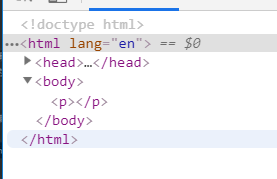
<p></p>

</body>

</html>

//往p标签中添加数据
$('p').data('username','json');
//查看数据,一个值是查看数据,两个值是新增数据
$('p').data('username');
在html代码中查看不到新增的数据的
Bootstrap:是一个前端框架
使用前提:到如bootstrap需要先导入jquery,对jquery有依赖
jQuery的主要使用方法的更多相关文章
- jquery中的ajax方法参数总是记不住,这里记录一下。
1.url: 要求为String类型的参数,(默认为当前页地址)发送请求的地址. 2.type: 要求为String类型的参数,请求方式(post或get)默认为get.注意其他http请求方法,例如 ...
- jquery编写插件的方法
版权声明:作者原创,转载请注明出处! 编写插件的两种方式: 1.类级别开发插件(1%) 2.对象级别开发(99%) 类级别的静态开发就是给jquery添加静态方法,三种方式 1.添加新的全局函数 2 ...
- jquery常用函数与方法
1.delay(duration,[queueName]) 设置一个延时来推迟执行队列中之后的项目.jQuery 1.4新增.用于将队列中的函数延时执行.他既可以推迟动画队列的执行,也可以用于自定义队 ...
- 扩展JQuery和JS的方法
//JS的扩展方法: 1 定义类静态方法扩展 2 定义类对象方法扩展 var aClass = function(){} //1 定义这个类的静态方法 aC ...
- JQuery获取元素的方法总结
JQuery获取元素的方法总结 一.说明 获取元素的方法分为两种:jQuery选择器.jQuery遍历函数. 做个总结,巩固下知识. 二.获取本身 1.只需要一种jQuery选择器 选择器 实 ...
- 封装jQuery Validate扩展验证方法
一.封装自定义验证方法-validate-methods.js /***************************************************************** j ...
- jquery 中一些 特殊方法 的特殊使用 一览表
cnblogs的页面, 一种是管理页面, 是随笔的列表 a full list of essays. 另一种是 首页. 要搜索文档的话, 就使用 "首页"的那种方式. 一个jque ...
- jQuery源代码阅读之二——jQuery静态属性和方法
一.jQuery.extend/jQuery.fn.extend //可接受的参数类型如下:jQuery.extend([deep],target,object1,[objectN]) jQuery. ...
- jquery validate 自定义验证方法
query validate有很多验证规则,但是更多的时候,需要根据特定的情况进行自定义验证规则. 这里就来聊一聊jquery validate的自定义验证. jquery validate有一个方法 ...
- magento jQuery冲突N种方法
在做修改模板的时候在page中加入jquery库发现原本自带的js冲突 商品无法加入购物车,很多js都没有效果 这是jQuery和magento自带prototype的冲突解决版本有很多种,说个简单点 ...
随机推荐
- MySQL 8 批处理模式
shell> mysql -h host -u user -p < batch-file 强制执行脚本,即使某些语句参数错误,可以添加 --force 参数 如果MySQL运行在Windo ...
- JavaScript DOM–事件操作
事件 注册事件 给元素添加事件,为注册事件或者绑定事件 注册事件两种方式 传统方式 监听事件方式 事件监听 addEventListener() 事件监听 (IE9以上) eventTarget.ad ...
- py 二级习题(加密与解密)
题目: 1.比如说,我想 “我喜欢月月” 这句话加密即:将字符串中的每个字符的unicode值全都向后移动三位,即unicode 值加3,然后输出. 2.将按照上述规则加密的文字解密即:将字符 ...
- PTA 1004 Counting Leaves
题目描述: A family hierarchy is usually presented by a pedigree tree. Your job is to count those family ...
- Android 基础知识 -- Linux环境搭建
Android 开发工具下载网站:http://www.androiddevtools.cn/ 1 JDK 1.1 下载JDK,解压后放到/usr/lib/jvm/目录 sudo mv jdk1.7. ...
- 375. 猜数字大小 II
题目: 链接:https://leetcode-cn.com/problems/guess-number-higher-or-lower-ii/ 我们正在玩一个猜数游戏,游戏规则如下: 我从 1 到 ...
- vue koa2 mongodb 从零开始做个人博客(二) 登录注册功能后端部分
0.效果演示 插入视频插不进来,就很烦.可以出门右拐去优酷看下(点我!). 1.后端搭建 1.1项目结构 首先看一下后端的server目录 挨个解释一下 首先dbs文件夹顾名思义,操作数据库的,mod ...
- windows系统使用sketch设计的设计稿
由sketch设计的文件因为没有windows系统的sketch所以无法使用windows系统的电脑打开,那么怎么办呢?可以借助zeplin, 通过sketch(mac电脑)上传到zeplin账号,然 ...
- 【巨杉数据库SequoiaDB】巨杉Tech | 巨杉数据库数据高性能数据导入迁移实践
SequoiaDB 一款自研金融级分布式数据库产品,支持标准SQL和分布式事务功能.支持复杂索引查询,兼容 MySQL.PGSQL.SparkSQL等SQL访问方式.SequoiaDB 在分布式存储功 ...
- 【已解决】使用 yarn 安装时,报错node_modules\node sass:Command failed.
npm install -g mirror-config-china --registry=http://registry.npm.taobao.org npm install node-sass y ...