
让VS2019支持.NET Core WinForms和WPF设计器的临时办法(转)
.net core 3.0 Preview 6,vs2019 16.1.4 暂时还不支持Winform designer
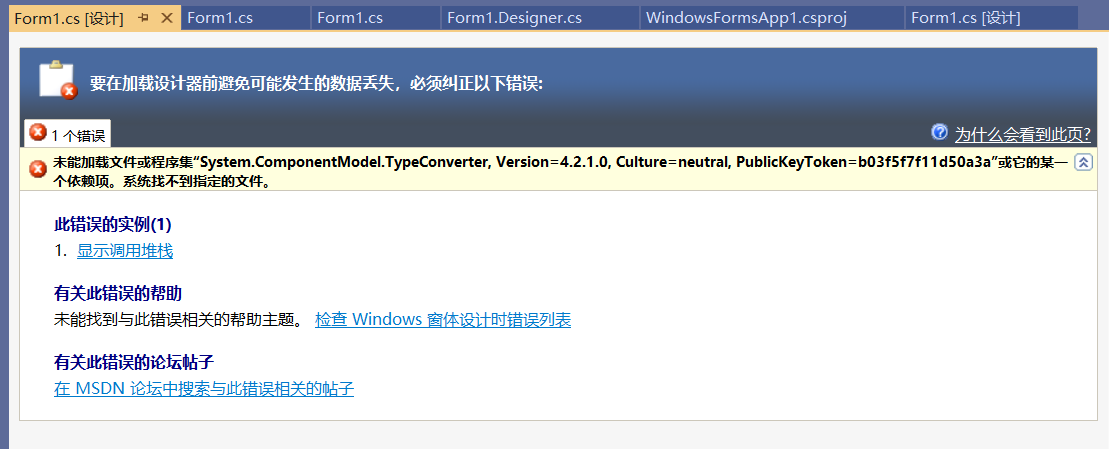
解决方案:
将Form1修改为其他名字
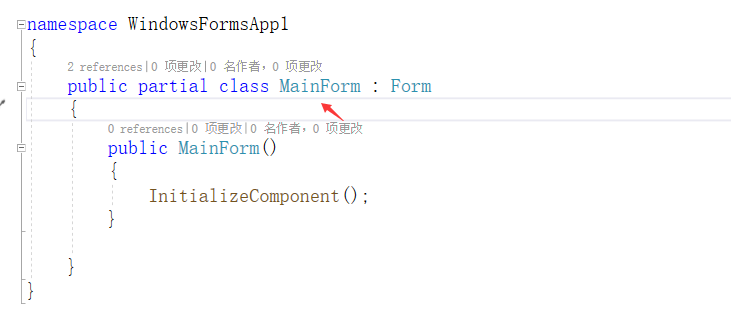
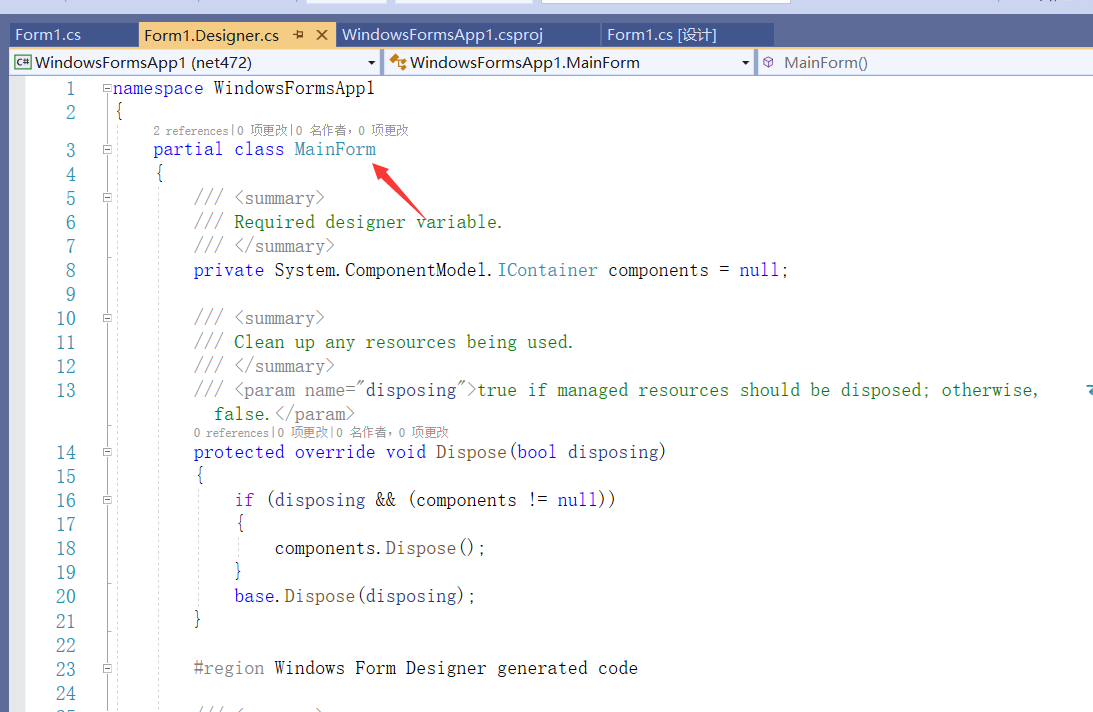
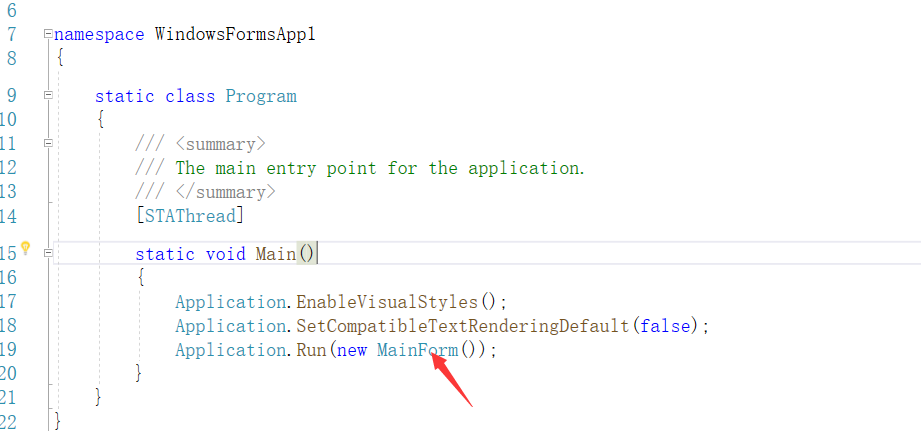
WinForm 编辑项目文件 加入 TargetFrameworks 使其支持net472;
<Project Sdk="Microsoft.NET.Sdk.WindowsDesktop">

  <PropertyGroup>

    <OutputType>WinExe</OutputType>

    <TargetFrameworks>net472;netcoreapp3.</TargetFrameworks>

    <UseWindowsForms>true</UseWindowsForms>

    <LangVersion>7.3</LangVersion>

  </PropertyGroup>

  <ItemGroup Condition=" '$(TargetFramework)' == 'net472' ">

    <Reference Include="System" />

    <Reference Include="System.Core" />

    <Reference Include="System.Xml.Linq" />

    <Reference Include="System.Data.DataSetExtensions" />

    <Reference Include="Microsoft.CSharp" />

    <Reference Include="System.Data" />

    <Reference Include="System.Deployment" />

    <Reference Include="System.Drawing" />

    <Reference Include="System.Net.Http" />

    <Reference Include="System.Windows.Forms" />

    <Reference Include="System.Xml" />

  </ItemGroup>

  <ItemGroup Condition=" '$(TargetFramework)' == 'net472' ">

    <!-- add From files to here to enable designer -->

    <Compile Update="Form1.cs">

      <SubType>Form</SubType>

    </Compile>

  </ItemGroup>

</Project>
现在已经支持WPF的设计器了 以下参考
WPF
<Project Sdk="Microsoft.NET.Sdk.WindowsDesktop">

  <PropertyGroup>

    <OutputType>WinExe</OutputType>

    <TargetFrameworks>net472;netcoreapp3.</TargetFrameworks>

    <UseWPF>true</UseWPF>

  </PropertyGroup>

  <ItemGroup Condition=" '$(TargetFramework)' == 'net472' ">

    <Reference Include="System" />

    <Reference Include="System.Data" />

    <Reference Include="System.Xml" />

    <Reference Include="Microsoft.CSharp" />

    <Reference Include="System.Core" />

    <Reference Include="System.Xml.Linq" />

    <Reference Include="System.Data.DataSetExtensions" />

    <Reference Include="System.Net.Http" />

    <Reference Include="System.Xaml">

      <RequiredTargetFramework>4.0</RequiredTargetFramework>

    </Reference>

    <Reference Include="WindowsBase" />

    <Reference Include="PresentationCore" />

    <Reference Include="PresentationFramework" />

  </ItemGroup>

  <ItemGroup Condition=" '$(TargetFramework)' == 'net472' ">

    <!-- add files to here to enable designer -->

    <Compile Update="App.xaml.cs">

      <DependentUpon>App.xaml</DependentUpon>

      <SubType>Code</SubType>

    </Compile>

    <Compile Update="MainWindow.xaml.cs">

      <DependentUpon>MainWindow.xaml</DependentUpon>

      <SubType>Code</SubType>

    </Compile>

  </ItemGroup>

</Project>
让VS2019支持.NET Core WinForms和WPF设计器的临时办法(转)的更多相关文章
- 让VS2019支持.NET Core WinForms和WPF设计器的临时办法(比微软给出的办法更方便)
参考以下代码片段,给项目添加NET Framework目标框架,切换到NET472运行时重新生成项目,然后打开设计器界面. 如果遇到设计器报错,尝试以NET472运行时为目标重新生成项目,并重新打开V ...
- [翻译]用于.NET Core的Windows窗体设计器发布
本文由微信公众号<开发者精选资讯>翻译首发,转载请注明来源 今天我们很高兴地宣布,.NET Core项目的Windows窗体设计器现在可以在 Visual Studio 2019 16.6 ...
- 解决COM组件在WPF设计器中命名空间不存在XXX的问题(附带如何在WPF中使用APlayer引擎)
总结起来就是:设计器的版本要跟外部引用的库版本一致,否则XAML设计器就会显示不出来. 例如你的程序是X64的,但是引用的COM组件是32位的,就会显示不出来.这里的建议是:编译一个32位的COM中间 ...
- WinForms项目升级.Net Core 3.0之后,没有WinForm设计器?
目录 .NET Conf 2019 Window Forms 设计器 .NET Conf 2019 2019 9.23-9.25召开了 .NET Conf 2019 大会,大会宣布了 .Net Cor ...
- 号外号外!WPF界面开发者福音,DevExpress支持.NET Core 3.0!
通过DevExpress WPF Controls,你能创建有着强大互动功能的XAML基础应用程序,这些应用程序专注于当代客户的需求和构建未来新一代支持触摸的解决方案. 无论是Office办公软件的衍 ...
- 微软:正式发布针对 .NET Core的 Winform 设计器
转载请注明出处:葡萄城官网,葡萄城为开发者提供专业的开发工具.解决方案和服务,赋能开发者. 原文出处:https://devblogs.microsoft.com/dotnet/windows-for ...
- 解决VS2019中.net core WPF 暂时无法使用 Designer 的临时方法
目录 解决 VS2019 中.net core WPF 暂时无法使用 Designer 的临时方法 安装 vs 2019 professional/enterprise版本 在vs的设置里,勾选.NE ...
- 解决vs2019中暂时无法为.net core WinForms使用 Designer 的临时方法
目录 解决vs2019中暂时无法为.net core WinForms使用 Designer 的临时方法 安装 vs 2019 professional/enterprise版本 在vs的设置里,勾选 ...
- WCF服务端的.NET Core支持项目Core WCF 正式启动
长期以来在wcf客户端库 https://github.com/dotnet/wcf 里反应最强烈的就是.NET Core的服务端支持 https://github.com/dotnet/wcf/is ...
随机推荐
- 4-10 items设计
1,items相当于dict,但是又比字典好 2,parse.urljoin(response.url,post_url)方法,其中image_url是一个域名的话,其中的当前域名就不用再添加. yi ...
- JPA一对多循环引用的解决&&JackSon无限递归问题
说是解决,其实不是很完美的解决的,写出来只是想记录一下这个问题或者看一下有没有哪位仁兄会的,能否知道一二. 下面说说出现问题: 问题是这样的,当我查询一个一对多的实体的时候,工具直接就爆了,差不多我就 ...
- (超级详细版)利用ThinkPHP3.2.3+PHPExcel实现将表格数据导入到数据库
请先阅读以下步骤再到结尾下载源码 第一步:下载 thinkphp_3.2.3 和 PHPExcel_1.8.0 并解压 对应的网站分别为: http://www.thinkphp.cn/down.ht ...
- H5 数据存储localStorage
<!DOCTYPE html> <html lang="en"> <head> <meta charset="UTF-8&quo ...
- CF1163F Indecisive Taxi Fee
NOIP之前留的坑 CF1163F Indecisive Taxi Fee 经典问题:删边最短路 在Ta的博客查看 任意找一条最短路E,给E上的点和边新加入一个1~len的编号 最短路上的边变大麻烦 ...
- P1016 高精度除法
题目描述 给你两个很大的正整数A和B,你需要计算A除以B的商和余数. 输入格式 输入一行包含两个正整数A和B,以一个空格分隔(A和B的位数都不超过 \(10^5\)) 输出格式 输出一行包含两个整数, ...
- Dubbo-本地Bean测试
Dubbo本地测试API的Bean 一.建立一个测试类文件 二.测试API // 自己要测试的API public static final XxApi xxApi; 三.注入Bean static ...
- 前端vue——阿里图标的使用方法
阿里图标库的官方网址:https://www.iconfont.cn/ 使用前需要先登录,这里有三种登录方式,本人使用的是新浪微博登录 第一步:找到你需要的图标,点击添加入库 第二步:点击右上角的购物 ...
- python基础[16]——解决django连接mysql数据库报错的问题
Models.py #创建数据表 from django.db import models from django.utils import timezone from tinymce.models ...
- 在springboot环境下tk-mybatis的使用记录
1. 新建springboot工程 访问https://start.spring.io/,新建一个springboot工程. 自动生成的工程主要的注意点如下: 1)pom.xml <parent ...