
Java 读取 txt 文件内容到容器 List
方法一:
一、桌面上准备 DataObject.txt 文件,内容为:
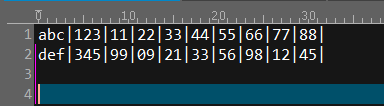
二、打开 Eclipse,编写代码如下:
import java.io.BufferedReader;

import java.io.File;

import java.io.FileReader;

import java.util.ArrayList;

import java.util.List;

import javax.swing.filechooser.FileSystemView;

public class test003 {

  public static void main(String[] args) {

    FileSystemView fsv = FileSystemView.getFileSystemView();

    File com = fsv.getHomeDirectory();

    String deskPath = com.getPath();

    String filePath = deskPath + "\\" +  "DataObject.txt";

    List<String> list = new ArrayList<String>();

    try {

      list = getFileContext( filePath );

      for( int i = 0; i < list.size(); i++ ) {

        String lineStr = list.get(i);

        System.out.println( "lineStr = " + lineStr );

      }

    } catch (Exception e) {

      e.printStackTrace();

    }

  }

  /**

   * 获取txt文件内容, 并按行放入list中

   */

  public static List<String> getFileContext( String path ) {

    FileReader fileReader = null;

    BufferedReader bufferedReader = null;

    List<String> list = new ArrayList<String>();

    String str = "";

    try {

      fileReader = new FileReader( path );

      bufferedReader = new BufferedReader( fileReader );

      while( (str = bufferedReader.readLine()) != null ) {

        if( str.trim().length() > 2 ) {

          list.add( str );

        }

      }

    } catch ( Exception e ) {

      e.printStackTrace();

    } finally {

      try {

        if (bufferedReader != null) {

          bufferedReader.close();

        }

      } catch (Exception e2) {

        e2.printStackTrace();

      }

      try {

        if (fileReader != null) {

          fileReader.close();

        }

      } catch (Exception e2) {

        e2.printStackTrace();

      }

    }

    return list;

  }

}
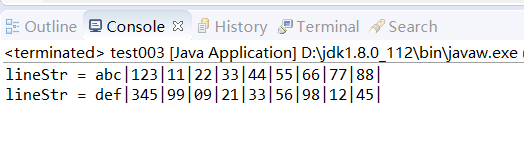
三、执行结果为:
方法二:
一、桌面上准备 DataObject.txt 文件,内容为:
二、打开 Eclipse,编写代码如下:
import java.io.BufferedReader;

import java.io.File;

import java.io.FileInputStream;

import java.io.IOException;

import java.nio.charset.Charset;

import java.util.ArrayList;

import java.util.List;

import javax.swing.filechooser.FileSystemView;

public class test003 {

  public static void main(String[] args) {

    FileSystemView fsv = FileSystemView.getFileSystemView();

    File com = fsv.getHomeDirectory();

    String deskPath = com.getPath();

    String filePath = deskPath + "\\" +  "DataObject.txt";

    List<String> list = new ArrayList<String>();

    try {

      list = readFileToList( filePath );

      for( int i = 0; i < list.size(); i++ ) {

        String lineStr = list.get(i);

        System.out.println( "lineStr = " + lineStr );

      }

    } catch (Exception e) {

      e.printStackTrace();

    }

  }

  /**

   * 读取文件内容到容器List

   * @param fileName 文件名称

   */

  public static List<String> readFileToList( String fileName ) {

    List<String> list = new ArrayList<String>();

    BufferedReader br = null;

    try {

      String line = null;

      br = new BufferedReader( new UnicodeReader( new FileInputStream(fileName), Charset.defaultCharset().name()) );

      while ( (line = br.readLine()) != null ) {

        list.add(line);

      }

    } catch ( IOException e ) {

      e.printStackTrace();

    } finally {

      try {

        if (null != br) {

          br.close();

        }

      } catch (Exception e2) {

        e2.printStackTrace();

      }

    }

    return list;

  }

}
UnicodeReader 类:
import java.io.IOException;

import java.io.InputStream;

import java.io.InputStreamReader;

import java.io.PushbackInputStream;

import java.io.Reader;

public class UnicodeReader extends Reader {

	  PushbackInputStream internalIn;

	  InputStreamReader   internalIn2 = null;

	  String              defaultEnc;

	  private static final int BOM_SIZE = 4;

	  public UnicodeReader(InputStream in, String defaultEnc) {

	     internalIn = new PushbackInputStream(in, BOM_SIZE);

	     this.defaultEnc = defaultEnc;

	  }

	  public String getDefaultEncoding() {

	     return defaultEnc;

	  }

	  public String getEncoding() {

	     if (internalIn2 == null) return null;

	     return internalIn2.getEncoding();

	  }

	  protected void init() throws IOException {

	     if (internalIn2 != null) return;

	     String encoding;

	     byte bom[] = new byte[BOM_SIZE];

	     int n, unread;

	     n = internalIn.read(bom, 0, bom.length);

	     if ( (bom[0] == (byte)0x00) && (bom[1] == (byte)0x00) &&

	                 (bom[2] == (byte)0xFE) && (bom[3] == (byte)0xFF) ) {

	        encoding = "UTF-32BE";

	        unread = n - 4;

	     } else if ( (bom[0] == (byte)0xFF) && (bom[1] == (byte)0xFE) &&

	                 (bom[2] == (byte)0x00) && (bom[3] == (byte)0x00) ) {

	        encoding = "UTF-32LE";

	        unread = n - 4;

	     } else if (  (bom[0] == (byte)0xEF) && (bom[1] == (byte)0xBB) &&

	           (bom[2] == (byte)0xBF) ) {

	        encoding = "UTF-8";

	        unread = n - 3;

	     } else if ( (bom[0] == (byte)0xFE) && (bom[1] == (byte)0xFF) ) {

	        encoding = "UTF-16BE";

	        unread = n - 2;

	     } else if ( (bom[0] == (byte)0xFF) && (bom[1] == (byte)0xFE) ) {

	        encoding = "UTF-16LE";

	        unread = n - 2;

	     } else {

	        encoding = defaultEnc;

	        unread = n;

	     }

	     if (unread > 0) internalIn.unread(bom, (n - unread), unread);

	     if (encoding == null) {

	        internalIn2 = new InputStreamReader(internalIn);

	     } else {

	        internalIn2 = new InputStreamReader(internalIn, encoding);

	     }

	  }

	  public void close() throws IOException {

	     init();

	     internalIn2.close();

	  }

	  public int read(char[] cbuf, int off, int len) throws IOException {

	     init();

	     return internalIn2.read(cbuf, off, len);

	  }

	}
三、执行结果为:
Java 读取 txt 文件内容到容器 List的更多相关文章
- java读取txt文件内容
package read; import java.io.BufferedReader; import java.io.File; import java.io.FileReader; public ...
- JAVA 读取txt文件内容
原文地址https://www.cnblogs.com/xing901022/p/3933417.html 通常,我们可以直接通过文件流来读取txt文件的内容,但有时可能会出现乱码!此时只要设置一下文 ...
- java 读取TXT文件的方法
java读取txt文件内容.可以作如下理解: 首先获得一个文件句柄.File file = new File(); file即为文件句柄.两人之间连通电话网络了.接下来可以开始打电话了. 通过这条线路 ...
- java读取TXT文件的方法
java读取txt文件内容.可以作如下理解: 首先获得一个文件句柄.File file = new File(); file即为文件句柄.两人之间连通电话网络了.接下来可以开始打电话了. 通过这条线路 ...
- Java读取txt文件信息并操作。
一.java读取txt文件内容 import java.io.BufferedInputStream; import java.io.BufferedReader; import java.io.Fi ...
- JAVA获取txt文件内容
JAVA 读取txt文件内容 通常,我们可以直接通过文件流来读取txt文件的内容,但有时可能会出现乱码!此时只要设置一下文件字符编码即可. public class txttest { /** * 读 ...
- java读取txt文件的2中方法---并将内容(每一行以固定的字符分割切成2段)存到map中去
#java读取txt文件的第一种方法 /** * 方法:readTxt * 功能:读取txt文件并把txt文件的内容---每一行作为一个字符串加入到List中去 * 参数:txt文件的地址 * 返回: ...
- Java读取txt文件
package com.loongtao.general.crawler.slave.utils; import java.io.BufferedReader; import java.io.File ...
- Java读取txt文件、excel文件的方法
Java读取txt文件.excel文件的方法 1.读取txt文件 public static String getFileContent(String filePath,String charset) ...
随机推荐
- wb 黑名单批量操作
0. 参考 yu961549745/WeiboBlackList 微博批量拉黑 1. 代码 block.py 更新内容:多线程,urllib.request 改为 requests + sessio ...
- 请推荐几个asp.net下做网站的好的开源框架
1.We7 CMS We7 CMS是由西部动力开发的一款充分发掘互联网Web2.0(如博客.RSS等)的信息组织优势,将其理念利用到政府企事业网站的构建.组织.管理中的网站建设和管理方面的产品. 系统 ...
- C语言关于进制转换,补码, 整数的位操作
菜单导航: 1.二进制.八进制.十进制.十六进制的相互转换 2.原码.反码.补码 3.举例证明整数在计算机内是以补码的形式存在(以负数为例) 4.整数的位操作:按位且&.或|.异或^.取反~ ...
- jquery的div局部刷新
jquery的div局部刷新 //div的局部刷新 $(".dl").load(location.href+" .dl"); 全页面的刷新方法 window.l ...
- HDU2853 Assignment KM
原文链接http://www.cnblogs.com/zhouzhendong/p/8284105.html 题目传送门 - HDU2853 题意概括 (来自谷歌翻译) 题解 这是一道好题. 我们首先 ...
- 003 python中的内置函数
一:如何查看内置函数 1.命令 dir(__builtins__) 2.效果 二:具体的用法 1.input 简单使用: 2.type 返回变量的类型 3.str 将类型转变为字符串 4.isinst ...
- JavaEE 之 Spring(二)
1.AOP(面向切面编程) a.定义:AOP将分散在系统中的功能块放到一个地方——切面 b.重要术语: ①切面(Aspect):就是你要实现的交叉功能---共通业务处理可以被切入到多个目标对象.并且多 ...
- POJ 2481 Cows 【树状数组】
<题目链接> 题目大意: 就是给出N个区间,问这个区间是多少个区间的真子集. 解题分析: 本题与stars类似,只要巧妙的将线段的起点和终点分别看成 二维坐标系中的x,y坐标,就会发现,其 ...
- elf逆向入门
一: 在linux下进行调试时容易出现权限不够的情况:此时解决办法就是chmod 777+文件名提升权限,以实验吧debug为例,给出了简单的32elf文件,我在查看一些资料以后发现,我需要在main ...
- BZOJ-8-2115: [Wc2011] Xor
https://www.lydsy.com/JudgeOnline/problem.php?id=2115 题意 : 给出一个连通无向图,求从1到n异或和最小的路径. 思路 :随意找一条简单路径 1- ...