
Unity3D开发之3D按钮的声音播放
这里我们首先就简易的制作一个非常简单的3D按钮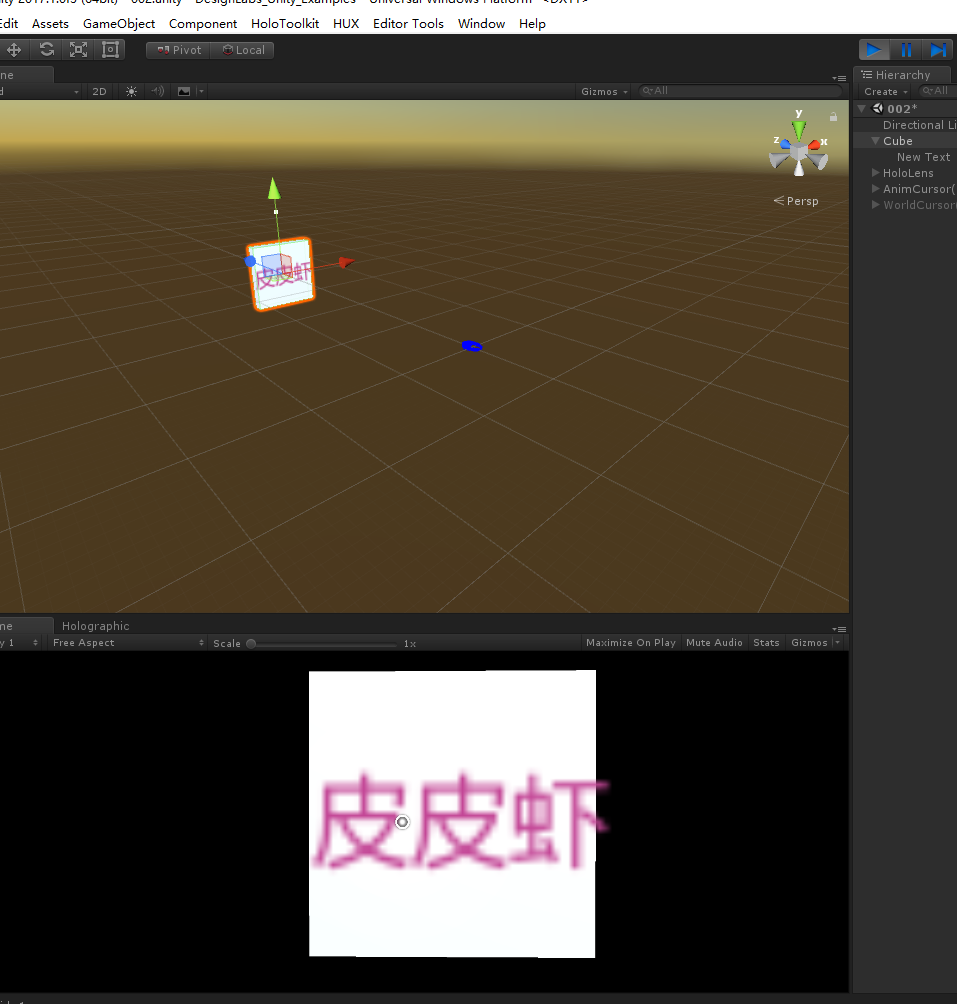
图中就一个cube 加个3DText,然后我们就编写代码
[RequireComponent(typeof(CompoundButton))]//特效用语
public class CompoundButtonSounds : ProfileButtonBase<ButtonSoundProfile>//泛型类需求T必须符合 where T 的要求
{
//这里说明下 定义的ButtonSoundProfile就一个声音源数组和声音值float数组 - -!这里就是为了装b用的
//CompoundButton 是摄像机检测用的组件(相当于事件源了)这个可以根据不同插件的事件源不同做处理
//Button的事件详细 我也在研究。。 - -!很蛋疼 (不同的插件可以选择不同的事件接口)
const float MinTimeBetweenSameClip = 0.1f;//常量最小按钮播放值
[SerializeField]//序列化
private AudioSource audioSource;
private static string lastClipName = string.Empty;//全局变量
private static float lastClipTime = 0f;
private Button.ButtonStateEnum lastState = Button.ButtonStateEnum.Disabled;//表示按钮交互的状态
void Start ()
{
Button button = GetComponent<Button>();
//以下是定义的按钮事件
button.OnButtonCancelled += OnButtonCancelled;
button.OnButtonHeld += OnButtonHeld;
button.OnButtonPressed += OnButtonPressed;
button.OnButtonReleased += OnButtonReleased;
button.StateChange += StateChange;
audioSource = GetComponent<AudioSource>();
}
/// <summary>
/// 状态改变
/// </summary>
/// <param name="newState"></param>
void StateChange(Button.ButtonStateEnum newState)
{
// 不能在同一个状态重复多次
if (lastState == newState)
return;
lastState = newState;
// 不活跃的按钮 不播放声音
if (!gameObject.activeSelf || !gameObject.activeInHierarchy)
return;
if (Profile == null)
{
Debug.LogError("Sound profile was null in button " + name);
return;
}
switch (newState)
{
case Button.ButtonStateEnum.Observation:
PlayClip(Profile.ButtonObservation, Profile.ButtonObservationVolume);
break;
case Button.ButtonStateEnum.ObservationTargeted:
PlayClip(Profile.ButtonObservationTargeted, Profile.ButtonObservationTargetedVolume);
break;
case Button.ButtonStateEnum.Targeted:
PlayClip(Profile.ButtonTargeted, Profile.ButtonTargetedVolume);
break;
default:
break;
}
}
//按钮取消
void OnButtonCancelled(GameObject go)
{
PlayClip(Profile.ButtonCancelled, Profile.ButtonCancelledVolume);
}
//按钮按住
void OnButtonHeld(GameObject go)
{
PlayClip(Profile.ButtonHeld, Profile.ButtonHeldVolume);
}
//按钮按下
void OnButtonPressed(GameObject go)
{
PlayClip(Profile.ButtonPressed, Profile.ButtonPressedVolume);
}
void OnButtonReleased (GameObject go)
{
PlayClip(Profile.ButtonReleased, Profile.ButtonReleasedVolume);
}
void PlayClip (AudioClip clip, float volume)
{
if (clip != null)
{
// 声音源是垃圾源,就不要做 Time.realtimeSinceStartup 静态属性表示 游戏开始实时时间
if (clip.name == lastClipName && Time.realtimeSinceStartup < MinTimeBetweenSameClip)
return;
lastClipName = clip.name;
lastClipTime = Time.realtimeSinceStartup;
if (audioSource != null)
{
audioSource.PlayOneShot(clip, volume);//这个不陌生吧(适合播放小源声音)
}
else
{
AudioSource.PlayClipAtPoint(clip, transform.position, volume);//这个是AudioSource的静态方法
//在transform.position位置创建一个空物体,并自动添加AudioSource组件,播放完成就会自动销毁
}
}
}
}
表述的也很明确了,最后就拖拽声音源到对应的属性中就行了,最后点击运行,点击按钮就ok了,
下次带来动物(老鼠)和气球的动态Mesh按钮还有文本图片等3D交互UI。最后搭建一个功能完善的UI组件
Unity3D开发之3D按钮的声音播放的更多相关文章
- iOS开发之3D Touch
1.简介 3DTouch是在6s之后苹果的一项技术,只能在6s及其以上机型真机运行,Xcode的模拟器是不支持的. Quick Actions(点击icon的快捷方式) Peek&Pop(应用 ...
- Unity3D 开发之shader教程(浅谈光照之漫反射diffuse)
在游戏开发过程中,光照应该是必不可少部分,当然,这是指大多数的稍微大型一些的3D游戏会需要,给模型或者山山水水加上光照,会看上去更加的真实,获得更好的体验.一个本身不发光物体显示什么颜色,在于本身反射 ...
- Unity3D开发之NGUI点击事件穿透响应处理
http://www.xuebuyuan.com/1936292.html 在使用NGUI 开发2D项目的时候,发现了一个问题,就是如果点出一个菜单,然后点击菜单上面的按钮的时候就会使得按钮下面的物品 ...
- 【转】Unity3D开发之Http协议网络通信
之前unity3d项目要做跟服务器通信的模块,然后服务器那边的协议是基于http的Jsonrpc通信方式一开始,用C#的本身类HttpWebRequest来提交请求,很快就在电脑上面成功了,代码也很简 ...
- Unity3D开发之Mac OS 开发环境搭建 笔记
http://www.cnblogs.com/zhaoqingqing/p/3383167.html 首先上几张图: 摸索了一上午,才搞定在模拟器中运行.至于在Iphone真机中运行,虽然有开发者证书 ...
- Unity3D开发之“获取IOS设备所在的国家代码"
原地址:http://dong2008hong.blog.163.com/blog/static/469688272014021025578/ 在前一段时间游戏开发中需要实现获取IOS设备所在的国家代 ...
- Unity3D开发之NGUI结合粒子系统的遮挡问题
原地址:http://blog.csdn.net/lihandsome/article/details/22194025 我的是NGUI3.0.3版本,在加入粒子系统的时候发现一直都是在精灵的下面,所 ...
- Unity3d 开发之 ulua 坑的总结
相同的 lua 代码在安卓上能正常运行,但在 IOS 上可能不会正常运行而导致报红,崩溃等,我在使用 lua 编程时遇到的一些坑总结如下: 1. File.ReadAllText, 诸如以下代码在 i ...
- Unity3D开发之Matrix4x4矩阵变换
在Unity开发中时常会用到Matrix4x4矩阵来变换场景中对象的位置.旋转和缩放.但是很多人都不太理解这儿Matrix4x4变换矩阵.通过DX中的变换矩阵我来讲一讲在unity中这个变换矩阵是怎么 ...
随机推荐
- java面试题:当一个对象被当作参数传递到一个方法后,此方法可改变这个对象的属性,并可返回变化后的结果,那么这里到底是值传递还是引用传递?
答:是值传递.Java编程语言只有值传递参数. 当一个对象实例作为一个参数被传递到方法中时,参数的值就是该对象的引用一个副本.指向同一个对象,对象的内容可以在被调用的方法中改变,但对象的引用(不是引用 ...
- 30 个java编程技巧
1.return 一个空的集合,而不是 null 如果一个程序返回一个没有任何值的集合,请确保一个空集合返回,而不是空元素.这样你就不用去写一大堆 ”if else” 判断null元素. Java 的 ...
- 如何在GooglePlay上面发布应用
上传和发布应用 注册开发者帐户后,您便可使用 Google Play 开发者控制台将应用上传到 Google Play. 访问 Google Play 开发者控制台. 点击屏幕顶部附近的添加新用户. ...
- Android生成二维码--保存和分享二维码图片
之前写过生成自定义二维码的两篇文章:<Android生成自定义二维码><Android生成二维码–拍照或从相册选取图片>,下面就介绍一下Android应用内如何保存以及分享二维 ...
- PHP-CPP开发扩展(四)
PHP-CPP是一个用于开发PHP扩展的C++库.本节讲解如何在C++中调用PHP函数. 调用PHP函数 调用普通函数 // call a function from user space Php:: ...
- Percona Toolkit mysql辅助利器
1 PT介绍 Percona Toolkit简称pt工具—PT-Tools,是Percona公司开发用于管理MySQL的工具,功能包括检查主从复制的数据一致性.检查重复索引.定位IO占用高的表文件.在 ...
- SQL 必知必会·笔记<4>使用通配符过滤数据
LIKE操作符 通配符(wildcard): 用来匹配值的一部分的特殊字符. 百分号(%)通配符 最常使用的通配符是百分号(%).在搜索串中,%表示任何字符出现任意次数: SELECT prod_id ...
- Spring Boot + Spring Cloud 构建微服务系统(十):配置中心(Spring Cloud Bus)
技术背景 我们在上一篇讲到,Spring Boot程序只在启动的时候加载配置文件信息,这样在GIT仓库配置修改之后,虽然配置中心服务器能够读取最新的提交信息,但是配置中心客户端却不会重新读取,以至于不 ...
- 【API知识】类型转换工具ConvertUtils引发的思考
前言 在读取Excel文件数据,有时候不可避免地需要把获取到的字符串转型为基本类型的对象.以前都是自己写转换,难度也不大.后来听说,有可以直接用的轮子——Apache 的commons-beanuti ...
- 【PyTorch深度学习60分钟快速入门 】Part4:训练一个分类器
太棒啦!到目前为止,你已经了解了如何定义神经网络.计算损失,以及更新网络权重.不过,现在你可能会思考以下几个方面: 0x01 数据集 通常,当你需要处理图像.文本.音频或视频数据时,你可以使用标准 ...