
python输出有色记录
一.第三方模块coloredlogs
# Create a logger object.

import logging

logger = logging.getLogger('your-module')

# Initialize coloredlogs.

import coloredlogs

coloredlogs.install(level='DEBUG')

# Some examples.

logger.debug("this is a debugging message")

logger.info("this is an informational message")

logger.warn("this is a warning message")

logger.error("this is an error message")

logger.critical("this is a critical message")

二.代码实现
示例一
#!/usr/bin/env python

# -*- coding: utf- -*-

class bcolors:

    HEADER = '\033[95m'

    OKBLUE = '\033[94m'

    OKGREEN = '\033[92m'

    WARNING = '\033[93m'

    FAIL = '\033[91m'

    ENDC = '\033[0m'

    def disable(self):

        self.HEADER = ''

        self.OKBLUE = ''

        self.OKGREEN = ''

        self.WARNING = ''

        self.FAIL = ''

        self.ENDC = ''

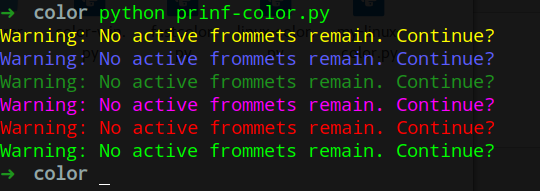
print bcolors.WARNING + "Warning: No active frommets remain. Continue?"

print bcolors.OKBLUE + "Warning: No active frommets remain. Continue?"

print bcolors.OKGREEN + "Warning: No active frommets remain. Continue?"

print bcolors.HEADER + "Warning: No active frommets remain. Continue?"

print bcolors.FAIL + "Warning: No active frommets remain. Continue?"

print bcolors.ENDC + "Warning: No active frommets remain. Continue?"
示例二
import logging

BLACK, RED, GREEN, YELLOW, BLUE, MAGENTA, CYAN, WHITE = range(8)

#The background is set with 40 plus the number of the color, and the foreground with 30

#These are the sequences need to get colored ouput

RESET_SEQ = "\033[0m"

COLOR_SEQ = "\033[1;%dm"

BOLD_SEQ = "\033[1m"

def formatter_message(message, use_color = True):

    if use_color:

        message = message.replace("$RESET", RESET_SEQ).replace("$BOLD", BOLD_SEQ)

    else:

        message = message.replace("$RESET", "").replace("$BOLD", "")

    return message

COLORS = {

    'WARNING': YELLOW,

    'INFO': WHITE,

    'DEBUG': BLUE,

    'CRITICAL': YELLOW,

    'ERROR': RED

}

class ColoredFormatter(logging.Formatter):

    def __init__(self, msg, use_color = True):

        logging.Formatter.__init__(self, msg)

        self.use_color = use_color

    def format(self, record):

        levelname = record.levelname

        if self.use_color and levelname in COLORS:

            levelname_color = COLOR_SEQ % (30 + COLORS[levelname]) + levelname + RESET_SEQ

            record.levelname = levelname_color

        return logging.Formatter.format(self, record)

# Custom logger class with multiple destinations

class ColoredLogger(logging.Logger):

    FORMAT = "[$BOLD%(name)-20s$RESET][%(levelname)-18s]  %(message)s ($BOLD%(filename)s$RESET:%(lineno)d)"

    COLOR_FORMAT = formatter_message(FORMAT, True)

    def __init__(self, name):

        logging.Logger.__init__(self, name, logging.DEBUG)

        color_formatter = ColoredFormatter(self.COLOR_FORMAT)

        console = logging.StreamHandler()

        console.setFormatter(color_formatter)

        self.addHandler(console)

        return

#

logging.setLoggerClass(ColoredLogger)

color_log = logging.getLogger(__name__)

color_log.setLevel(logging.DEBUG)

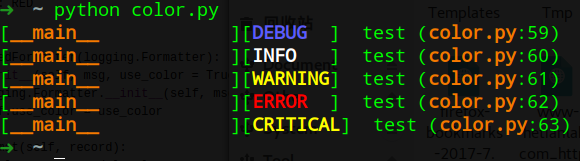
color_log.debug("test")

color_log.info("test")

color_log.warning("test")

color_log.error("test")

color_log.critical("test")
Windows下python环境
转自:https://www.oschina.net/code/snippet_614988_26500
#! /usr/bin/env python

# coding: utf-8

import logging,os

import ctypes

FOREGROUND_WHITE = 0x0007

FOREGROUND_BLUE = 0x01 # text color contains blue.

FOREGROUND_GREEN= 0x02 # text color contains green.

FOREGROUND_RED  = 0x04 # text color contains red.

FOREGROUND_YELLOW = FOREGROUND_RED | FOREGROUND_GREEN

STD_OUTPUT_HANDLE= -11

std_out_handle = ctypes.windll.kernel32.GetStdHandle(STD_OUTPUT_HANDLE)

def set_color(color, handle=std_out_handle):

    bool = ctypes.windll.kernel32.SetConsoleTextAttribute(handle, color)

    return bool

class Logger:

    def __init__(self, path,clevel = logging.DEBUG,Flevel = logging.DEBUG):

        self.logger = logging.getLogger(path)

        self.logger.setLevel(logging.DEBUG)

        fmt = logging.Formatter('[%(asctime)s] [%(levelname)s] %(message)s', '%Y-%m-%d %H:%M:%S')

        #设置CMD日志

        sh = logging.StreamHandler()

        sh.setFormatter(fmt)

        sh.setLevel(clevel)

        #设置文件日志

        fh = logging.FileHandler(path)

        fh.setFormatter(fmt)

        fh.setLevel(Flevel)

        self.logger.addHandler(sh)

        self.logger.addHandler(fh)

    def debug(self,message):

        self.logger.debug(message)

    def info(self,message):

        self.logger.info(message)

    def war(self,message,color=FOREGROUND_YELLOW):

        set_color(color)

        self.logger.warn(message)

        set_color(FOREGROUND_WHITE)

    def error(self,message,color=FOREGROUND_RED):

        set_color(color)

        self.logger.error(message)

        set_color(FOREGROUND_WHITE)

    def cri(self,message):

        self.logger.critical(message)

if __name__ =='__main__':

    logyyx = Logger('yyx.log',logging.WARNING,logging.DEBUG)

    logyyx.debug('一个debug信息')

    logyyx.info('一个info信息')

    logyyx.war('一个warning信息')

    logyyx.error('一个error信息')

    logyyx.cri('一个致命critical信息')
python输出有色记录的更多相关文章
- python 输出颜色的与样式的方法
上次遇到这个问题就想写下来,其实当时我也不怎么会,老师说这个东西不需要理解,只需要死记硬背,写的多了就记住了,所以今天搜集了几篇文章,加上自己的理解,写下了这篇python 输出颜色的样式与方法的文章 ...
- python 输出颜色与样式的方法
上次遇到这个问题就想写下来,其实当时我也不怎么会,老师说这个东西不需要理解,只需要死记硬背,写的多了就记住了,所以今天搜集了几篇文章,加上自己的理解,写下了这篇python 输出颜色的样式与方法的文章 ...
- python输出颜色与样式的方法
一.输出颜色与样式的方法 上次遇到这个问题就想写下来,其实当时我也不怎么会,老师说这个东西不需要理解,只需要死记硬背,写的多了就记住了,所以今天搜集了几篇文章,加上自己的理解,写下了这篇python ...
- Python 输出文件内容到网络端口
Python 输出文件内容到网络端口 $ cat mySocketTest.py import sys import time import socket if __name__ == "_ ...
- python输出缓冲区的问题
碰到的问题,一段代码,print在前,log的在后,查看日志中log的反而在前面.是python输出缓冲区的问题. python输出缓冲区要满 4k 才写入文件,除非禁用缓存或者强制输出或者程序结束. ...
- python3.4学习笔记(二十六) Python 输出json到文件,让json.dumps输出中文 实例代码
python3.4学习笔记(二十六) Python 输出json到文件,让json.dumps输出中文 实例代码 python的json.dumps方法默认会输出成这种格式"\u535a\u ...
- Python爬虫个人记录(三)爬取妹子图
这此教程可能会比较简洁,具体细节可参考我的第一篇教程: Python爬虫个人记录(一)豆瓣250 Python爬虫个人记录(二)fishc爬虫 一.目的分析 获取煎蛋妹子图并下载 http://jan ...
- Python爬虫个人记录(二) 获取fishc 课件下载链接
参考: Python爬虫个人记录(一)豆瓣250 (2017.9.6更新,通过cookie模拟登陆方法,已成功实现下载文件功能!!) 一.目的分析 获取http://bbs.fishc.com/for ...
- Python 输出百分比的两种方式
Python 输出百分比的两种方式 注: 在python3环境下测试. 方式1:直接使用参数格式化:{:.2%} {:.2%}: 显示小数点后2位 显示小数点后2位: >>> pri ...
随机推荐
- Jmeter压测过程报错the target server failed to respond
失败事务报错信息如下, Socket closed Non HTTP response code: org.apache.http.NoHttpResponseException (the targe ...
- C - Rikka with Badminton --- HDU 6425 快速幂加组合数学
---恢复内容开始--- 题目链接: https://vjudge.net/problem/1812693/origin 这题的mod运算很恶心,真的... 本题有正反两个思路,一个是正面求解其不能成 ...
- 潭州课堂25班:Ph201805201 django 项目 第三十课 linux 系统迁移 (课堂笔记)
进入虚拟环境, 冷冻 把安装环境放到这个文档中 pip freeze >> requirements.txt 在另一台机器中 pip install -r requirements.txt ...
- vue给methods中的方法传入当前点击行的值
<template> <!-- 在template中,只能存在一个根组件 --> <div class="event"> <ul> ...
- 读《31天学会CRM项目开发》记录1 - 认识软件开发
今天闲来无事,心中又对软件开发充满了向往和憧憬.一直认为实践是检验真知的唯一标准,也是快速提升的绝密方法,是巩固基础加深基础的好去处.故在JD上搜了下软件开发,看到了这本<31天学会CRM项目开 ...
- C++学习笔记54:关联容器,函数对象
关联容器的特点 1.每个关联容器都有一个键(key) 2.可以根据键高效查找元素 集合set 集合用来存储一组无重复的元素,由于集合的元素本身是有序的,可以高效地查找元素,也可以方便地指定大小范围的元 ...
- JS 正则表达式基础
1.元字符: 2.重复限定符 一些简单的正则表达式 (1)匹配8位数的QQ号码 ^\d{8}$ (2)匹配1开头的11位数手机号码 ^1\d{10}$ (3)匹配14-18位数的银行卡号 ^\d{14 ...
- Source map error
前端访问接口时火狐浏览器控制台出现了这个问题, source map文件是js文件压缩后,文件的变量名替换对应.变量所在位置等元信息数据文件,一般这种文件和min.js主文件放在同一个目录下. 比如压 ...
- ArrayList源码分析和实例应用
1.ArrayList介绍 ArrayList 是一个数组队列,相当于 动态数组.与Java中的数组相比,它的容量能动态增长.它继承于AbstractList,实现了List, RandomAcces ...
- 【组合数】[NOIP2011]选择客栈[c++]
题目描述 丽江河边有n 家很有特色的客栈,客栈按照其位置顺序从 1 到n 编号.每家客栈都按照某一种色调进行装饰(总共 k 种,用整数 0 ~ k-1 表示),且每家客栈都设有一家咖啡店,每家咖啡店均 ...