
ArrayList源码分析和实例应用
1、ArrayList介绍
ArrayList 是一个数组队列,相当于 动态数组。与Java中的数组相比,它的容量能动态增长。它继承于AbstractList,实现了List, RandomAccess, Cloneable, java.io.Serializable这些接口。
ArrayList 继承了AbstractList,实现了List。它是一个数组队列,提供了相关的添加、删除、修改、遍历等功能。
ArrayList 实现了RandmoAccess接口,即提供了随机访问功能。RandmoAccess是java中用来被List实现,为List提供快速访问功能的。在ArrayList中,我们即可以通过元素的序号快速获取元素对象;这就是快速随机访问。通过比较List的“快速随机访问”和“通过Iterator迭代器访问”,我们会发现,遍历ArrayList时,使用随机访问(即,通过索引序号访问)效率最高,而使用迭代器的效率最低。
ArrayList 实现了Cloneable接口,即覆盖了函数clone(),能被克隆。
ArrayList 实现java.io.Serializable接口,这意味着ArrayList支持序列化,能通过序列化去传输。
和Vector不同,ArrayList中的操作不是线程安全的!所以,建议在单线程中才使用ArrayList,而在多线程中可以选择Vector或者CopyOnWriteArrayList。
2、ArrayList的数据结构
 java.lang.Object

    ↳     java.util.AbstractCollection<E>

          ↳     java.util.AbstractList<E>

                ↳     java.util.ArrayList<E>

 public class ArrayList<E> extends AbstractList<E>

         implements List<E>, RandomAccess, Cloneable, java.io.Serializable {}
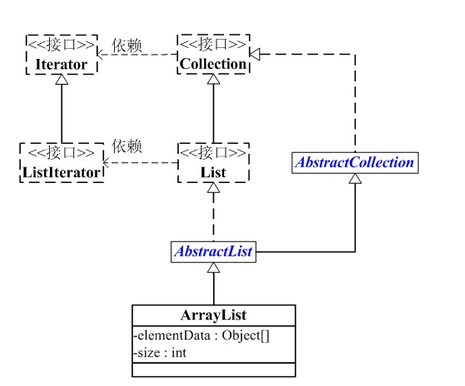
ArrayList包含了两个重要的对象:elementData 和 size。
(01) elementData 是"Object[]类型的数组",它保存了添加到ArrayList中的元素。实际上,elementData是个动态数组,我们能通过构造函数 ArrayList(int initialCapacity)来执行它的初始容量为initialCapacity;如果通过不含参数的构造函数ArrayList()来创建ArrayList,则elementData的容量默认是10。elementData数组的大小会根据ArrayList容量的增长而动态的增长,具体的增长方式在源码中的ensureCapacity()函数来定义。
(02) size 则是动态数组的实际大小。
3、ArrayList的源码分析
 package java.util;

 public class ArrayList<E> extends AbstractList<E>

         implements List<E>, RandomAccess, Cloneable, java.io.Serializable

 {

     // 序列版本号

     private static final long serialVersionUID = 8683452581122892189L;

     // 保存ArrayList中数据的数组

     private transient Object[] elementData;

     // ArrayList中实际数据的数量

     private int size;

     // ArrayList带容量大小的构造函数。

     public ArrayList(int initialCapacity) {

         super();

         if (initialCapacity < 0)

             throw new IllegalArgumentException("Illegal Capacity: "+

                                                initialCapacity);

         // 新建一个数组

         this.elementData = new Object[initialCapacity];

     }

     // ArrayList构造函数。默认容量是10。

     public ArrayList() {

         this(10);

     }

     // 创建一个包含collection的ArrayList

     public ArrayList(Collection<? extends E> c) {

         elementData = c.toArray();

         size = elementData.length;

         // c.toArray might (incorrectly) not return Object[] (see 6260652)

         if (elementData.getClass() != Object[].class)

             elementData = Arrays.copyOf(elementData, size, Object[].class);

     }

     // 将当前容量值设为 =实际元素个数

     public void trimToSize() {

         modCount++;

         int oldCapacity = elementData.length;

         if (size < oldCapacity) {

             elementData = Arrays.copyOf(elementData, size);

         }

     }

     // 确定ArrarList的容量。

     // 若ArrayList的容量不足以容纳当前的全部元素,设置 新的容量=“(原始容量x3)/2 + 1”

     public void ensureCapacity(int minCapacity) {

         // 将“修改统计数”+1

         modCount++;

         int oldCapacity = elementData.length;

         // 若当前容量不足以容纳当前的元素个数,设置 新的容量=“(原始容量x3)/2 + 1”

         if (minCapacity > oldCapacity) {

             Object oldData[] = elementData;

             int newCapacity = (oldCapacity * 3)/2 + 1;

             if (newCapacity < minCapacity)

                 newCapacity = minCapacity;

             elementData = Arrays.copyOf(elementData, newCapacity);

         }

     }

     // 添加元素e

     public boolean add(E e) {

         // 确定ArrayList的容量大小

         ensureCapacity(size + 1);  // Increments modCount!!

         // 添加e到ArrayList中

         elementData[size++] = e;

         return true;

     }

     // 返回ArrayList的实际大小

     public int size() {

         return size;

     }

     // 返回ArrayList是否包含Object(o)

     public boolean contains(Object o) {

         return indexOf(o) >= 0;

     }

     // 返回ArrayList是否为空

     public boolean isEmpty() {

         return size == 0;

     }

     // 正向查找,返回元素的索引值

     public int indexOf(Object o) {

         if (o == null) {

             for (int i = 0; i < size; i++)

             if (elementData[i]==null)

                 return i;

             } else {

                 for (int i = 0; i < size; i++)

                 if (o.equals(elementData[i]))

                     return i;

             }

             return -1;

         }

         // 反向查找,返回元素的索引值

         public int lastIndexOf(Object o) {

         if (o == null) {

             for (int i = size-1; i >= 0; i--)

             if (elementData[i]==null)

                 return i;

         } else {

             for (int i = size-1; i >= 0; i--)

             if (o.equals(elementData[i]))

                 return i;

         }

         return -1;

     }

     // 反向查找(从数组末尾向开始查找),返回元素(o)的索引值

     public int lastIndexOf(Object o) {

         if (o == null) {

             for (int i = size-1; i >= 0; i--)

             if (elementData[i]==null)

                 return i;

         } else {

             for (int i = size-1; i >= 0; i--)

             if (o.equals(elementData[i]))

                 return i;

         }

         return -1;

     }

     // 返回ArrayList的Object数组(这个不常用,因为有向下转型会出现类型转换的异常)

     public Object[] toArray() {

         return Arrays.copyOf(elementData, size);

     }

     // 返回ArrayList的模板数组。所谓模板数组,即可以将T设为任意的数据类型

     public <T> T[] toArray(T[] a) {

         // 若数组a的大小 < ArrayList的元素个数;

         // 则新建一个T[]数组,数组大小是“ArrayList的元素个数”,并将“ArrayList”全部拷贝到新数组中

         if (a.length < size)

             return (T[]) Arrays.copyOf(elementData, size, a.getClass());

         // 若数组a的大小 >= ArrayList的元素个数;

         // 则将ArrayList的全部元素都拷贝到数组a中。

         System.arraycopy(elementData, 0, a, 0, size);

         if (a.length > size)

             a[size] = null;

         return a;

     }

     // 获取index位置的元素值

     public E get(int index) {

         RangeCheck(index);

         return (E) elementData[index];

     }

     // 设置index位置的值为element

     public E set(int index, E element) {

         RangeCheck(index);

         E oldValue = (E) elementData[index];

         elementData[index] = element;

         return oldValue;

     }

     // 将e添加到ArrayList中

     public boolean add(E e) {

         ensureCapacity(size + 1);  // Increments modCount!!

         elementData[size++] = e;

         return true;

     }

     // 将e添加到ArrayList的指定位置

     public void add(int index, E element) {

         if (index > size || index < 0)

             throw new IndexOutOfBoundsException(

             "Index: "+index+", Size: "+size);

         ensureCapacity(size+1);  // Increments modCount!!

         System.arraycopy(elementData, index, elementData, index + 1,

              size - index);

         elementData[index] = element;

         size++;

     }

     // 删除ArrayList指定位置的元素

     public E remove(int index) {

         RangeCheck(index);

         modCount++;

         E oldValue = (E) elementData[index];

         int numMoved = size - index - 1;

         if (numMoved > 0)

             System.arraycopy(elementData, index+1, elementData, index,

                  numMoved);

         elementData[--size] = null; // Let gc do its work

         return oldValue;

     }

     // 删除ArrayList的指定元素

     public boolean remove(Object o) {

         if (o == null) {

                 for (int index = 0; index < size; index++)

             if (elementData[index] == null) {

                 fastRemove(index);

                 return true;

             }

         } else {

             for (int index = 0; index < size; index++)

             if (o.equals(elementData[index])) {

                 fastRemove(index);

                 return true;

             }

         }

         return false;

     }

     // 快速删除第index个元素

     private void fastRemove(int index) {

         modCount++;

         int numMoved = size - index - 1;

         // 从"index+1"开始,用后面的元素替换前面的元素。

         if (numMoved > 0)

             System.arraycopy(elementData, index+1, elementData, index,

                              numMoved);

         // 将最后一个元素设为null

         elementData[--size] = null; // Let gc do its work

     }

     // 删除元素

     public boolean remove(Object o) {

         if (o == null) {

             for (int index = 0; index < size; index++)

             if (elementData[index] == null) {

                 fastRemove(index);

             return true;

             }

         } else {

             // 便利ArrayList,找到“元素o”,则删除,并返回true。

             for (int index = 0; index < size; index++)

             if (o.equals(elementData[index])) {

                 fastRemove(index);

             return true;

             }

         }

         return false;

     }

     // 清空ArrayList,将全部的元素设为null

     public void clear() {

         modCount++;

         for (int i = 0; i < size; i++)

             elementData[i] = null;

         size = 0;

     }

     // 将集合c追加到ArrayList中

     public boolean addAll(Collection<? extends E> c) {

         Object[] a = c.toArray();

         int numNew = a.length;

         ensureCapacity(size + numNew);  // Increments modCount

         System.arraycopy(a, 0, elementData, size, numNew);

         size += numNew;

         return numNew != 0;

     }

     // 从index位置开始,将集合c添加到ArrayList

     public boolean addAll(int index, Collection<? extends E> c) {

         if (index > size || index < 0)

             throw new IndexOutOfBoundsException(

             "Index: " + index + ", Size: " + size);

         Object[] a = c.toArray();

         int numNew = a.length;

         ensureCapacity(size + numNew);  // Increments modCount

         int numMoved = size - index;

         if (numMoved > 0)

             System.arraycopy(elementData, index, elementData, index + numNew,

                  numMoved);

         System.arraycopy(a, 0, elementData, index, numNew);

         size += numNew;

         return numNew != 0;

     }

     // 删除fromIndex到toIndex之间的全部元素。

     protected void removeRange(int fromIndex, int toIndex) {

     modCount++;

     int numMoved = size - toIndex;

         System.arraycopy(elementData, toIndex, elementData, fromIndex,

                          numMoved);

     // Let gc do its work

     int newSize = size - (toIndex-fromIndex);

     while (size != newSize)

         elementData[--size] = null;

     }

     private void RangeCheck(int index) {

     if (index >= size)

         throw new IndexOutOfBoundsException(

         "Index: "+index+", Size: "+size);

     }

     // 克隆函数

     public Object clone() {

         try {

             ArrayList<E> v = (ArrayList<E>) super.clone();

             // 将当前ArrayList的全部元素拷贝到v中

             v.elementData = Arrays.copyOf(elementData, size);

             v.modCount = 0;

             return v;

         } catch (CloneNotSupportedException e) {

             // this shouldn't happen, since we are Cloneable

             throw new InternalError();

         }

     }

     // java.io.Serializable的写入函数

     // 将ArrayList的“容量,所有的元素值”都依次写入到输出流中

     private void writeObject(java.io.ObjectOutputStream s)

         throws java.io.IOException{

     // Write out element count, and any hidden stuff

     int expectedModCount = modCount;

     s.defaultWriteObject();

         // 写入“数组的容量”

         s.writeInt(elementData.length);

     // 写入“数组的每一个元素”

     for (int i=0; i<size; i++)

             s.writeObject(elementData[i]);

     if (modCount != expectedModCount) {

             throw new ConcurrentModificationException();

         }

     }

     // java.io.Serializable的读取函数:根据写入方式读出

     // 先将ArrayList的“容量”读出,然后将“所有的元素值”读出

     private void readObject(java.io.ObjectInputStream s)

         throws java.io.IOException, ClassNotFoundException {

         // Read in size, and any hidden stuff

         s.defaultReadObject();

         // 从输入流中读取ArrayList的“容量”

         int arrayLength = s.readInt();

         Object[] a = elementData = new Object[arrayLength];

         // 从输入流中将“所有的元素值”读出

         for (int i=0; i<size; i++)

             a[i] = s.readObject();

     }

 }
4、ArrayList的遍历方式
ArrayList支持3种遍历方式
(01) 第一种,通过迭代器遍历。即通过Iterator去遍历。
 Integer value = null;

 Iterator iter = list.iterator();

 while (iter.hasNext()) {

     value = (Integer)iter.next();

 }
(02) 第二种,随机访问,通过索引值去遍历。
由于ArrayList实现了RandomAccess接口,它支持通过索引值去随机访问元素。
 Integer value = null;

 int size = list.size();

 for (int i=0; i<size; i++) {

     value = (Integer)list.get(i);

 }
(03) 第三种,for循环遍历。如下:
 Integer value = null;

 for (Integer integ:list) {

     value = integ;

 }
5、ArrayList的测试实例
 import java.util.*;

 /*

  * @desc ArrayList常用API的测试程序

  * @author skywang

  * @email kuiwu-wang@163.com

  */

 public class ArrayListTest {

     public static void main(String[] args) {

         // 创建ArrayList

         ArrayList list = new ArrayList();

         // 将“”

         list.add("1");

         list.add("2");

         list.add("3");

         list.add("4");

         // 将下面的元素添加到第1个位置

         list.add(0, "5");

         // 获取第1个元素

         System.out.println("the first element is: "+ list.get(0));

         // 删除“3”

         list.remove("3");

         // 获取ArrayList的大小

         System.out.println("Arraylist size=: "+ list.size());

         // 判断list中是否包含"3"

         System.out.println("ArrayList contains 3 is: "+ list.contains(3));

         // 设置第2个元素为10

         list.set(1, "10");

         // 通过Iterator遍历ArrayList

         for(Iterator iter = list.iterator(); iter.hasNext(); ) {

             System.out.println("next is: "+ iter.next());

         }

         // 将ArrayList转换为数组

         String[] arr = (String[])list.toArray(new String[0]);

         for (String str:arr)

             System.out.println("str: "+ str);

         // 清空ArrayList

         list.clear();

         // 判断ArrayList是否为空

         System.out.println("ArrayList is empty: "+ list.isEmpty());

     }

 }
备注:
当我们调用ArrayList中的 toArray()函数时,可能会抛出“java.lang.ClassCastException”异常的情况。
ArrayList提供了两个toArray()函数:
Object[] toArray()

<T> T[] toArray(T[] contents)
调用 toArray() 函数会抛出“java.lang.ClassCastException”异常,但是调用 toArray(T[] contents) 能正常返回 T[]。
toArray() 会抛出异常是因为 toArray() 返回的是 Object[] 数组,将 Object[] 转换为其它类型(如如,将Object[]转换为的Integer[])则会抛出“java.lang.ClassCastException”异常,因为Java不支持向下转型。具体的可以参考前面ArrayList.java的源码介绍部分的toArray()。
解决该问题的办法是调用 <T> T[] toArray(T[] contents) , 而不是 Object[] toArray()。
ArrayList源码分析和实例应用的更多相关文章
- ArrayList 源码分析
ArrayList 源码分析 1. 结构 首先我们需要对 ArrayList 有一个大致的了解就从结构来看看吧. 1. 继承 该类继承自 AbstractList 这个比较好说 2. 实现 这 ...
- ArrayList源码分析超详细
ArrayList源码分析超详解 想要分析下源码是件好事,但是如何去进行分析呢?以我的例子来说,我进行源码分析的过程如下几步: 找到类:利用 IDEA 找到所需要分析的类(ztrl+N查找ArraLi ...
- Java - ArrayList源码分析
java提高篇(二一)-----ArrayList 一.ArrayList概述 ArrayList是实现List接口的动态数组,所谓动态就是它的大小是可变的.实现了所有可选列表操作,并允许包括 nul ...
- ArrayList源码分析超详细(转载)
ArrayList源码分析超详细 ArrayList源码分析超详解 想要分析下源码是件好事,但是如何去进行分析呢?以我的例子来说,我进行源码分析的过程如下几步: 找到类:利用 IDEA 找到所需要 ...
- Java入门系列之集合ArrayList源码分析(七)
前言 上一节我们通过排队类实现了类似ArrayList基本功能,当然还有很多欠缺考虑,只是为了我们学习集合而准备来着,本节我们来看看ArrayList源码中对于常用操作方法是如何进行的,请往下看. A ...
- Java ArrayList源码分析(含扩容机制等重点问题分析)
写在最前面 这个项目是从20年末就立好的 flag,经过几年的学习,回过头再去看很多知识点又有新的理解.所以趁着找实习的准备,结合以前的学习储备,创建一个主要针对应届生和初学者的 Java 开源知识项 ...
- ArrayList源码分析笔记
ArrayList源码分析笔记 先贴出ArrayList一些属性 public class ArrayList<E> extends AbstractList<E> imple ...
- Java集合干货——ArrayList源码分析
ArrayList源码分析 前言 在之前的文章中我们提到过ArrayList,ArrayList可以说是每一个学java的人使用最多最熟练的集合了,但是知其然不知其所以然.关于ArrayList的具体 ...
- java集合系列之ArrayList源码分析
java集合系列之ArrayList源码分析(基于jdk1.8) ArrayList简介 ArrayList时List接口的一个非常重要的实现子类,它的底层是通过动态数组实现的,因此它具备查询速度快, ...
随机推荐
- checkbox选中相关问题总结
html: <input type="checkbox" name="fruit" id="apple">苹果 <inpu ...
- Android抓包方法(转)
Android抓包方法(转) 作者:Findyou 地址:http://www.cnblogs.com/findyou/p/3491014.html 前言: 做前端测试,基本要求会抓包,会分析请求数据 ...
- 无法删除另一个分区的windows文件夹
转自:http://zhidao.baidu.com/link?url=77mJiLzVTdr9LzW4R6UYHZ8OJovvXsH8HQb0hyUKL4RKv2J3bItFJgJx-xqAEGOj ...
- Openstack1 云计算与虚拟化概念
一.云概念 二.虚拟化,云计算不等于虚拟化,但是云计算需要用到虚拟化的技术 1.服务器虚拟化 2.桌面虚拟化 3.应用虚拟化 三.区别 1.虚拟化是具体的技术. 2.云计算是交付使用的一种模式
- spring cloud (四、服务消费者demo_consumer)
spring cloud (一.服务注册demo_eureka) spring cloud (二.服务注册安全demo_eureka) spring cloud (三.服务提供者demo_provid ...
- Dig
在 UNIX 和 Linux 下,建议大家使用 dig 命令来代替 nslookup. dig 命令的功能比 nslookup 强大很多,不像 nslookkup 还得 set 来 set 去的,怪麻 ...
- P1118 [USACO06FEB]数字三角形`Backward Digit Su`… 回溯法
有这么一个游戏: 写出一个11至NN的排列a_iai,然后每次将相邻两个数相加,构成新的序列,再对新序列进行这样的操作,显然每次构成的序列都比上一次的序列长度少11,直到只剩下一个数字位置.下面是一 ...
- QT pyqt pyside2 QLabel 自动换行设置注意点
QT pyqt pyside2 QLabel 自动换行设置注意点 先看效果: PySide2(QT5) 的 QT Designer (我在 QT4 的 designer 中不可以直接看效果,可能需要设 ...
- scrapy meta不用pipe用命令-o
1. spider代码: # -*- coding: utf-8 -*- import scrapy from tencent1.items import Tencent1Item import js ...
- react-route4 学习记录
新建项目 create-react-app react20180413 安装路由 npm install react-router-dom -S 跑通路由 删除全部文件后 重新新建index.js 代 ...