
【Unity/Kinect】手势识别Gesture
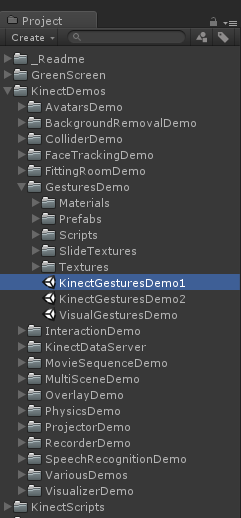
在Unity的AssetStore官方商店下载Kinect v2 Examples案例包,参考KinectDemos/GestureDemo这个文件夹下的例子。
自定义一个类,实现KinectGestures.GestureListenerInterface接口。参考案例中的CubeGestureListener中的用法。下面演示监听SwipeLeft向左划,SwipeRight向右划,SwipeUp向上划的手势Gesture。其中包含了一些修改界面UI显示当前手势状态等功能,如不需要可以去掉(主要是用来调试)。
using UnityEngine;

using System.Collections;

using System;

//using Windows.Kinect;

public class PeopleGestureListener : MonoBehaviour, KinectGestures.GestureListenerInterface

{

    [Tooltip("Index of the player, tracked by this component. 0 means the 1st player, 1 - the 2nd one, 2 - the 3rd one, etc.")]

    public int playerIndex = ;

    [Tooltip("GUI-Text to display gesture-listener messages and gesture information.")]

    public GUIText gestureInfo;

    // singleton instance of the class

    private static PeopleGestureListener instance = null;

    // internal variables to track if progress message has been displayed

    private bool progressDisplayed;

    private float progressGestureTime;

    // whether the needed gesture has been detected or not

    private bool swipeLeft;

    private bool swipeRight;

    private bool swipeUp;

    /// <summary>

    /// Gets the singleton CubeGestureListener instance.

    /// </summary>

    /// <value>The CubeGestureListener instance.</value>

    public static PeopleGestureListener Instance

    {

        get

        {

            return instance;

        }

    }

    /// <summary>

    /// Determines whether swipe left is detected.

    /// </summary>

    /// <returns><c>true</c> if swipe left is detected; otherwise, <c>false</c>.</returns>

    public bool IsSwipeLeft()

    {

        if(swipeLeft)

        {

            swipeLeft = false;

            return true;

        }

        return false;

    }

    /// <summary>

    /// Determines whether swipe right is detected.

    /// </summary>

    /// <returns><c>true</c> if swipe right is detected; otherwise, <c>false</c>.</returns>

    public bool IsSwipeRight()

    {

        if(swipeRight)

        {

            swipeRight = false;

            return true;

        }

        return false;

    }

    /// <summary>

    /// Determines whether swipe up is detected.

    /// </summary>

    /// <returns><c>true</c> if swipe up is detected; otherwise, <c>false</c>.</returns>

    public bool IsSwipeUp()

    {

        if(swipeUp)

        {

            swipeUp = false;

            return true;

        }

        return false;

    }

    /// <summary>

    /// Invoked when a new user is detected. Here you can start gesture tracking by invoking KinectManager.DetectGesture()-function.

    /// </summary>

    /// <param name="userId">User ID</param>

    /// <param name="userIndex">User index</param>

    public void UserDetected(long userId, int userIndex)

    {

        // the gestures are allowed for the primary user only

        KinectManager manager = KinectManager.Instance;

        if(!manager || (userIndex != playerIndex))

            return;

        // detect these user specific gestures

        manager.DetectGesture(userId, KinectGestures.Gestures.SwipeLeft);

        manager.DetectGesture(userId, KinectGestures.Gestures.SwipeRight);

        manager.DetectGesture(userId, KinectGestures.Gestures.SwipeUp);

        if(gestureInfo != null)

        {

            gestureInfo.text = "Swipe left, right or up to change the slides.";

        }

    }

    /// <summary>

    /// Invoked when a user gets lost. All tracked gestures for this user are cleared automatically.

    /// </summary>

    /// <param name="userId">User ID</param>

    /// <param name="userIndex">User index</param>

    public void UserLost(long userId, int userIndex)

    {

        // the gestures are allowed for the primary user only

        if(userIndex != playerIndex)

            return;

        if(gestureInfo != null)

        {

            gestureInfo.text = string.Empty;

        }

    }

    /// <summary>

    /// Invoked when a gesture is in progress.

    /// </summary>

    /// <param name="userId">User ID</param>

    /// <param name="userIndex">User index</param>

    /// <param name="gesture">Gesture type</param>

    /// <param name="progress">Gesture progress [0..1]</param>

    /// <param name="joint">Joint type</param>

    /// <param name="screenPos">Normalized viewport position</param>

    public void GestureInProgress(long userId, int userIndex, KinectGestures.Gestures gesture,

                                  float progress, KinectInterop.JointType joint, Vector3 screenPos)

    {

        // the gestures are allowed for the primary user only

        if(userIndex != playerIndex)

            return;

        if((gesture == KinectGestures.Gestures.ZoomOut || gesture == KinectGestures.Gestures.ZoomIn) && progress > 0.5f)

        {

            if(gestureInfo != null)

            {

                string sGestureText = string.Format ("{0} - {1:F0}%", gesture, screenPos.z * 100f);

                gestureInfo.text = sGestureText;

                progressDisplayed = true;

                progressGestureTime = Time.realtimeSinceStartup;

            }

        }

        else if((gesture == KinectGestures.Gestures.Wheel || gesture == KinectGestures.Gestures.LeanLeft ||

                 gesture == KinectGestures.Gestures.LeanRight) && progress > 0.5f)

        {

            if(gestureInfo != null)

            {

                string sGestureText = string.Format ("{0} - {1:F0} degrees", gesture, screenPos.z);

                gestureInfo.text = sGestureText;

                progressDisplayed = true;

                progressGestureTime = Time.realtimeSinceStartup;

            }

        }

        else if(gesture == KinectGestures.Gestures.Run && progress > 0.5f)

        {

            if(gestureInfo != null)

            {

                string sGestureText = string.Format ("{0} - progress: {1:F0}%", gesture, progress * );

                gestureInfo.text = sGestureText;

                progressDisplayed = true;

                progressGestureTime = Time.realtimeSinceStartup;

            }

        }

    }

    /// <summary>

    /// Invoked if a gesture is completed.

    /// </summary>

    /// <returns>true</returns>

    /// <c>false</c>

    /// <param name="userId">User ID</param>

    /// <param name="userIndex">User index</param>

    /// <param name="gesture">Gesture type</param>

    /// <param name="joint">Joint type</param>

    /// <param name="screenPos">Normalized viewport position</param>

    public bool GestureCompleted (long userId, int userIndex, KinectGestures.Gestures gesture,

                                  KinectInterop.JointType joint, Vector3 screenPos)

    {

        // the gestures are allowed for the primary user only

        if(userIndex != playerIndex)

            return false;

        if(gestureInfo != null)

        {

            string sGestureText = gesture + " detected";

            gestureInfo.text = sGestureText;

        }

        if(gesture == KinectGestures.Gestures.SwipeLeft)

            swipeLeft = true;

        else if(gesture == KinectGestures.Gestures.SwipeRight)

            swipeRight = true;

        else if(gesture == KinectGestures.Gestures.SwipeUp)

            swipeUp = true;

        return true;

    }

    /// <summary>

    /// Invoked if a gesture is cancelled.

    /// </summary>

    /// <returns>true</returns>

    /// <c>false</c>

    /// <param name="userId">User ID</param>

    /// <param name="userIndex">User index</param>

    /// <param name="gesture">Gesture type</param>

    /// <param name="joint">Joint type</param>

    public bool GestureCancelled (long userId, int userIndex, KinectGestures.Gestures gesture,

                                  KinectInterop.JointType joint)

    {

        // the gestures are allowed for the primary user only

        if(userIndex != playerIndex)

            return false;

        if(progressDisplayed)

        {

            progressDisplayed = false;

            if(gestureInfo != null)

            {

                gestureInfo.text = String.Empty;

            }

        }

        return true;

    }

    void Awake()

    {

        instance = this;

    }

    void Update()

    {

        if(progressDisplayed && ((Time.realtimeSinceStartup - progressGestureTime) > 2f))

        {

            progressDisplayed = false;

            gestureInfo.text = String.Empty;

            Debug.Log("Forced progress to end.");

        }

    }

}
调用方法:其他脚本获取该脚本的实例,然后通过IsSwipeLeft()等方法获取手势识别结果即可。
PeopleGestureListener gestureListener = PeopleGestureListener.Instance;

if (gestureListener.IsSwipeLeft())

{

    // do something

}
坑点:该脚本需要被挂在Kienct Manager脚本所在的游戏物体身上!
新手建议:如果自己写的GestureListener类 (实现KinectGestures.GestureListenerInterface接口)无论怎么测都不能识别出手势的话,可以复制KinectDemos/GestureDemo下面的例子场景(如KinectGesturesDemo1.unity),先实现能识别出手势了再根据自己的需求删改一下代码!
参考:
【Unity/Kinect】手势识别Gesture的更多相关文章
- kinect for windows - 手势识别之一,kinect手势识别框架
何为手势识别,就是电脑认识人手的自然动作.自然动作包括摆手,握拳,双手合十等等.如果电脑能认识我们这些手势,将来的人机交互将会变得简单而有趣.这里手势不等同于某些规定的动作,比如按鼠标左键,则不属于手 ...
- 【Unity/Kinect】获取预制的手势信息KinectInterop.HandState
Kinect使用了枚举KinectInterop.HandState来描述手势. 该手势指的是手掌的状态(张开/握拳),而不是说整个手臂的肢体动作(Gesture). 同样是需要嵌套在Kinect获取 ...
- 【Unity/Kinect】Kinect入门——项目搭建
本文是Unity Store里的官方Demo包中的ReadMe翻译(别人翻的),介绍了用Unity如何入门搭建起一个Kinect项目工程. 非常感谢下面这位大大的无私奉献! http://www.ma ...
- 【Unity/Kinect】显示Kinect摄像头内容,屏幕显示环境背景及人体投影
最近学习用Unity做些体感小游戏,使用Kinect的Unity插件,结合一些官方Demo学习(网上资源用Unity做的较少,蛋疼).插件及其Demo就在Unity商店里搜Kinect即可找到,其中下 ...
- 【Unity/Kinect】Kinect实现UI控件的点击
用体感来实现UI控件的点击,如点击按钮. 做法:用一个图片表示左手手掌,图片位置追踪左手手掌移动,当手掌位于UI控件的矩形内时,握拳表示点击该控件. using UnityEngine; using ...
- 【Unity/Kinect】Kinect一些常用的API
先开好这个坑,之后用到就补充,方便回顾. 获取用户相对Kinect传感器设备的位置坐标.(在Kinect坐标系中的位置) public Vector3 GetUserPosition(Int64 us ...
- 【Unity/Kinect】使用KinectManager的一般流程
想要从Kinect读取到数据,然后使用数据,通常是以下流程: using UnityEngine; using System.Collections; /// <summary> /// ...
- 手势识别(一)--手势基本概念和ChaLearn Gesture Challenge
以下转自: http://blog.csdn.net/qq1175421841/article/details/50312565 像点击(clicks)是GUI平台的核心,轻点(taps)是触摸平台的 ...
- IOS-Gesture(手势识别)
手势识别——Gesture Recognizer •iOS3.2版本之后,苹果推出了手势识别(Gesture Recognizer),其目的是: –简化开发者的开发难度 –统一用户体验 • •iOS目 ...
随机推荐
- 在UnrealEngine中用Custom节点实现描边效果
在<Real Time Rendering, third edition>一书中,作者把描边算法分成了5种类型.1.基于观察角度与表面法线的轮廓渲染.缺点很明显.2.过程式几何轮廓渲染.即 ...
- [Python]mysql-python 安装错误 fatal error C1083: Cannot open include file: 'config-win.h': No such file or directory
需要安装mysql connector 前往 https://dev.mysql.com/downloads/connector/python/ 下载 选择Platform independence, ...
- Nowcoder牛客网NOIP赛前集训营-提高组(第六场)
A 拓扑排序+倍增哈希 或者 拓扑排序对于每个点计一个rank,每个点优先选取rank靠前的最小边权点 每次依然按照rank排序更新rank #include<bits/stdc++.h> ...
- C# 网络编程之基于SMTP发送电子邮件
本文主要讲述基于C#网络编程的发送邮件的编程,邮件发送功能是基于邮件协议的,常见的电子邮件协议有SMTP(简单邮件传输协议).POP3(邮局协议).IMAP(Internet邮件访问协议),文章主要 ...
- nodejs 支付宝app支付
[链接]单笔转账到支付宝账户产品介绍更新时间:https://docs.open.alipay.com/309 const crypto = require('crypto') const momen ...
- C语言基础三(敲打键盘、寻找资料,循环语句)
有人在学C语言或者其他语言的时候,大家都会说逻辑思维的硬道理,认为没有逻辑思维的人走不远,那么小编这里借助简单的if...else... 英文解释if(如果),else(否则) ----------- ...
- Unity 显示FPS(C#语言)
直接上脚本了: using UnityEngine; using System.Collections; public class ShowFPS : MonoBehaviour { //设置帧率 A ...
- Django深度剖析
启动过程 通过命令行执行 python manage.py runserver 127.0.0.1:8000 启动Django服务 manage.py模块获取到命令行参数manage.py runse ...
- JS膏集04
JS膏集04 1.apply和call方法 可以改变this的指向,可以用于函数的调用 apply和call方法中如果没有传入参数,或者传入null,那么调用该方法的函数中的this就是window ...
- Wpf 之Canvas介绍
从这篇文章开始是对WPF中的界面如何布局做一个较简单的介绍,大家都知道:UI是做好一个软件很重要的因素,如果没有一个漂亮的UI,功能做的再好也无法吸引很多用户使用,而且没有漂亮的界面,那么普通用户会感 ...