
Python实现wc.exe
项目相关要求
- 基本功能
-c file.c 返回文件file.c的字符数 (实现)
-w file.c 返回文件file.c的词的数目(实现)
-l file.c 返回文件file.c的行数(实现) - 扩展功能
-s 递归处理目录下符合条件的文件(实现)
-a 返回更复杂的数据(代码行 / 空行 / 注释行)(实现)
文件名支持通配符(*, ?)(实现) - 高级功能
-x 程序会显示图形界面,用户可以通过界面选取单个文件,程序就会显示文件的字符数、行数等全部统计信息。(未实现)
解题思路
刚看到这个题目的时候觉得这个项目的主要内容没有什么难度,但是对于扩展功能中的代码行、空行、注释行的含义理解不是很懂,仔细看了几次文档和反复用IDE进行验证才搞懂。考虑到项目主要是对文件的IO和对String的解析,所以选择了开发效率较高的python。但由于以前从来没有开发过使用命令行参数启动的程序,所以查阅了许多网站后最终选择了argparse模块解析命令行参数。
设计实现过程和代码说明
设计思路:
以main()为中心,通过command_parse()获取操作与参数,根据是否查询子目录调用get_file_recursive()和get_file()获取需要遍历的文件list,最后根据相应的操作对相应的文件使用相应的get_?()方法。
在main()中调用command_parse()解析命令行参数并返回,使用argparse模块
def command_parse():

    parser = argparse.ArgumentParser()

    parser.add_argument('-c', action='store_true', default=False, help='计算文件的字符数')

    parser.add_argument('-w', action='store_true', default=False, help='计算文件词的数目')

    parser.add_argument('-l', action='store_true', default=False, help='计算文件的行数')

    parser.add_argument('-s', action='store_true', default=False, help='递归处理目录下符合条件的文件')

    parser.add_argument('-a', action='store_true', default=False, help='返回更复杂的数据(代码行 / 空行 / 注释行)')

    parser.add_argument(action="store", dest="file")

    args = parser.parse_args()

    file_path = args.file

    # 通过往字符串中加入各操作的字母传递信息

  param = ''

  if args.c:

        param = param + 'c'

  if args.w:

        param = param + 'w'

  if args.l:

        param = param + 'l'

  if args.s:

        param = param + 's'

  if args.a:

        param = param + 'a'

  # 如果输入的是相对路径,自动补充当前路径

  if "\\" not in file_path:

        file_path = os.path.abspath(os.path.join(os.getcwd(), "..")) + "\\" + file_path

    return param, file_path
根据有无-s参数决定是否递归子目录和文件(调用get_file_recursive()和get_file()),并使用正则表达式处理通配符(*, ?)的问题
# 如果有通配符,识别符合的目录,返回符合的文件路径

if "*" in file_path or "?" in file_path:

    pattern = r"^" + file_path.split("\\")[-1].replace("*", "[0-9a-zA-Z]*").replace("?", "[0-9a-zA-Z]*") + "$"

    # 获取根路径

    root = os.path.abspath(os.path.join(file_path, ".."))

    file_list = get_file_recursive(root, pattern)

# 没有通配符,先检测路径是否正确,然后递归

else:

    if not os.path.isdir(file_path):

        print("输入的路径不是目录!")

        print("ERROR: " + file_path)

        exit()

    # 无通配符,匹配任意字符

    file_list = get_file_recursive(file_path, "[\s\S]*")
查找需要查询的filelist
def get_file_recursive(root, pattern):

    file_list = []

    dir_list = os.listdir(root)

    for i in range(len(dir_list)):

        path = os.path.join(root, dir_list[i])

        if os.path.isdir(path):

            file_list.extend(get_file_recursive(path, pattern))

        elif os.path.isfile(path) and re.match(pattern, dir_list[i]):

            file_list.append(path)

    return file_list
基本功能:
def get_chars(file):

    with open(file, 'r') as f:

        data = f.read()

        print("文件(" + file + ")的字符数: " + str(len(data)))

def get_words(file):

    with open(file, 'r') as f:

        data = f.read()

        # 将所有不是英文的字符replace成空格,使用split查询list长度即可

        data = re.sub('[^a-zA-Z]', '', data)

        print("文件(" + file + ")的词的数目: " + str(len(data.split())))

def get_lines(file):

    with open(file, 'r') as f:

        data = f.read()

        print("文件(" + file + ")的行数: " + str(len(data.split("\n"))))
扩展功能的-a:
def get_appends(file):

    with open(file, 'r') as f:

        data = f.read()

    empty = 0

    code = 0

    annotation = 0

    # 标识多行注释

    is_annotation = False

    for line in data.split('\n'):

        if is_annotation:

            annotation = annotation + 1

            if '*/' in line:

                is_annotation = False

				continue

		# 去除空格等无用字符

	    visual_line = line.replace('\t', '').replace(' ', '')

        if len(visual_line) < 2:

            empty = empty + 1

		elif '/*' in visual_line:

            annotation = annotation + 1

            is_annotation = True

        elif '//' in visual_line:

            annotation = annotation + 1

        else:

            code = code + 1

    print("文件(" + file + ")的空行数: " + str(empty))

    print("文件(" + file + ")的代码行数: " + str(code))

    print("文件(" + file + ")的注释行数: " + str(annotation))
测试运行
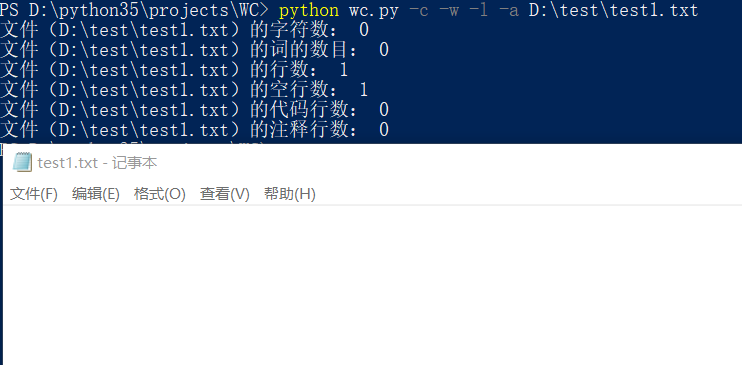
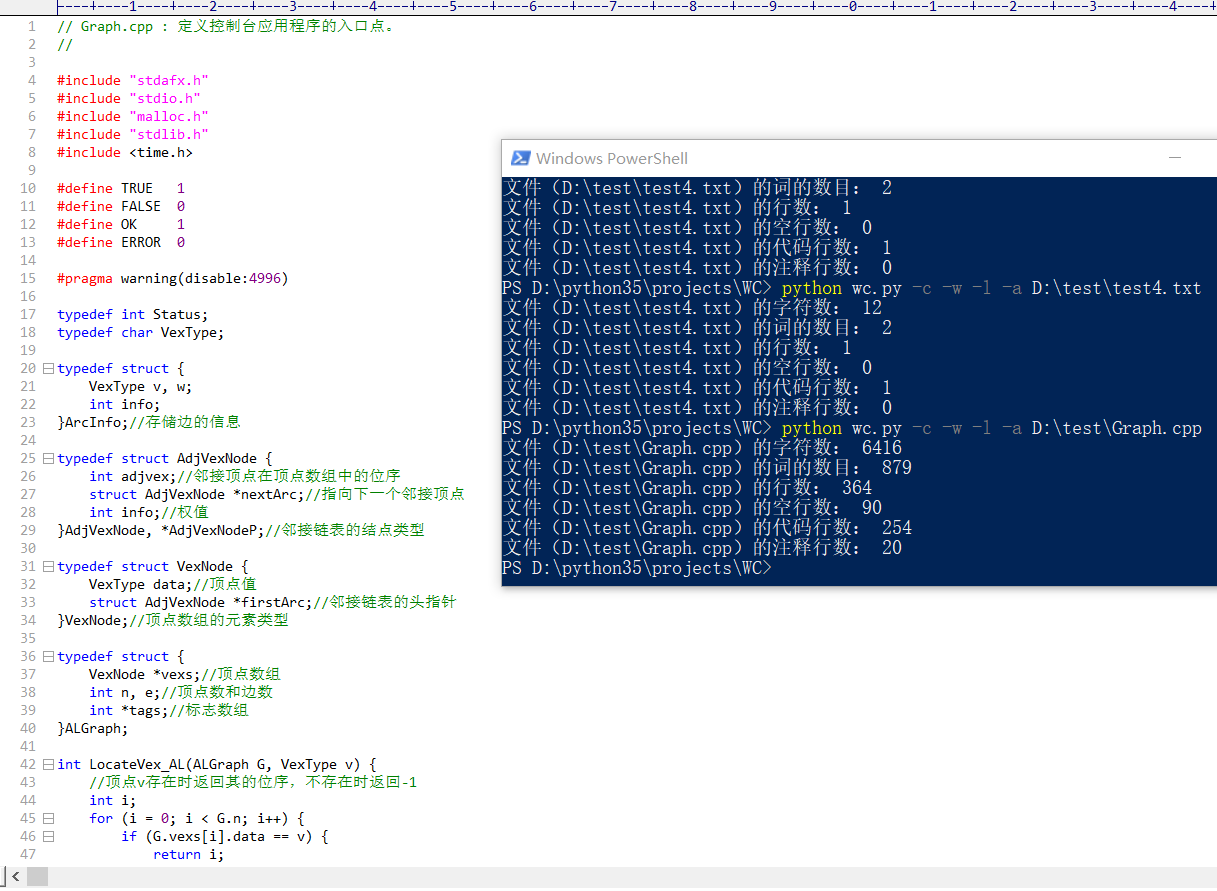
空文件测试:
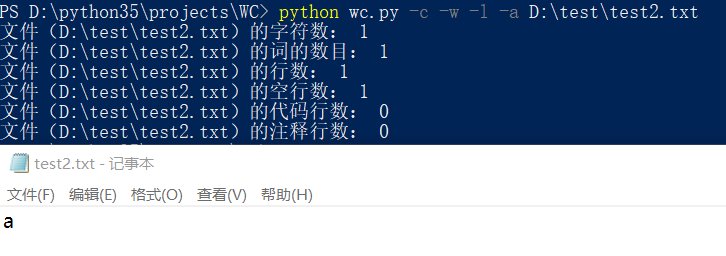
只有一个字符的文件:
只有一个词的文件:
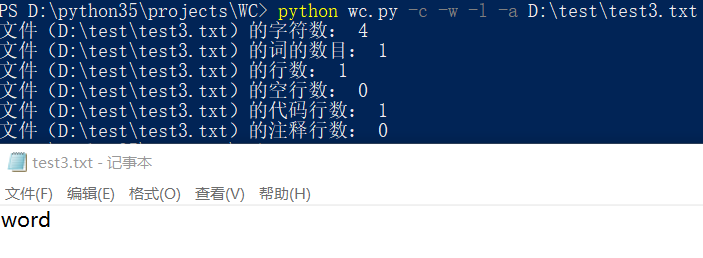
只有一行的文件:
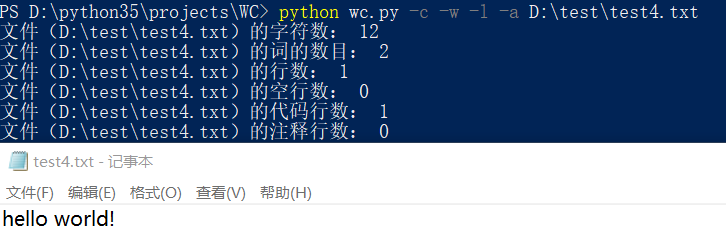
一个典型的源文件:
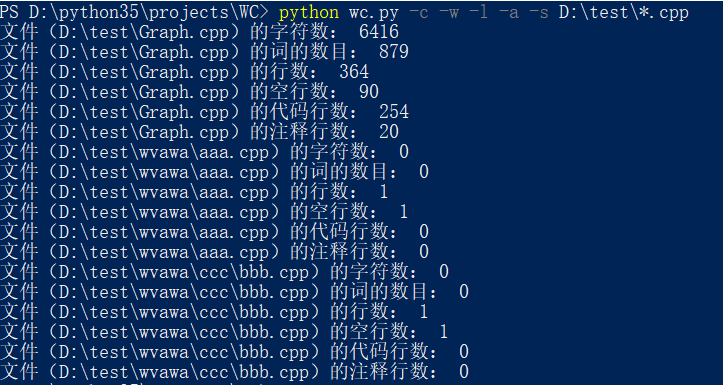
-a 命令和通配符测试:
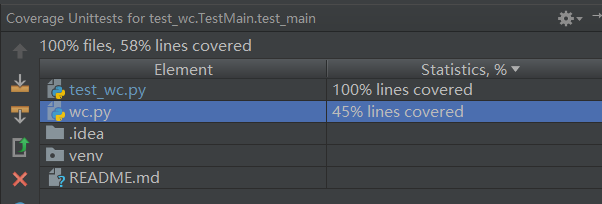
代码覆盖率:
PSP
| PSP2.1 | Personal Software Process Stages | 预估耗时(分钟) | 实际耗时(分钟) |
|---|---|---|---|
| Planning | 计划 | 30 | 30 |
| · Estimate | · 估计这个任务需要多少时间 | 30 | 30 |
| Development | 开发 | 410 | 700 |
| · Analysis | · 需求分析 (包括学习新技术) | 30 | 60 |
| · Design Spec | · 生成设计文档 | 30 | 20 |
| · Design Review | · 设计复审 (和同事审核设计文档) | 15 | 10 |
| · Coding Standard | · 代码规范 (为目前的开发制定合适的规范) | 15 | 10 |
| · Design | · 具体设计 | 120 | 150 |
| · Coding | · 具体编码 | 120 | 300 |
| · Code Review | · 代码复审 | 20 | 30 |
| · Test | · 测试(自我测试,修改代码,提交修改) | 60 | 120 |
| Reporting | 报告 | 65 | 85 |
| · Test Report | · 测试报告 | 20 | 40 |
| · Size Measurement | · 计算工作量 | 15 | 15 |
| · Postmortem & Process Improvement Plan | · 事后总结, 并提出过程改进计划 | 30 | 30 |
| 合计 | 505 | 815 |
项目小结
从PSP表可以看出我在拿到这个题目之后低估了题目的难度,没有在计划和需求分析上花太多的时候,文档也没有太仔细看,所以开发前的设计文档不能很好的完成需求,导致后来基本处于一种边写代码边改结构的地步,开发效率大大降低,也因为经常改动代码所以bug很多。当然,也和自己开发时不是特别专注有关(边做其他事情边开发)
这次的项目让我了解到自己对于python并不是特别的熟练,对正则表达式的不熟悉也让我吃了很多亏。总体来说,这次经历受益匪浅,让我了解到了自己的不足,也让我知道做项目不能太急,要按流程合理地分配时间才能真正地提高开发效率和代码质量。
Python实现wc.exe的更多相关文章
- Python模拟wc命令(软件测试第二次作业)
Python实现字符,单词,行,代码行,空行及可视化 Gitee项目地址:https://gitee.com/biubiubiuLYQ/word_and_character_statistics 一. ...
- 软工作业No.1。Java实现WC.exe
网址:https://github.com/a249970271/WC WC 项目要求 wc.exe 是一个常见的工具,它能统计文本文件的字符数.单词数和行数.这个项目要求写一个命令行程序,模仿已有w ...
- 通过python实现wc基本功能
---恢复内容开始--- 1.Github项目地址: https://github.com/zhg1998/ww/blob/master/wc.py 2.项目相关要求: 写一个命令行程序,模仿已有wc ...
- python脚本生成exe可执行文件
1.先安装第三方插件: py2exe. Get py2exe from http://www.py2exe.org/ 在download里下载与自己python对应的版本 2.写一个测试python文 ...
- 打包python脚本为exe可执行文件-pyinstaller和cx_freeze示例
本文介绍使用cx_freeze和pyinstaller打包python脚本为exe文件 cx_freeze的使用实例 需要使用到的文件wxapp.py, read_file.py, setup.py ...
- python打包成exe
目前有三种方法可以实现python打包成exe,分别为 py2exe Pyinstaller cx_Freeze 其中没有一个是完美的 1.py2exe的话不支持egg类型的python库 2.Pyi ...
- WC.exe【C】
gitee传送门!!!(电脑打不开github,多次尝试未果,决定先用gitee存着先) 项目要求 wc.exe 是一个常见的工具,它能统计文本文件的字符数.单词数和行数.这个项目要求写一个命令行程序 ...
- 小白のjava实现wc.exe功能
GitHub地址 项目完成情况 基本功能列表(已实现) wc.exe -c file.c //返回文件 file.c 的字符数 wc.exe -w file.c //返回文件 file. ...
- 模仿WC.exe的功能实现--node.js
Github项目地址:https://github.com/102derLinmenmin/myWc WC 项目要求 wc.exe 是一个常见的工具,它能统计文本文件的字符数.单词数和行数.这个项目要 ...
随机推荐
- 深入浅出K-Means算法
在数据挖掘中,K-Means算法是一种cluster analysis的算法,其主要是来计算数据聚集的算法,主要通过不断地取离种子点最近均值的算法. 问题 K-Means算法主要解决的问题如下图所示. ...
- 把OnDraw和OnPaint弄清楚(转贴)
OnDraw()和OnPaint()兄弟 经常有朋友问雷神这样的问题:我在视图画的图象或者文字,当窗口改变后为什么不见了?OnDraw()和OnPaint()两个都是解决上面的问题,有什么不同? 雷神 ...
- 【转】学习使用Jmeter做压力测试(一)--压力测试基本概念
一.性能测试的概念 性能测试是通过自动化的测试工具模拟多种正常峰值及异常负载条件来对系统的各项性能指标进行测试.负载测试和压力测试都属于性能测试,两者可以结合进行. 通过负载测试,确定在各种工作负载下 ...
- PTA 最大子列和问题(10 分)
最大子列和问题(10 分) 给定K个整数组成的序列{ N1, N2, ..., NK },“连续子列”被定义为{ Ni, Ni+1, ..., Nj },其中 1≤ ...
- PHP定时任务Crontab结合CLI模式详解
从版本 4.3.0 开始,PHP 提供了一种新类型的 CLI SAPI(Server Application Programming Interface,服务端应用编程端口)支持,名为 CLI,意为 ...
- python学习(九) 魔法方法、属性和迭代器
9.1 准备工作 python 3.0的所有类都会隐式地成为object的子类. 9.2 构造方法 在python中创建一个构造方法:只要把init方法的名字修改为魔法版本__init__即可. &g ...
- Py修行路 python基础 (九)作用域 函数嵌套 闭包
名称空间与作用域 变量,函数 分成三种 #内置名称空间 内置函数, 系统函数内部自定义的. python查看内置函数,命令: import builtins dir(builtins) #全局名称空 ...
- windows下使用nginx
本文介绍如何在windows下使用nginx 起步 下载安装 将nginx安装成windows服务 常用命令 构建服务 静态服务 代理服务器 http配置文件转移 负载均衡 负载均衡配置 负载均衡方法 ...
- Maven整合SSM框架——详细整合教程(Spring+SpringMVC+MyBatis)
使用SSM(Spring.SpringMVC和Mybatis)已经有三个多月了,项目在技术上已经没有什么难点了,基于现有的技术就可以实现想要的功能,当然肯定有很多可以改进的地方.之前没有记录SSM整合 ...
- Bootstrap 学习资料
1.Bootstrap中文文档 2.Bootstrap3.1.1 DEMO 3.Bootstrap教程 4.Sco.js--Bootstrap javascript组件的增强版 如果,您认为阅读这篇博 ...