
ASP.NET 5 Middleware, Or Where Has My HttpModule Gone?
31 March 2015 13:22
ASP.NET 5 has been largely rewritten from the ground up, and incorporates some radical changes when compared with previous versions of ASP.NET. One of the biggest changes is in the HTTP Pipeline. This article looks at how those changes impact the design and registration of plug and play components that used to be represented by HttpModules.
HttpModules act as request filters in ASP.NET versions prior to 5. They are reusable units of code that can be plugged into the request pipeline, and tasked with responding to events defined in the HttpApplication class as they are fired. The kind of things that modules are used for include managing authentication, global error handling and logging. Traditional forms authentication is implemented as a module, and I have written about using ELMAH, a component that logs details of unhandled exceptions, which is impemented as an HttpModule. Modules can also be used to intercept and modify the outbound response to remove white space or compress it, for example. Modules implement the IHttpModule interface, which is defined in System.Web, and that library is not part of the new ASP.NET.
HttpModule code can either be added to the relevant event handler in Global.asax, or more usually, created as class libraries and registered with the application in the web.config file.
What Is Middleware?
The definition of "Middleware" varies widely depending on its context, but in relation to ASP.NET 5, the definition provided by the OWIN specification is probably closest:
Pass through components that form a pipeline between a server and application to inspect, route, or modify request and response messages for a specific purpose.
That's also pretty much the description of traditional HttpModules and their kin, HttpHandlers.
Access to the request pipeline in an ASP.NET 5 application is provided in the Startup class (Startup.cs file), which is the entry point to the application itself. The Startup class includes a Configure method which takes anIApplicationBuilder type as a parameter. The IApplicationBuilder interface, an instance of which is represented by the parameter app, provides a number of extension methods by which components can be plugged in to the request pipeline. The major difference between this and the previous implementation of the HTTP pipeline is that the event-driven approach has been replaced with a composable model. In the new ASP.NET, the order in which components are added is important. The Beta 3.0 MVC Starter site template has some components added with comments that explain their purpose:
// Add static files to the request pipeline.

app.UseStaticFiles();

// Add cookie-based authentication to the request pipeline.

app.UseIdentity();

// Add MVC to the request pipeline.

app.UseMvc(routes =>

{

    routes.MapRoute(

        name: "default",

        template: "{controller}/{action}/{id?}",

        defaults: new { controller = "Home", action = "Index" });

    // Uncomment the following line to add a route for porting Web API 2 controllers.

    // routes.MapWebApiRoute("DefaultApi", "api/{controller}/{id?}");

});
The methods by which Identity, MVC and static files management are added to the pipeline are extension methods on the IApplicationBuilder type. When adding the middleware that will be built in this article, I will also create an extension method for adding it to the pipeline.
The Example Middleware
The example middleware that I shall create will do two things: it will measure the time taken to process the request and it will add the value to both the outgoing html and as a custom response header. That might be three things. Anyhoo, the example will feature two of the most common scenarios illustrated in the plethora of existing "Build your own HttpModule" tutorials on the Internet - modifying the response output and adding headers. The code for the middleware class is as follows:
using Microsoft.AspNet.Builder;

using Microsoft.AspNet.Http;

using System.Diagnostics;

using System.IO;

using System.Threading.Tasks;

namespace WebApplication1.MiddleWare

{

    public class MyMiddleware

    {

        RequestDelegate _next;

        public MyMiddleware(RequestDelegate next)

        {

            _next = next;

        }

        public async Task Invoke(HttpContext context)

        {

            var sw = new Stopwatch();

            sw.Start();

            using (var memoryStream = new MemoryStream())

            {

                var bodyStream = context.Response.Body;

                context.Response.Body = memoryStream;

                await _next(context);

                var isHtml = context.Response.ContentType?.ToLower().Contains("text/html");

                if (context.Response.StatusCode == 200 && isHtml.GetValueOrDefault())

                {

                    {

                        memoryStream.Seek(0, SeekOrigin.Begin);

                        using (var streamReader = new StreamReader(memoryStream))

                        {

                            var responseBody = await streamReader.ReadToEndAsync();

                            var newFooter = @"<footer><div id=""process"">Page processed in {0} milliseconds.</div>";

                            responseBody = responseBody.Replace("<footer>", string.Format(newFooter, sw.ElapsedMilliseconds));

                            context.Response.Headers.Add("X-ElapsedTime", new[] { sw.ElapsedMilliseconds.ToString() });

                            using (var amendedBody = new MemoryStream())

                            using (var streamWriter = new StreamWriter(amendedBody))

                            {

                                streamWriter.Write(responseBody);

                                amendedBody.Seek(0, SeekOrigin.Begin);

                                await amendedBody.CopyToAsync(bodyStream);

                            }

                        }

                    }

                }

            }

        }

    }

}
A private field of type RequestDelegate is declared. This is used to store the RequestDelegate that is passed in to the constructor that takes a RequestDelegate. A RequestDelegate is a function that takes an HttpContextinstance and returns a Task:
public delegate Task RequestDelegate(HttpContext context);
The HttpContext object is similar to the one found in previous versions of ASP.NET in that it provdes access to the request and response etc, but it is a different animal altogether and much, much slimmer.
In ASP.NET 5, middleware is an instance of Func<RequestDelegate, RequestDelegate> - a delegate that takes aRequestDelegate as a parameter and returns a RequestDelegate. And as described above, the RequestDelegateis a function that returns a function, and it is in this way that the pipeline is built, with each piece of middleware being chained to the next and responsible for passing the processing on to the next in line (if appropriate).
The Invoke method is a convention-based method in that the runtime looks for a method with that name and will call it. It is where the action happens within your middleware, and it is where you pass control on to the next component in the pipeline if appropriate. Sometimes you won't want to pass control on - you will want to halt execution of the pipeline altogether, if, for example, you are writing a custom authentication middleware that determines that the current user should proceed no further. Control is passed to the next component by callingawait _next(context). Code that you place before this call is executed, and in this example that code creates aStopwatch instance and starts it. The code also gets a reference to the response content, which is implemented as a stream. Then the next component is called, which in turn calls the next component and so on. Then control is passed back up the chain of components and any code that has been added after the await _next(context) call is executed. It is in that block of code in this example that the response body is modified to include some HTML to display the elapsed time in milliseconds somewhere in the footer region of the page. At the same time, a custom header is added with the elapsed time as its value.
Plugging into the pipeline
The next step is to plug the component into the pipeline. As I mentioned earlier, this is achieved via an extension method on the IApplicationBuilder type:
using Microsoft.AspNet.Builder;

namespace ASPNET5Test.MiddleWare

{

    public static class BuilderExtensions

    {

        public static IApplicationBuilder UseMyMiddleware(this IApplicationBuilder app)

        {

            return app.UseMiddleware<MyMiddleware>();

        }

    }

}
The result is a wrapper around the existing UseMiddleware<T> extension method (currently found in theMicrosoft.AspNet.Builder namespace - hence the using directive) into something a little prettier.
Finally, the extension method is called in the Configure method of the Startup class:
public void Configure(IApplicationBuilder app, IHostingEnvironment env, ILoggerFactory loggerfactory)

{

    app.UseMyMiddleware();

    // etc
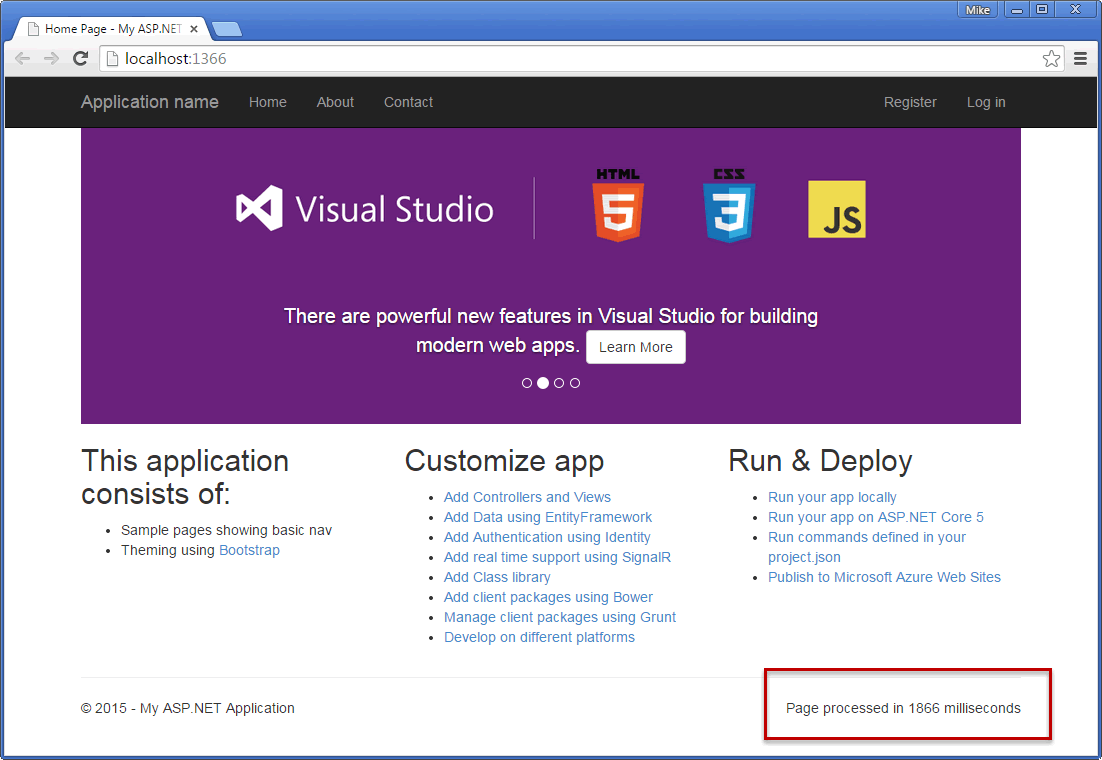
When the site is run for the first time, the processing time takes a while - just under two seconds in this image - and is printed to the bottom of the screen (with a little CSS assistance):
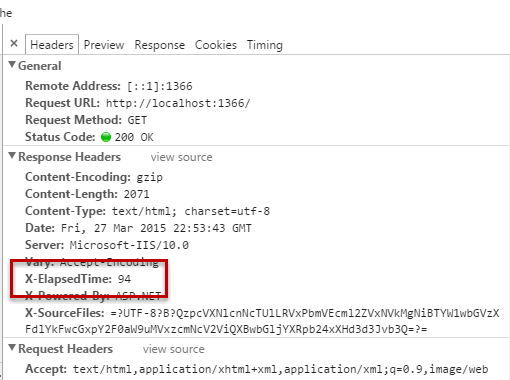
And the developer tools in Chrome provide an easy way to confirm that the custom header was added:
Summary
In this article, I introduced the ASP.NET5 replacement to traditional HttpModules and showed how to create one and plug it in to the application pipeline. This article is based on Beta 3 of ASP.NET 5 and the concepts illustrated here are subject to change. I will endeavour to keep the article current in line with future releases.
ASP.NET 5 Middleware, Or Where Has My HttpModule Gone?的更多相关文章
- ASP.NET Core Middleware 抽丝剥茧
一. 宏观概念 ASP.NET Core Middleware是在应用程序处理管道pipeline中用于处理请求和操作响应的组件. 每个组件是pipeline 中的一环. 自行决定是否将请求传递给下一 ...
- ASP.NET Core Middleware (转载)
What is Middleware? Put simply, you use middleware components to compose the functionality of your A ...
- Prerender Application Level Middleware - ASP.NET Core Middleware
In the previous post Use Prerender to improve AngularJS SEO, I have explained different solutions at ...
- [ASP.NET Core] Middleware
前言 本篇文章介绍ASP.NET Core里,用来处理HTTP封包的Middleware,为自己留个纪录也希望能帮助到有需要的开发人员. ASP.NET Core官网 结构 在ASP.NET Core ...
- ASP.NET Core Middleware管道介绍
public void Configure(IApplicationBuilder app, IHostingEnvironment env) { app.Use(async (context, ne ...
- ASP.NET WebAPI框架解析第二篇(HttpModule的创建和使用)
我们先看一下执行流程图 图中画红圈的部分便是HttpModule,在说创建HttpModule之前,先说一下HttpApplication对象,HttpApplication对象由Asp.net框架创 ...
- ASP.NET Core中Middleware的使用
https://www.cnblogs.com/shenba/p/6361311.html ASP.NET 5中Middleware的基本用法 在ASP.NET 5里面引入了OWIN的概念,大致意 ...
- Prerender Application Level Middleware - ASP.NET HttpModule
In the previous post Use Prerender to improve AngularJS SEO, I have explained different solutions at ...
- 翻译 - ASP.NET Core 基本知识 - 中间件(Middleware)
翻译自 https://docs.microsoft.com/en-us/aspnet/core/fundamentals/middleware/?view=aspnetcore-5.0 中间件是集成 ...
随机推荐
- Servlet概念入门
什么是Servlet Servlet 为创建基于 web 的应用程序提供了基于组件.独立于平台的方法,可以不受 CGI 程序的性能限制.Servlet 有权限访问所有的 Java API,包括访问企业 ...
- 浪潮各机型管理芯片BMC IP(智能平台管理接口)设置
NF5240m3/NF5140m3/NF5280m3/SA5212H2/NP5540M3NF5270M3/NF5170M3/NF8420m3 IPMI主板集成管理芯片BMC IP 设置开机按DEL键进 ...
- android Shape使用(转)
在Android中常常会使用shape来定义控件的一些显示属性,那么怎么来用那,今天我们就来看一些shape的使用,大家看完这篇以后就会对shape有了大体的了解,下面的是稍作总结请大家仔细的观看: ...
- ubuntu下安装ros出现“无法下载-package.ros.org中某个包-校验和不符”的解决方法
新安装的Ubuntu14.04,为了科研马上准备装ros indigo,却困难重重,一步一个坎. 比如说按照ros wiki里面一步一步来,当运行sudoapt-get update 然后出现下列情况 ...
- java图形用户界面添加图片的代码
package com.aa; import java.awt.Component; import javax.swing.ImageIcon; import javax.swing.JPanel; ...
- bootstrap-datetimepicker如何只显示到日期
bootstrap-datetimepicker 一般都是设置到时分秒,有时候并不需要,怎么处理呢? minView: "month", //选择日期后,不会再跳转去选择时分秒 1 ...
- 转载:Oracle RAC日常基本维护命令
本文转载自: https://blog.csdn.net/tianlesoftware/article/details/5358573 Oracle RAC日常基本维护命令 好文转载, Oracle ...
- python开发模块基础:正则表达式
一,正则表达式 1.字符组:[0-9][a-z][A-Z] 在同一个位置可能出现的各种字符组成了一个字符组,在正则表达式中用[]表示字符分为很多类,比如数字.字母.标点等等.假如你现在要求一个位置&q ...
- python学习(十) 自带电池
10.1 模块 >>> import math >>> math.sin(0) 0.0 10.1.1 模块是程序 假设自己写的hello.py放在c:\python ...
- Java面试(二)
1 同步方法 VS 同步代码块: java中,每一个对象都有一把锁,线程用synchronized获取对象上的锁. 非静态同步方法:锁是类的对象的锁. 静态同步方法:锁的是类本身. 同步方法块:锁是可 ...