
stm32+lwip(五):以太网帧发送测试
我是卓波,很高兴你来看我的博客。
系列文章:
stm32+lwip(一):使用STM32CubeMX生成项目
很多时候,我们想直接获取以太网帧的数据或者直接发送以太网帧数据。在使用STM32CubeMX生成的工程当中,有两个函数就是直接跟以太网通信有关:
 /**

  * This function should do the actual transmission of the packet. The packet is

  * contained in the pbuf that is passed to the function. This pbuf

  * might be chained.

  *

  * @param netif the lwip network interface structure for this ethernetif

  * @param p the MAC packet to send (e.g. IP packet including MAC addresses and type)

  * @return ERR_OK if the packet could be sent

  *         an err_t value if the packet couldn't be sent

  *

  * @note Returning ERR_MEM here if a DMA queue of your MAC is full can lead to

  *       strange results. You might consider waiting for space in the DMA queue

  *       to become availale since the stack doesn't retry to send a packet

  *       dropped because of memory failure (except for the TCP timers).

  */

 static err_t low_level_output(struct netif *netif, struct pbuf *p)
 /**

  * Should allocate a pbuf and transfer the bytes of the incoming

  * packet from the interface into the pbuf.

  *

  * @param netif the lwip network interface structure for this ethernetif

  * @return a pbuf filled with the received packet (including MAC header)

  *         NULL on memory error

    */

 static struct pbuf * low_level_input(struct netif *netif)
这两个函数就是实现与以太网的通信,本来需要我们自己实现。现在STM32CubeMX已经帮我们实现好,因此收发以太网数据可以通过调用或修改这两个函数实现。
发送测试
 /**

   *****************************************************************************

   * @file    ethernet_test.c

   * @author  Zorb

   * @version V1.0.0

   * @date    2018-09-04

   * @brief   以太网帧数据发送与接收测试的实现

   *****************************************************************************

   * @history

   *

   * 1. Date:2018-09-04

   *    Author:Zorb

   *    Modification:建立文件

   *

   *****************************************************************************

   */

 #include "stm32f4xx_hal.h"

 #include "lwip.h"

 /******************************************************************************

  * 描述  : 以太网帧发送测试1

  * 参数  : 无

  * 返回  : 无

 ******************************************************************************/

 void ethernet_sendtest1(void)

 {

     uint8_t frame_data[] =

     {

         /* 以太网帧格式 */

         0x50,0xFA,0x84,0x15,0x3C,0x3C,                            /* 远端MAC */

         0x0,0x80,0xE1,0x0,0x0,0x0,                                /* 本地MAC */

         0x8,0x0,                                                  /* ip类型 */

         0x45,0x0,0x0,0x26/*l*/,0x0,0x0,0x0,0x0,0xFF,0x11,0x0,0x0, /* UDP报头 */

         0xC0,0xA8,0x2,0x8,                                        /* 本地IP */

         0xC0,0xA8,0x2,0xC2,                                       /* 远端IP */

         0x22,0xB0,                                                /* 本地端口 */

         0x22,0xB1,                                                /* 远端端口 */

         0x0,0x12,                                                 /* UDP长度 */

         0x0,0x0,                                                  /* UDP校验和 */

         0x68,0x65,0x6C,0x6C,0x6F,0x20,0x7A,0x6F,0x72,0x62         /* 数据 */

     };

     struct pbuf *p;

     /* 分配缓冲区空间 */

     p = pbuf_alloc(PBUF_TRANSPORT, 0x26 + , PBUF_POOL);

     if (p != NULL)

     {

         /* 填充缓冲区数据 */

         pbuf_take(p, frame_data, 0x26 + );

         /* 把数据直接通过底层发送 */

         gnetif.linkoutput(&gnetif, p);

         /* 释放缓冲区空间 */

         pbuf_free(p);

     }

 }

 /******************************************************************************

  * 描述  : 以太网帧发送测试2

  * 参数  : 无

  * 返回  : 无

 ******************************************************************************/

 void ethernet_sendtest2(void)

 {

     uint8_t dstAddr[] = {0x50,0xFA,0x84,0x15,0x3C,0x3C};         /* 远端MAC */

     uint8_t frame_data[] =

     {

         /* UDP帧格式 */

         0x45,0x0,0x0,0x26/*l*/,0x0,0x0,0x0,0x0,0xFF,0x11,0x0,0x0, /* UDP报头 */

         0xC0,0xA8,0x2,0x8,                                        /* 本地IP */

         0xC0,0xA8,0x2,0xC2,                                       /* 远端IP */

         0x22,0xB0,                                                /* 本地端口 */

         0x22,0xB1,                                                /* 远端端口 */

         0x0,0x12,                                                 /* UDP长度 */

         0x0,0x0,                                                  /* UDP校验和 */

         0x68,0x65,0x6C,0x6C,0x6F,0x20,0x7A,0x6F,0x72,0x62         /* 数据 */

     };

     struct pbuf *p;

     /* 分配缓冲区空间 */

     p = pbuf_alloc(PBUF_TRANSPORT, 0x26, PBUF_POOL);

     if (p != NULL)

     {

         /* 填充缓冲区数据 */

         pbuf_take(p, frame_data, 0x26);

         /* 把数据进行以太网封装,再通过底层发送 */

         ethernet_output(&gnetif, p, (const struct eth_addr*)gnetif.hwaddr,

             (const struct eth_addr*)dstAddr, ETHTYPE_IP);

         /* 释放缓冲区空间 */

         pbuf_free(p);

     }

 }

 /******************************** END OF FILE ********************************/
gnetif.linkoutput和ethernet_output最终调用的还是low_level_output。
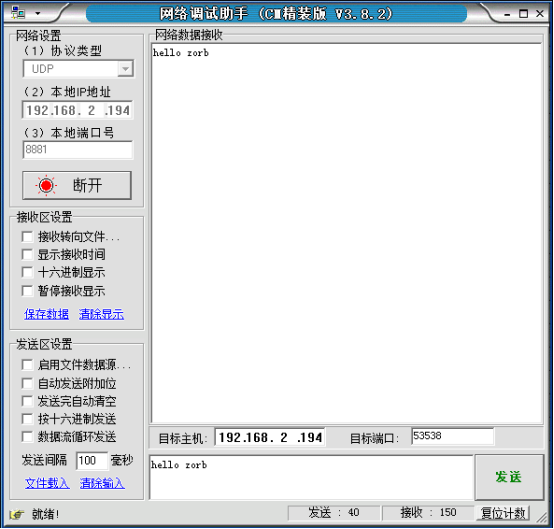
上面测试的数据包是给IP:192.168.2.194端口:8881发送”hello zorb”数据,网络调试助手能正确收到数据:
最后
本文主要介绍了怎样发送以太网帧数据,当能给网络发送任意数据,就可以做一些有趣的事情。
github:https://github.com/54zorb/stm32-lwip
版权所有,转载请打赏哟
如果你喜欢我的文章,可以通过微信扫一扫给我打赏哟

stm32+lwip(五):以太网帧发送测试的更多相关文章
- stm32+lwip(三):TCP测试
我是卓波,很高兴你来看我的博客. 系列文章: stm32+lwip(一):使用STM32CubeMX生成项目 stm32+lwip(二):UDP测试 stm32+lwip(三):TCP测试 stm32 ...
- stm32+lwip(二):UDP测试
我是卓波,很高兴你来看我的博客. 系列文章: stm32+lwip(一):使用STM32CubeMX生成项目 stm32+lwip(二):UDP测试 stm32+lwip(三):TCP测试 stm32 ...
- stm32+lwip(四):网页服务器测试
我是卓波,很高兴你来看我的博客. 系列文章: stm32+lwip(一):使用STM32CubeMX生成项目 stm32+lwip(二):UDP测试 stm32+lwip(三):TCP测试 stm32 ...
- stm32+lwip(一):使用STM32CubeMX生成项目
我是卓波,很高兴你来看我的博客. 系列文章: stm32+lwip(一):使用STM32CubeMX生成项目 stm32+lwip(二):UDP测试 stm32+lwip(三):TCP测试 stm32 ...
- IFG以太网帧间隙
交换机的线速 描述交换机性能可以使用“线速”这个概念,那它是什么意思呢?所谓的线速是指经过交换机处理的理想状态下最大数据率.描述数据率可以用bps(bit per second)和mpps(milli ...
- RFC2889错误帧过滤测试----网络测试仪实操
一.简介 RFC 2889为LAN交换设备的基准测试提供了方法学,它将RFC 2544中为网络互联设备基准测试所定义的方法学扩展到了交换设备,提供了交换机转发性能(Forwarding Perform ...
- RFC2899广播帧转发测试——网络测试仪实操
一.简介 RFC 2889为LAN交换设备的基准测试提供了方法学,它将RFC 2544中为网络互联设备基准测试所定义的方法学扩展到了交换设备,提供了交换机转发性能(Forwarding Perform ...
- s4-5 以太网帧
以太网所处的层次 IEEE 802.3/以太网MAC子层协议 IEEE802.3协议描述了运行在各种介质上1 Mb/s~10 Mb/s的1- 持续CSMA/CD协议的局域网标准. 很多人对以太 ...
- # 第五周课下测试(ch03)补交
第五周课下测试(ch03)补交 1.( 多选题 | 1 分) 有关gdb调试汇编,下面说法正确的是() A . 可以用disas反汇编当前函数 B . 以16进制形式打印%rax中内容的命令是 pri ...
随机推荐
- visual studio 调试 不进断点 断点失效 提示当前不会命中该断点等问题解决
1.首先看一下 当前调试模式是否为debug 2. 点击[调试]>[选项和设置] 将[要求源文件与原始文件完全匹配]勾选掉 3.点击调试的最后一个选项 点击[web] 将调试器内部勾选上需要测 ...
- IEEP-网络设计
IEEP-网络设计 网络设计概述 网络设计概述 1.负责把网络规划阶段获得的客户需求运用技术手段予以规范化体现 2.网络设计一般遵循模块化指导方针,分模块进行设计 3.网络设计的输出成果必须是规范的. ...
- adb工具包使用方法
ADB工具包总共有四个文件,两个exe后缀,两个dll后缀.里面还带有fastboot.exe下载后在PC上安装,如安装到D:\adb_tools-2.0目录,确认目录中带有fastboot.exe文 ...
- 异常:org.hibernate.id.IdentifierGenerationException
在有关联关系的数据表中保存数据时,先保存一端,再保存多端的抛出的异常(此时不管一端,还是多端的对象都没有设置id,属性,也就是要保存的两个对象的id 属性为空.) org.hibernate.id.I ...
- auto create statistic script
--生成用户创建的statistic脚本 select object_name(stout.object_id), stout.name, 'CREATE STATISTICS '+ stout.na ...
- 动态规划(DP),递推,最大子段和,POJ(2479,2593)
题目链接:http://poj.org/problem?id=2479 解题报告: 1.再求left[i]的时候,先没有考虑a[i]的正负,先把a[i]放到left[i]中,然后left=max(le ...
- Redux概念简述
react可以写出一些比较简单的一些项目,但是只能写出很简单的一些项目,原因是什么呢,原因是react是一个非常轻量级的是视图层框架,打开官网可以看到大大的一行字,A JavaScript libra ...
- pinyin4j工具类
<!-- 导入pinyin4j --> <dependency> <groupId>com.belerweb</groupId> <artifac ...
- Batch Normalization:Accelerating Deep Network Training by Reducing Internal Covariate Shift(BN)
internal covariate shift(ics):训练深度神经网络是复杂的,因为在训练过程中,每层的输入分布会随着之前层的参数变化而发生变化.所以训练需要更小的学习速度和careful参数初 ...
- Java中获取classpath路径下的资源文件
ClassLoader 提供了两个方法用于从装载的类路径中取得资源: public URL getResource (String name); public InputStream getRes ...