
Python+Selenium-BDD框架之behave
(查看behave具体教程可以访问官网: http://pythonhosted.org/behave/)
1.安装behave
安装好python后,使用 pip install behave命令安装behave
2.简单实例
新建下面几个文件,文件结构如下
firstCase
firstCase/wordcheck.feature
firstCase/steps
firstCase/steps/wordcheck.py
wordcheck.feature的内容如下:
Feature: word check

  Scenario: Check letters

    Given I have a letter

    When I input letter y

    Then the inputed letter is Equal with y
wordcheck.py内容如下:
__author__ = 'Amy'

from behave import *

@Given('I have a letter')

def step_impl(context):

    pass

@When('I input letter {letter}')

def step_impl(context,letter):

    context.letter = letter

@Then('the inputed letter is Equal with {TargetLetter}')

def step_impl(context,TargetLetter):
    context.TargetLetter = TargetLetter

    assert context.letter is context.TargetLetter
3.在cmd里面运行
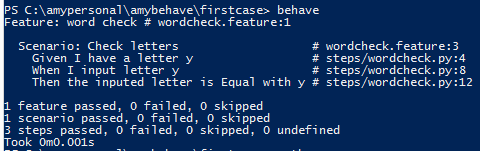
4.Scenario Outlines
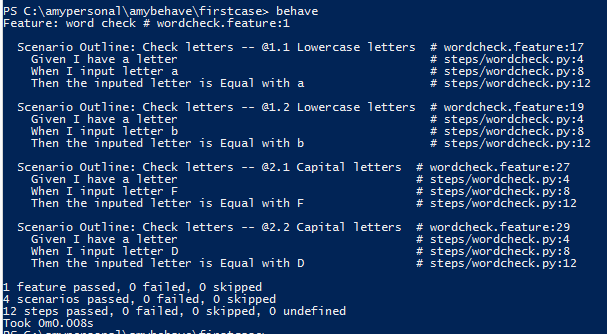
在测试同一个场景时,很多时候我们需要输入各种各样的数据来验证不同的结果输出,这时我们用Scenario Outlines就可以实现了。如下图分别输大小写字母来验证场景
Feature: word check

  Scenario Outline: Check letters

    Given I have a letter

    When I input letter <keyword>

    Then the inputed letter is Equal with <targetword>

   Examples: Lowercase letters

    |keyword|targetword|

    |a      |a         |

    |b      |b         |

    Examples: Capital letters

    |keyword|targetword|

    |F      |F         |

    |D      |D         |
结果如下:
5.使用table
在场景中可以一个表格作为context.table属性值,如下图在Given中加入表格:
Feature: show the table

  Scenario: some scenario

  Given a set of specific users

     | name      | department  |

     | Barry     | Beer Cans   |

     | Pudey     | Silly Walks |

     | Two-Lumps | Silly Walks |

 """
 This is a table,and this line will be displayed in result,it is context.text attribute
 """

 When we count the number of people in each department

 Then we will find two people in "Silly Walks"

  But we will find one person in "Beer Cans"
6.Environment.py
Environment.py是个非常重要的文件,放在feature文件夹下,与.feature文件并列。下面是Environment.py中定义的一些方法:
before_step(context, step), after_step(context, step)
These run before and after every step.
before_scenario(context, scenario), after_scenario(context, scenario)
These run before and after each scenario is run.
before_feature(context, feature), after_feature(context, feature)
These run before and after each feature file is exercised.
before_tag(context, tag), after_tag(context, tag)
These run before and after a section tagged with the given name. They are invoked for each tag encountered in the order they’re found in the feature file.
before_all(context), after_all(context)
These run before and after the whole shooting match.
下面是一个简单的例子,大家可以根据自己的需要定义方法:
# coding:utf-8

__author__ = 'Amy'

import sys

from behave import *

from selenium import webdriver

# 开始测试前,定义系统编码为utf-8

def before_all(context):

    reload(sys)

    sys.setdefaultencoding('utf-8')

def before_feature(context):

    context.driver = webdriver.Firefox()

def after_feature(context):

    context.driver.quit()
7.通过标签tag来控制测试执行
标签以@开头,如下示例:
Feature: find a look

  @valid

  Scenario: look up a book

   Given I search for a valid book

    Then the result page will include "success"

  @invalid

  Scenario: look up an invalid book

    Given I search for a invalid book

     Then the result page will include "failure"
执行的时候在behave 后面加上tag 标签即可,如我只测试“valid”这个场景,那么就输入“behave --tags=valid”.
如果你想执行若干个不同标签的场景,你可以这么写“behave --tags=valid,invalid”;
如果你想执行除了@invalid外的所有场景,你可以这么写“behave --tags=-invalid”;
如果你要执行标签包含了 “valid”和“invalid”两个签标的场景,你可以这么写“behave --tags=valid --tags=invalid”
当然,tags在py文件中也起作用,例如
def before_feature(context):

    if 'browser' in feature.tags:

        context.driver = webdriver.Firefox()

def after_feature(context):

    if 'browser' in feature.tags:

        context.driver.quit()
Python+Selenium-BDD框架之behave的更多相关文章
- python+selenium+unnittest框架
python+selenium+unnittest框架,以百度搜索为例,做了一个简单的框架,先看一下整个项目目录结构 我用的是pycharm工具,我觉得这个工具是天使,超好用也超好看! 这些要感谢原作 ...
- python+selenium之框架设计
一.自动化测试框架 1.什么是自动化测试框架 简单来说,自动化测试框架就是由一些标准,协议,规则组成,提供脚本运行的环境.自动化测试框架能够提供很多便利给用户高效完成一些事情,例如,结构清晰开发脚本, ...
- 从零开始到设计Python+Selenium自动化测试框架-如何开始
如何开始学习web ui自动化测试?如何选择一门脚本语言?选择什么自动化测试工具? 本人已经做测试快5年,很惭愧,感觉积累不够,很多测试都不会,三年多功能测试,最近两年才开始接触和学习自动化测试.打算 ...
- 《一头扎进》系列之Python+Selenium自动化测试框架实战篇6 - 价值好几K的框架,呦!这个框架还真牛叉哦!!!
1. 简介 本文开始介绍如何通过unittest来管理和执行测试用例,这一篇主要是介绍unittest下addTest()方法来加载测试用例到测试套件中去.用addTest()方法来加载我们测试用例到 ...
- BDD框架:behave学习记录
本人学习的时候基本上是按照behave的tutorial教程一步步学习的,这篇文章就当Behave教程的翻译版吧(*^__^*) 嘻嘻--. 1 安装behave 安装好python后 ...
- python selenium --unittest 框架
转自:http://www.cnblogs.com/fnng/p/3300788.html 学习unittest 很好的一个切入点就是从selenium IDE 录制导出脚本.相信不少新手学习sele ...
- Python selenium自动化测试框架入门实战--登录测试案例
本文为Python自动化测试框架基础入门篇,主要帮助会写基本selenium测试代码又没有规划的同仁.本文应用到POM模型.selenium.unittest框架.configparser配置文件.s ...
- python+selenium 自动化测试框架-学习记录
本人小白一枚,想着把学习时的东西以博客的方式记录下来,文章中有不正确的地方请大佬多多指点!!共同学习 前期准备 安装python3.selenium.下载对应版本的webdriver:安装所需的第三 ...
- Eclipse+Python+Selenium自动化测试框架搭建
1.下载Eclipse:http://www.eclipse.org/downloads/ 2.下载JDK:http://www.oracle.com/technetwork/java/javaee/ ...
- python + selenium 自动化测试框架
分享一个网站自动化测试框架 结构如下: test_project|--logs|---pages |---register_page.py| |---base_page.py|---test ...
随机推荐
- vs2010 在win8附加进程调试小技巧
在win8 附加进程居然找不到 我要的是iis 名为HKFlight的web的进程(下面2个勾也勾上了,就是找不到它)(下图是管理员身份运行截图) 解决方法:打开vs2010 用管理员身份打开...其 ...
- 温故而知新:什么是wcf
1.什么是WCF.WCF是Windows Communication Fundation的缩写,是微软在.net 3.0 的时候引进的,用于开发可交互的分布式应用程序,是由微软发展的一组数据通信的应用 ...
- win7系统电脑显示windows副本不是正版怎么办
win7系统电脑显示windows副本,可以:在开始输入框中输入cmd——以管理员权限运行——在命令行中输入SLMGR -REARM,——重启.
- loj#6437. 「PKUSC2018」PKUSC(计算几何)
题面 传送门 题解 计算几何的东西我好像都已经忘光了-- 首先我们可以把原问题转化为另一个等价的问题:对于每一个敌人,我们以原点为圆心,画一个经过该点的圆,把这个圆在多边形内部的圆弧的度数加入答案.求 ...
- HDU6308-2018ACM暑假多校联合训练1011-Time Zone
题目大意就是给你UTC-8时区的时间 让你求对应时区的时间 哇 这个题 看似简单,但是一开始怎么都过不了啊 同学用自己写的read过了,后来看了一下各位大佬说改成分钟随便过,就随便过了 Problem ...
- Ping命令简单报错介绍
了解ABC类IP地址:网络.主机.子网.广播. ---------------------------- 学会ping: ping www.baidu.com 网络检测:ping某一主机可以正常启动! ...
- struts2的主要工作流程
struts2的框架结构图 struts2的主要工作流程: 1.客户端请求一个HttpServletRequest的请求,如在浏览器中输入http://localhost: 8080/bookcode ...
- checkbox的常见问题
1.在使用checkbox时,最好不要阻止他原有的事件,要利用它原有的事件进行控制 2.尽量使用label for属性,不要对input元素的父元素或者input本身绑定事件,这样不能有效的避免冒泡事 ...
- 【BZOJ4800】[CEOI2015 Day2]世界冰球锦标赛 (折半搜索)
[CEOI2015 Day2]世界冰球锦标赛 题目描述 译自 CEOI2015 Day2 T1「Ice Hockey World Championship」 今年的世界冰球锦标赛在捷克举行.\(Bob ...
- Reviewing notes 1.1 of Analytic geometry
Chapter 1 Vector Algebra ♦ Vector Space Vector and vector space A vector is described as a quantity ...