
从零教你在Linux环境下(ubuntu)如何编译hadoop2.4
问题导读:
1.如果获取hadoop src maven包?
2.编译hadoop需要装哪些软件?
3.如何编译hadoop2.4?
扩展:
编译hadoop为何安装这些软件?

本文链接
http://www.aboutyun.com/thread-8130-1-1.html
一、首先下载hadoop源码包
下载的方式还是比较多的
1.svn的方式
svn下载首先需要安装SVN,如果想尝试使用svn,可以参考源码管理、获取网络源码工具:TortoiseSVN使用手册,hadoop的svn下载地址点此
2.压缩包的方式
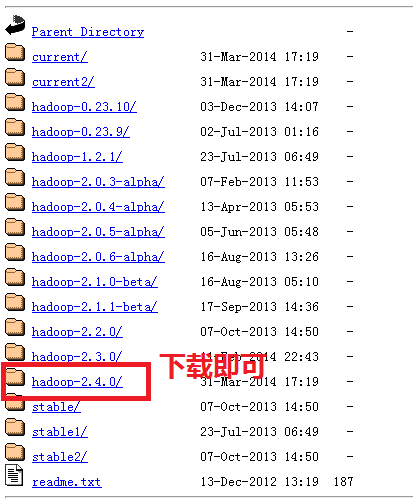
这里我们介绍一种压缩包的方式。
首先我们登录官网:
http://hadoop.apache.org/,我们找到下面链接,点进去下载即可。如果刚接触,不知道怎么下载,可以查看帖子新手指导:hadoop官网介绍及如何下载hadoop(2.4)各个版本与查看hadoop API介绍,里面介绍的很详细。
二、解压
- aboutyun@master:~$ tar zxvf hadoop-2.4.0-src.tar.gz
解压完毕,我们会看到相应的文件夹:

三、解压完毕,我们开始准备编译所需要的软件
这里软件的准备,很多文章写的都不全,这里整理一下。哪些软件是需要安装的。
这里需要说明的是有的Linux有自带的这些工具,这个需要仔细看一下版本是否匹配,不匹配则升级一下,有些不能升级,那么就重装一下吧
1、jdk的安装
步骤下载压缩包、解压、配置环境变量
(1)jdk下载
链接: http://pan.baidu.com/s/1jGr41SU 密码: rawv
(2)jdk解压
- tar zxvf jdk-7u51-linux-x64.tar.gz
然后重命令为:

(3)配置环境变量:
如下图所示红字部分为:(记得这里的路径改成自己的实际安装路径)
- /usr/jdk1.7/bin

(4)检验是否安装成功
2、maven的安装
- sudo apt-get install maven
我这里已经安装

上面可能还需要配置环境变量之类的,但是我这里没有好像是系统自带的,网上的资料也比较多,注意maven的版本,我这里是3.0.4,hadoop2.4需要maven的这个版本或则更高的版本3.2.1版本也是可以的。
验证安装是否成功
- mvn -version

3.protobuf的安装
(1)下载
- sudo wget https://protobuf.googlecode.com/files/protobuf-2.5.0.tar.gz
(2)解压
- tar zxvf protobuf-2.5.0.tar.gz
如下效果:

然后进入protobuf-2.5.0文件夹,进行如下操作:

- $ sudo ./configure
- $ sudo make
- $ sudo make check
- $ sudo make install
- $ sudo ldconfig
(3)验证
- protoc --version

4.安装openssl库
- sudo apt-get install libssl-dev
5.CMake安装
- sudo yum install cmake
或则
- sudo apt-get install cmake
6.ant安装
(1)首先下载ant
百度网盘: apache-ant-1.9.4-bin.tar.gz
http://pan.baidu.com/s/1c0vjhBy
或则下面链接:
apache-ant-1.9.4-bin.tar.gz
(2)解压
- tar zxvf apache-ant-1.9.4-bin.tar.gz
(3)配置环境变量
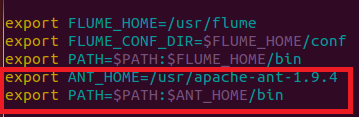
如下图所示:
1.打开profile
- sudo vi /etc/profile
2.添加下图红字部分,记得修改成自己的路径
3.生效
- source /etc/profile
4.检验
- ant -version

四、编译hadoop2.4
上面准备工作已经做的差不多了,我们终于可以开始,记得进入src文件夹下,输入下面命令
- mvn package -Pdist,native -DskipTests -Dtar

等了40多分钟,ok

在目录~/hadoop-2.4.0-src/hadoop-dist/target下有文件:
hadoop-2.4.0.tar.gz

更多内容:hadoop2.4汇总:hadoop2.4插件下载、完全分布式、伪分布、eclipse插件开发大全
问题总结:
这里还需要在补充:
1.遇到错误1:CMake没有安装
- [ERROR] Failed to execute goal org.apache.maven.plugins:maven-antrun-
- plugin:1.6:run (make) on project hadoop-common: An Ant BuildException has
- occured: Execute failed: java.io.IOException: Cannot run program "cmake" (in
- directory "/home/wyf/hadoop-2.0.2-alpha-src/hadoop-common-project/hadoop-
- common/target/native"): java.io.IOException: error=2, No such file or directory
- -> [Help 1]
- [ERROR]
- [ERROR] To see the full stack trace of the errors, re-run Maven with the -e
- switch.
- [ERROR] Re-run Maven using the -X switch to enable full debug logging.
- [ERROR]
- [ERROR] For more information about the errors and possible solutions, please
- read the following articles:
- [ERROR] [Help 1]
- http://cwiki.apache.org/confluence/display/MAVEN/MojoExecutionException
解决方法:
CMake没有安装
- sudo yum install cmake
或则使用
- sudo apt-get install cmake

2.遇到错误2:ant没有安装
- ERROR] Failed to execute goal org.codehaus.mojo.jspc:jspc-maven-plugin:2.0-
- alpha-3:compile (hdfs) on project hadoop-hdfs: Execution hdfs of goal
- org.codehaus.mojo.jspc:jspc-maven-plugin:2.0-alpha-3:compile failed: Plugin
- org.codehaus.mojo.jspc:jspc-maven-plugin:2.0-alpha-3 or one of its dependencies
- could not be resolved: Could not transfer artifact ant:ant:jar:1.6.5 from/to
- central (http://repo.maven.apache.org/maven2): GET request of:
- ant/ant/1.6.5/ant-1.6.5.jar from central failed: Read timed out -> [Help 1]
- [ERROR]
- [ERROR] To see the full stack trace of the errors, re-run Maven with the -e
- switch.
- [ERROR] Re-run Maven using the -X switch to enable full debug logging.
- [ERROR]
- [ERROR] For more information about the errors and possible solutions, please
- read the following articles:
- [ERROR] [Help 1]
- http://cwiki.apache.org/confluence/display/MAVEN/PluginResolutionException
- [ERROR]
- [ERROR] After correcting the problems, you can resume the build with the command
- [ERROR] mvn <goals> -rf :hadoop-hdfs
1.首先下载ant
百度网盘: apache-ant-1.9.4-bin.tar.gz
http://pan.baidu.com/s/1c0vjhBy
或则下面链接:
apache-ant-1.9.4-bin.tar.gz
2.解压
- tar zxvf apache-ant-1.9.4-bin.tar.gz
3.配置环境变量
记得配置环境变量
如下图所示:
1.打开profile
- sudo vi /etc/profile
2.添加下图红字部分,记得修改成自己的路径
3.生效
- source /etc/profile
4.检验
- ant -version
3.protobuf版本过低,错误现象
- [ERROR] Failed to execute goal org.apache.hadoop:hadoop-maven-plugins:2.4.0:prot
- oc (compile-protoc) on project hadoop-common: org.apache.maven.plugin.MojoExecut
- ionException: 'protoc --version' did not return a version -> [Help 1]
- [ERROR]
- [ERROR] To see the full stack trace of the errors, re-run Maven with the -e swit
- ch.
- [ERROR] Re-run Maven using the -X switch to enable full debug logging.
- [ERROR]
- [ERROR] For more information about the errors and possible solutions, please rea
- d the following articles:
- [ERROR] [Help 1] http://cwiki.apache.org/confluence/display/MAVEN/MojoExecutionE
- xception
- [ERROR]
- [ERROR] After correcting the problems, you can resume the build with the command
- [ERROR] mvn <goals> -rf :hadoop-common

hadoop2.4对应的版本是protobuf-2.5.0
解决办法:按照安装步骤中protobuf的安装即可
从零教你在Linux环境下(ubuntu)如何编译hadoop2.4的更多相关文章
- Linux环境下使用VSCode编译makefile文件的注意事项
Linux环境下使用VSCode编译makefile文件的注意事项 首先安装C/C++的两个依赖 在debug,launch会自动的生成下方的launch.json launch.json { // ...
- Linux环境下使用gcc编译,gdb反汇编C语言程序
使用虚拟机 VMware Workstation 10 Linux环境:Ubuntu 14.04 LTS Server amd64 我把过程截图如下. 首先是hello world程序: 备注: ...
- Linux 环境下使用g++编译C++
单个源文件生成可执行程序 下面是一个保存在文件 helloworld.cpp 中一个简单的 C++ 程序的代码: /* helloworld.cpp */ #include <iostream& ...
- 编写第一个Linux环境下程序的编译,下载记录
跟着韦东山学习Linux: 今天系统系统性的学了代码的编译下载,条记录一下: 一,代码:001_led_on.S,就把下面代码编译后Bin文件下载进2440处理器. /* * 点亮LED1: gpf4 ...
- Linux环境下的Nginx编译与安装
1.新建文件夹: mkdir -p /zuker cd /zuker 2.编译: yum -y install gcc-c++ make wget autoconf libjpeg libjpeg-d ...
- 多线程编程之Linux环境下的多线程(一)
一.Linux环境下的线程 相对于其他操作系统,Linux系统内核只提供了轻量级进程的支持,并未实现线程模型.Linux是一种“多进程单线程”的操作系统,Linux本身只有进程的概念,而其所谓的“线程 ...
- 教你如何在Kali Linux 环境下设置蜜罐?
导读 Pentbox是一个包含了许多可以使渗透测试工作变得简单流程化的工具的安全套件.它是用Ruby编写并且面向GNU/Linux,同时也支持Windows.MacOS和其它任何安装有Ruby的系统. ...
- PHP 命令行模式实战之cli+mysql 模拟队列批量发送邮件(在Linux环境下PHP 异步执行脚本发送事件通知消息实际案例)
源码地址:https://github.com/Tinywan/PHP_Experience 测试环境配置: 环境:Windows 7系统 .PHP7.0.Apache服务器 PHP框架:ThinkP ...
- linux 环境下运行STS时 出现must be available in order to run STS
linux 环境下运行ECLIPSE时 出现 “ A Java Runtime Environment (JRE) or Java Development Kit (JDK) must be avai ...
随机推荐
- 62. Unique Paths
题目: A robot is located at the top-left corner of a m x ngrid (marked 'Start' in the diagram below). ...
- Android TextView多行文本滚动实现
Android中我们为了实现文本的滚动可以在ScrollView中嵌入一个TextView,其实TextView自己也可以实现多行滚动的,毕竟ScrollView必须只能有一个直接的子类布局.只要在l ...
- Android Cursor空指针的问题
最近几天无聊自己动手写个音乐播放器,用到Cursor来取得数据库中音乐文件的信息,但是当用到Cursor的时候总是报空指针错误,后来发现是模拟器上没有音乐文件,使用Cursor的时候 ,若Cursor ...
- android休眠唤醒流程2
android系统一段时间没有操作, 屏幕(screen)将从高亮(bright)变为暗淡(dim),如果再过段时间还是没有操作,屏幕(screen)从暗淡(dim)变为关闭(off).这时,系 ...
- openfire开发
openfire github地址:https://github.com/igniterealtime/Openfire 1.下载源代码:http://www.igniterealtime.org/d ...
- java--面向接口编程
之前看的一本书的笔记,上周再看设计模式的时候,想到了这篇之前在看某本书时候的笔记. 面向接口编程很重要的一点就是接口回调,用接口声明的变量称作接口变量,属于引用型变量,可以存放实现该接口的类的实例的引 ...
- sdut 2351 In Danger (找规律)
题目:http://acm.sdut.edu.cn/sdutoj/problem.php?action=showproblem&problemid=2351 题意:xyez, xy表示一个十进 ...
- Asp.Net读写XML简单方法
xml文件 <?xml version="1.0" encoding="utf-8"?> <book> <title>web ...
- 图形数据库、NOSQL和Neo4j
简介 在众多不同的数据模型里,关系数据模型自80年代就处于统治地位,而且有不少实现,如Oracle.MySQL和MSSQL,它们也被称为关系数据库管理系统(RDBMS).然而,最近随着关系数据库使用案 ...
- HDU 5312 Sequence (规律题)
题意: 一个序列的第n项为3*n*(n-1)+1,而 n>=1,现在给一个正整数m,问其最少由多少个序列中的数组成? 思路: 首先,序列第1项是1,所以任何数都能构成了.但是最少应该是多少?对式 ...