
Jquery下拉框左右选择
1、说明
本文demo实现下拉框左右选择,本文地址:http://www.cnblogs.com/lengzhan/p/6423023.html
2、代码
<!DOCTYPE html PUBLIC "-//W3C//DTD XHTML 1.0 Transitional//EN" "http://www.w3.org/TR/xhtml1/DTD/xhtml1-transitional.dtd">

<html xmlns="http://www.w3.org/1999/xhtml">

<head>

    <meta http-equiv="Content-Type" content="text/html; charset=utf-8" />

    <title></title>

    <style type="text/css">

        .centent

        {

            width: 260px;

        }

        .cententl

        {

            float: left;

        }

        .btnAdd

        {

            float: left;

            padding:30px 5px;

        }

    </style>

    <script src="scripts/jquery.js" type="text/javascript"></script>

    <script type="text/javascript">

        $(function () {

            //移到右边

            $('#btnAdd').click(function () {

                //获取选中的选项,删除自己并追加给对方

                $('#select1 option:selected').appendTo('#select2');

            });

            //移到左边

            $('#btnDel').click(function () {

                //获取选中的选项,删除自己并追加给对方

                $('#select2 option:selected').appendTo('#select1');

            });

            //全部移到右边

            $('#btnAdds').click(function () {

                //获取全部的选项,删除自己并追加给对方

                $('#select1 option').appendTo('#select2');

            });

            //全部移到左边

            $('#btnDels').click(function () {

                //获取全部的选项,删除自己并追加给对方

                $('#select2 option').appendTo('#select1');

            });

            //双击选项

            $('#select1').dblclick(function () {

                //获取双击的选项,删除自己并追加给对方

                $("option:selected", this).appendTo('#select2');

            });

            //双击选项

            $('#select2').dblclick(function () {

                //获取双击的选项,删除自己并追加给对方

                $("option:selected", this).appendTo('#select1');

            });

        });

    </script>

</head>

<body>

    <div class="centent">

        <div class="cententl">

            <select multiple="multiple" id="select1" style="width: 100px; height: 160px;">

                <option value="1">课程1</option>

                <option value="2">课程2</option>

                <option value="3">课程3</option>

                <option value="4">课程4</option>

                <option value="5">课程5</option>

                <option value="6">课程6</option>

                <option value="7">课程7</option>

                <option value="8">课程8</option>

            </select>

        </div>

        <div class="btnAdd">

            <input type="button" id="btnAdd" value=" > " /><br />

            <input type="button" id="btnDel" value=" < " /><br />

            <input type="button" id="btnAdds" value=">>" /><br />

            <input type="button" id="btnDels" value="<<" />

        </div>

        <div>

            <select multiple="multiple" id="select2" style="width: 100px; height: 160px;">

            </select>

        </div>

    </div>

</body>

</html>
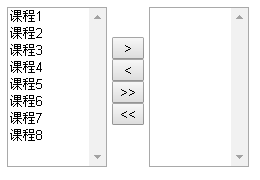
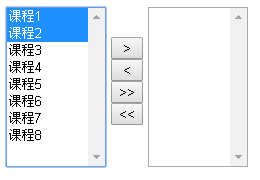

3、Demo
Jquery下拉框左右选择的更多相关文章
- jquery 下拉框左右选择
html <!DOCTYPE html> <html> <head> <meta charset="utf-8" /> <ti ...
- jquery 下拉框 收藏
jquery 下拉框 Query获取Select选择的Text和Value: 语法解释: 1. $("#select_id").change(function(){//code. ...
- 带搜索框的jQuery下拉框插件
由于下拉框的条数有几十个,于是打算找一个可以搜索查找功能的下拉框,刚开始在网上看了几个,都是有浏览器兼容性问题,后来看到这个“带搜索框的jQuery下拉框美化插件 searchable”,看演示代码简 ...
- Ajax jQuery下拉框联动案例
需求: 使用ajax和jQuery实现下拉框联动. 注意:需要加入jquery-2.1.1.min.js 前台 <!DOCTYPE html> <html> <head& ...
- JS年月日三级联动下拉框日期选择代码
<!DOCTYPE html PUBLIC "-//W3C//DTD XHTML 1.0 Transitional//EN" "http://www.w3.org/ ...
- jQuery下拉框操作系列$("option:selected",this) &&(锋利的jQuery)
jQuery下拉框操作系列$("option:selected",this) &&(锋利的jQuery) <!DOCTYPE html> <ht ...
- selenium 显示等待wait.until 常用封装 及下拉框的选择操作等
from selenium.webdriver.common.by import Byfrom selenium.webdriver.support.ui import WebDriverWait a ...
- 使用 JavaScript 中的 document 对象的属性,根据下拉框中选择的属性,更改页面中的字体颜色和背景颜色
查看本章节 查看作业目录 需求说明: 使用 JavaScript 中的 document 对象的属性,根据下拉框中选择的属性,更改页面中的字体颜色和背景颜色 实现思路: 在页面的 <body&g ...
- jQuery插件实现select下拉框左右选择_交换内容(multiselect2side)
效果图: 使用jQuery插件---multiselect2side做法: <!DOCTYPE html PUBLIC "-//W3C//DTD XHTML 1.0 Transitio ...
随机推荐
- Dos 改动IP 地址
1.改动 ip地址 子网掩码 默认网关 netsh interface ip set address "本地连接" static 192.168.1.23 255.255.255. ...
- hdu3076ssworld VS DDD 概率dp
//ssworld VS DDD 两个人有血量值 hp1 , hp2 //两人掷骰子得到每一点的概率已知 //ssword赢的概率 //dp[i][j] 表示有第一个人血量为i.第二个人的血量为j ...
- unity常见问题之20题
1:天空盒有接缝怎么解决? 答:在贴图导入设置里设置Wrap Mode为"Clamp". 2: DDS格式怎么不显示? 答:Unity不支持DDS格式,Unity会将除DDS外的其 ...
- 关于 underscore 中模板引擎的应用演示样例
//关于 underscore 中模板引擎的应用演示样例 <!doctype html> <html> <head> <meta charset=" ...
- 理解CSS中的BFC(块级可视化上下文)[译]
开篇 一些元素,如float元素,如position为absolute,inline-block,table-cell或table-caption的元素,以及overflow属性不为visible的元 ...
- python调用nmap进行扫描
#coding=utf-8 import nmap import optparse import threading import sys import re ''' 需安装python_nmap包, ...
- 设计模式学习笔记——Observer观察者模式
观察者模式里面有两个东西:观察者(Observer)和目标(Subject).当目标发生变化的时候,观察者随之起舞,也作出相应的变化.此为观察者模式. 这是怎么做到的?主要是目标里面存有一份观察者的名 ...
- BZOJ 3992: [SDOI2015]序列统计 快速幂+NTT(离散对数下)
3992: [SDOI2015]序列统计 Description 小C有一个集合S,里面的元素都是小于M的非负整数.他用程序编写了一个数列生成器,可以生成一个长度为N的数列,数列中的每个数都属于集合S ...
- liberOJ #2033. 「SDOI2016」生成魔咒 后缀数组
#2033. 「SDOI2016」生成魔咒 题目描述 魔咒串由许多魔咒字符组成,魔咒字符可以用数字表示.例如可以将魔咒字符 1 11.2 22 拼凑起来形成一个魔咒串 [1,2] [1, 2] ...
- Codeforces Round #422 (Div. 2) E. Liar 后缀数组+RMQ+DP
E. Liar The first semester ended. You know, after the end of the first semester the holidays beg ...