
【C# 基础应用】我的第一个App,不容易——随机生成小人网站,asp.net core
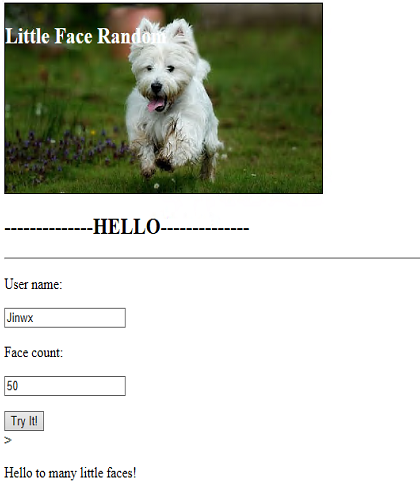
Index page
Welcome page
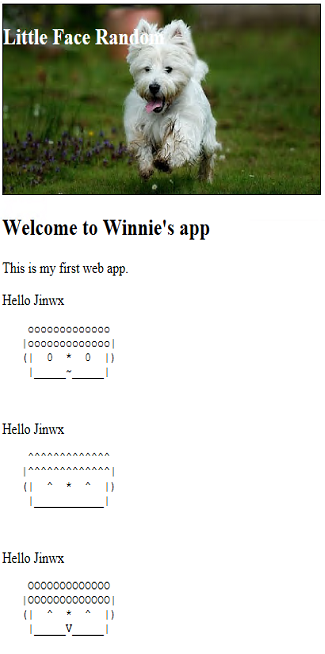
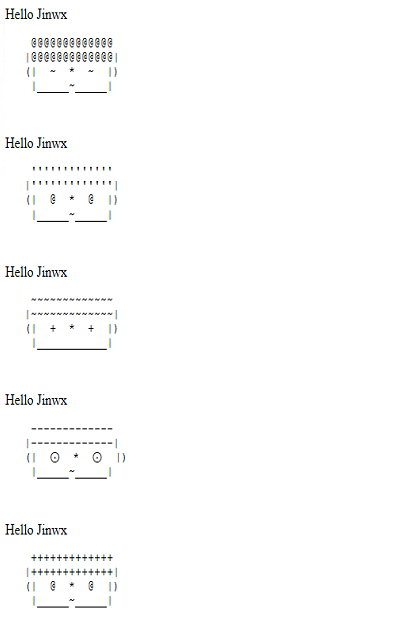
生成很多不同的小人哦~我是如何实现这么stupid but interesting的程序呢?我用了ASP.NET Core
画小人的话,用了一个很stupid的辅助类, 自己写的,小人脸宽21,然后鼻子占1,剩下的眼睛,鼻子,脸,耳朵,分分看。
 using System;

 using System.Collections.Generic;

 using System.Linq;

 using System.Text;

 using System.Threading;

 using System.Threading.Tasks;

 namespace game1.Controllers

 {

     public class DrawingHelper

     {

         public static string randomEye = @"-|@!~^+'o0O⊙";

         public static string randomMouth = @"_x*oO~DVv";

         public static string randomHair = randomEye + randomMouth;

         public static List<StringBuilder> Draw(int FaceCount)

         {

             int RowWidth = ;

             int hairWidth = ;

             string leftEar = "(";

             string rightEar = ")";

             string leftFace = "|";

             string nose = "*";

             var faces = new List<StringBuilder>();

             for (int t = ; t <= FaceCount; t++)

             {

                 StringBuilder sb = new StringBuilder();

                 string eye = GetRandomPart(randomEye, );

                 string mouth = GetRandomPart(randomMouth, );

                 string hairStyle = GetRandomPart(randomHair, );

                 DrawHair(RowWidth, hairWidth, hairStyle,sb);

                 DrawCartoon(leftEar, rightEar, leftFace, eye, nose, mouth,sb);

                 sb.Append("\n");

                 faces.Add(sb);

             }

             return faces;

         }

         private static void DrawHair(int RowWidth, int hairWidth, string hairStyle,StringBuilder sb)

         {

             StringBuilder hair = new StringBuilder();

             for (int i = ; i <= hairWidth - ; i++)

             {

                 hair.Append(hairStyle);

             }

             sb.AppendLine((" " + hair + " ").PadLeft((RowWidth - hairWidth) /  + hairWidth, ' '));

             sb.AppendLine(("|" + hair + "|").PadLeft((RowWidth - hairWidth) /  + hairWidth, ' '));

         }

         public static string GetRandomPart(string pwdchars, int pwdlen)

         {

             string tmpstr = "";

             int iRandNum;

             Thread.Sleep();

             long tick = DateTime.Now.Ticks;

             Random rnd = new Random((int)(tick & 0xffffffffL) | (int)(tick >> ));

             for (int i = ; i < pwdlen; i++)

             {

                 iRandNum = rnd.Next(pwdchars.Length);

                 tmpstr += pwdchars[iRandNum];

             }

             return tmpstr;

         }

         private static void DrawCartoon(string leftEar, string rightEar, string leftFace, string eye, string nose, string mouth, StringBuilder sb)

         {

             //Print left

             PrintLeftParts(leftEar, ,sb);

             PrintLeftParts(leftFace, ,sb);

             PrintLeftParts(eye, ,sb);

             PrintLeftParts(nose, ,sb);

             //Pring right

             PrintLeftParts(eye, , sb);

             PrintLeftParts(leftFace, ,sb);

             PrintLeftParts(rightEar, ,sb);

             //Print down face

             sb.AppendLine();

             PrintLeftParts(leftFace, ,sb);

             PrintLeftParts(mouth, ,sb,'_');

             PrintLeftParts(leftFace, , sb,'_');

             sb.AppendLine();

             sb.AppendLine();

         }

         static void PrintLeftParts(string organName, int leftPad, StringBuilder sb,char paddingchar = ' ')

         {

             for( int i=; i < leftPad; i++)

             {

                 sb.Append(paddingchar);

             }

             sb.Append(organName);

         }

     }

 }
上一个HelloWorldController,也是整个程序唯一的controller。
using game1.Models;

using Microsoft.ApplicationInsights;

using Microsoft.AspNetCore.Mvc;

using System;

using System.Collections.Generic;

using System.Linq;

using System.Text.Encodings.Web;

// For more information on enabling MVC for empty projects, visit http://go.microsoft.com/fwlink/?LinkID=397860

namespace game1.Controllers

{

    public class HelloWorldController : Controller

    {

        TelemetryClient tc = new TelemetryClient();

        //

        // GET: /HelloWorld/

        [HttpPost]

        public ActionResult Index(string userName, int count)

        {

            FaceInfo fi = new FaceInfo();

            fi.Name = userName;

            fi.FaceCount = count;

            return RedirectToAction("Welcome",fi);

        }

        [HttpGet]

        public ActionResult Index()

        {

            return View();

        }

        public ActionResult About()

        {

            return View();

        }

        //

        // GET: /HelloWorld/Welcome/

        //public string Welcome(string name, int ID = 1)

        //{

        //    tc.TrackEvent("welcome");

        //    return HtmlEncoder.Default.Encode($"Hello {name}, ID: {ID}");

        //}

        public ActionResult Welcome(FaceInfo fi)

        {

            tc.TrackEvent("Generating....");

            ViewData["Message"] = "Hello " + fi.Name;

            ViewData["FaceCount"] = fi.FaceCount;

            List<String> faces = DrawingHelper.Draw(fi.FaceCount).Select(t => t.ToString()).ToList();

            return View(faces);

        }

    }

}
omg~我还有一个model呢~ model好像是实现了在controller里传值。
using System;

using System.Collections.Generic;

using System.Linq;

using System.Threading.Tasks;

namespace game1.Models

{

    public class FaceInfo

    {

        public int FaceCount { get; set; }

        public string Name { get; set; }

    }

}
Index.cshtml里很简单
俩输入框,一个按钮
@model game1.Models.FaceInfo

@{

    ViewData["Title"] = "Index";

}

<h2>--------------HELLO--------------</h2>

<hr />

@using (Html.BeginForm())

{

    <p>User name:</p>

    <input type="text" name="userName" />

    <p>Face count:</p>

    <input type="text" name="count" />

    <p></p>

    <input type="submit" value="Try It!"/>

}>

<p>Hello to many little faces!</p>
Welcome.cshtml似乎更简单!
@{

    ViewData["Title"] = "Welcome";

}

@model List<String>

<h2>Welcome to Winnie's app</h2>

<p>This is my first web app.</p>

@foreach(var element in Model)

{

    <li>@ViewData["Message"]</li>

    <pre>@Html.DisplayFor(m=>element)</pre>

}
嗯虽然简单,但是宝宝也忙乎了一天~
【C# 基础应用】我的第一个App,不容易——随机生成小人网站,asp.net core的更多相关文章
- 微软Azure配置中心 App Configuration (一):轻松集成到Asp.Net Core
写在前面 在日常开发中,我这边比较熟悉的配置中心有,携程Apollo,阿里Nacos(配置中心,服务治理一体) 之前文章: Asp.Net Core与携程阿波罗(Apollo)的第一次亲密接触 总体来 ...
- 创业成本?亲身经历告诉你做一个app要多少钱
导语:作为一名苦逼的移动互联网创业者,被外行的朋友们问及最多的问题是“做一个网站需要多少钱?”或者“做一个APP需要多少钱?” 作为一名苦逼的移动互联网创业者,被外行的朋友们问及最多的问题是“做一个网 ...
- Windows + IIS 环境部署Asp.Net Core App
环境:Windows Server 2012, IIS 8, Asp.Net Core 1.1. 不少人第一次在IIS中部署Asp.Net Core App的人都会遇到问题,会发现原来的部署方式无法运 ...
- ASP.NET Core 基本项目目录结构 - ASP.NET Core 基础教程 - 简单教程,简单编程
原文:ASP.NET Core 基本项目目录结构 - ASP.NET Core 基础教程 - 简单教程,简单编程 ASP.NET Core 基本项目目录结构 上一章节中我们成功创建了一个名为 Hell ...
- 【ASP.NET Core学习】基础
新建项目时,程序入口调用CreateDefaultBuilder(args),下面是源代码 public static IHostBuilder CreateDefaultBuilder(string ...
- ASP.NET Core中app.UseDeveloperExceptionPage和app.UseExceptionHandler方法有什么用
在新建一个ASP.NET Core项目后,在项目Startup类的Configure方法中默认会添加两个方法的调用,app.UseDeveloperExceptionPage和app.UseExcep ...
- 学习ASP.NET Core Blazor编程系列二——第一个Blazor应用程序(下)
学习ASP.NET Core Blazor编程系列一--综述 学习ASP.NET Core Blazor编程系列二--第一个Blazor应用程序(上) 学习ASP.NET Core Blazor编程系 ...
- 学习ASP.NET Core Blazor编程系列二——第一个Blazor应用程序(完)
学习ASP.NET Core Blazor编程系列一--综述 学习ASP.NET Core Blazor编程系列二--第一个Blazor应用程序(上) 学习ASP.NET Core Blazor编程系 ...
- 如何一秒钟从头构建一个 ASP.NET Core 中间件
前言 其实地上本没有路,走的人多了,也便成了路. -- 鲁迅 就像上面鲁迅说的那样,其实在我们开发中间件的过程中,微软并没有制定一些策略或者文档来约束你如何编写一个中间件程序, 但是其中却存在者一些最 ...
随机推荐
- (iOS)项目总结-项目中遇到的各种的问题和解决方法
前言: 一到公司报道那时,便着手独立的去完成了一个项目,其中的辛酸泪也是不足为外人道也.这次算是一个新型的app,仍然是独立开发,但心境和想法却是完全的不同.下面说一次以前做开发时常常忽略的知识,也算 ...
- DataSet、DataTable、Json、List 等各种数据的相互转化
1.根据Dataset生成json格式的字符串,不管Dataset里面有多少个表都可以一一生成对应的json字符串,并一次性返回 private string dsToJson(DataSet d ...
- Struts2文件上传与下载
一,页面 index.html 在页面中最重要的就是这个文件上传用的 form 表单,注意这里一定要把 form 的encyType属性明确标定为“multipart/form-data”,只有这样. ...
- 【BZOJ】3737: [Pa2013]Euler
题意: 求满足\(phi(a)=n\)的\(a\)的个数.(\(n \le 10^{10}\)) 分析 这种题一开始就感觉是搜索= = 题解 首先容易得到 \[\phi(n) = \prod_{i} ...
- 使用 yum 安装 virtualbox 虚拟机
我的环境是centos7,所以也可以说是在centos7下使用yum安装virtualbox,不过对于其他的LINUX发行版方法都一样. 下面的操作都是在命令行中进行的. 1.首先需要配置yum的源. ...
- Unity: Passing Constructor Parameters to Resolve
In this tutorial we will go through of couple different ways of using custom constructor parameters ...
- Android SDK下载和更新失败的解决方法
解决国内访问Google服务器的困难启动 Android SDK Manager ,打开主界面,依次选择「Tools」.「Options...」,弹出『Android SDK Manager - Se ...
- Linux Vim编辑器使用简单讲解
在Linux中,主要编辑器为vi或者vim,本文围绕vim做简单的讲解说明:Linux默认自带vi(vim)编辑器,其程序包为:[root@linuxidc.com ~]# rpm -qf `whic ...
- Sublime Text 使用笔记
常用快捷键 command+shift+d # 复制当前行到下一行 .
- swift-懒加载
override func viewDidLoad() { super.viewDidLoad() self.view.backgroundColor = UIColor.cyan self.navi ...