
【C# 基础应用】我的第一个App,不容易——随机生成小人网站,asp.net core
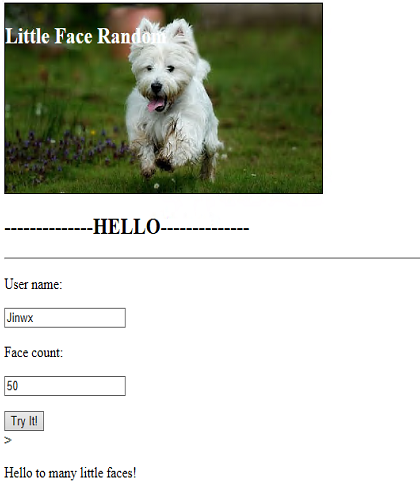
Index page
Welcome page
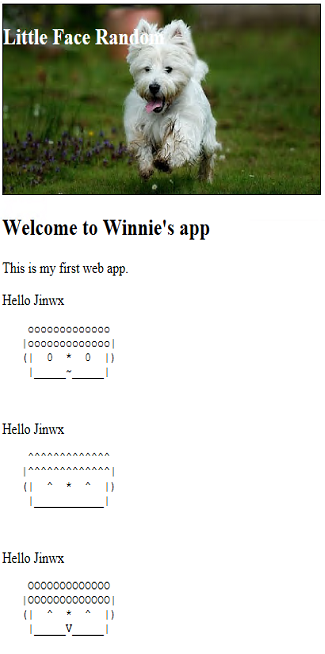
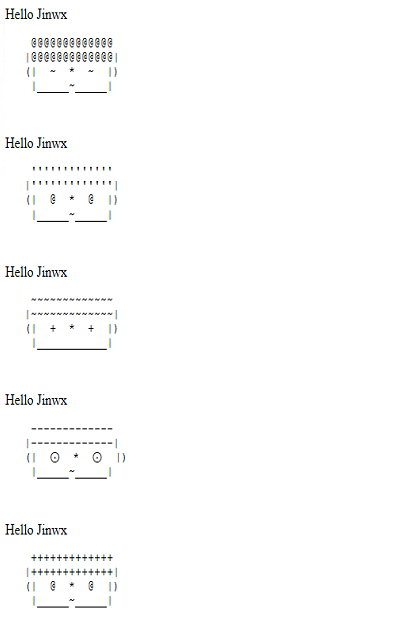
生成很多不同的小人哦~我是如何实现这么stupid but interesting的程序呢?我用了ASP.NET Core
画小人的话,用了一个很stupid的辅助类, 自己写的,小人脸宽21,然后鼻子占1,剩下的眼睛,鼻子,脸,耳朵,分分看。
 using System;

 using System.Collections.Generic;

 using System.Linq;

 using System.Text;

 using System.Threading;

 using System.Threading.Tasks;

 namespace game1.Controllers

 {

     public class DrawingHelper

     {

         public static string randomEye = @"-|@!~^+'o0O⊙";

         public static string randomMouth = @"_x*oO~DVv";

         public static string randomHair = randomEye + randomMouth;

         public static List<StringBuilder> Draw(int FaceCount)

         {

             int RowWidth = ;

             int hairWidth = ;

             string leftEar = "(";

             string rightEar = ")";

             string leftFace = "|";

             string nose = "*";

             var faces = new List<StringBuilder>();

             for (int t = ; t <= FaceCount; t++)

             {

                 StringBuilder sb = new StringBuilder();

                 string eye = GetRandomPart(randomEye, );

                 string mouth = GetRandomPart(randomMouth, );

                 string hairStyle = GetRandomPart(randomHair, );

                 DrawHair(RowWidth, hairWidth, hairStyle,sb);

                 DrawCartoon(leftEar, rightEar, leftFace, eye, nose, mouth,sb);

                 sb.Append("\n");

                 faces.Add(sb);

             }

             return faces;

         }

         private static void DrawHair(int RowWidth, int hairWidth, string hairStyle,StringBuilder sb)

         {

             StringBuilder hair = new StringBuilder();

             for (int i = ; i <= hairWidth - ; i++)

             {

                 hair.Append(hairStyle);

             }

             sb.AppendLine((" " + hair + " ").PadLeft((RowWidth - hairWidth) /  + hairWidth, ' '));

             sb.AppendLine(("|" + hair + "|").PadLeft((RowWidth - hairWidth) /  + hairWidth, ' '));

         }

         public static string GetRandomPart(string pwdchars, int pwdlen)

         {

             string tmpstr = "";

             int iRandNum;

             Thread.Sleep();

             long tick = DateTime.Now.Ticks;

             Random rnd = new Random((int)(tick & 0xffffffffL) | (int)(tick >> ));

             for (int i = ; i < pwdlen; i++)

             {

                 iRandNum = rnd.Next(pwdchars.Length);

                 tmpstr += pwdchars[iRandNum];

             }

             return tmpstr;

         }

         private static void DrawCartoon(string leftEar, string rightEar, string leftFace, string eye, string nose, string mouth, StringBuilder sb)

         {

             //Print left

             PrintLeftParts(leftEar, ,sb);

             PrintLeftParts(leftFace, ,sb);

             PrintLeftParts(eye, ,sb);

             PrintLeftParts(nose, ,sb);

             //Pring right

             PrintLeftParts(eye, , sb);

             PrintLeftParts(leftFace, ,sb);

             PrintLeftParts(rightEar, ,sb);

             //Print down face

             sb.AppendLine();

             PrintLeftParts(leftFace, ,sb);

             PrintLeftParts(mouth, ,sb,'_');

             PrintLeftParts(leftFace, , sb,'_');

             sb.AppendLine();

             sb.AppendLine();

         }

         static void PrintLeftParts(string organName, int leftPad, StringBuilder sb,char paddingchar = ' ')

         {

             for( int i=; i < leftPad; i++)

             {

                 sb.Append(paddingchar);

             }

             sb.Append(organName);

         }

     }

 }
上一个HelloWorldController,也是整个程序唯一的controller。
using game1.Models;

using Microsoft.ApplicationInsights;

using Microsoft.AspNetCore.Mvc;

using System;

using System.Collections.Generic;

using System.Linq;

using System.Text.Encodings.Web;

// For more information on enabling MVC for empty projects, visit http://go.microsoft.com/fwlink/?LinkID=397860

namespace game1.Controllers

{

    public class HelloWorldController : Controller

    {

        TelemetryClient tc = new TelemetryClient();

        //

        // GET: /HelloWorld/

        [HttpPost]

        public ActionResult Index(string userName, int count)

        {

            FaceInfo fi = new FaceInfo();

            fi.Name = userName;

            fi.FaceCount = count;

            return RedirectToAction("Welcome",fi);

        }

        [HttpGet]

        public ActionResult Index()

        {

            return View();

        }

        public ActionResult About()

        {

            return View();

        }

        //

        // GET: /HelloWorld/Welcome/

        //public string Welcome(string name, int ID = 1)

        //{

        //    tc.TrackEvent("welcome");

        //    return HtmlEncoder.Default.Encode($"Hello {name}, ID: {ID}");

        //}

        public ActionResult Welcome(FaceInfo fi)

        {

            tc.TrackEvent("Generating....");

            ViewData["Message"] = "Hello " + fi.Name;

            ViewData["FaceCount"] = fi.FaceCount;

            List<String> faces = DrawingHelper.Draw(fi.FaceCount).Select(t => t.ToString()).ToList();

            return View(faces);

        }

    }

}
omg~我还有一个model呢~ model好像是实现了在controller里传值。
using System;

using System.Collections.Generic;

using System.Linq;

using System.Threading.Tasks;

namespace game1.Models

{

    public class FaceInfo

    {

        public int FaceCount { get; set; }

        public string Name { get; set; }

    }

}
Index.cshtml里很简单
俩输入框,一个按钮
@model game1.Models.FaceInfo

@{

    ViewData["Title"] = "Index";

}

<h2>--------------HELLO--------------</h2>

<hr />

@using (Html.BeginForm())

{

    <p>User name:</p>

    <input type="text" name="userName" />

    <p>Face count:</p>

    <input type="text" name="count" />

    <p></p>

    <input type="submit" value="Try It!"/>

}>

<p>Hello to many little faces!</p>
Welcome.cshtml似乎更简单!
@{

    ViewData["Title"] = "Welcome";

}

@model List<String>

<h2>Welcome to Winnie's app</h2>

<p>This is my first web app.</p>

@foreach(var element in Model)

{

    <li>@ViewData["Message"]</li>

    <pre>@Html.DisplayFor(m=>element)</pre>

}
嗯虽然简单,但是宝宝也忙乎了一天~
【C# 基础应用】我的第一个App,不容易——随机生成小人网站,asp.net core的更多相关文章
- 微软Azure配置中心 App Configuration (一):轻松集成到Asp.Net Core
写在前面 在日常开发中,我这边比较熟悉的配置中心有,携程Apollo,阿里Nacos(配置中心,服务治理一体) 之前文章: Asp.Net Core与携程阿波罗(Apollo)的第一次亲密接触 总体来 ...
- 创业成本?亲身经历告诉你做一个app要多少钱
导语:作为一名苦逼的移动互联网创业者,被外行的朋友们问及最多的问题是“做一个网站需要多少钱?”或者“做一个APP需要多少钱?” 作为一名苦逼的移动互联网创业者,被外行的朋友们问及最多的问题是“做一个网 ...
- Windows + IIS 环境部署Asp.Net Core App
环境:Windows Server 2012, IIS 8, Asp.Net Core 1.1. 不少人第一次在IIS中部署Asp.Net Core App的人都会遇到问题,会发现原来的部署方式无法运 ...
- ASP.NET Core 基本项目目录结构 - ASP.NET Core 基础教程 - 简单教程,简单编程
原文:ASP.NET Core 基本项目目录结构 - ASP.NET Core 基础教程 - 简单教程,简单编程 ASP.NET Core 基本项目目录结构 上一章节中我们成功创建了一个名为 Hell ...
- 【ASP.NET Core学习】基础
新建项目时,程序入口调用CreateDefaultBuilder(args),下面是源代码 public static IHostBuilder CreateDefaultBuilder(string ...
- ASP.NET Core中app.UseDeveloperExceptionPage和app.UseExceptionHandler方法有什么用
在新建一个ASP.NET Core项目后,在项目Startup类的Configure方法中默认会添加两个方法的调用,app.UseDeveloperExceptionPage和app.UseExcep ...
- 学习ASP.NET Core Blazor编程系列二——第一个Blazor应用程序(下)
学习ASP.NET Core Blazor编程系列一--综述 学习ASP.NET Core Blazor编程系列二--第一个Blazor应用程序(上) 学习ASP.NET Core Blazor编程系 ...
- 学习ASP.NET Core Blazor编程系列二——第一个Blazor应用程序(完)
学习ASP.NET Core Blazor编程系列一--综述 学习ASP.NET Core Blazor编程系列二--第一个Blazor应用程序(上) 学习ASP.NET Core Blazor编程系 ...
- 如何一秒钟从头构建一个 ASP.NET Core 中间件
前言 其实地上本没有路,走的人多了,也便成了路. -- 鲁迅 就像上面鲁迅说的那样,其实在我们开发中间件的过程中,微软并没有制定一些策略或者文档来约束你如何编写一个中间件程序, 但是其中却存在者一些最 ...
随机推荐
- java基础-继承
浏览以下内容前,请点击并阅读 声明 一个由其他类继承的类叫子类(也叫继承类,扩展类等),该类继承的类叫父类或超类.除了Object类意外,所有的类都有切仅有一个父类,如果一个类没有用extends关键 ...
- 【BZOJ4008】[HNOI2015]亚瑟王 期望
[BZOJ4008][HNOI2015]亚瑟王 Description 小 K 不慎被 LL 邪教洗脑了,洗脑程度深到他甚至想要从亚瑟王邪教中脱坑. 他决定,在脱坑之前,最后再来打一盘亚瑟王.既然是最 ...
- ZeroMQ接口函数之 :zmq_send – 在一个socket上发送一个消息帧
ZeroMQ 官方地址 :http://api.zeromq.org/4-1:zmq-send zmq_send(3) ØMQ Manual - ØMQ/4.1.0 Name ...
- svn 修改文件的二进制或文本标记
在添加一个文件的时候,svn自动标记成了二进制文件.当时也没在意就提交了.结果修改了之后不能进行svn diff操作,说是二进制文件不能进行diff操作.在网上找了个方法,修改这个文件的标记属性,把这 ...
- easyUI中的form表单
首先创建form表单,并在form表单上创建id便于执行表单验证 <form id="form1"action="" method="post& ...
- jquery插件学习之元素顶部悬浮
jquery插件的学习: HTML部分及应用 <!DOCTYPE html> <html> <head> <meta charset="utf-8& ...
- 关于string.format() 转
string.format()函数用来生成具有特定格式的字符串,这个函数有两个参数,第一个参数为格式化串:由指示符和控制格式的字符组成.第二个参数是对应格式中每个代号的各种数据. 格式字符串可能包含以 ...
- PHP调用MYSQL存储过程实例
PHP调用MYSQL存储过程实例 标签: mysql存储phpsqlquerycmd 2010-09-26 11:10 11552人阅读 评论(3) 收藏 举报 实例一:无参的存储过程$conn = ...
- Mysql 获取年级每个班前十学生的信息
select * from Table1 a where 10>(select count(*) from Table1 where ClsNo=a.ClsNo and Score>a.S ...
- Linux学习笔记
性能问题排查: Linux系统出现了性能问题,一般我们可以通过top.iostat.free.vmstat等命令来查看初步定位问题.内存资源占用:free命令 IO占用:iostat -d -k 1 ...