
maven项目创建4 dao层整合
项目配置文件要放在打包成war包的web项目中
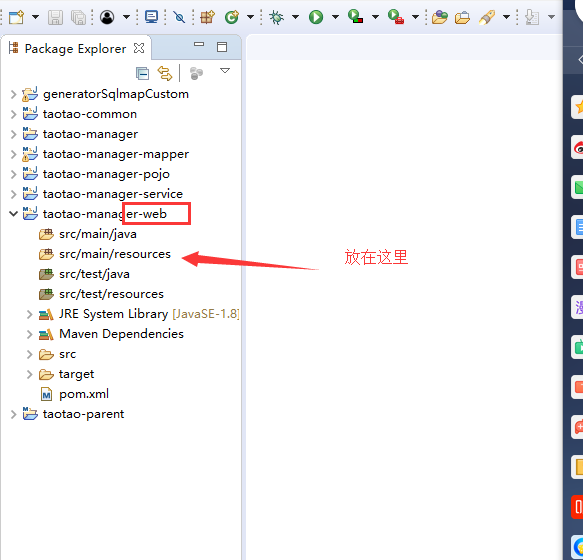

创建文件步骤
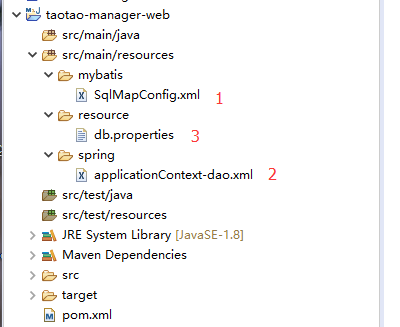
1 SqlMapConfig.xml
<?xml version="1.0" encoding="UTF-8" ?>

<!DOCTYPE configuration

        PUBLIC "-//mybatis.org//DTD Config 3.0//EN"

        "http://mybatis.org/dtd/mybatis-3-config.dtd">

<configuration>

</configuration>
2 applicationContext-dao.xml
<?xml version="1.0" encoding="UTF-8"?>

<beans xmlns="http://www.springframework.org/schema/beans"

    xmlns:context="http://www.springframework.org/schema/context" xmlns:p="http://www.springframework.org/schema/p"

    xmlns:aop="http://www.springframework.org/schema/aop" xmlns:tx="http://www.springframework.org/schema/tx"

    xmlns:xsi="http://www.w3.org/2001/XMLSchema-instance"

    xsi:schemaLocation="http://www.springframework.org/schema/beans http://www.springframework.org/schema/beans/spring-beans-4.0.xsd

    http://www.springframework.org/schema/context http://www.springframework.org/schema/context/spring-context-4.0.xsd

    http://www.springframework.org/schema/aop http://www.springframework.org/schema/aop/spring-aop-4.0.xsd http://www.springframework.org/schema/tx http://www.springframework.org/schema/tx/spring-tx-4.0.xsd

    http://www.springframework.org/schema/util http://www.springframework.org/schema/util/spring-util-4.0.xsd">

    <!-- 数据库连接池 -->

    <!-- 加载配置文件 -->

    <context:property-placeholder location="classpath:resource/*.properties" />

    <!-- 数据库连接池 -->

    <bean id="dataSource" class="com.alibaba.druid.pool.DruidDataSource"

        destroy-method="close">

        <property name="url" value="${jdbc.url}" />

        <property name="username" value="${jdbc.username}" />

        <property name="password" value="${jdbc.password}" />

        <property name="driverClassName" value="${jdbc.driver}" />

        <property name="maxActive" value="10" />

        <property name="minIdle" value="5" />

    </bean>

    <!-- 配置sqlsessionFactory -->

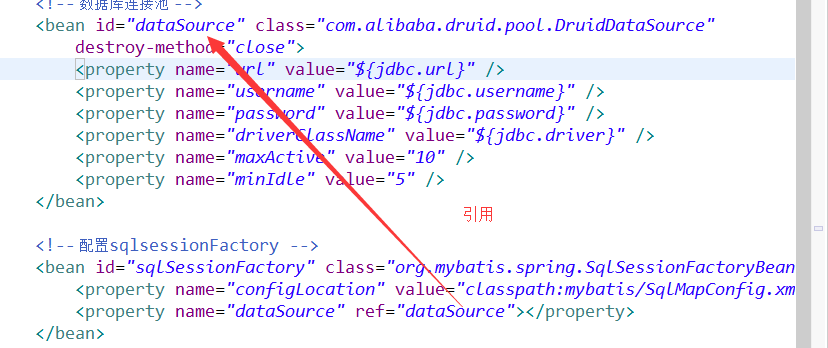
    <bean id="sqlSessionFactory" class="org.mybatis.spring.SqlSessionFactoryBean">

        <property name="configLocation" value="classpath:mybatis/SqlMapConfig.xml"></property>

        <property name="dataSource" ref="dataSource"></property>

    </bean>

    <!-- 配置扫描包,加载mapper代理对象 -->

    <bean class="org.mybatis.spring.mapper.MapperScannerConfigurer">

        <property name="basePackage" value="com.taotao.mapper"></property>

    </bean>

</beans>
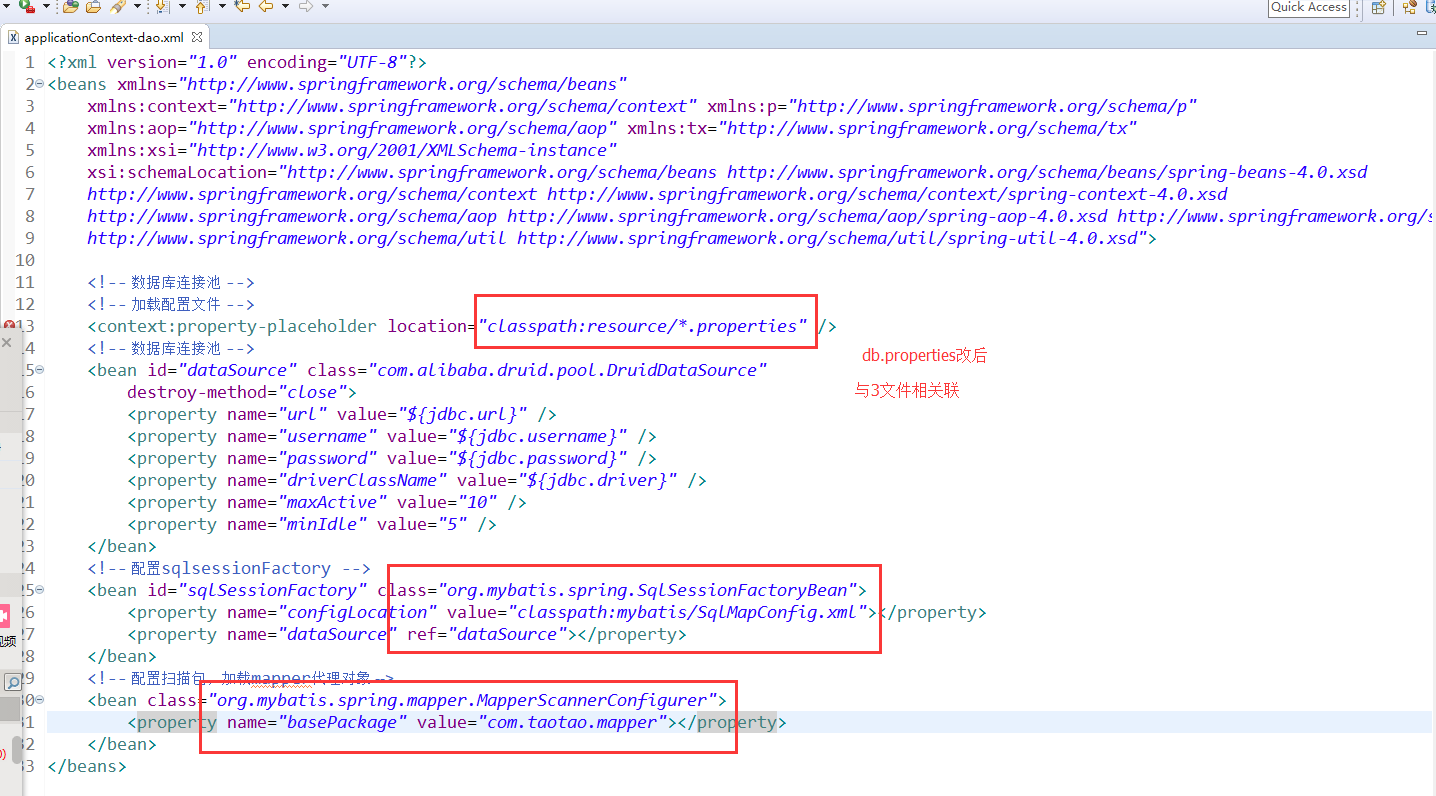
3 db.properties 注:配置连接数据库,密码等
jdbc.driver=com.mysql.jdbc.Driver

jdbc.url=jdbc:mysql://192.168.25.134:3306/taotao?characterEncoding=utf-8

jdbc.username=root

jdbc.password=123456
接下来配置其余两块
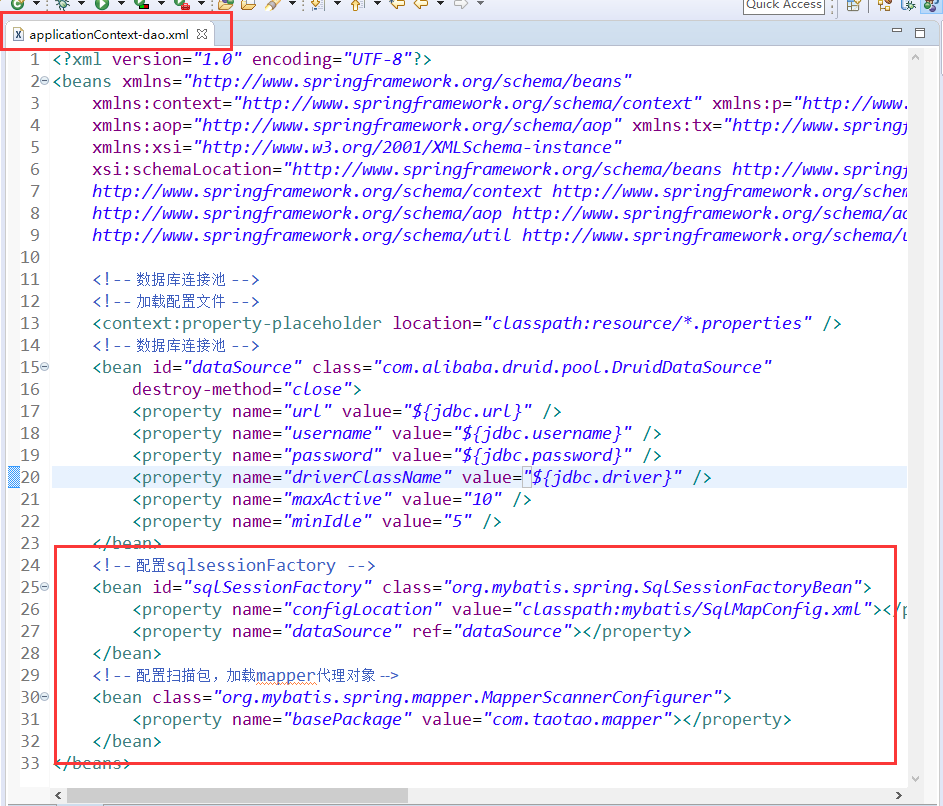
配置属性,注:进入class内部copy全路径

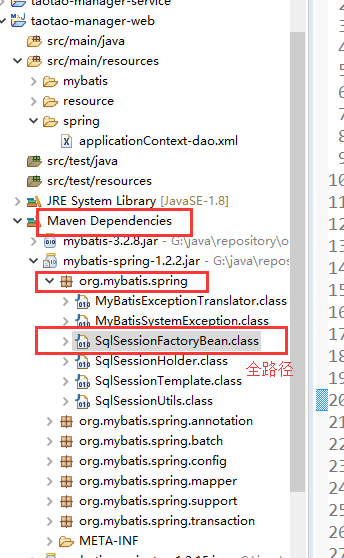
org.mybatis.spring.SqlSessionFactoryBean.class去掉.class
配置属性

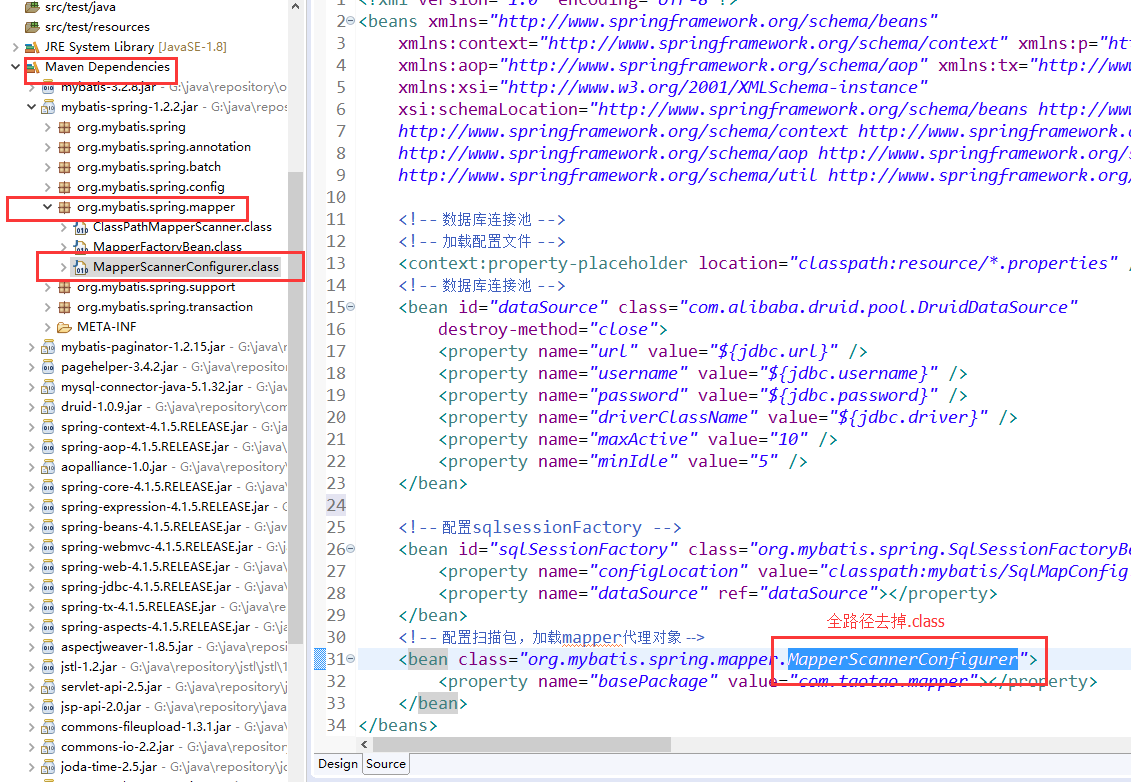
配置属性

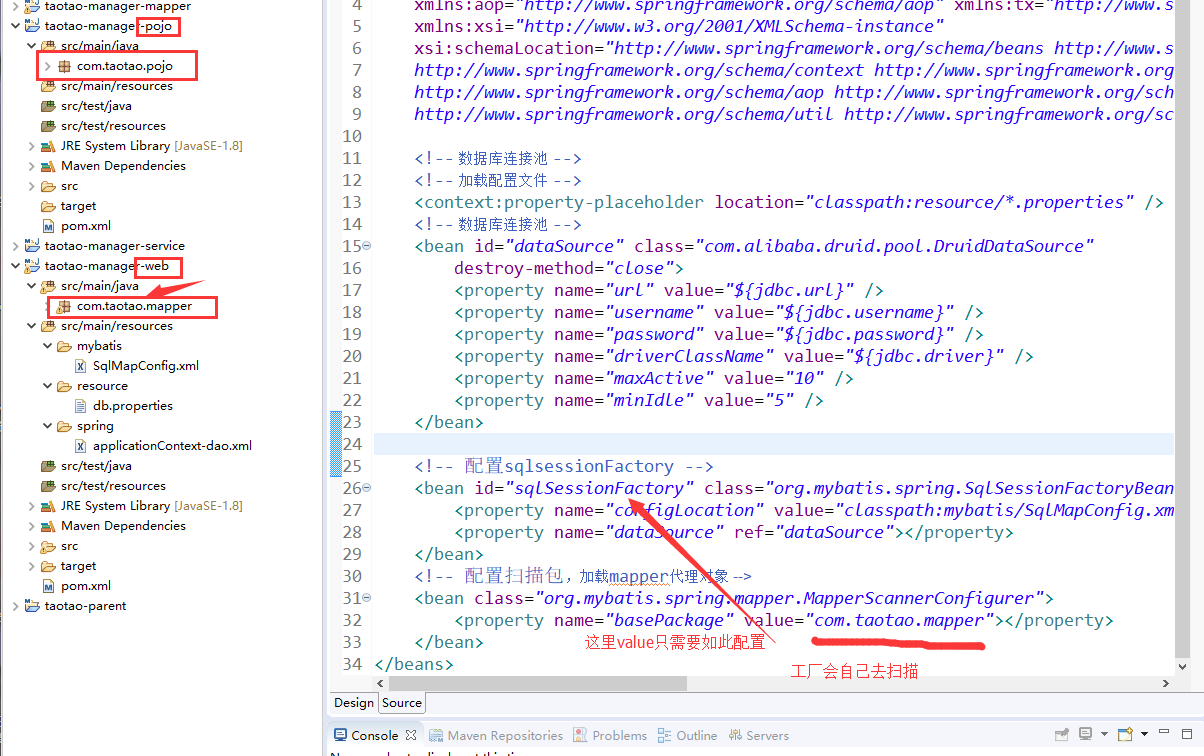
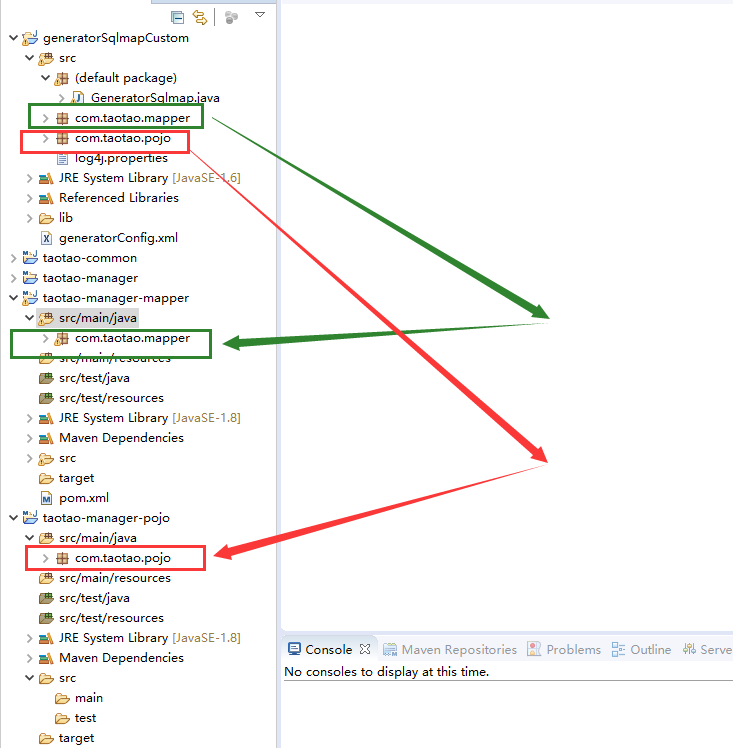
自己创建的或者逆向工程建的包
maven项目创建4 dao层整合的更多相关文章
- maven项目创建5 service层整合
创建service相关文件 创建applicationContext-service.xml文件 <?xml version="1.0" encoding="UTF ...
- maven项目创6 表现层整合
springmvc.xm创建l 和 web.xml配置 ,报错先不管 springmvc.xml com.taotao.controller 空包 其中 资源映射 是等 web.x ...
- ssm框架整合+maven项目创建
在引入外部maven插件后就可以创建一个maven项目了,这篇文章主要介绍ssm框架的整合和如何创建一个maven项目 1.在开发工具的项目空白区单击右键,依次选择New.Other,会出现如下界面, ...
- (转)淘淘商城系列——SSM框架整合之Dao层整合
http://blog.csdn.net/yerenyuan_pku/article/details/72721093 一个项目中往往有三层即Dao层.Service层和Web层,看标题就知道了,本文 ...
- Maven学习 五 Maven项目创建(1)jar项目
第一步:Maven项目的创建 File->new->Maven project. 点击下一步 上方的两个多选框选上,第一个是不使用archetype 原型模板,第二个是使用默认工作空间 点 ...
- IntelliJ IDEA 进行Maven项目创建build
IntelliJ IDEA 进行Maven项目创建build 1,文件-新建-maven 项目:2,编写pom.xml文件:3,鼠标放到左下,然后选择Maven Projects,然后可以查看项目信息 ...
- Eclipse+Maven 项目创建
★:jar包下载不了的话可能是镜像里没有这个版本,换个低版本的就行 ★:eclipse工程validating很慢,可以先关掉验证(一般对项目没什么影响) ★:eclipse工程pom.xml文件报错 ...
- Maven学习 七 Maven项目创建(2)war项目
一.web项目的目录结构 如果手动创建一个java web项目,其基本的目录结构包括:METE-INF,WEB-INF,以及WEB-INF下必须包含一个web.xml文件 二.使用Maven创建wa ...
- springmvc 项目完整示例09 maven项目创建
需求表均同springmvc案例 此处只是使用maven 注意,以下所有需要建立在你的eclipse等已经集成配置好了maven了,说白了就是新建项目的时候已经可以找到maven了 没有的话需要安装m ...
随机推荐
- rabbitmq死信队列消息监听
#邮件通知并发送队列消息#!/bin/bash maillog="/var/log/mq.maillog" message_file="/tmp/mq_message&q ...
- servlet_cdi自动注入
@WebServlet("/cdiservlet")//url映射,即@WebServlet告诉容器,如果请求的URL是"/cdiservlet",则由NewS ...
- 双元素非递增(容斥)--Number Of Permutations Educational Codeforces Round 71 (Rated for Div. 2)
题意:https://codeforc.es/contest/1207/problem/D n个元素,每个元素有a.b两个属性,问你n个元素的a序列和b序列有多少种排序方法使他们不同时非递减(不同时g ...
- Centos7 更换为网易YUM源
当我们刚刚安装系统的时候 yum 的速度那是真滴慢所以我们就需要一个更加快速的镜像,这时候网易镜像带给我们便捷.下面来一起更换吧! 备份当前的 yum 源 # yum 源在目录 /etc/yum.re ...
- 用纯 CSS 创作一个在容器中反弹的小球
效果预览 在线演示 按下右侧的"点击预览"按钮可以在当前页面预览,点击链接可以全屏预览. https://codepen.io/comehope/pen/jKVbyE 可交互视频教 ...
- linux安装git服务器和svn服务器
linux版本 linux版本为CentOS 6.8 (要注意有些软件的安装方法在各个linux版本之间也是存在差异的) git服务器 git服务器需要提供一个UI供开发人员创建项目管理项目,选择使用 ...
- 基础数据类型之集合和深浅copy,还有一些数据类型补充
集合 集合是无序的,不重复的数据集合,它里面的元素是可哈希的(不可变类型),但是集合本身是不可哈希(所以集合做不了字典的键)的.以下是集合最重要的两点: 去重,把一个列表变成集合,就自动去重了. 关系 ...
- Sentinel基本使用--基于QPS流量控制(二), 采用Warm Up预热/冷启动方式控制突增流量
Sentinel基本使用--基于QPS流量控制(二), 采用Warm Up预热/冷启动方式控制突增流量 2019年02月18日 23:52:37 xiongxianze 阅读数 398更多 分类专栏: ...
- Volatile可见性 与 Synchronization原子性的优化
Volatile可见性 比如现在我们有这样一段代码:线程等待另一个线程将数据装载完就输出success,可是最后程序一直卡在while循环里没有往下执行. public class VolatileD ...
- oracle查看执行计划以及使用场景
文档结构: oracle执行计划使用场景 环境: Centos 6.10 Oracle 18.3.0.0.0 c 11g默认启动了自动统计信息收集的任务,默认运行时间是周一到周五晚上10点和周6,周天 ...