
bootstrap学习(三)表单
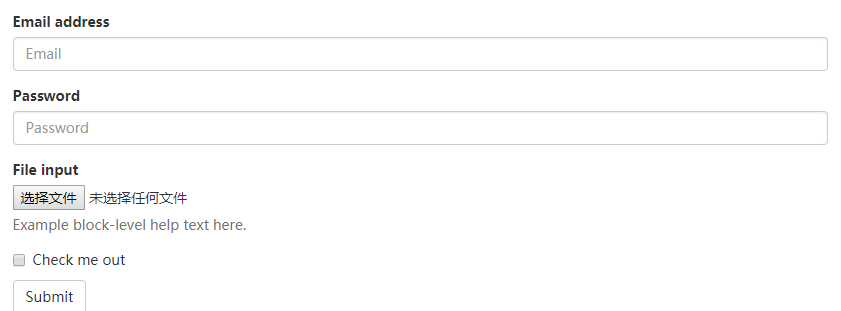
基本实例:
from-group:可以是其内的标签排列更好
from-control:使标签宽度为100%
<form>

  <div class="form-group">

    <label for="exampleInputEmail1">Email address</label>

    <input type="email" class="form-control" id="exampleInputEmail1" placeholder="Email">

  </div>

  <div class="form-group">

    <label for="exampleInputPassword1">Password</label>

    <input type="password" class="form-control" id="exampleInputPassword1" placeholder="Password">

  </div>

  <div class="form-group">

    <label for="exampleInputFile">File input</label>

    <input type="file" id="exampleInputFile">

    <p class="help-block">Example block-level help text here.</p>

  </div>

  <div class="checkbox">

    <label>

      <input type="checkbox"> Check me out

    </label>

  </div>

  <button type="submit" class="btn btn-default">Submit</button>

</form>
内联表单:表单在一行显示
form-inline: 其内标签水平排列
.form-inline 类可使其内容左对齐并且表现为 inline-block 级别的控件。只适用于视口(viewport)至少在 768px 宽度时(视口宽度再小的话就会使表单折叠)。
必须有label标签:如果不限让label显示。可以设置 .sr-only
<form class="form-inline">

  <div class="form-group">

    <label for="exampleInputName2">Name</label>

    <input type="text" class="form-control" id="exampleInputName2" placeholder="Jane Doe">

  </div>

  <div class="form-group">

    <label for="exampleInputEmail2">Email</label>

    <input type="email" class="form-control" id="exampleInputEmail2" placeholder="jane.doe@example.com">

  </div>

  <button type="submit" class="btn btn-default">Send invitation</button>

</form>

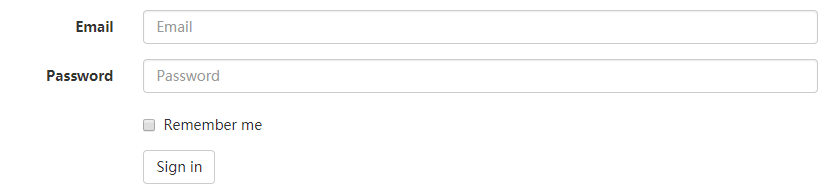
水平排列:
通过为表单添加 .form-horizontal 类,并联合使用 Bootstrap 预置的栅格类,可以将 label 标签和控件组水平并排布局。这样做将改变 .form-group 的行为,使其表现为栅格系统中的行(row),因此就无需再额外添加 .row 了。
将每一个 .form-group水平排列
control-label:将label和div 水平排列整齐
<form class="form-horizontal">

  <div class="form-group">

    <label for="inputEmail3" class="col-sm-2 control-label">Email</label>

    <div class="col-sm-10">

      <input type="email" class="form-control" id="inputEmail3" placeholder="Email">

    </div>

  </div>

  <div class="form-group">

    <label for="inputPassword3" class="col-sm-2 control-label">Password</label>

    <div class="col-sm-10">

      <input type="password" class="form-control" id="inputPassword3" placeholder="Password">

    </div>

  </div>

  <div class="form-group">

    <div class="col-sm-offset-2 col-sm-10">

      <div class="checkbox">

        <label>

          <input type="checkbox"> Remember me

        </label>

      </div>

    </div>

  </div>

  <div class="form-group">

    <div class="col-sm-offset-2 col-sm-10">

      <button type="submit" class="btn btn-default">Sign in</button>

    </div>

  </div>

</form>
bootstrap学习(三)表单的更多相关文章
- Bootstrap学习(2)--表单
Bootstrap里的role属性,增强标签的语义化,提高识别力, 如:<form role="form"> input.select.textarea等元素,在Bo ...
- bootstrap学习笔记(表单)
1.基础表单 :对于基础表单,Bootstrap并未对其做太多的定制性效果设计,仅仅对表单内的fieldset.legend.label标签进行了定制. fieldset { min-width: 0 ...
- Bootstrap学习-排版-表单
1.标题 <h1>~<h6>,所有标题的行高都是1.1(也就是font-size的1.1倍). 2.副标题 <small>,行高都是1,灰色(#999) <h ...
- bootstrap基础学习【表单含按钮】(二)
<!DOCTYPE html> <html> <head> <meta charset="UTF-8"> <title> ...
- Bootstrap<基础六> 表单
Bootstrap 通过一些简单的 HTML 标签和扩展的类即可创建出不同样式的表单. 表单布局 Bootstrap 提供了下列类型的表单布局: 垂直表单(默认) 内联表单 水平表单 垂直或基本表单 ...
- bootstrap+jQuery.validate表单校验
谈谈表单校验 这大概是一种惯例,学习前台后台最开始接触的业务都是用户注册和登录.现在社会坚持以人为本的理念,在网站开发过程同样如此.User是我们面对较多的对象,也是较核心的对象.最开始的用户注册和登 ...
- bootstrap上传表单的时候上传的数据默认是0 一定要小心
bootstrap上传表单的时候上传的数据默认是0 一定要小心
- Bootstrap基础学习(二)—表单
一.表单 1.基本格式 <!-- 基本格式 --> <form> <div class="form-group"> <label>姓 ...
- [jQuery学习系列五 ]5-Jquery学习五-表单验证
前言最近总是有一个感觉,虽然这些东西都自己学习并一个案例一个案例的去验证过了.但是总觉得不写成博客记录下来这些都不是自己的东西(心理作用,哈哈).所以每当学习或者复习相关的知识我都喜欢记录下来,下面开 ...
- bootstrap 列表 表格 表单 复选 单选 多选 输入框组
一.列表 ul li 二.表格 table (http://www.runoob.com/bootstrap/bootstrap-tables.html) 1. 基本表格 <table cla ...
随机推荐
- Android(一)Android Eclipse环境搭建
SDK Manager下载实在是太慢了,不知道什么时候能下完,所以我是通过手工下载的. Android SDK 手工下载各个包然后解压到Android对应的目录 API对应的是platforms目录 ...
- C++中继承的protected访问级别
1,子类是否可以直接访问父类的私有成员? 2,根据面向对象理论: 根据 C++ 语法: 3,继承中的访问级别编程实验: #include <iostream> #include <s ...
- ajax跨域请求,状态码200,F12控制台报错
在接口的地方加上请求头.//跨域请求header('Access-Control-Allow-Origin:*'); 不要在ajax里面加!!!!!!!!!
- C#冒泡排序法学习
一,冒泡排序法理解:就是将一个集合里的数据当前位置和后一位比较,然当前位置大于后一位,则两个位置替换,直到排序完成 using System; using System.Collections.Gen ...
- mySQL部分疑问和小结(orale)
2015/10/15 1.mysql语句: ALTER table scfz_xewp add BGR varchar(255) after KYR 2.创建触发器时: --/ CREATE D ...
- HTML页面仿iphone数字角标
做仿iphone样式的数字角标,用简单的css来实现 <html><head><title>角标数字</title><style type=&qu ...
- Jquery的$.ajax、$.get、$.post发送、接收JSON数据及回调函数用法
平时研究代码时,经常会遇到AJAX的相关用法,做项目时才真正体会到Ajax的强大之处(与服务器数据交互如此之便捷,更新DOM节点而不用刷新整个页面),以及运用的频繁程度.今天整理了一下自己之前没搞清楚 ...
- 分析dwebsocket的源码过程
前言 dwebsocet 是python django的websocket库,github地址:https://github.com/duanhongyi/dwebsocket 本章是对dwebsoc ...
- @InitBinder 前端传递date时间类型属性时,转换错误问题
在Controller里加上这段代码 @InitBinder public void initBinder(WebDataBinder binder) { binder.registerCustomE ...
- 【串线篇】SpringMvc框架乱码
提交的数据可能有乱码: * 请求乱码: * GET请求:改server.xml:在8080端口处URIEncoding="UTF-8" * POST请求: * ...