
C#使用NPOI读写excel
本帖内容来自网络+自己稍作整理,已找不到原贴,侵删
个人比较习惯用NPOI操作excel,方便易理解。在宇宙第一IDE(笑)——VS2017中插入NPOI就很方便:
首先安装NPOI:

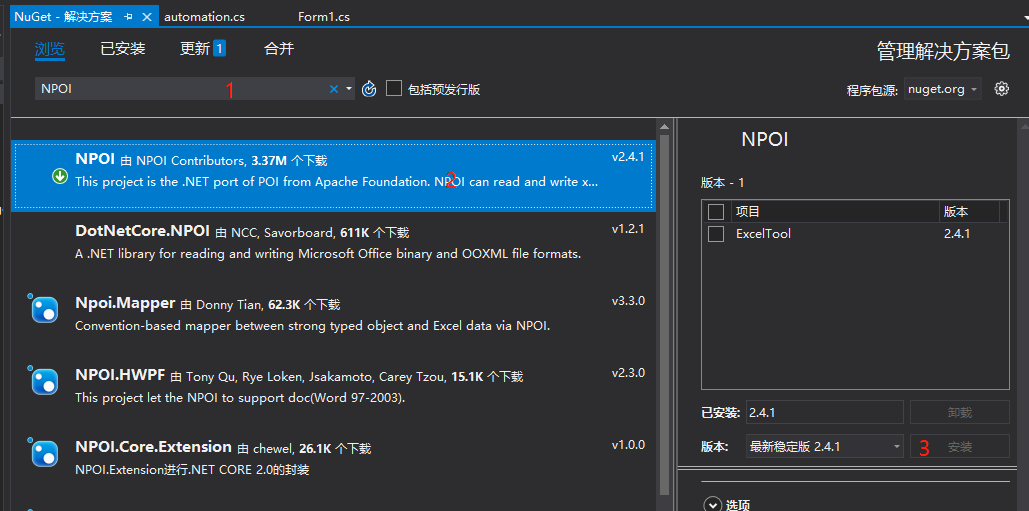
然后在.cs文件中加入如下引用:
using NPOI.SS.UserModel;

using NPOI.XSSF.UserModel;

using NPOI.HSSF.UserModel;
XSSF是用于.xlsx(2007以后版本)
HSSF是用于.xls(2007以前版本)
同时我的代码中要用到Datatable,用于存储表格数据
读写文件需要IO
using System.Data;

using System.IO
接下来是读写excel的代码:
首先从excel中读入数据存入datatable并返回:
        /// <summary>

        /// Excel导入成DataTble

        /// </summary>

        /// <param name="file">导入路径(包含文件名与扩展名)</param>

        /// <returns></returns>

        public static DataTable ExcelToTable(string file)

        {

            DataTable dt = new DataTable();

            IWorkbook workbook;

            string fileExt = Path.GetExtension(file).ToLower();

            using (FileStream fs = new FileStream(file, FileMode.Open, FileAccess.Read))

            {

                if (fileExt == ".xlsx") { workbook = new XSSFWorkbook(fs); } else if (fileExt == ".xls") { workbook = new HSSFWorkbook(fs); } else { workbook = null; }

                if (workbook == null) { return null; }

                ISheet sheet = workbook.GetSheetAt();

                //表头

                IRow header = sheet.GetRow(sheet.FirstRowNum);

                List<int> columns = new List<int>();

                for (int i = ; i < header.LastCellNum; i++)

                {

                    object obj = GetValueType(header.GetCell(i));

                    if (obj == null || obj.ToString() == string.Empty)

                    {

                        dt.Columns.Add(new DataColumn("Columns" + i.ToString()));

                    }

                    else

                        dt.Columns.Add(new DataColumn(obj.ToString()));

                    columns.Add(i);

                }

                //数据

                for (int i = sheet.FirstRowNum + ; i <= sheet.LastRowNum; i++)

                {

                    DataRow dr = dt.NewRow();

                    bool hasValue = false;

                    foreach (int j in columns)

                    {

                        dr[j] = GetValueType(sheet.GetRow(i).GetCell(j));

                        if (dr[j] != null && dr[j].ToString() != string.Empty)

                        {

                            hasValue = true;

                        }

                    }

                    if (hasValue)

                    {

                        dt.Rows.Add(dr);

                    }

                }

            }

            return dt;

        }
同时支持.xlsx和.xls
上面代码用到了GetValueType函数:
        /// <summary>

        /// 获取单元格类型

        /// </summary>

        /// <param name="cell">目标单元格</param>

        /// <returns></returns>

        private static object GetValueType(ICell cell)

        {

            if (cell == null)

                return null;

            switch (cell.CellType)

            {

                case CellType.Blank:

                    return null;

                case CellType.Boolean:

                    return cell.BooleanCellValue;

                case CellType.Numeric:

                    return cell.NumericCellValue;

                case CellType.String:

                    return cell.StringCellValue;

                case CellType.Error:

                    return cell.ErrorCellValue;

                case CellType.Formula:

                default:

                    return "=" + cell.CellFormula;

            }

        }
最后是datatable写入excel(仅适用于.xlsx)文件:
        /// <summary>

        /// Datable导出成Excel(xlsx)

        /// </summary>

        /// <param name="dt"></param>

        /// <param name="file">导出路径(包括文件名与扩展名)</param>

        public static void TableToExcel(DataTable dt, string file)

        {

            IWorkbook workbook;

            string fileExt = Path.GetExtension(file).ToLower();if (workbook == null) { return; }

            ISheet sheet = string.IsNullOrEmpty(dt.TableName) ? workbook.CreateSheet("sheet0") : workbook.CreateSheet(dt.TableName);

//表头

            IRow row = sheet.CreateRow();

            for (int i = ; i < dt.Columns.Count; i++)

            {

                ICell cell = row.CreateCell(i);

                cell.SetCellValue(dt.Columns[i].ColumnName);

            }

            //数据

            for (int i = ; i < dt.Rows.Count; i++)

            {

                IRow row1 = sheet.CreateRow(i + );

                for (int j = ; j < dt.Columns.Count; j++)

                {

                    ICell cell = row1.CreateCell(j);
cell.SetCellValue(dt.Rows[i][j].ToString());
                }

            }

            //转为字节数组

            MemoryStream stream = new MemoryStream();

            workbook.Write(stream);

            var buf = stream.ToArray();

            //保存为Excel文件
            using (FileStream fs = new FileStream(file, FileMode.Open, FileAccess.Write))

            {

                fs.Write(buf, , buf.Length);

                fs.Flush();

            }

        }
其中:
using (FileStream fs = new FileStream(file, FileMode.Open, FileAccess.Write))
这一行,FileMode.open会在已有的文件中加入你所create的sheet,适用FileMode.create会创新新文件,几遍已有文件,也会删掉该文件。
这是写入.xls文件的代码
        /// <summary>

        /// 将datatable写入到excel(xls)

        /// </summary>

        /// <param name="dt">datatable</param>

        /// <param name="filepath">写入的文件路径</param>

        /// <returns></returns>

        public static bool DataTableToExcel(DataTable dt, string filepath)

        {

            bool result = false;

            IWorkbook workbook = null;

            FileStream fs = null;

            IRow row = null;

            ISheet sheet = null;

            ICell cell = null;

            try

            {

                if (dt != null && dt.Rows.Count > )

                {

                    workbook = new HSSFWorkbook();

                    sheet = workbook.CreateSheet("Sheet0");//创建一个名称为Sheet0的表

                    int rowCount = dt.Rows.Count;//行数

                    int columnCount = dt.Columns.Count;//列数

                    int cellnum;

                    //设置列头

                    row = sheet.CreateRow();//excel第一行设为列头

                    for (int c = ; c < columnCount; c++)

                    {

                        cell = row.CreateCell(c);

                        cell.SetCellValue(dt.Columns[c].ColumnName);

                    }

                    //设置每行每列的单元格,

                    for (int i = ; i < rowCount; i++)

                    {

                        row = sheet.CreateRow(i + );

                        for (int j = ; j < columnCount; j++)

                        {

                            cell = row.CreateCell(j);//excel第二行开始写入数据

                            //cell.SetCellValue(dt.Rows[i][j].ToString());

                            //保存单元格格式为数字

                            if (j < )

                            {

                                cell.SetCellValue(dt.Rows[i][j].ToString());

                            }

                            else

                            {

                                //cell.SetCellValue(int.Parse(dt.Rows[i][j].ToString()));

                                if (dt.Rows[i][j] is DBNull)

                                {

                                    cell.SetCellValue(dt.Rows[i][j].ToString());

                                }

                                else

                                {

                                    cellnum = Convert.ToInt32(dt.Rows[i][j].ToString());

                                    cell.SetCellValue(cellnum);

                                }

                            }

                        }

                    }

                    if (System.IO.File.Exists(filepath))

                    {

                        if (MessageBox.Show("该文件已存在!确定覆盖吗?", "WARNING", MessageBoxButtons.OKCancel) == DialogResult.OK)

                        {

                            File.Delete(filepath);

                        }

                        else

                        {

                            return false;

                        }

                    }

                    using (fs = File.OpenWrite(filepath))

                    {

                        workbook.Write(fs);//向打开的这个xls文件中写入数据

                        result = true;

                    }

                }

                return result;

            }

            catch (Exception ex)

            {

                MessageBox.Show(ex.Message);

                if (fs != null)

                {

                    fs.Close();

                }

                return false;

            }

        }
最后,虽然不常用,但是关键时刻很有用的,写入文件时设置每个单元格数据类型的代码:
        /// <summary>

        /// 设置单元格数据类型

        /// </summary>

        /// <param name="cell">目标单元格</param>

        /// <param name="obj">数据值</param>

        /// <returns></returns>

        public static void SetCellValue(ICell cell, object obj)

        {

            if (obj.GetType() == typeof(int))

            {

                cell.SetCellValue((int)obj);

            }

            else if (obj.GetType() == typeof(double))

            {

                cell.SetCellValue((double)obj);

            }

            else if (obj.GetType() == typeof(IRichTextString))

            {

                cell.SetCellValue((IRichTextString)obj);

            }

            else if (obj.GetType() == typeof(string))

            {

                cell.SetCellValue(obj.ToString());

            }

            else if (obj.GetType() == typeof(DateTime))

            {

                cell.SetCellValue((DateTime)obj);

            }

            else if (obj.GetType() == typeof(bool))

            {

                cell.SetCellValue((bool)obj);

            }

            else

            {

                cell.SetCellValue(obj.ToString());

            }

        }
C#使用NPOI读写excel的更多相关文章
- NPOI读写Excel
1.整个Excel表格叫做工作表:WorkBook(工作薄),包含的叫页(工作表):Sheet:行:Row:单元格Cell. 2.NPOI是POI的C#版本,NPOI的行和列的index都是从0开始 ...
- 【转】NPOI读写Excel
1.整个Excel表格叫做工作表:WorkBook(工作薄),包含的叫页(工作表):Sheet:行:Row:单元格Cell. 2.NPOI是POI的C#版本,NPOI的行和列的index都是从0开始 ...
- NPOI读写Excel【转载】
参考示例:https://www.cnblogs.com/luxiaoxun/p/3374992.html 感谢! 1.整个Excel表格叫做工作表:WorkBook(工作薄),包含的叫页(工作表): ...
- 使用NPOI读写Excel、Word
NPOI 是 POI 项目的 .NET 版本.POI是一个开源的Java读写Excel.WORD等微软OLE2组件文档的项目. 使用 NPOI 你就可以在没有安装 Office 或者相应环境的机器上对 ...
- NPOI读写Excel组件封装Excel导入导出组件
后台管理系统多数情况会与Excel打交道,常见的就是Excel的导入导出,对于Excel的操作往往是繁琐且容易出错的,对于后台系统的导入导出交互过程往往是固定的,对于这部分操作,我们可以抽离出公共组件 ...
- NPOI 读写Excel
实例功能概述: 1.支持Excel2003以及2007 2.支持Excel读取到DataTable(TableToExcel) 3.支持DataTable导出到Excel(TableToExcel) ...
- Unity3d 使用NPOI读写Excel 遇到的问题
开发环境:unity5.3 NPOI(.net 2.0版 http://npoi.codeplex.com/) 运行环境:PC版, 其他平台没有测试 先上效果图: 实现步骤: 1.新建一个Exce ...
- C#使用NPOI读写Excel的注意事项
NPOI的基本使用参照:https://www.cnblogs.com/lixiaobin/p/NPOI.html 既存文档读取修改方法 *既存Excel文档修改保存注意使用FileMode.Crea ...
- 用插件NPOI读写excel
1.用插件NPOIusing NPOI.SS.UserModel;using NPOI.XSSF.UserModel;using NPOI.HSSF.UserModel; public class E ...
随机推荐
- Java事务(转载)
Java事务的类型有三种:JDBC事务.JTA(Java Transaction API)事务.容器事务. 1.JDBC事务 JDBC 事务是用 Connection 对象控制的.JDBC Conne ...
- Acwing-275-传纸条(DP)
链接: https://www.acwing.com/problem/content/description/277/ 题意: 给定一个 N*M 的矩阵A,每个格子中有一个整数. 现在需要找到两条从左 ...
- php l练习(写着玩)
需求:假设今天24号,今天发表的评论显示几小时前发布,23号发布的显示 昨天几点发布的,再往前的就直接显示年月日. date_default_timezone_set('PRC'); // $crea ...
- linux查看网关
Linux下查看网关方法:route -n ip route show traceroute www.prudentwoo.com -s 100 第一行就是自己的默认网关 netstat -r mor ...
- 11、LineEdit与setCompleter自动补全
#include "mainwindow.h" #include "ui_mainwindow.h" #include <QDebug>//引入打印 ...
- 插入排序,选择排序,冒泡排序等常用排序算法(java实现)
package org.webdriver.autotest.Study; import java.util.*; public class sort_examp{ public static voi ...
- java命令--jstack 工具【转载】
一.介绍 jstack是java虚拟机自带的一种堆栈跟踪工具.jstack用于打印出给定的java进程ID或core file或远程调试服务的Java堆栈信息,如果是在64位机器上,需要指定选项&qu ...
- Intelij IDEA创建SpringBoot项目 - 配置文件的解释
springboot介绍 官网:spring.io Spring Boot is designed to get you up and running as quickly as possible, ...
- 【学习】linux环境下nginx文件彻底删除
nginx卸载其实很简单,只需要两步即可完成!第一步:输入以下指令全局查找nginx相关的文件: sudo find / -name nginx* 第二步:删除查找出来的所有nginx相关文件 sud ...
- Docker入门-常用命令
Docker镜像操作 Docker运行容器前需要本地存在对应的镜像,如果本地不存在该镜像,Docker会从镜像仓库下载该镜像. 获取镜像 从Docker镜像仓库获取镜像的命令是docker pull. ...