
JS框架_(Popup.js)3D对话框窗口插件
百度云盘 传送门 密码:afdo
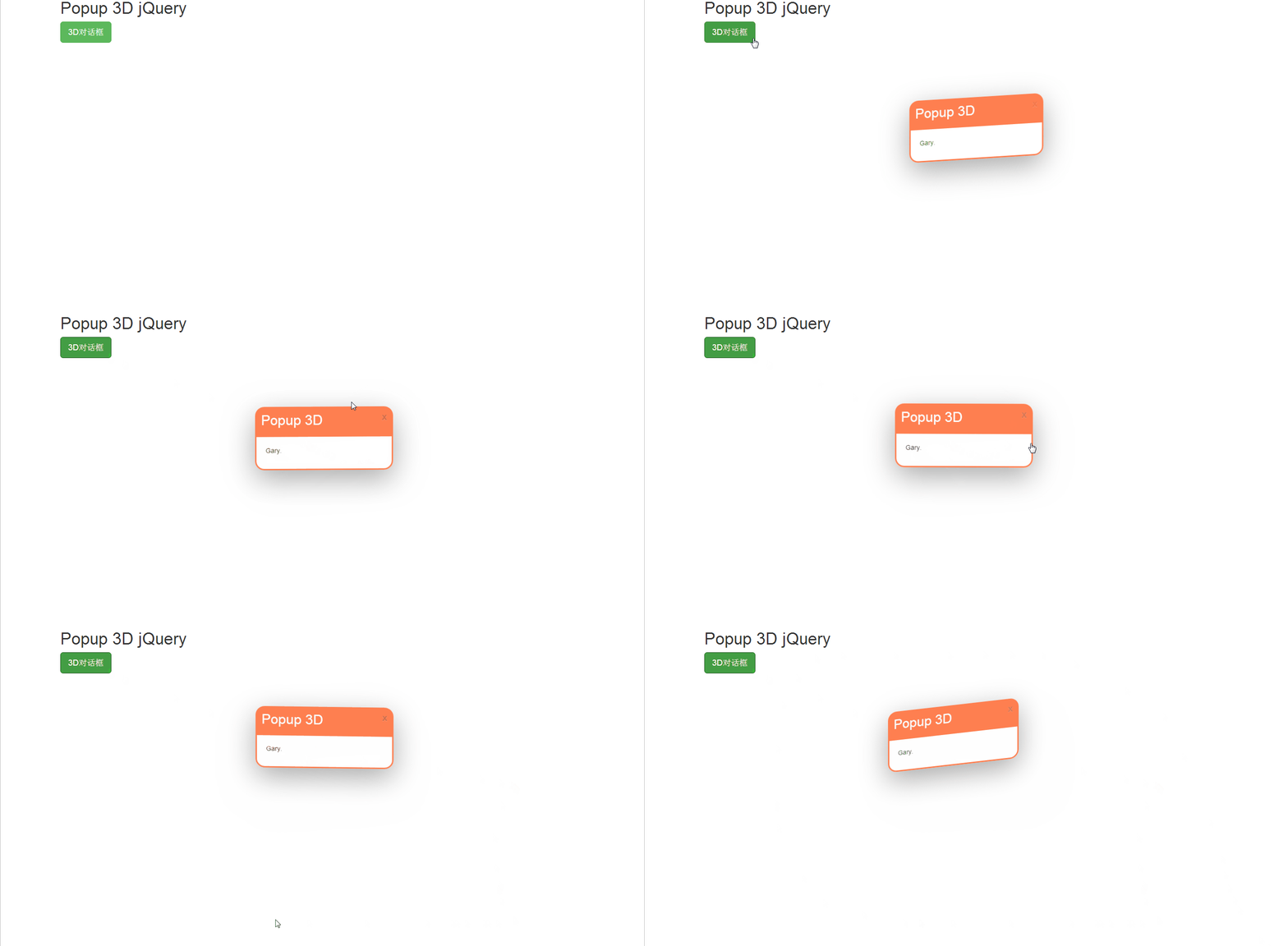
3D对话框窗口插件效果:
<!doctype html>

<html lang="zh">

<head>

<meta charset="UTF-8">

<meta http-equiv="X-UA-Compatible" content="IE=edge,chrome=1">

<meta name="viewport" content="width=device-width, initial-scale=1.0">

<title>jQuery点击按钮弹出3D对话框窗口插件</title>

<link rel="stylesheet" type="text/css" href="https://maxcdn.bootstrapcdn.com/bootstrap/3.3.5/css/bootstrap.min.css" />

<link rel="stylesheet" type="text/css" href="css/htmleaf-demo.css">

<link rel="stylesheet" type="text/css" href="css/popup.css" />

</head>

<body>

    <div class="container center-block">

        <h1>Popup 3D jQuery</h1>

        <a id="tst" rel="popup_name" class="btn btn-success btn-lg" href="#" role="button">3D对话框</a>

        <div class="popup">

            <div id="popup_name" class="popup_block">

                <div class="popup_head">

                    <h2>Popup 3D</h2>

                </div>

                <div class="popup_body">

                    <p>Gary.</p>

                </div>

            </div>

        </div>

    </div>

<script src="js/jquery-1.11.0.min.js" type="text/javascript"></script>

<script src="https://maxcdn.bootstrapcdn.com/bootstrap/3.3.5/js/bootstrap.min.js"></script>

<script src="js/popup.js"></script>

<script src="js/script.js"></script>

</body>

</html>
index.html
.popup{

    position: absolute;

    top:50%;

    left:50%;

}

.popup_block{

    display: none;

    position: absolute;

    width:300px;

    margin:-150px;

    box-sizing: border-box;

    border-radius: 20px;

    border-style:solid;

    border-color:coral;

    cursor: pointer;

    transform-style: preserve-3d;

    box-shadow: 0px 20px 100px #aaa;

}

.close{

    padding:10px;

}

.popup_head{

    background-color:coral;

    padding:10px;

    border-radius: 10px 10px 0 0;

    transition-duration:0.2s;

}

.popup_body{

    padding:20px;

}

.popup_head > h1, h2, h3, h4, h5{

    margin-top:0px;

    color:white;

}

.popup_head:hover{

    padding-left:20px;

}
popup.css
实现过程
popup.js:jQuery和CSS3制作并可以使用鼠标进行互动的3D弹出窗口插件
CSS
设置弹出窗口模式快
.popup_block{

    display: none;

    position: absolute;

    width:300px;

    margin:-150px;

    box-sizing: border-box;

    border-radius: 20px;

    border-style:solid;

    border-color:coral;

    cursor: pointer;

    transform-style: preserve-3d;

    box-shadow: 0px 20px 100px #aaa;

}
box-sizing:为元素指定的任何内边距和边框都将在已设定的宽度和高度内进行绘制
border-radius:向 div 元素添加圆角边框
border-style:设置 4 个边框的样式 传送门
1个参数

border-style:dotted;

所有 4 个边框都是点状

2个参数

border-style:dotted solid;

上边框和下边框是点状

右边框和左边框是实线

3个参数

border-style:dotted solid double;

上边框是点状

右边框和左边框是实线

下边框是双线

4个参数

border-style:dotted solid double dashed;

上边框是点状

右边框是实线

下边框是双线

左边框是虚线
border-style:参数
cursor :规定要显示的光标的类型(形状)
pointer 光标呈现为指示链接的指针 其他参数:传送门
transform-style:被转换的子元素保留其 3D 转换
flat 子元素将不保留其 3D 位置。
preserve-3d 子元素将保留其 3D 位置。
box-shadow::设置一个或多个下拉阴影的框
box-shadow: h-shadow v-shadow blur spread color inset;

h-shadow    :必需的。水平阴影的位置。允许负值

v-shadow    :必需的。垂直阴影的位置。允许负值

blur    :可选。模糊距离

spread    :可选。阴影的大小

color    :可选。阴影的颜色。在CSS颜色值寻找颜色值的完整列表

inset    :可选。从外层的阴影(开始时)改变阴影内侧阴影
box-shadow:参数
设置弹出框头部
.popup_head{

    background-color:coral;

    padding:10px;

    border-radius: 10px 10px 0 0;

    transition-duration:0.2s;

}
transition-duration:规定完成过渡效果需要花费的时间(以秒或毫秒计)
DOM
加载popup.js,写入对话框标题和对话框内容
<div class="popup">

            <div id="popup_name" class="popup_block">

                <div class="popup_head">

                    <h2>Popup 3D</h2>

                </div>

                <div class="popup_body">

                    <p>Gary.</p>

                </div>

            </div>

        </div>
JS框架_(Popup.js)3D对话框窗口插件的更多相关文章
- JS框架_(JQuery.js)绚丽的3D星空动画
百度云盘: 传送门 密码:8ft8 绚丽的3D星空动画效果(纯CSS) (3D星空动画可以用作网页背景,Gary为文本文字) <!doctype html> <html lang=& ...
- JS框架_(Bootstrap.js)实现简单的轮播图
Bootstrap框架中 轮播(Carousel)插件是一种灵活的响应式的向站点添加滑块的方式 轮播图效果: <!DOCTYPE html> <html> <head&g ...
- JS框架_(JQuery.js)Tooltip弹出式按钮插件
百度云盘 传送门 密码:7eh5 弹出式按钮效果 <!DOCTYPE html> <html > <head> <meta charset="UTF ...
- JS框架_(Laydate.js)简单实现日期日历
百度云盘 传送门 密码:71hf JavaScript日期与时间组件_____laydate.js 日期日历效果: <!DOCTYPE html> <html> <hea ...
- JS框架_(JQuery.js)圆形多选菜单选项
百度云盘 传送门 密码:zb1c 圆形多选菜单选项效果: <!DOCTYPE html> <html lang="en" > <head> &l ...
- JS框架_(coolShow.js)图片旋转动画特效
百度云盘 传送门 密码:ble6 coolShow.js插件图片旋转动画效果 <!DOCTYPE HTML> <head> <meta http-equiv=" ...
- JS框架_(JQuery.js)动画效果鼠标跟随
百度云盘 传送门 密码 :4n9u 火狐浏览器上纯CSS_动画效果鼠标跟随效果: (作者:lily_lcj 传送门) <!DOCTYPE html PUBLIC "-//W3C//DT ...
- JS框架_(Typed.js)彩色霓虹灯发光文字动画
百度云盘 传送门 密码:8oei 发光文字动画效果: <!doctype html> <html> <head> <meta charset="ut ...
- JS框架_(JQuery.js)夜晚天空满天星星闪烁动画
百度云盘 传送门 密码:xftr 满天星星闪烁动画效果: (可用星空动画来作为页面背景,白色文字改为文章或者其他的O(∩_∩)O) <!doctype html> <html> ...
随机推荐
- 小白基础Python重要的字符串详解String的内置方法
String的内置方法: st='hello world {name} is {age}' {} 特殊内容需要识别format print(st.count('1')) 统计元素个数 print ...
- C++ 类类型转换函数explicit 关键字
标准数据之间会进行 隐式类型安全转换. 转换规则: 隐式类型转换的问题: #include <iostream> #include <string> using namesp ...
- 十大经典排序算法(Python,Java实现)
参照:https://www.cnblogs.com/wuxinyan/p/8615127.html https://www.cnblogs.com/onepixel/articles/7674659 ...
- dede_arctype|栏目表
dede_arctype|栏目表: 字段 类型 整理 属性 Null 默认 额外 id smallint(5) UNSIGNED 是 NULL 栏目ID reid smallint(5) UNSIGN ...
- python中的定时任务
使用threading模块中的Timer函数 from threading import Timer import time def execute_func(name, age, gender, h ...
- iQOO5G手机卡槽公布
华为.中兴.一加.OPPO.vivo各自的5G手机相继拿到了3C强制认证,小米的也在路上,5G手机真的越来越近了. 今天,vivo iQOO还公布了其5G手机所用的卡槽样式,可以看到采用了双卡设计,同 ...
- 斐波那契数列 Java 不同的实现方法所需要的时间比较
# 首先我们直接看一个demo以及他的结果 public class QQ { public static void main(String[] args) throws ParseException ...
- keras多gpu训练
使用multi_gpu_model即可.观察了一下GPU的利用率,非常的低,大部分时候都是0,估计在相互等待,同步更新模型: 当然了,使用多GPU最明显的好处是可以使用更大的batch size im ...
- Codeforces Codeforces Round #432 (Div. 2 D ) Arpa and a list of numbers
D. Arpa and a list of numbers time limit per test 2 seconds memory limit per test 256 megabyte ...
- switch的参数类型
switch(expr1)中,expr1是一个整数表达式,整数表达式可以是int基本类型或Integer包装类型,由于,byte,short,char都可以隐含转换为int,所以,这些类型以及这些类型 ...