
jq 获取各个元素的宽度高度的方法
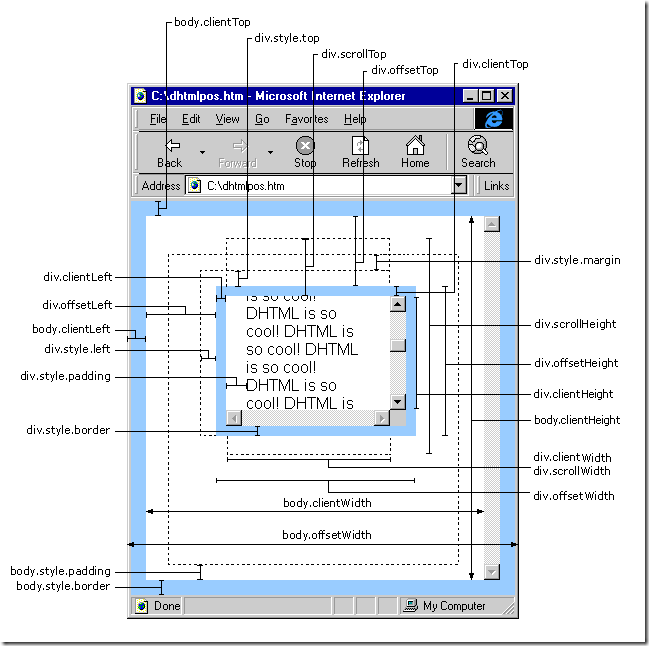
JS获取各种宽度、高度的简单介绍:
scrollHeight: 获取对象的滚动高度。
scrollLeft:设置或获取位于对象左边界和窗口中目前可见内容的最左端之间的距离
scrollTop:设置或获取位于对象最顶端和窗口中可见内容的最顶端之间的距离
scrollWidth:获取对象的滚动宽度
offsetHeight:获取对象相对于版面或由父坐标 offsetParent 属性指定的父坐标的高度
offsetLeft:获取对象相对于版面或由 offsetParent 属性指定的父坐标的计算左侧位置
offsetTop:获取对象相对于版面或由 offsetTop 属性指定的父坐标的计算顶端位置
event.clientX 相对文档的水平座标
event.clientY 相对文档的垂直座标
event.offsetX 相对容器的水平坐标
event.offsetY 相对容器的垂直坐标
document.documentElement.scrollTop 垂直方向滚动的值
event.clientX+document.documentElement.scrollTop 相对文档的水平座标+垂直方向滚动的量
以上主要指IE之中,FireFox差异如下:
IE6.0、FF1.06+:
clientWidth = width + padding
clientHeight = height + padding
offsetWidth = width + padding + border
offsetHeight = height + padding + border
IE5.0/5.5:
clientWidth = width - border
clientHeight = height - border
offsetWidth = width
offsetHeight = height
(需要提一下:CSS中的margin属性,与clientWidth、offsetWidth、clientHeight、offsetHeight均无关)
offsetWidth (width+padding+border)
假设 obj 为某个 HTML 控件。
obj.offsetTop 指 obj 距离上方或上层控件的位置,整型,单位像素。
obj.offsetLeft 指 obj 距离左方或上层控件的位置,整型,单位像素。
obj.offsetWidth 指 obj 控件自身的宽度,整型,单位像素。获取对象可见内容的宽度,不包括滚动条,不包括边框;
obj.offsetHeight 指 obj 控件自身的高度,整型,单位像素。
offsetWidth 与 style.width 的区别
一、offsetTop 返回的是数字,而 style.top 返回的是字符串,除了数字外还带有单位:px。
二、offsetTop 只读,而 style.top 可读写。
三、如果没有给 HTML 元素指定过 top 样式,则 style.top 返回的是空字符串。
jQuery获取各种宽度、高度的简单介绍
- alert($(window).height()); //浏览器时下窗口可视区域高度
- alert($(document).height()); //浏览器时下窗口文档的高度
- alert($(document.body).height());//浏览器时下窗口文档body的高度
- alert($(document.body).outerHeight(true));//浏览器时下窗口文档body的总高度 包括border padding margin
- alert($(window).width()); //浏览器时下窗口可视区域宽度
- alert($(document).width());//浏览器时下窗口文档对于象宽度
- alert($(document.body).width());//浏览器时下窗口文档body的高度
- alert($(document.body).outerWidth(true));//浏览器时下窗口文档body的总宽度 包括border padding margin
- alert($(document).scrollTop()); //获取滚动条到顶部的垂直高度
- $('#outer-div')[0].scrollHeight
- //获取div的实际高度
- alert($(document).scrollLeft()); //获取滚动条到左边的垂直宽度
scrollTop为滚动条在Y轴上的滚动距离。
clientHeight为内容可视区域的高度。
scrollHeight为内容可视区域的高度加上溢出(滚动)的距离。
从这个三个属性的介绍就可以看出来,滚动条到底部的条件即为scrollTop + clientHeight == scrollHeight。
jquery实现判断滚动条滚动到底部:
- <!DOCTYPE html PUBLIC "-//W3C//DTD XHTML 1.0 Transitional//EN" "http://www.w3.org/TR/xhtml1/DTD/xhtml1-transitional.dtd">
- <html xmlns="http://www.w3.org/1999/xhtml">
- <head>
- <meta http-equiv="content-type" content="text/html;charset=utf-8">
- <title>下拉滚动条滚到底部了吗?</title>
- <script language="javascript" src="jQuery.js"></script>
- <script language="javascript">
- $(document).ready(function (){
- $('#scroll-top-msg').html($("#outer-div")[0].scrollTop);
- $('#scroll-height-msg').html($("#outer-div")[0].scrollHeight);
- $("#outer-div").scroll(function(){
- $('#scroll-to-bottom-msg').html('');
- $('#scroll-top-msg').html($("#outer-div")[0].scrollTop);
- $('#scroll-height-msg').html($("#outer-div")[0].scrollHeight);
- if($("#outer-div")[0].scrollTop >= ($("#outer-div")[0].scrollHeight - $("#outer-div").height()))
- $('#scroll-to-bottom-msg').html('滚动到DIV底部了');
- });
- });
- </script>
- <body>
- Scroll Top : <span id="scroll-top-msg">0</span> |
- Scroll Height : <span id="scroll-height-msg">0</span> <br/>
- <span id="scroll-to-bottom-msg"></span>
- <div id="outer-div" style="overflow-y:auto; overflow-x:hidden; width:800px;height:500px;background:gray;">
- <div style="height:750px;background:#aea;width:600px;margin:0 auto;">
- </div>
- </div>
- </body>
- </html>
当然也可以使用百分比判断滚动条离底部距离
- <!DOCTYPE html PUBLIC "-//W3C//DTD XHTML 1.0 Transitional//EN" "http://www.w3.org/TR/xhtml1/DTD/xhtml1-transitional.dtd">
- <html xmlns="http://www.w3.org/1999/xhtml">
- <head>
- <meta http-equiv="content-type" content="text/html;charset=utf-8">
- <title>下拉滚动条滚到底部了吗?</title>
- <script language="javascript" src="jQuery.js"></script>
- <script language="javascript">
- $(document).ready(function (){
- $('#scroll-top-msg').html($("#outer-div")[0].scrollTop);
- $('#scroll-height-msg').html($("#outer-div")[0].scrollHeight);
- $("#outer-div").scroll(function(){
- $('#scroll-to-bottom-msg').html('');
- $('#scroll-top-msg').html($("#outer-div")[0].scrollTop);
- $('#scroll-height-msg').html($("#outer-div")[0].scrollHeight);
- if($("#outer-div")[0].scrollTop / (($("#outer-div")[0].scrollHeight - $("#outer-div").height()))== 0.95 ) //在滚动条距离底端5%以内
- $('#scroll-to-bottom-msg').html('滚动到DIV底部了');
- });
- });
- </script>
- <body>
- Scroll Top : <span id="scroll-top-msg">0</span> |
- Scroll Height : <span id="scroll-height-msg">0</span> <br/>
- <span id="scroll-to-bottom-msg"></span>
- <div id="outer-div" style="overflow-y:auto; overflow-x:hidden; width:800px;height:500px;background:gray;">
- <div style="height:750px;background:#aea;width:600px;margin:0 auto;">
- </div>
- </div>
- </body>
- </html>
jq 获取各个元素的宽度高度的方法的更多相关文章
- Knockout获取数组元素索引的2种方法,在MVC中实现
原文:Knockout获取数组元素索引的2种方法,在MVC中实现 在遍历数组.集合的时候,通常要获取元素的索引,本篇体验使用Knockout获取索引的2种方法. 假设有这样的一个模型: namespa ...
- Jq_Js_Js、Jq获取浏览器和屏幕各种高度宽度
$(document).ready(function() {alert($(window).height()); //浏览器当前窗口可视区域高度alert($(document).he ...
- jquery outerHeight方法 outerWidth方法 获取元素实际宽度高度
曾经写代码中,每当须要获取元素的实际"宽度"(这里的宽度是指元素宽度加上其边距)时,都须要用元素宽度加上margin值才行,今天发现一个叫outerWidth(options)的方 ...
- 获取dom元素的宽度和高度
一.获取css的大小 1.第一种通过内联样式 var box = document.getElementById('box'); var w = box.style.width; var h = bo ...
- JS与JQ 获取页面元素值的方法和差异对比
获取浏览器高度和宽度 document.documentElement.clientWidth ==> 浏览器可见区域宽度 document.documentElement.clientHeig ...
- 使用jquery获取父元素或父节点的方法
今天面试题问到了,没答上,jq要继续学习啊 jquery获取父元素方法比较多,比如parent(),parents(),closest()这些都能帮你实现查找父元素或节点,下面我们来一一讲解: 先举个 ...
- jquery获取父元素或父节点的方法
jquery获取父元素方法比较多,比如parent(),parents(),closest()这些都能帮你实现查找父元素或节点,下面我们来一一讲解: 先举个例子: <ul class=" ...
- js jq 获取网页元素宽度
Javascript: IE中:document.body.clientWidth ==> BODY对象宽度document.body.clientHeight ==> BODY对象高度d ...
- JS 和 Jq 获取客户端各种屏幕宽度和高度
//javascript 网页可见区域宽: document.body.clientWidth 网页可见区域高: document.body.clientHeight 网页可见区域宽: documen ...
随机推荐
- Linux centos 解决"不在 sudoers 文件中。此事将被报告"的问题
第一部分讲解如何从普通用户到root用户 网上看了很多,其实就是执行 su root ,然后输入当前用户密码,这个时候可能报错 这个问题不大,执行一下提示的语句: abrt-auto-reportin ...
- 网页上预览pdf文件的几种方案
网页上查看pdf的方案: 1.使用adobe reader的插件 2.使用在线office控件 3.使用火狐开源项目pdf.js(浏览器需支持html5) 4.将pdf转换为swf文件 5.使用pdf ...
- Python基础语法之字典
1 字典基础 1.1 字典是无序的对象的集合,通过键来存取,字典的键只能是不可变类型. 1.3 字典的长度可变,异构,任意嵌套. 1.2 python中不可变数据类型包括:数值类型,字符串和元组. 2 ...
- Python基础语法之列表 元组
1 列表 列表由一系列按照特定顺序的元素组成,其中的元素可以使不同的数据类型,用[ ]来表示列表,用逗号来分割列表中的元素. 1.1 列表操作之切片 a = [1, 2, 3, 4, 5, 6, 7, ...
- python 并发编程 多进程 互斥锁 目录
python 并发编程 多进程 互斥锁 模拟抢票 互斥锁与join区别
- CF573E Bear and Bowling
题目 我们设\(f_{i,j}\)表示前\(i\)个数中选\(j\)个的最大值. 那么显然有\(f_{i,j}=max(f_{i-1,j},f_{i-1,j-1}+j*a_i)\). 这个东西我们首先 ...
- Nginx工作机制
Nginx分为单工作进程和多工作进程两种模式.通常采用1个master+多个worker进程配合异步非阻塞的工作机制.master进程主要负责管理自身和下属的worker进程,worker负责处理请求 ...
- 通过编写串口助手工具学习MFC过程——(三)Unicode字符集的宽字符和多字节字符转换
通过编写串口助手工具学习MFC过程 因为以前也做过几次MFC的编程,每次都是项目完成时,MFC基本操作清楚了,但是过好长时间不再接触MFC的项目,再次做MFC的项目时,又要从头开始熟悉.这次通过做一个 ...
- 执行npm publish 报错:401 Unauthorized - PUT https://registry.npmjs.org/kunmomotest - You must be logged in to publish packages.
前言 执行npm publish 报错:401 Unauthorized - PUT https://registry.npmjs.org/kunmomotest - You must be logg ...
- CentOS服务器开放端口
拿到服务器之后接着之前的通信步骤进行,却发现怎么也连接不上.最后发现是因为服务器端的端口5000没有开放.下面记录一下开放端口的过程. 使用命令 netstat -anp 查看端口开放情况.如果显示命 ...