
jq 获取各个元素的宽度高度的方法
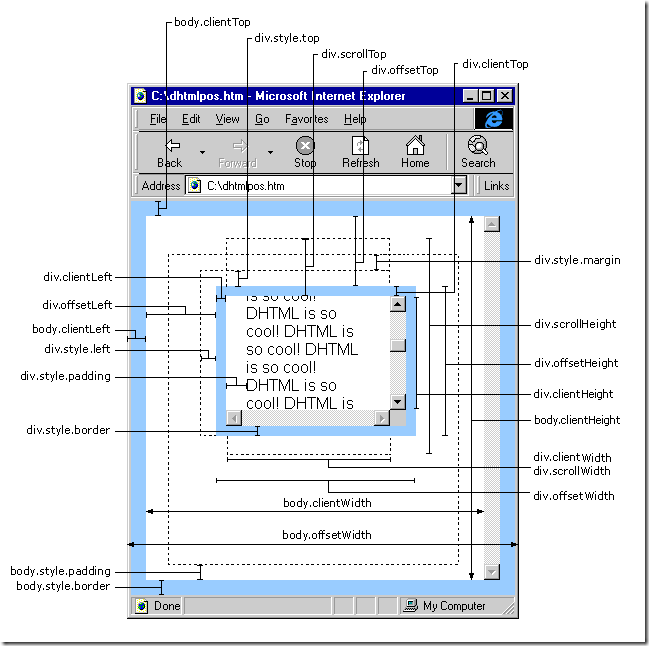
JS获取各种宽度、高度的简单介绍:
scrollHeight: 获取对象的滚动高度。
scrollLeft:设置或获取位于对象左边界和窗口中目前可见内容的最左端之间的距离
scrollTop:设置或获取位于对象最顶端和窗口中可见内容的最顶端之间的距离
scrollWidth:获取对象的滚动宽度
offsetHeight:获取对象相对于版面或由父坐标 offsetParent 属性指定的父坐标的高度
offsetLeft:获取对象相对于版面或由 offsetParent 属性指定的父坐标的计算左侧位置
offsetTop:获取对象相对于版面或由 offsetTop 属性指定的父坐标的计算顶端位置
event.clientX 相对文档的水平座标
event.clientY 相对文档的垂直座标
event.offsetX 相对容器的水平坐标
event.offsetY 相对容器的垂直坐标
document.documentElement.scrollTop 垂直方向滚动的值
event.clientX+document.documentElement.scrollTop 相对文档的水平座标+垂直方向滚动的量
以上主要指IE之中,FireFox差异如下:
IE6.0、FF1.06+:
clientWidth = width + padding
clientHeight = height + padding
offsetWidth = width + padding + border
offsetHeight = height + padding + border
IE5.0/5.5:
clientWidth = width - border
clientHeight = height - border
offsetWidth = width
offsetHeight = height
(需要提一下:CSS中的margin属性,与clientWidth、offsetWidth、clientHeight、offsetHeight均无关)
offsetWidth (width+padding+border)
假设 obj 为某个 HTML 控件。
obj.offsetTop 指 obj 距离上方或上层控件的位置,整型,单位像素。
obj.offsetLeft 指 obj 距离左方或上层控件的位置,整型,单位像素。
obj.offsetWidth 指 obj 控件自身的宽度,整型,单位像素。获取对象可见内容的宽度,不包括滚动条,不包括边框;
obj.offsetHeight 指 obj 控件自身的高度,整型,单位像素。
offsetWidth 与 style.width 的区别
一、offsetTop 返回的是数字,而 style.top 返回的是字符串,除了数字外还带有单位:px。
二、offsetTop 只读,而 style.top 可读写。
三、如果没有给 HTML 元素指定过 top 样式,则 style.top 返回的是空字符串。
jQuery获取各种宽度、高度的简单介绍
- alert($(window).height()); //浏览器时下窗口可视区域高度
- alert($(document).height()); //浏览器时下窗口文档的高度
- alert($(document.body).height());//浏览器时下窗口文档body的高度
- alert($(document.body).outerHeight(true));//浏览器时下窗口文档body的总高度 包括border padding margin
- alert($(window).width()); //浏览器时下窗口可视区域宽度
- alert($(document).width());//浏览器时下窗口文档对于象宽度
- alert($(document.body).width());//浏览器时下窗口文档body的高度
- alert($(document.body).outerWidth(true));//浏览器时下窗口文档body的总宽度 包括border padding margin
- alert($(document).scrollTop()); //获取滚动条到顶部的垂直高度
- $('#outer-div')[0].scrollHeight
- //获取div的实际高度
- alert($(document).scrollLeft()); //获取滚动条到左边的垂直宽度
scrollTop为滚动条在Y轴上的滚动距离。
clientHeight为内容可视区域的高度。
scrollHeight为内容可视区域的高度加上溢出(滚动)的距离。
从这个三个属性的介绍就可以看出来,滚动条到底部的条件即为scrollTop + clientHeight == scrollHeight。
jquery实现判断滚动条滚动到底部:
- <!DOCTYPE html PUBLIC "-//W3C//DTD XHTML 1.0 Transitional//EN" "http://www.w3.org/TR/xhtml1/DTD/xhtml1-transitional.dtd">
- <html xmlns="http://www.w3.org/1999/xhtml">
- <head>
- <meta http-equiv="content-type" content="text/html;charset=utf-8">
- <title>下拉滚动条滚到底部了吗?</title>
- <script language="javascript" src="jQuery.js"></script>
- <script language="javascript">
- $(document).ready(function (){
- $('#scroll-top-msg').html($("#outer-div")[0].scrollTop);
- $('#scroll-height-msg').html($("#outer-div")[0].scrollHeight);
- $("#outer-div").scroll(function(){
- $('#scroll-to-bottom-msg').html('');
- $('#scroll-top-msg').html($("#outer-div")[0].scrollTop);
- $('#scroll-height-msg').html($("#outer-div")[0].scrollHeight);
- if($("#outer-div")[0].scrollTop >= ($("#outer-div")[0].scrollHeight - $("#outer-div").height()))
- $('#scroll-to-bottom-msg').html('滚动到DIV底部了');
- });
- });
- </script>
- <body>
- Scroll Top : <span id="scroll-top-msg">0</span> |
- Scroll Height : <span id="scroll-height-msg">0</span> <br/>
- <span id="scroll-to-bottom-msg"></span>
- <div id="outer-div" style="overflow-y:auto; overflow-x:hidden; width:800px;height:500px;background:gray;">
- <div style="height:750px;background:#aea;width:600px;margin:0 auto;">
- </div>
- </div>
- </body>
- </html>
当然也可以使用百分比判断滚动条离底部距离
- <!DOCTYPE html PUBLIC "-//W3C//DTD XHTML 1.0 Transitional//EN" "http://www.w3.org/TR/xhtml1/DTD/xhtml1-transitional.dtd">
- <html xmlns="http://www.w3.org/1999/xhtml">
- <head>
- <meta http-equiv="content-type" content="text/html;charset=utf-8">
- <title>下拉滚动条滚到底部了吗?</title>
- <script language="javascript" src="jQuery.js"></script>
- <script language="javascript">
- $(document).ready(function (){
- $('#scroll-top-msg').html($("#outer-div")[0].scrollTop);
- $('#scroll-height-msg').html($("#outer-div")[0].scrollHeight);
- $("#outer-div").scroll(function(){
- $('#scroll-to-bottom-msg').html('');
- $('#scroll-top-msg').html($("#outer-div")[0].scrollTop);
- $('#scroll-height-msg').html($("#outer-div")[0].scrollHeight);
- if($("#outer-div")[0].scrollTop / (($("#outer-div")[0].scrollHeight - $("#outer-div").height()))== 0.95 ) //在滚动条距离底端5%以内
- $('#scroll-to-bottom-msg').html('滚动到DIV底部了');
- });
- });
- </script>
- <body>
- Scroll Top : <span id="scroll-top-msg">0</span> |
- Scroll Height : <span id="scroll-height-msg">0</span> <br/>
- <span id="scroll-to-bottom-msg"></span>
- <div id="outer-div" style="overflow-y:auto; overflow-x:hidden; width:800px;height:500px;background:gray;">
- <div style="height:750px;background:#aea;width:600px;margin:0 auto;">
- </div>
- </div>
- </body>
- </html>
jq 获取各个元素的宽度高度的方法的更多相关文章
- Knockout获取数组元素索引的2种方法,在MVC中实现
原文:Knockout获取数组元素索引的2种方法,在MVC中实现 在遍历数组.集合的时候,通常要获取元素的索引,本篇体验使用Knockout获取索引的2种方法. 假设有这样的一个模型: namespa ...
- Jq_Js_Js、Jq获取浏览器和屏幕各种高度宽度
$(document).ready(function() {alert($(window).height()); //浏览器当前窗口可视区域高度alert($(document).he ...
- jquery outerHeight方法 outerWidth方法 获取元素实际宽度高度
曾经写代码中,每当须要获取元素的实际"宽度"(这里的宽度是指元素宽度加上其边距)时,都须要用元素宽度加上margin值才行,今天发现一个叫outerWidth(options)的方 ...
- 获取dom元素的宽度和高度
一.获取css的大小 1.第一种通过内联样式 var box = document.getElementById('box'); var w = box.style.width; var h = bo ...
- JS与JQ 获取页面元素值的方法和差异对比
获取浏览器高度和宽度 document.documentElement.clientWidth ==> 浏览器可见区域宽度 document.documentElement.clientHeig ...
- 使用jquery获取父元素或父节点的方法
今天面试题问到了,没答上,jq要继续学习啊 jquery获取父元素方法比较多,比如parent(),parents(),closest()这些都能帮你实现查找父元素或节点,下面我们来一一讲解: 先举个 ...
- jquery获取父元素或父节点的方法
jquery获取父元素方法比较多,比如parent(),parents(),closest()这些都能帮你实现查找父元素或节点,下面我们来一一讲解: 先举个例子: <ul class=" ...
- js jq 获取网页元素宽度
Javascript: IE中:document.body.clientWidth ==> BODY对象宽度document.body.clientHeight ==> BODY对象高度d ...
- JS 和 Jq 获取客户端各种屏幕宽度和高度
//javascript 网页可见区域宽: document.body.clientWidth 网页可见区域高: document.body.clientHeight 网页可见区域宽: documen ...
随机推荐
- windows 把ps/2 鼠标当成ps/2键盘了
真坑口阿 https://zhidao.baidu.com/question/425134865713508932.html 电脑的PS/2鼠标接口认成键盘了 电脑主板技嘉,只有一个PS/2接口.开始 ...
- firewalld无法使用解决
一.安装完Python3.6.5后无法使用firewalld解决 解决:需要把/usr/sbin/firewalld./usr/bin/firewall-cmd 的头部内容改为原来的 pyton2.7 ...
- flutter dialog异常Another exception was thrown: Navigator operation requested with a context that does not include a Navigator
我在使用flutter里的对话框控件的时候遇到了一个奇怪的错误 Another exception was thrown: Navigator operation requested with a c ...
- date picker with jquery
<html> <input id="from_time" name="from_time"type="text" valu ...
- Jmeter JDBC请求---把数据库结果参数化传递到其他请求
摘要: 最近一个场景进行压力测试:生成商品id进行上下架和购买,记录写脚本的一个过程 1.在商品上架前需要准备商品ID,商品ID生成需要从数据库读取商品类别,从而生成商品ID,下面是从数据库:读取商品 ...
- 【MM系列】SAP 各种冲销凭证
公众号:SAP Technical 本文作者:matinal 原文出处:http://www.cnblogs.com/SAPmatinal/ 原文链接:[MM系列]SAP 各种冲销凭证 前言部分 ...
- 【Windows Server存储】MBR和GPT分区表
MBR和GPT分区表 分区表用于引导操作系统 master boot record(MBR)于1983年首次在PC上推出 最大4个主分区 2太空间 GUID Partition Table(GPT), ...
- docker安装tomcat&部署javaweb程序
一.docker定制简单的java-web应用镜像 网址: 1.jdk下载网址:https://www.oracle.com/technetwork/java/javase/downloads/jdk ...
- Java——LinkedList使用Demo
package list; import java.util.Iterator; import java.util.LinkedList; public class LinkedListDemo { ...
- qt undefined reference to `vtable for subClass'
1. 建立一个console工程 QT -= gui CONFIG += c++ console CONFIG -= app_bundle # The following define makes y ...