
React -- 3/100 】组件通讯
通讯 | props | prop-types
组件通讯
Props: 组件无论是使用函数声明还是通过 class 声明,都决不能修改自身的 props
/* class  */

.parent-box {

  width: 700px;

  height: 300px;

  background-color: #eeeeee;

  border: 1px solid #ca46dd;

}

.child-box {

  width: 500px;

  height: 200px;

  background-color: #c4ee9f;

}

.grandchild-box {

  width: 300px;

  height: 100px;

  background-color: #c05b76;

}
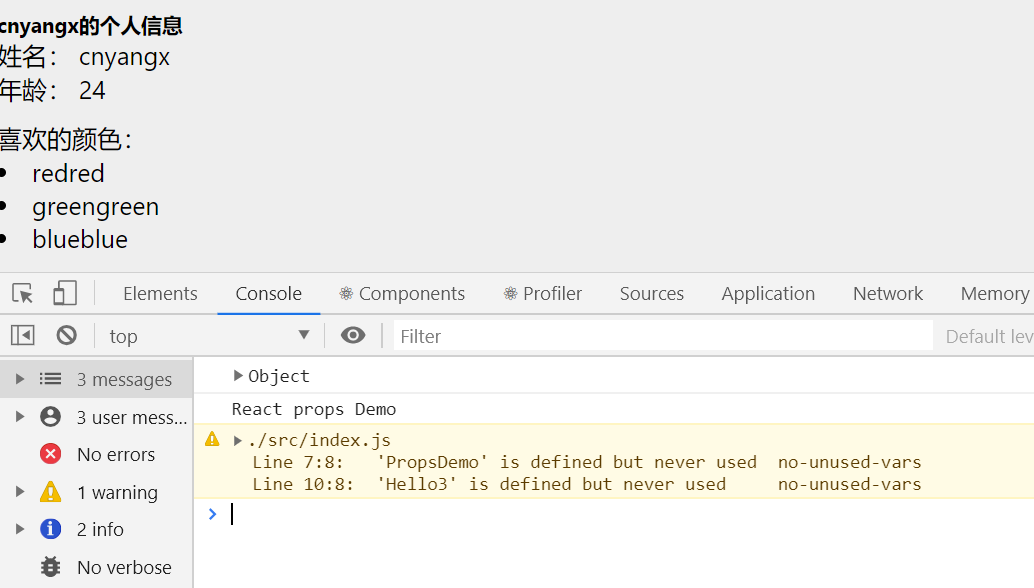
1 - 使用function
const Demo = (props) => {
console.log(props)
return (
<div>
{props.info}
<p>姓名: {props.name}</p>
<p>年龄: {props.age}</p>
<div>喜欢的颜色:
{props.Colors.map( item =>
<li key={item}>{item}{item}</li>
)}
</div>
{props.func()}
</div>
)
};
ReactDOM.render(
<Demo
info = { <h5>cnyangx的个人信息</h5> }
name="cnyangx"
age={24}
Colors={['red', 'green', 'blue']}
func={ () => console.log('React props Demo')} />,
document.getElementById('root'));
2 - 使用class
/**
注意: 使用类组件时,如果写了构造函数,应该将props传递给super(),否则,无法在构造函数中获取到props
*/
import React from 'react'
// class 组件
class PropsDemo extends React.Component{
constructor(props){
super(props);
}
render() {
return (
<div>
<h2>class 组件</h2>
{this.props.info}
<p>姓名: {this.props.name}</p>
<p>年龄: {this.props.age}</p>
<div>喜欢的颜色:
{this.props.Colors.map( item =>
<li key={item}>{item}{item}</li>
)}
</div>
{this.props.func()}
</div>
)
}
}
export default PropsDemo;
// 在页面中使用
ReactDOM.render(
<PropsDemo
info = { <h5>cnyangx的个人信息</h5> }
name="cnyangx"
age={24}
Colors={['red', 'green', 'blue']}
func={ () => console.log('React props Demo')} />,
document.getElementById('root'));

组件通讯的三种方式
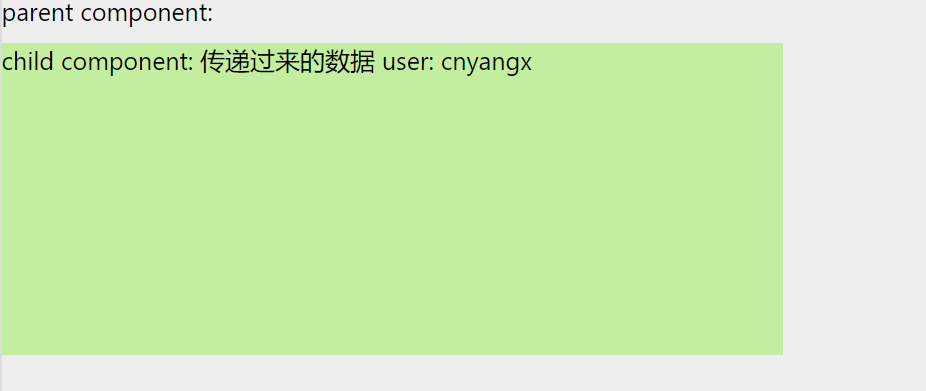
(1)父组件传递数据给子组件
- 父组件提供要传递的state数据

- 给子组件标签添加属性,值为state中的数据

- 子组件中通过props接收父组件中传递的数据
class Parent extends React.Component {

    state = {

        user: 'cnyangx'

    }

    render() {

        return (

            <div className="parent-box" >

                parent component:

                <Child user={this.state.user}/>

            </div>

        );

    }

}

const Child = (props) => {

    return(

        <div className="child-box">

            child component: 传递过来的数据 user: {props.user}

        </div>

    )

};

ReactDOM.render(<Parent />, document.getElementById('root'));
(2)子组件传递数据给父组件
- 利用回调函数,父组件提供回调,子组件调用,将要传递的数据作为回调函数的参数

- 父组件提供一个回调函数,用来接收数据

- 将该函数作为属性的值,传递给子组件
class Parent extends React.Component {

    state = {

        getmsg: ''

    };

    // 提供回调函数用来接收数据

    getChildMsg = data => {

        this.setState({

            getmsg: data

        });

        console.log(data)

    };

    render() {

        return (

            <div className="parent-box" >

                parent component: 组件传递过来的数据:{this.state.getmsg}

                <Child getMsg = {this.getChildMsg}/>

            </div>

        );

    }

}

class Child extends React.Component{

    state = {

        user: 'cnyangx'

    };

    handleClick = () => {

        this.props.getMsg(this.state.user)

    };

    render() {

        return(

            <div className="child-box">

                <button onClick={this.handleClick}>点我传递数据给父组件</button>

            </div>

        )

    }

};

ReactDOM.render(<Parent />, document.getElementById('root'));

(3) 兄弟组件传递
- 将共享状态(数据)提升到最近的公共父组件中,由公共父组件管理这个状态

- 这个称为状态提升

- 公共父组件职责:

	1. 提供共享状态

	2.提供操作共享状态的方法

- 要通讯的子组件只需要通过props接收状态或操作状态的方法
// 父组件

class Counter extends React.Component {

    // 共享的状态

    state = {

        count: 0

    };

    // 提供修改状态的方法

    onIncrement = () => {

        this.setState({

            count: this.state.count + 1

        })

    };

    render() {

        return (

            <div>

                <Child1 count={this.state.count} />

                <Child2 onIncrement={this.onIncrement}/>

            </div>

        )

    }

}

const Child1 = (props) => {

    return <h1>计数器:{props.count}</h1>

};

const  Child2 = (props) => {

    return <button onClick={() => props.onIncrement()}> child + 1 </button>

};

ReactDOM.render(<Counter />, document.getElementById('root'));
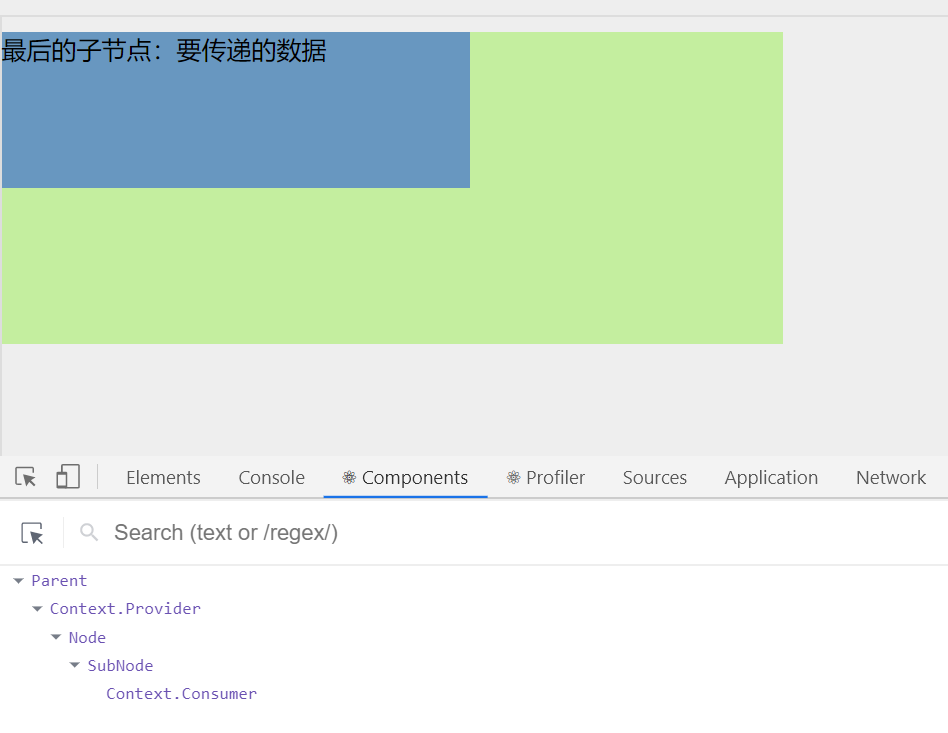
Context -- 跨组件传递数据
// 1. 创建Context 得到两个组件

const { Provider, Consumer } = React.createContext();

// 2. 使用Provider组件作为父节点

class Parent extends React.Component {

    render() {

        return (

            // 3. 设置value属性,表示要传递的数据

            <Provider value="要传递的数据">

                <div className="parent-box">

                    <Node/>

                </div>

            </Provider>

        )

    }

}

const Node = props => {

    return (

        <div className="child-box">

            <SubNode/>

        </div>

    )

};

const SubNode = props => {

    return (

        <div className="grandchild-box">

            {/*// 4. 哪一层想要接收数据,就用Consumer进行包裹,在里面回调函数中的参数就是传递过来的值*/}

            <Consumer >

                {/*  更新:Consumer里面只能有一个根组件 */}

                { data => <span>最后的子节点:{data} </span>}

            </Consumer>

        </div>

    )

ReactDOM.render(<Parent />, document.getElementById('root'));
Props 探究
children属性
- children属性: 表示组件标签的子节点,当组件标签有子节点时,props就会有该属性
- children属性与普通的props一样,值可以使任意值(文本、react元素、组件、甚至是函数)
const Parent = (props) => {

    console.log(props);

    return (

        <div>parent

            {props.children}

        </div>

    )

};

ReactDOM.render(<Parent>

    <h1>children</h1>

    <p>txt</p>

</Parent>, document.getElementById('root'));

props校验
- 对于组件来说,props是外来的,无法保证组件使用者传入什么格式的数据,简单来说就是组件调用者可能不知道组件封装着需要什么样的数据
- 如果传入的数据不对,可能会导致报错
- 关键问题:组件的使用者不知道需要传递什么样的数据
- props校验:允许在创建组件的时候,指定props的类型、格式等
- 作用:捕获使用组件时因为props导致的错误,给出明确的错误提示,增加组件的健壮性
使用步骤
- 安装包
prop-types (yarn add prop-types | npm i props-types) - 导入prop-types 包
- 使用
组件名.propTypes={}来给组件的props添加校验规则 - 校验规则通过PropTypes对象来指定
// props 校验

const Verify = props => {

    const arr = props.colors;

    const lis = arr.map((item, index) => <li key={index}>{item}</li>);

    return (

        <ul>{lis}</ul>

    )

};

// 添加校验

Verify.propTypes = {

    colors: PropTypes.array

};

ReactDOM.render(<Verify colors={['blue', 'yellow', 'red']} />, document.getElementById('root'));
常见的约束规则
创建的类型:
array、bool、func、number、object、stringReact元素类型:
element必填项:
isRequired特定结构的对象:
shape({})更多的约束规则
// 添加props校验

// 属性 a 的类型:      数值(number)

// 属性 fn 的类型:     函数(func)并且为必填项

// 属性 tag 的类型:    React元素(element)

// 属性 filter 的类型: 对象({area: '上海', price: 1999})

Verify.propTypes = {

    colors: PropTypes.array,

    a: PropTypes.number,

    fn: PropTypes.func.isRequired,

    tag: PropTypes.element,

    filter: PropTypes.shape({

        area: PropTypes.string,

        price: PropTypes.number

    })

};

ReactDOM.render(<Verify colors={['blue', 'yellow', 'red']} />, document.getElementById('root'));
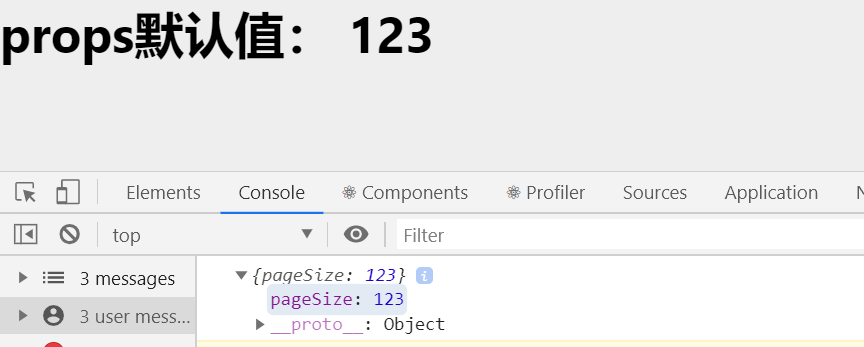
props的默认值
- 场景:分页组件 -> 每页显示条数
// props 默认值

const DefaultValue = props => {

    console.log(props);

    return (

        <div>

            <h1>props默认值: {props.pageSize}</h1>

        </div>

    )

};

DefaultValue.defaultProps = {

    pageSize: 123

};

ReactDOM.render(<DefaultValue  />, document.getElementById('root'));
React -- 3/100 】组件通讯的更多相关文章
- React 组件通讯
React 父→子组件通讯 在父组件中子组件上 绑定一个 变量名={要传递的数据}:走我们去子组件中接收.... 直接用 this.props.刚刚起的变量名就ok了 上代 ...
- 【React -- 5/100】 组件复用
组件复用 React组件复用概述 思考:如果两个组件中的部分功能相似或相同,该如何处理? 处理方式:复用相似的功能 复用什么? state 操作state的方法 两种方式: render props模 ...
- React jQuery公用组件开发模式及实现
目前较为流行的react确实有很多优点,例如虚拟dom,单向数据流状态机的思想.还有可复用组件化的思想等等.加上搭配jsx语法和es6,适应之后开发确实快捷很多,值得大家去一试.其实组件化的思想一直在 ...
- React Native的组件ListView
React Native的组件ListView类似于iOS中的UITableView和UICollectionView,也就是说React Native的组件ListView既可以实现UITableV ...
- 【Vue】Vue中的父子组件通讯以及使用sync同步父子组件数据
前言: 之前写过一篇文章<在不同场景下Vue组件间的数据交流>,但现在来看,其中关于“父子组件通信”的介绍仍有诸多缺漏或者不当之处, 正好这几天学习了关于用sync修饰符做父子组件数据双向 ...
- WEB通知和React Native之即时通讯(iOS Android)
WEB通知和React Native之即时通讯(iOS Android) 一,需求分析 1.1,允许服务器主动发送信息给客户端,客户端能监听到并且能接收. 1.2,为了方便同一个系统内的用户可以指定某 ...
- 函数式编程与React高阶组件
相信不少看过一些框架或者是类库的人都有印象,一个函数叫什么creator或者是什么什么createToFuntion,总是接收一个函数,来返回另一个函数.这是一个高阶函数,它可以接收函数可以当参数,也 ...
- React高阶组件 和 Render Props
高阶组件 本质 本质是函数,将组件作为接收参数,返回一个新的组件.HOC本身不是React API,是一种基于React组合的特而形成的设计模式. 解决的问题(作用) 一句话概括:功能的复用,减少代码 ...
- vue 组件通讯方式到底有多少种 ?
前置 做大小 vue 项目都离不开组件通讯, 自己也收藏了很多关于 vue 组件通讯的文章. 今天自己全部试了试, 并查了文档, 在这里总结一下并全部列出, 都是简单的例子. 如有错误欢迎指正. 温馨 ...
随机推荐
- 论文阅读:Elastic Scaling of Stateful Network Functions
摘要: 弹性伸缩是NFV的核心承诺,但在实际应用中却很难实现.出现这种困难的原因是大多数网络函数(NFS)是有状态的,并且这种状态需要在NF实例之间共享.在满足NFS上的吞吐量和延迟要求的同时实现状态 ...
- PHPStrom 配置DataSource来管理数据库
在使用phpstrom的时候经常会连接数据库,使用phpstrom自带的工具,可以连接到mysql数据库,管理和查看mysql,非常方便 这个连接是官方文档教你如何配置http://www.jetbr ...
- ERROR 1044 (42000): Access denied for user ''@'localhost' to database 'ambari'
配置Ambari远程maridb 报错: ERROR 1044 (42000): Access denied for user ''@'localhost' to database 'ambari' ...
- 14 补充 MySQL的创建用户和授权
权限管理 我们知道我们的最高权限管理者是root用户,它拥有着最高的权限操作.包括select.update.delete.update.grant等操作.那么一般情况在公司之后DBA工程师会创建一个 ...
- 搜索引擎算法研究专题七:Hilltop算法
搜索引擎算法研究专题七:Hilltop算法 2017年12月19日 ⁄ 搜索技术 ⁄ 共 1256字 ⁄ 字号 小 中 大 ⁄ 评论关闭 HillTop也是搜索引擎结果排序的专利,是Google工 ...
- ObjectDataSource.ObjectCreating 事件
ObjectCreating 事件在创建由 TypeName 属性标识的对象之前发生. 命名空间:System.Web.UI.WebControls程序集:System.Web(在 system.we ...
- iOS UICollectionView数据少导致不能滚动
有时候UICollectionView会遇到不能滑动的情况,但是我们并没有代码明确禁止这个东西的滑动效果,这个是苹果系统的小漏洞. 解决办法: 横向滑动的 collectionView.alwaysB ...
- JDK1.7安装配置环境变量+图文说明Jmeter安装
Jmeter通常用于并发测试,本文介绍Jmeter工具的安装步骤. 工具/原料 WIN7 Jmeter安装包 JDK 一.安装JDK 1 [步骤一]安装jdk 1.下载jdk,到官网下载jdk ...
- ftp4j揭示java.net.SocketException: Connection reset的解决
ftp4j提示java.net.SocketException: Connection reset的解决系统的自动更新FTP服务器,其他计算机连接都没有问题,包括xp.server2008.win7. ...
- Matlab——表达式 阵列与矩阵的创建
表达式 指令过长: 如果一个指令过长可以在结尾加上... 下一行继续写指令即可 若不想每次都显示运算结果,只需在运算式最後加上分号(:)即可 注释 基本的算术运算有: 加 (+).减 (-).乘 (* ...