
Zabbix3.4.5部署安装(二)
[root@Node3 ~]# cat /etc/redhat-release      //查看系统版本

CentOS Linux release 7.4. (Core)

[root@Node3 ~]# ip - addr | grep 172.17      //查看IP地址

  inet 172.17.21.208/ brd 172.17.21.255 scope global ens192
二)软件下载:
[root@Node3 ~]# cd /usr/src/zabbix3.4.5/    //软件包下载目录

[root@Node3 zabbix3.4.5]# ls

zabbix-agent-3.4.-.el7.x86_64.rpm         zabbix-proxy-sqlite3-3.4.-.el7.x86_64.rpm  zabbix-web-japanese-3.4.-.el7.noarch.rpm

zabbix-get-3.4.-.el7.x86_64.rpm           zabbix-sender-3.4.-.el7.x86_64.rpm         zabbix-web-mysql-3.4.-.el7.noarch.rpm

zabbix-java-gateway-3.4.-.el7.x86_64.rpm  zabbix-server-mysql-3.4.-.el7.x86_64.rpm   zabbix-web-pgsql-3.4.-.el7.noarch.rpm

zabbix-proxy-mysql-3.4.-.el7.x86_64.rpm   zabbix-server-pgsql-3.4.-.el7.x86_64.rpm

zabbix-proxy-pgsql-3.4.-.el7.x86_64.rpm   zabbix-web-3.4.-.el7.noarch.rpm
[root@Node3 ~]# systemctl stop firewalld.service    //停掉防火墙

[root@Node3 ~]# systemctl disable firewalld.service     //禁止防火墙开机自启动

Removed symlink /etc/systemd/system/multi-user.target.wants/firewalld.service.

Removed symlink /etc/systemd/system/dbus-org.fedoraproject.FirewallD1.service.

[root@Node3 ~]# iptables -X

[root@Node3 ~]# iptables -Z

[root@Node3 ~]# iptables -F

[root@Node3 ~]# iptables -vnL

Chain INPUT (policy ACCEPT  packets,  bytes)

 pkts bytes target     prot opt in     out     source               destination

Chain FORWARD (policy ACCEPT  packets,  bytes)

 pkts bytes target     prot opt in     out     source               destination

Chain OUTPUT (policy ACCEPT  packets,  bytes)

 pkts bytes target     prot opt in     out     source               destination
[root@Node3 ~]# sed -i 's/SELINUX=enforcing/SELINUX=disabled/g' /etc/selinux/config   //在/etc/selinux/config 把SELNUX=enforcing换成SELINUX=disabled

[root@Node3 ~]# setenforce

setenforce: SELinux is disabled

[root@Node3 ~]# getenforce

Disabled

[root@Node3 ~]# systemctl reboot
注:部署官方文档
rpm包安装3.4手册:https://www.zabbix.com/documentation/3.4/zh/manual/installation/getting_zabbix
从源代码安装zabbix 3.4: https://www.zabbix.com/documentation/3.4/zh/manual/installation/install#installation_from_sources
二、数据库的安装及配置
MariaDB数据库管理系统是MySQL的一个分支,主要由开源社区在维护,采用GPL授权许可。
开发这个分支的原因是:甲骨文公司收购了MySQL后,有将MySQL闭源的潜在风险,因此社区采用分支的方式来避开这个风险。
MariaDB的目的是完全兼容MySQL,包括API和命令行,使之能轻松成为MySQL的代替品
一)安装MariaDB:
[root@Node3 ~]# yum install mariadb-server mariadb –y    //yum安装mariadb

[root@Node3 ~]# rpm -qa | grep mariadb

mariadb-5.5.-.el7.x86_64

mariadb-server-5.5.-.el7.x86_64

mariadb-libs-5.5.-.el7.x86_64
二)设置MariaDB并启动:
1、编辑my.cnf文件,增加以下内容:
[root@Node3 ~]# vim /etc/my.cnf    //编辑my.cnf文件
[mysqld]

datadir=/var/lib/mysql

socket=/var/lib/mysql/mysql.sock

innodb_file_per_table = on  //每个表使用一张单独的表

skip_name_resolve =  on  //跳过名称反解

# Disabling symbolic-links is recommended to prevent assorted security risks

symbolic-links=

# Settings user and group are ignored when systemd is used.

# If you need to run mysqld under a different user or group,

# customize your systemd unit file for mariadb according to the

# instructions in http://fedoraproject.org/wiki/Systemd

[mysqld_safe]

log-error=/var/log/mariadb/mariadb.log

pid-file=/var/run/mariadb/mariadb.pid

#

# include all files from the config directory

#

!includedir /etc/my.cnf.d
2、启动数据库,并设置开机自启动
[root@Node3 ~]# systemctl start mariadb.service       //启动数据库

[root@Node3 ~]# systemctl enable mariadb.service      //设置开机自启动

Created symlink from /etc/systemd/system/multi-user.target.wants/mariadb.service to /usr/lib/systemd/system/mariadb.service.

[root@Node3 ~]# systemctl status mariadb.service      //查看状态

● mariadb.service - MariaDB database server

   Loaded: loaded (/usr/lib/systemd/system/mariadb.service; enabled; vendor preset: disabled)

   Active: active (running) since Tue -- :: CST; 17s ago

 Main PID:  (mysqld_safe)

   CGroup: /system.slice/mariadb.service

           ├─ /bin/sh /usr/bin/mysqld_safe --basedir=/usr

           └─ /usr/libexec/mysqld --basedir=/usr --datadir=/var/lib/mysql --plugin-dir=/usr/lib64/mysql/plugin --log-error=/var/log/mariadb/ma...

Jan  :: Node3.contoso.com mariadb-prepare-db-dir[]: MySQL manual for more instructions.

Jan  :: Node3.contoso.com mariadb-prepare-db-dir[]: Please report any problems at http://mariadb.org/jira

Jan  :: Node3.contoso.com mariadb-prepare-db-dir[]: The latest information about MariaDB is available at http://mariadb.org/.

Jan  :: Node3.contoso.com mariadb-prepare-db-dir[]: You can find additional information about the MySQL part at:

Jan  :: Node3.contoso.com mariadb-prepare-db-dir[]: http://dev.mysql.com

Jan  :: Node3.contoso.com mariadb-prepare-db-dir[]: Consider joining MariaDB's strong and vibrant community:

Jan  :: Node3.contoso.com mariadb-prepare-db-dir[]: https://mariadb.org/get-involved/

Jan  :: Node3.contoso.com mysqld_safe[]:  :: mysqld_safe Logging to '/var/log/mariadb/mariadb.log'.

Jan  :: Node3.contoso.com mysqld_safe[]:  :: mysqld_safe Starting mysqld daemon with databases from /var/lib/mysql

Jan  :: Node3.contoso.com systemd[]: Started MariaDB database server.

[root@Node3 ~]# ss -tnl | grep 3306   //查看3306端口是否正常

LISTEN                      *:                     *:*
三) 创建数据库:
[root@Node3 ~]# mysql

Welcome to the MariaDB monitor.  Commands end with ; or \g.

Your MariaDB connection id is

Server version: 5.5.-MariaDB MariaDB Server

Copyright (c) , , Oracle, MariaDB Corporation Ab and others.

Type 'help;' or '\h' for help. Type '\c' to clear the current input statement.

MariaDB [(none)]> CREATE DATABASE zabbix CHARSET 'utf8' COLLATE 'utf8_bin';    //创建数据库,并设置字符集

Query OK,  row affected (0.00 sec)

MariaDB [(none)]> GRANT ALL ON zabbix.* TO 'zbxuser'@'172.17.21.%' IDENTIFIED BY 'zbxpass';      //授权用户对其数据库的权限

Query OK,  rows affected (0.00 sec)

MariaDB [(none)]> FLUSH PRIVILEGES;

Query OK,  rows affected (0.00 sec)

MariaDB [(none)]> exit

Bye

[root@Node3 ~]# mysql -uzbxuser -pzbxpass -h 172.17.21.208    //测试数据库是否登录正常

Welcome to the MariaDB monitor.  Commands end with ; or \g.

Your MariaDB connection id is

Server version: 5.5.-MariaDB MariaDB Server

Copyright (c) , , Oracle, MariaDB Corporation Ab and others.

Type 'help;' or '\h' for help. Type '\c' to clear the current input statement.

MariaDB [(none)]>
1、设置zabbix yum源仓库
[root@Node3 ~]# rpm -Uvh http://repo.zabbix.com/zabbix/3.4/rhel/7/x86_64/zabbix-release-3.4-1.el7.centos.noarch.rpm  //连接外网可以安装yum源的rpm包,让其自动生成zabbix仓库

Retrieving http://repo.zabbix.com/zabbix/3.4/rhel/7/x86_64/zabbix-release-3.4-1.el7.centos.noarch.rpm

Preparing...                          ################################# [%]

Updating / installing...

   :zabbix-release-3.4-.el7.centos  ################################# [%]

[root@Node3 ~]# ls  /etc/yum.repos.d/   //查看仓库是否自动生成

cdrom.repo  repo  zabbix.repo  CentOS-Base.repo

[root@Node3 ~]#
2、安装 zabbix3.4.5
[root@Node3 zabbix3.4.5]# yum -y install zabbix-server-mysql-3.4.-.el7.x86_64.rpm zabbix-web-mysql-3.4.-.el7.noarch.rpm zabbix-get-3.4.-.el7.x86_64.rpm  //安装zabbix服务端
Loaded plugins: fastestmirror, langpacks
Examining zabbix-server-mysql-3.4.5-1.el7.x86_64.rpm: zabbix-server-mysql-3.4.5-1.el7.x86_64
Marking zabbix-server-mysql-3.4.5-1.el7.x86_64.rpm to be installed
Examining zabbix-web-mysql-3.4.5-1.el7.noarch.rpm: zabbix-web-mysql-3.4.5-1.el7.noarch
Marking zabbix-web-mysql-3.4.5-1.el7.noarch.rpm to be installed
Examining zabbix-get-3.4.5-1.el7.x86_64.rpm: zabbix-get-3.4.5-1.el7.x86_64
Marking zabbix-get-3.4.5-1.el7.x86_64.rpm to be installed
Resolving Dependencies
--> Running transaction check
---> Package zabbix-get.x86_64 0:3.4.5-1.el7 will be installed
---> Package zabbix-server-mysql.x86_64 0:3.4.5-1.el7 will be installed
--> Processing Dependency: fping for package: zabbix-server-mysql-3.4.5-1.el7.x86_64
base                                                                                                                          | 3.6 kB  00:00:00
extras                                                                                                                        | 3.4 kB  00:00:00
updates                                                                                                                       | 3.4 kB  00:00:00
(1/4): base/7/x86_64/group_gz                                                                                                 | 156 kB  00:00:00
(2/4): extras/7/x86_64/primary_db                                                                                             | 145 kB  00:00:01
(3/4): base/7/x86_64/primary_db                                                                                               | 5.7 MB  00:00:12
(4/4): updates/7/x86_64/primary_db                                                                                            | 5.2 MB  00:00:55
Loading mirror speeds from cached hostfile
 * base: mirrors.aliyun.com
 * extras: mirrors.cn99.com
 * updates: mirrors.aliyun.com

...........................安装过程省略............................

Installed:

  zabbix-get.x86_64 :3.4.-.el7             zabbix-server-mysql.x86_64 :3.4.-.el7             zabbix-web-mysql.noarch :3.4.-.el7

Dependency Installed:   //安装所需的依赖包

  OpenIPMI-libs.x86_64 :2.0.-.el7           OpenIPMI-modalias.x86_64 :2.0.-.el7             fping.x86_64 :3.10-.el7

  httpd.x86_64 :2.4.-.el7.centos.           httpd-tools.x86_64 :2.4.-.el7.centos.           iksemel.x86_64 :1.4-.el7.centos

  libzip.x86_64 :0.10.-.el7                   mailcap.noarch :2.1.-.el7                        php.x86_64 :5.4.-.el7_4

  php-bcmath.x86_64 :5.4.-.el7_4            php-cli.x86_64 :5.4.-.el7_4                     php-common.x86_64 :5.4.-.el7_4

  php-gd.x86_64 :5.4.-.el7_4                php-ldap.x86_64 :5.4.-.el7_4                    php-mbstring.x86_64 :5.4.-.el7_4

  php-mysql.x86_64 :5.4.-.el7_4             php-pdo.x86_64 :5.4.-.el7_4                     php-xml.x86_64 :5.4.-.el7_4

  t1lib.x86_64 :5.1.-.el7                    unixODBC.x86_64 :2.3.-.el7                       zabbix-web.noarch :3.4.-.el7

Complete!
3、导入zabbix数据库
[root@Node3 zabbix3.4.5]# zcat /usr/share/doc/zabbix-server-mysql-3.4./create.sql.gz |mysql -uzbxuser -pzbxpass -h172.17.21.208 zabbix //导入数据库
4、配置数据库用户及密码
[root@Node3 ~]# vim /etc/zabbix/zabbix_server.conf //修改zabbix_server.conf配置文件红色部分

[root@Node3 ~]# grep -n '^[a-Z]' /etc/zabbix/zabbix_server.conf //查看修改部分

:LogFile=/var/log/zabbix/zabbix_server.log

:LogFileSize=

:PidFile=/var/run/zabbix/zabbix_server.pid

:SocketDir=/var/run/zabbix
91:DBHost=172.17.21.208       //修改数据库地址

:DBName=zabbix             //修改数据库名

:DBUser=zbxuser            //修改数据库账号

:DBPassword=zbxpass       //修改数据库密码

:SNMPTrapperFile=/var/log/snmptrap/snmptrap.log

:Timeout=

:AlertScriptsPath=/usr/lib/zabbix/alertscripts    //Zabbix运行脚本存放目录

:ExternalScripts=/usr/lib/zabbix/externalscripts

:LogSlowQueries=

[root@Node3 ~]#
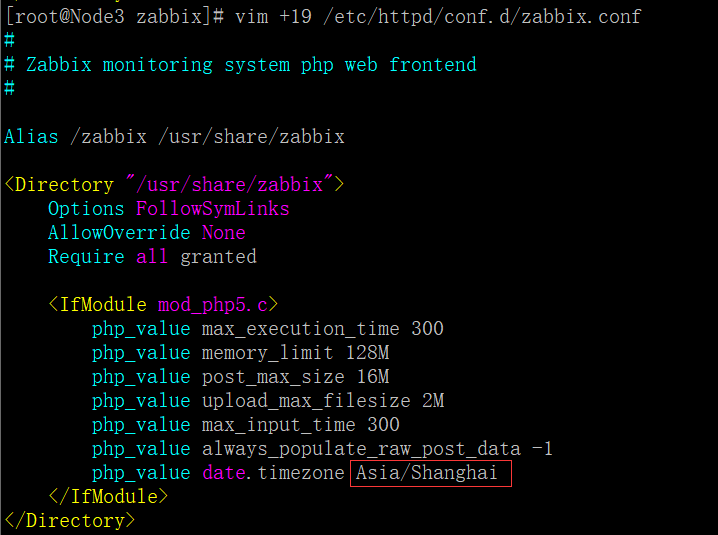
5、编辑Zabbix前端PHP配置,更改时区
[root@Node3 zabbix]# vim + /etc/httpd/conf.d/zabbix.conf //将#去掉,修改为Asia/Shanghai
6、SELinux配置
[root@Node3 zabbix]# setsebool -P httpd_can_connect_zabbix on

setsebool:  SELinux is disabled.

[root@Node3 zabbix]# setsebool -P httpd_can_cetwork_connect_db on

setsebool:  SELinux is disabled.

[root@Node3 zabbix]#
7、开启httpd服务,并设置开机自启动
[root@Node3 zabbix]# systemctl start httpd.service

[root@Node3 zabbix]# systemctl enable httpd.service

Created symlink from /etc/systemd/system/multi-user.target.wants/httpd.service to /usr/lib/systemd/system/httpd.service.

[root@Node3 zabbix]# ss -tnl | grep 80

LISTEN     0      128         :::                      :::*
8、开启zabbix- server服务,并设置为开机自启动
[root@Node3 zabbix]# systemctl start zabbix-server.service

[root@Node3 zabbix]# systemctl enable zabbix-server.service

Created symlink from /etc/systemd/system/multi-user.target.wants/zabbix-server.service to /usr/lib/systemd/system/zabbix-server.service.

[root@Node3 zabbix]# ss -tnl | grep

LISTEN                     *:                    *:*

LISTEN                    :::                   :::*

[root@Node3 zabbix]#
四、安装Zabbix Web
1、浏览器访问,并进行安装http://172.17.21.178/zabbix/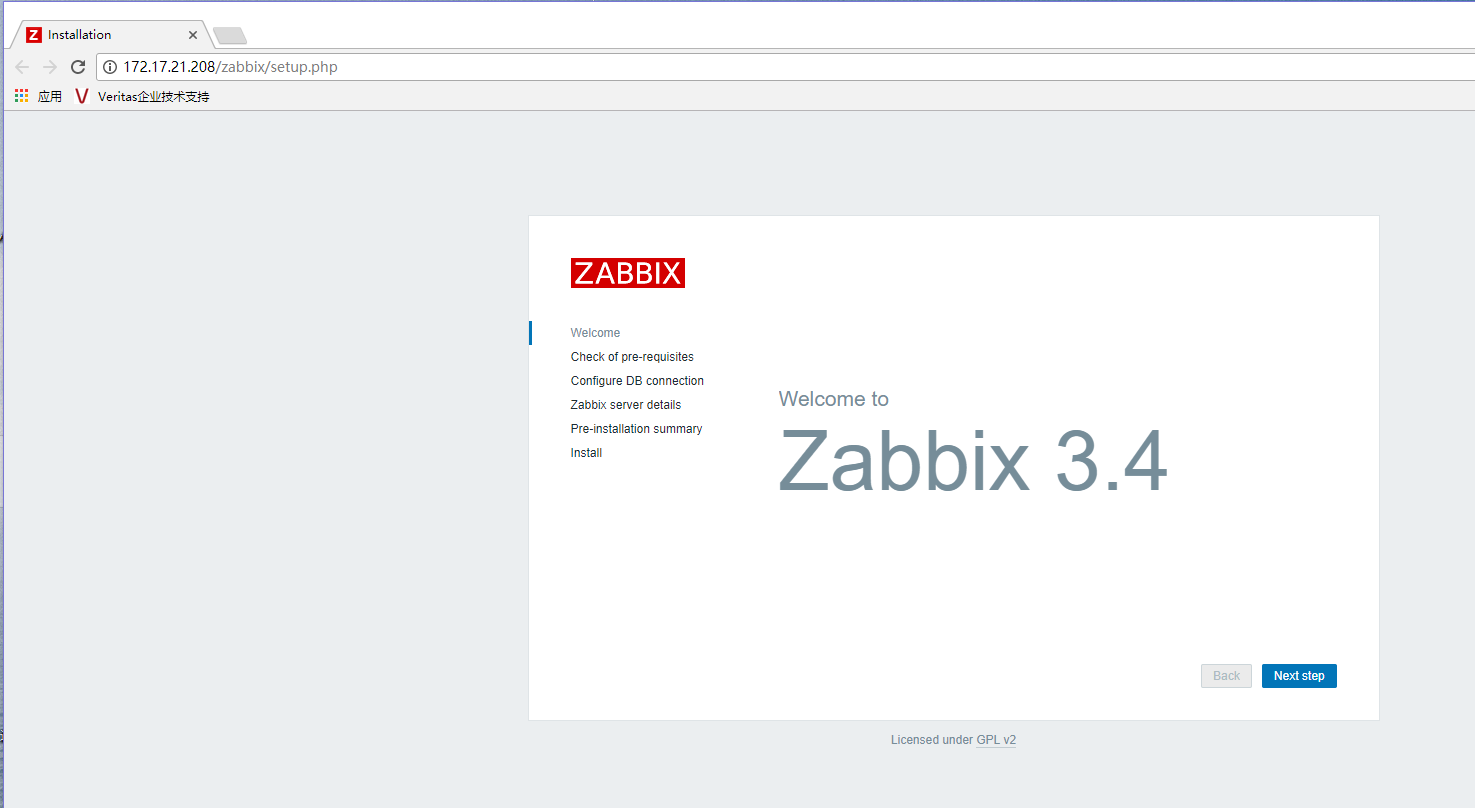
2、点击Next setp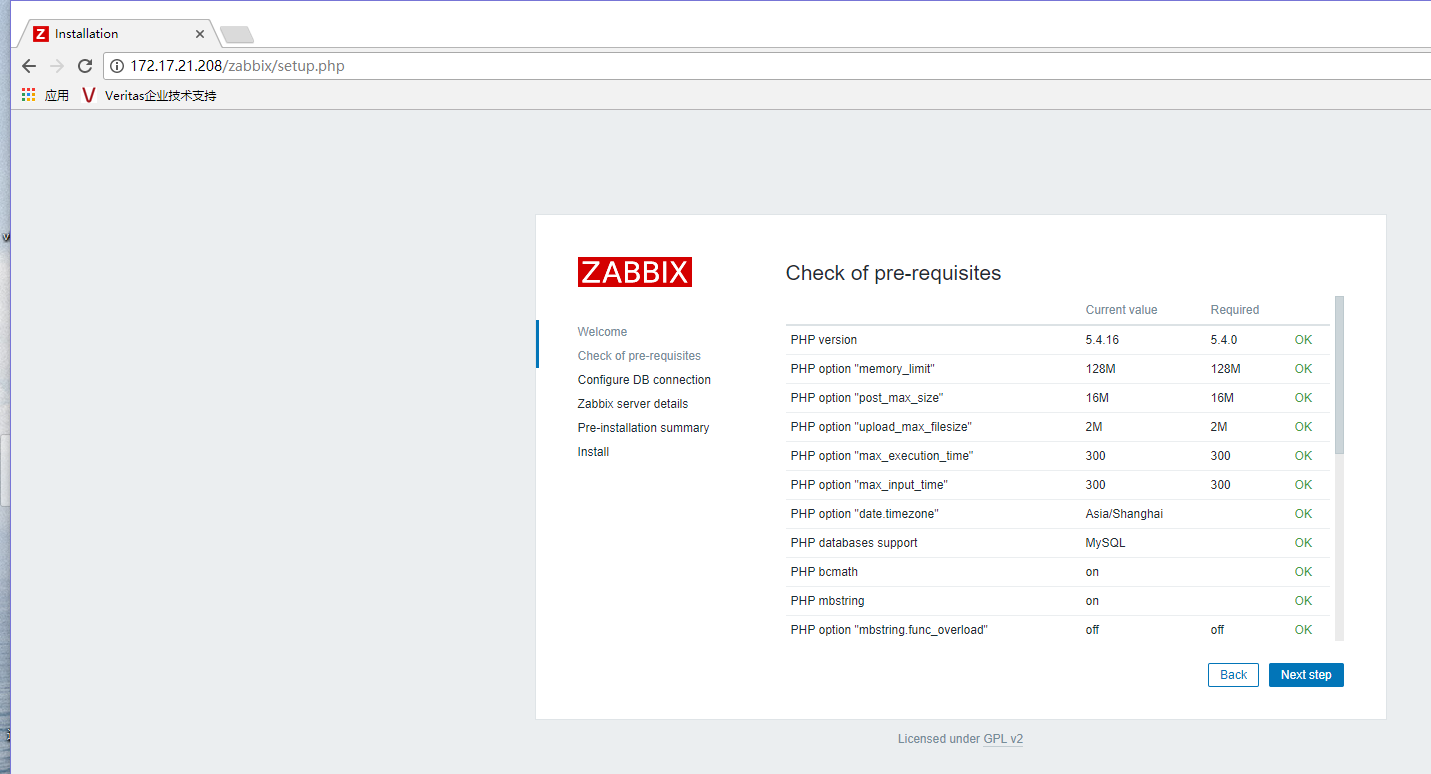
3、查看没有相关的报错信息,然后再点击Next step
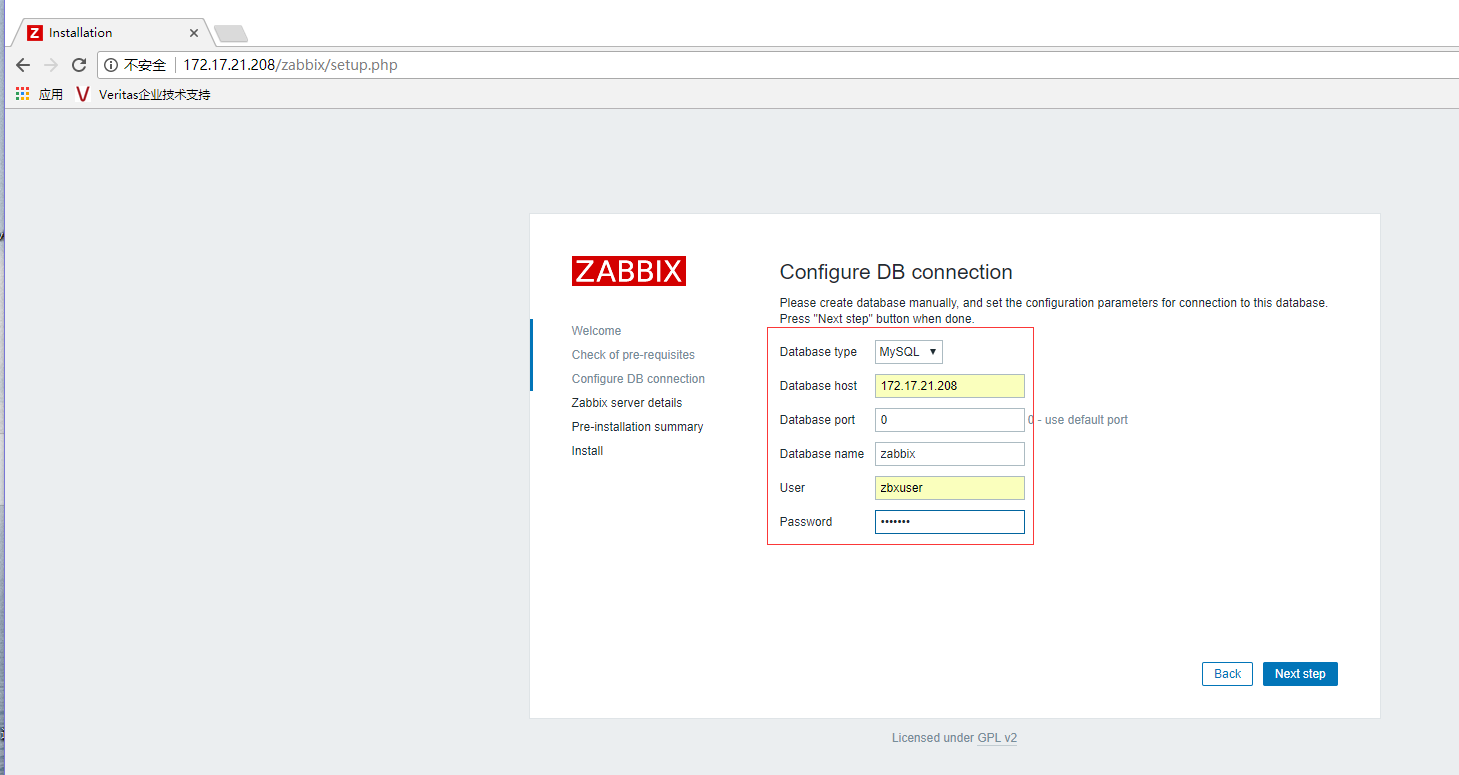
4、设置数据库地址,数据库,数据用户及密码、端口号等(端口号0代表默认端口)
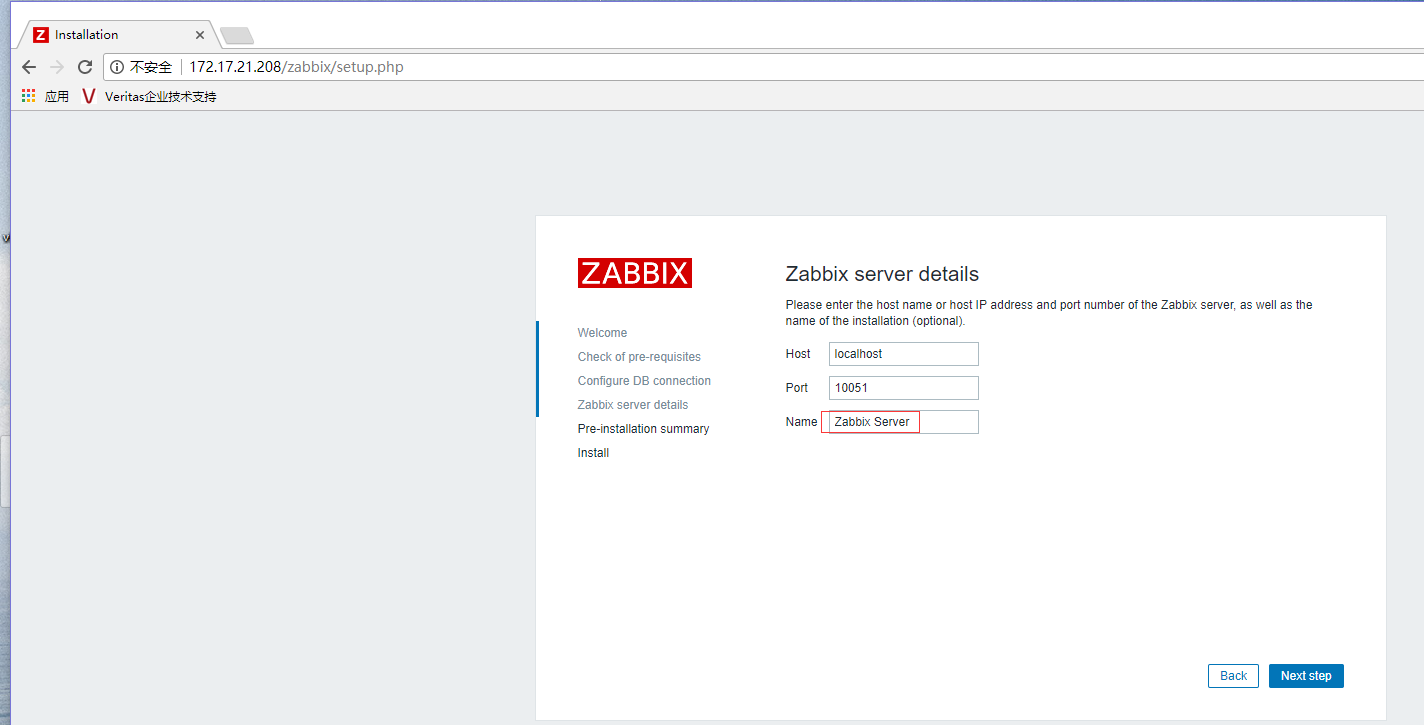
5、设置Zabbix平台名称,点击Next step
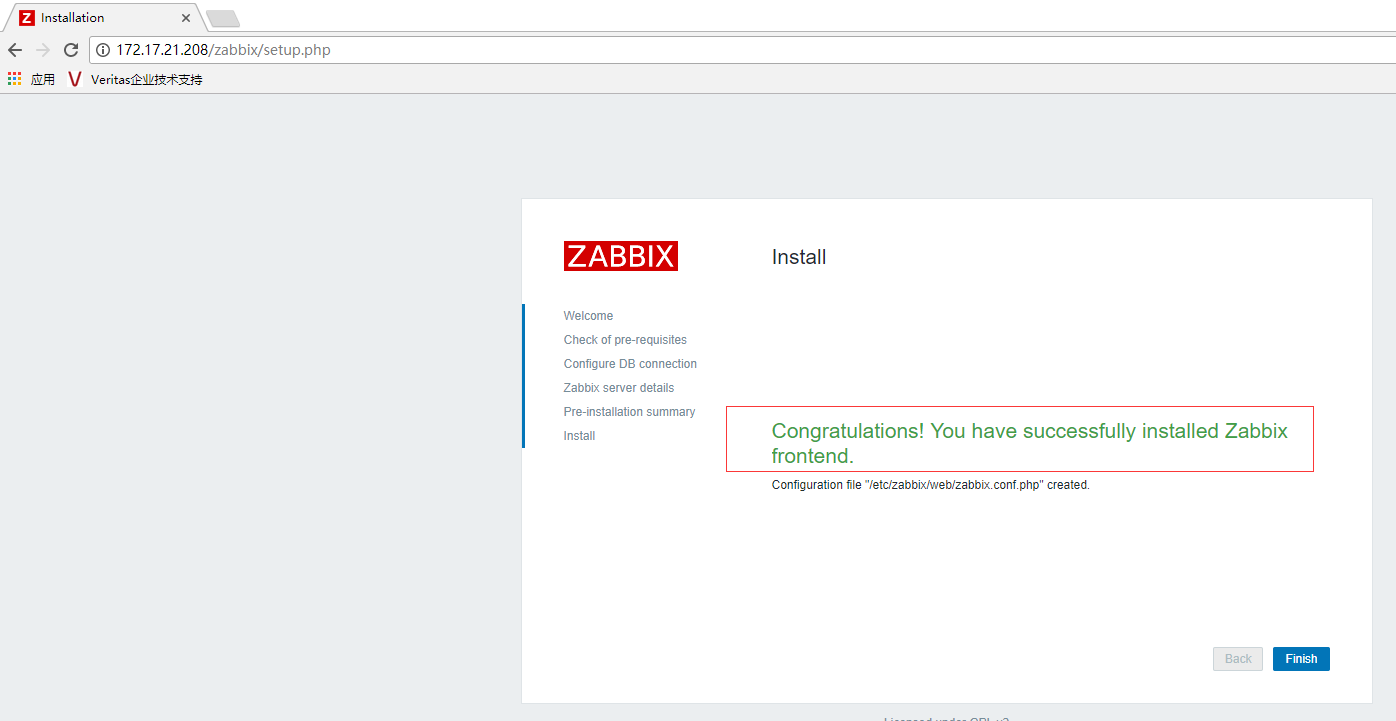
完成安装,会将在/etc/zabbix/web/zabbix.conf.php生成配置文件
Congratulations! You have successfully installed Zabbix frontend.
Configuration file "/etc/zabbix/web/zabbix.conf.php" created.
6、看到以上安装 成功的字样,代表安装成功,点击Finish结束安装,打开登录界面,默认账号为:Admin 密码为:zabbix,点击Sign in

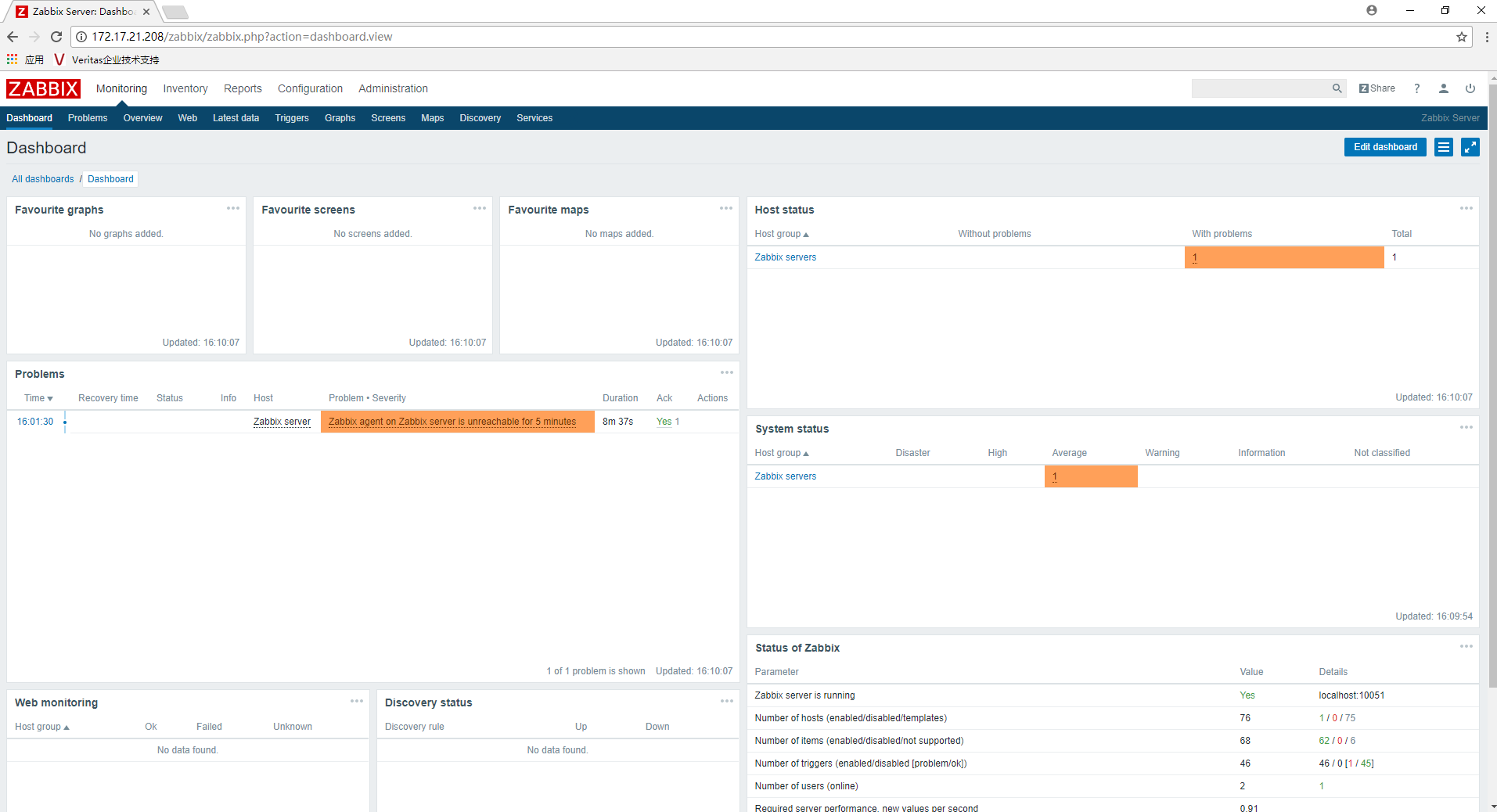
7、登录成功之后,看到以下界面,代表安装结束
Zabbix3.4.5部署安装(二)的更多相关文章
- zabbix3.0.4 部署之二 (Centos6.5系统准备)
1.安装Centos6.5 2.6.32-642.4.2.el6.x86_64 升级所有软件至最新: yum update 2.同步时间.安装ntpd yum install ntpddate n ...
- [原]CentOS7安装Rancher2.1并部署kubernetes (二)---部署kubernetes
################## Rancher v2.1.7 + Kubernetes 1.13.4 ################ ##################### ...
- (二)docker的部署安装,配置,基础命令
一.docker 的安装部署 这里不过多介绍,下面这两个linux发型版 安装可以参考 ubuntu的 docker-ce安装 centos7的 docker-ce安装 二.docker配置文件 重要 ...
- 【Docker学习之二】Docker部署安装
环境 docker-ce-19.03.1-3.el7.x86_64 一.Docker的部署安装 Docker采用Linux(内核)技术,所以只能运行在Linux上,官方说Linux kernel至少3 ...
- 分布式监控系统Zabbix-3.0.3-完整安装记录(1)
分布式监控系统Zabbix-3.0.3的安装记录 环境说明zabbix-server:192.168.1.30 #zabbix的服务端(若要监控本机,则需要配置本机的Zabbix agent, ...
- Ubuntu16.04 部署安装Docker容器 & 注意事项
一.部署安装Docker容器 1.1 Ubuntu下安装 crul sudo apt install curl curl是利用URL语法在命令行方式下工作的开源文件传输工具.它被广泛应用在Unix.多 ...
- Docker+Redis镜像的原理以及部署安装(超详解附截图)
文章来源:公众号-智能化IT系统. 一. DOCKER介绍 Docker简介 (1)Docker 是一个开源的应用容器引擎,基于 Go 语言,并遵从Apache2.0协议开源. (2)Docker 可 ...
- 单机多实例mysq 8.0l部署安装
单机多实例mysql部署安装 目的需求 在单台虚拟机部署部署多实例mysql,用于配置mysql replication,MHA等. 思路 多实例安装mysql可以参考<源编译MySQL8.0的 ...
- zabbix3.0通过yum安装笔记
zabbix3.0通过yum安装笔记 一.通过yum安装zabbix rpm -Uvh https://repo.zabbix.com/zabbix/3.0/rhel/7/x86_64/zabbix- ...
随机推荐
- Redis的事物
Redis的事物 Redis 事物常用命令 multi标记一个事物块的开始 exec:执行所有事物块内的命令 discard: 取消事物,放弃执行事物块的所有命令 watch key [k ...
- ffmpeg 踩坑实录 安装与视频切片(一)
这段时间一直在做一个关于视频处理的项目.其中有一块需要切片相关功能.于是采用了ffmpeg来完成相关需求. 第一,ffmpeg的安装. 首先下载官方包,我这里用的是ffmpeg-release-64b ...
- MantisBT导出Excel文件名显示中文的修改方法
我安装的是 mantisbt-2.15.0. 在“查看问题”页面导出Excel文件后,其文件名虽然是我选择的项目名称,但是,若项目名称中有中文,这就是用%加编码显示. 解决方法是: 在 <Ma ...
- Android 8.0 NavigationBar 颜色问题。
1. packages/SystemUI/src/com/android/systemui/statusbar/phone/LightBarController.java public void on ...
- 小白初识 - 基数排序(RadixSort)
基数排序算是桶排序和计数排序的衍生吧,因为基数排序里面会用到这两种其中一种. 基数排序针对的待排序元素是要有高低位之分的,比如单词adobe,activiti,activiti就高于adobe,这个是 ...
- python-__getattr__ 和 __getattribute__
python3完全使用了新式类,废弃了旧式类,getattribute作为新式类的一个特性有非常奇妙的作用.查看一些博客和文章后,发现想要彻底理解getattr和getattribute的区别,实际上 ...
- win2003系统网络安装——基于linux+pxe+dhcp+tftp+samba+ris
原文发表于:2010-09-16 转载至cu于:2012-07-21 一.原理简介 PXE(preboot execute environment)工作于Client/Server的网络模式,支持工作 ...
- 在Windows2008下添加iscsi存储出现磁盘Offine(The disk is offine because of policy set by an adminstrator)的解决方法
打开CMD命令行输入如下命令: DISKPART.EXE DISKPART> san SAN Policy : Offline Shared DISKPART> san policy=On ...
- 网络安全攻防----html基础
一.学习html的硬件条件 网页(.Html)是静态的,学习html语言需要选择Chrome浏览器和Sublime3编辑器,选择Chrome浏览器是因为Chrome浏览器兼容性比较好,支持各种各样的插 ...
- alpha8/10
队名:Boy Next Door 燃尽图 晗(组长) 今日完成 和队友讨论alpha版的最终界面. 明日工作 确定alpha版既定功能的正常使用. 还剩下哪些任务 账号绑定功能以及账单信息的下载. 困 ...