
用jersey写简单Restful接口
1.在myeclipse中新建一个Dynamic Web Project
2.下载jar包,地址在这里
3.restful service代码
package com.qy;

import javax.ws.rs.GET;

import javax.ws.rs.Path;

import javax.ws.rs.PathParam;

import javax.ws.rs.Produces;

import javax.ws.rs.core.MediaType;

//这里@Path定义了类的层次路径。

//指定了资源类提供服务的URI路径。

@Path("userService")

public class HelloRestFul {

    private String name= "";

    @GET    //get请求

    @Path("/hello/{name}")    //指定了资源类提供服务的URI路径。

    @Produces(MediaType.TEXT_XML)    //返回xml类型

    public String sayHello(@PathParam("name") String name){

        this.name = name;

        System.out.println("Hello "+this.name);

        return "<root>" + "<Say>" + "Hello "+name + "</Say>" + "</root>";

    }

    @GET

    @Path("/bye/{name}")

    @Produces(MediaType.TEXT_XML)

    public String bye(@PathParam("name") String name) {

        System.out.println("Bye "+ name);

        return "<root>" + "<Say>" + "bye "+name + "</Say>" + "</root>";

    }

}
4.在web.xml中配置
<?xml version="1.0" encoding="UTF-8"?>

<web-app xmlns:xsi="http://www.w3.org/2001/XMLSchema-instance"

    xmlns="http://java.sun.com/xml/ns/javaee"

    xsi:schemaLocation="http://java.sun.com/xml/ns/javaee http://java.sun.com/xml/ns/javaee/web-app_3_0.xsd"

    version="3.0">

    <display-name>RESTful</display-name>

    <servlet>

        <servlet-name>Jersey REST Service</servlet-name>

        <servlet-class>com.sun.jersey.spi.container.servlet.ServletContainer</servlet-class>   <!--restful容器类-->

        <init-param>

            <param-name>com.sun.jersey.config.property.packages</param-name>    <!--自动加载的包的参数-->

            <param-value>com.qy</param-value>     <!--restful自动加载指定包下的controller-->

        </init-param>

        <load-on-startup>1</load-on-startup>

    </servlet>

    <servlet-mapping>

        <servlet-name>Jersey REST Service</servlet-name>

        <url-pattern>/rest/*</url-pattern>   <!--请求地址时需要在项目和servicepath之间加上这个rest-->

    </servlet-mapping>

</web-app>
5.测试service接口是否成功
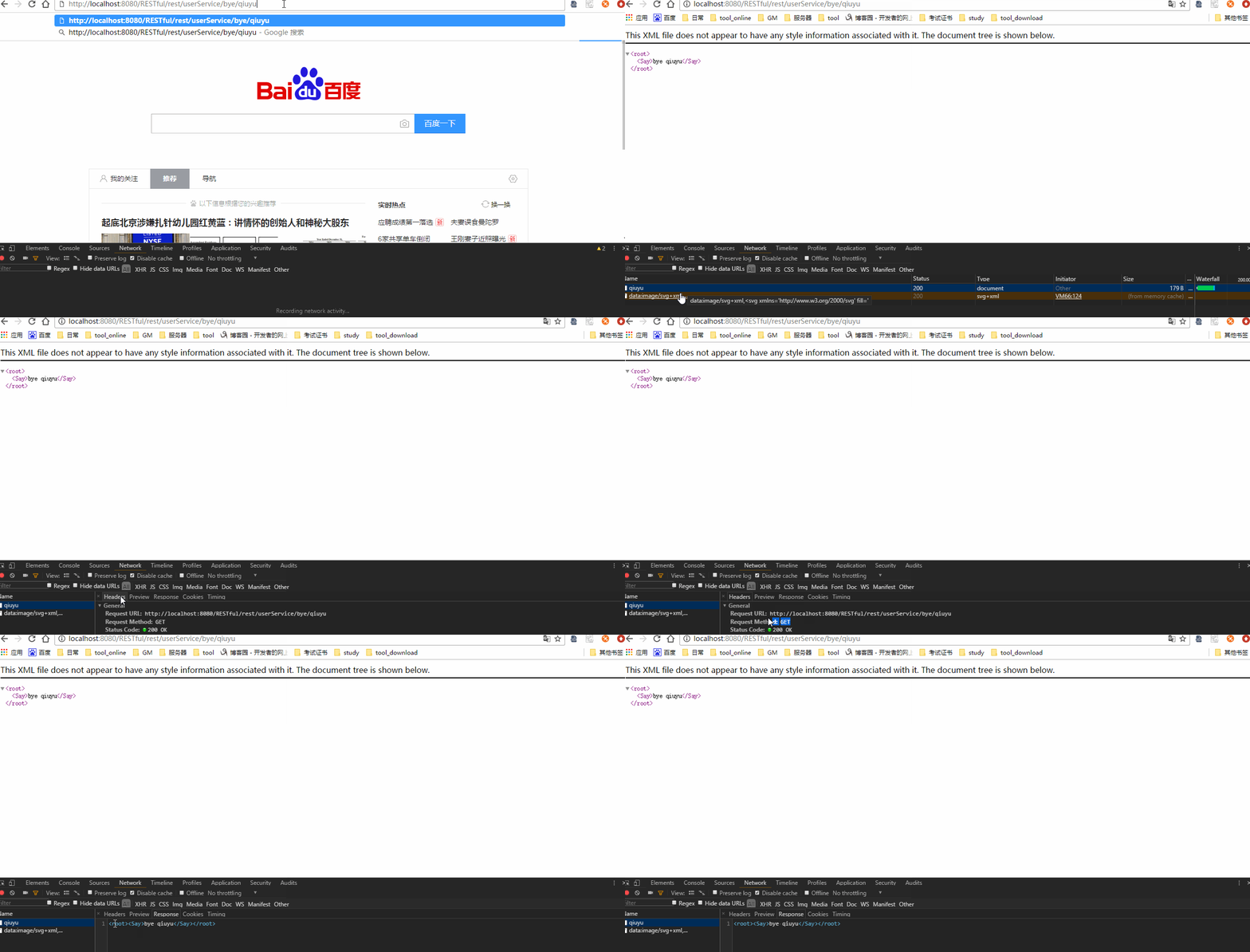
6.确定service接口没问题了,在java中写调用接口的方法,jersey调用接口方法如下
    //创建请求对象

    ClientConfig config = new DefaultClientConfig();

    Client client = Client.create(config);

    WebResource resource = client.resource(BASE_URI);    //具体项目的WebResource

    //具体路径的WebResource

    WebResource helloResource = resource.path("rest").path(PATH_Hello + name);
   //返回请求结果的xml

    String responseString = helloResource.accept(MediaType.TEXT_XML).get(String.class);
   //返回请求结果的状态

    String clientResponseString = helloResource.accept(MediaType.TEXT_XML).get(ClientResponse.class).toString();
7.调用接口
package com.qy;

import javax.ws.rs.core.MediaType;

import com.sun.jersey.api.client.Client;

import com.sun.jersey.api.client.ClientResponse;

import com.sun.jersey.api.client.WebResource;

import com.sun.jersey.api.client.config.ClientConfig;

import com.sun.jersey.api.client.config.DefaultClientConfig;

/**

 * 调用接口

 */

public class HelloRestFulClient {

    public static final String BASE_URI = "http://localhost:8080/RESTful";

    public static final String PATH_Hello = "/userService/hello/";

    public static final String PATH_Bye = "/userService/bye/";

    public static void main(String[] args) {

    //参数

    String name = "qy";

    //创建请求对象

    ClientConfig config = new DefaultClientConfig();

    Client client = Client.create(config);

    WebResource resource = client.resource(BASE_URI);    //具体项目的WebResource

    //路径

    WebResource helloResource = resource.path("rest").path(PATH_Hello + name);

    System.out.println("Client Response 返回状态");

    getClientResponse(helloResource);

    System.out.println("Response 返回 xml" );

    getResponse(helloResource);

    System.out.println("----------------------------------------------------");

    WebResource byeResource = resource.path("rest").path(PATH_Bye + name);

    System.out.println("Client Response 返回状态");

    getClientResponse(byeResource);

    System.out.println("Response 返回 xml" );

    getResponse(byeResource);

    }

    /**

    * 调用WebResource,返回客户端请求状态。

    * GET http://localhost:8080/RESTful/rest/userService/hello/qiuyu

    * 返回请求结果状态“200 OK”。

    */

    private static String getClientResponse(WebResource resource) {

        String clientResponseString = resource.accept(MediaType.TEXT_XML)

                                    .get(ClientResponse.class).toString();

        System.out.println(clientResponseString);

        return clientResponseString;

    }

    /**

    * 调用WebResource,返回请求结果XML

    * <root><Say>bye qiuyu</Say></root>

    */

    private static String getResponse(WebResource resource) {

        String responseString = resource.accept(MediaType.TEXT_XML)

                                .get(String.class);

        System.out.println(responseString);

        return responseString;

    }

}
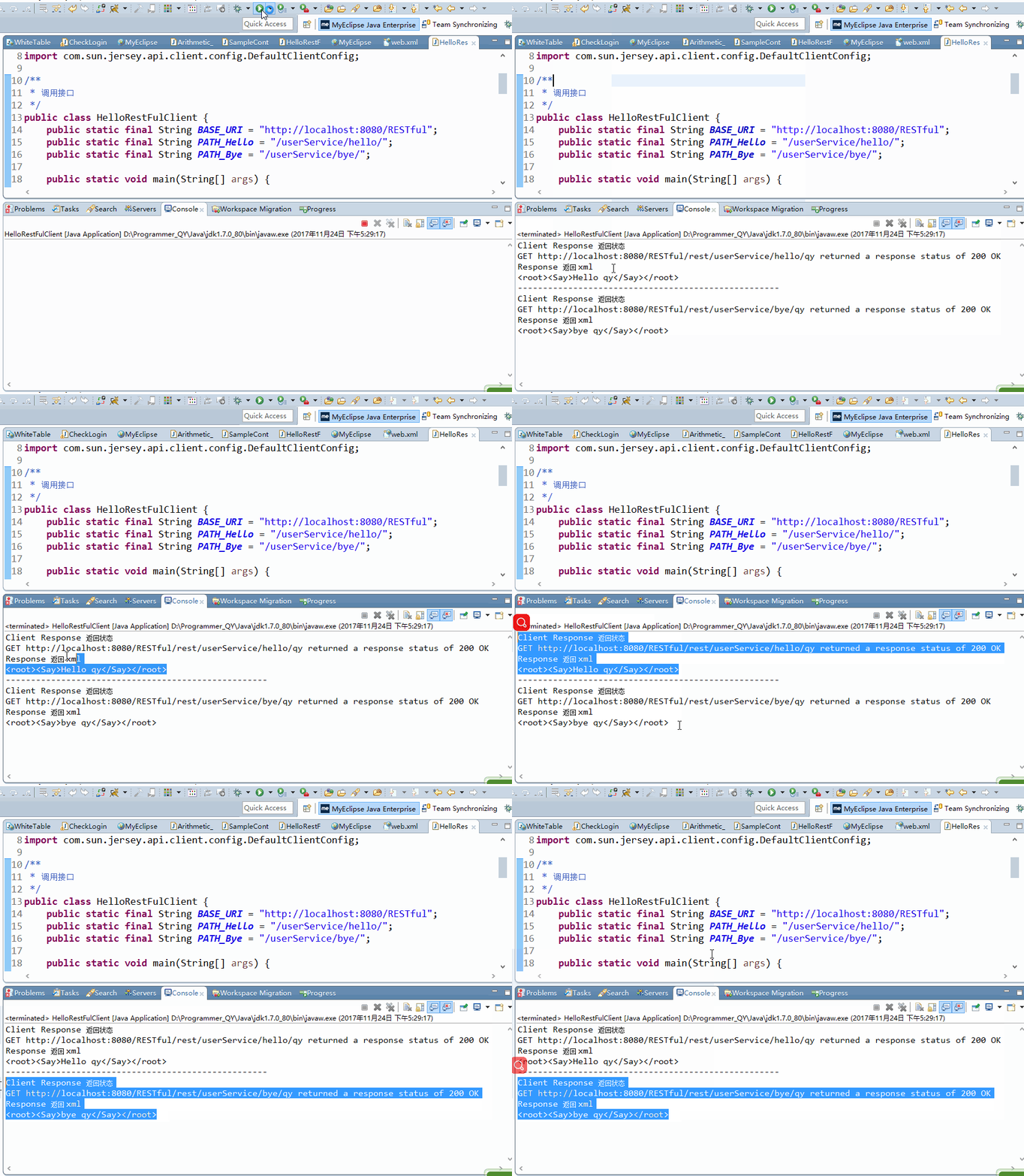
8.执行返回结果
用jersey写简单Restful接口的更多相关文章
- flask 搭建简单restful接口,moco基础
from flask import Flask, jsonify, abort, make_response app = Flask(__name__)app.config['JSON_AS_ASCI ...
- Jersey 写restful接口时QueryParam ,FormParam 等的区别
今天用jersey写接口,发现有一个post方法中没有得到参数,查了半天发现自己一不小心将@formparam写成了@queryparam,真是一个悲伤的故事.在这里把几个参数类型整理了一下放出来. ...
- 用flask写一个简单的接口
用falsk写一个简单的接口,这个接口的数据本来是爬虫爬取的数据,但是今天只写一个flask接口,数据就用测试数据好了. import random import re import time imp ...
- [转]简单识别 RESTful 接口
本文描述了识别一个接口是否真的是 RESTful 接口的基本方法.符合 REST 架构风格的接口,称为 RESTful 接口.本文不打算从架构风格的推导方面描述,而是从 HTTP 标准的方面 ...
- Swagger+Spring mvc生成Restful接口文档
简介 Swagger 是一个规范和完整的框架,用于生成.描述.调用和可视化 RESTful 风格的 Web 服务.总体目标是使客户端和文件系统作为服务器以同样的速度来更新.文件的方法,参数和模型紧密集 ...
- 网络协议 21 - RPC 协议(中)- 基于 JSON 的 RESTful 接口协议
上一节我们了解了基于 XML 的 SOAP 协议,SOAP 的 S 是啥意思来着?是 Simple,但是好像一点儿都不简单啊! 传输协议问题 对于 SOAP 来讲,比如我创建一个订单, ...
- python 全栈开发,Day100(restful 接口,DRF组件,DRF跨域(cors组件))
昨日内容回顾 1. 为什么要做前后端分离? - 前后端交给不同的人来编写,职责划分明确.方便快速开发 - 针对pc,手机,ipad,微信,支付宝... 使用同一个接口 2. 简述http协议? - 基 ...
- vue项目构建实战基础知识:SPA理解/RESTful接口介绍/static目录配置/axios封装/打包时map文件去除
一.SPA 不是指水疗.是 single page web application 的缩写.中文翻译为 单页应用程序 或 单页Web应用,更多解释请自行搜索. 所有的前端人员都应该明白我们的页面的 u ...
- RESTful 接口实现简明指南
REST 简介 REST 是一个术语的缩写,REpresentational State Transfer,中文直译「表征状态转移」,这是个很拗口的词.我的建议是先不要强行理解,直接看怎么做,等对实施 ...
随机推荐
- c#字符串切割split使用方法
string strtest = "asdfg12wertgv1287654" "}, StringSplitOptions.RemoveEmptyEntries); 结 ...
- hdu6386 Age of Moyu【最短路】
Age of Moyu Time Limit: 5000/2500 MS (Java/Others) Memory Limit: 262144/262144 K (Java/Others) To ...
- LightGBM值参数配置
LightGBM 可以使用一个 pairs 的 list 或一个字典来设置参数: 1.Booster提升器的参数: param={'num_class':33, 'boosting_type':'gb ...
- day18(JDBC事务&连接池介绍&DBUtils工具介绍&BaseServlet作用)
day18总结 今日思维导图: 今日内容 事务 连接池 ThreadLocal BaseServlet自定义Servlet父类(只要求会用,不要求会写) DBUtils à commons-dbuti ...
- 查看MySQL锁定情况
SHOW STATUS LIKE '%Table_locks%' Table_locks_immediate | 105 | Table_locks_waited | 3 ...
- Kconfig文件说明2
Konfig详解: 当执行#make menuconfig时会出现内核的配置界面,所有配置工具都是通过读取"arch/$(ARCH)Kconfig"文件来生成配置界面,这个文件就是 ...
- MISC-WHCTF2016-crypto100
题目:李二狗的梦中情人 找不同! 如图,下载得到“nvshen.png” 流程:看到这个被命名为nvshen的文件,感觉文件本身会有东西.用16进制查看器在图片的末尾发现了一串类似URL的ASCII ...
- linux 定时备份
每部主机的任务都不相同,重要的数据也不相同,重要性也不一样,因此,每个人癿备份思考角度都不一样! 有些备份策略是非常有趣的: (1)挂载储存设备进行备份: 挂载设备: 备份的 script #!/bi ...
- python16_day36【爬虫1】
一.requests 1. GET请求 # 1.无参数实例 import requests ret = requests.get('https://github.com/timeline.json') ...
- mac 零碎
查看主机名 import socket socket.gethostname() 可以这样安装postgresql 安装postgresql, 输入 brew install postgresql 安 ...