
sench touch 时间插件 扩展
因项目 需要 老项目需要用到 时分 的插件 而本身sencha touch 自己木有这个功能,因此在网上找到了 一个可以扩展的插件.
相关目录复制如下代码:
/**

* The picker with hours and minutes slots

*/

Ext.define('Ext.ux.picker.Time', {

    extend:'Ext.picker.Picker',

    xtype:'timepicker',

    config:{

        /**

         * @cfg {Number} increment The number of minutes between each minute value in the list.

         * Defaults to: 5

         */

        increment:5,

        /**

         * @cfg {Number} start value of hours

         */

        minHours:0,

        /**

         * @cfg {Number} end value of hours.

         */

        maxHours:23,

        /**

         * @cfg {String} title to show above hour slot

         * Note: for titles to show set the {useTitle} config to true.

         */

        hoursTitle:'Hours',

        /**

         * @cfg {String} title to show above hour slot

         * Note: for this to show set the {useTitle} config to true.

         */

        minutesTitle:'Minutes',

        /**

         * @cfg {boolean} show/hide title headers.

         * Note: defaults to false (framework default 'Ext.picker.Picker')

         */

        slots: []

    },

    /**

     *

     * @param value

     * @param animated

     */

    setValue:function (value, animated) {

        var increment = this.getInitialConfig().increment,

            modulo;

        if (Ext.isDate(value)) {

            value = {

                hours:value.getHours(),

                minutes:value.getMinutes()

            };

        }

        //Round minutes

        modulo = value.minutes % increment;

        if (modulo > 0) {

            value.minutes = Math.round(value.minutes / increment) * increment;

        }

        this.callParent([value, animated]);

    },

    /**

     * @override

     * @returns {Date} A date object containing the selected hours and minutes. Year, month, day default to the current date..

     */

    getValue:function () {

        var value = this.callParent(arguments),

            date = new Date();

        value = new Date(date.getFullYear(), date.getMonth(), date.getDate(), value.hours, value.minutes);

        return value;

    },

    applySlots:function (slots) {

        var me = this,

            hours = me.createHoursSlot(),

            minutes = me.createMinutesSlot();

        return [hours, minutes];

    },

    createHoursSlot:function () {

        var me = this,

            initialConfig = me.getInitialConfig(),

            title = initialConfig.hoursTitle ,

            minHours = initialConfig.minHours,

            maxHours = initialConfig.maxHours,

            hours = [],

            slot;

        for (var i = minHours; i <= maxHours; i++) {

            var text = (i < 10) ? ('0' + i) : i; //Add leading zero

            hours.push({text:text, value:i});

        }

        slot = {

            name:'hours',

            align:'center',

            title:title,

            data:hours,

            flex:1

        };

        return slot;

    },

    createMinutesSlot:function () {

        var me = this,

            initialConfig = me.getInitialConfig(),

            title = initialConfig.minutesTitle ,

            increment = initialConfig.increment,

            minutes = [],

            slot;

        for (var j = 0; j < 60; j += increment) {

            var text;

            text = (j < 10) ? ('0' + j) : j; //Add leading zero

            minutes.push({text:text, value:j});

        }

        slot = {

            name:'minutes',

            align:'center',

            title:title,

            data:minutes,

            flex:1

        };

        return slot;

    }

});
/**

* TimePickerfield. Extends from datepickerfield

*/

Ext.define('Ext.ux.field.TimePicker', {

    extend:'Ext.field.DatePicker',

    xtype:'timepickerfield',

    requires:['Ext.ux.picker.Time'],

    config:{

        dateFormat:'H:i', //Default format show time only

        picker:true

    },

    /**

     * @override

     * @param value

     * Source copied, small modification

     */

    applyValue:function (value) {

        if (!Ext.isDate(value) && !Ext.isObject(value)) {

            value = null;

        }

        // Begin modified section

        if (Ext.isObject(value)) {

            var date = new Date(),

                year = value.year || date.getFullYear(), // Defaults to current year if year was not supplied etc..

                month = value.month || date.getMonth(),

                day = value.day || date.getDate();

            value = new Date(year, month, day, value.hours, value.minutes); //Added hour and minutes

        }

        // End modfied section!

        return value;

    },

    applyPicker:function (picker) {

        picker = Ext.factory(picker, 'Ext.ux.picker.Time');

        picker.setHidden(true); // Do not show picker on creeation

        Ext.Viewport.add(picker);

        return picker;

    },

    updatePicker:function (picker) {

        picker.on({

            scope:this,

            change:'onPickerChange',

            hide:'onPickerHide'

        });

        picker.setValue(this.getValue());

        return picker;

    }

});
使用方法 如下:
{

    xtype: 'timepickerfield',

    label: 'time',

    value: new Date(), // object also possible {hours:12, minutes:25},

    name: 'time',

    picker:{

        height:300

        minHours:9, //(optional)Selectable hours will be between 9-18

        maxHours:18 // (optional) These values default to 0-24

    }

}
时间获取方法:
//* Notes:

getValue() // will return a {Date} object

getFormattedValue() //will return H:i (example16:40)
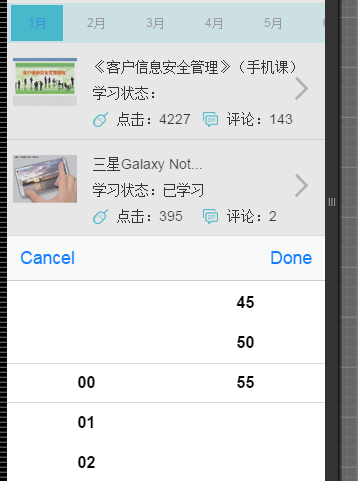
效果如下:
sench touch 时间插件 扩展的更多相关文章
- Yii笔记:打印sql、Form表单、时间插件、Mysql的 FIND_IN_SET函数使用、是否是post/ajax请求
语句部分: yii1版本打印最后一条执行的SQL: $this->getDbConnection()->createCommand()->select()->from()-&g ...
- 【eclipse插件开发实战】 Eclipse插件开发5——时间插件Timer开发实例详解
Eclipse插件开发5--时间插件Timer开发实例详解 这里做的TimeHelper插件设定为在菜单栏.工具栏提供快捷方式,需要在相应地方设置扩展点,最后弹出窗体显示时间. 在上一篇文章里创建好了 ...
- Chrome插件(扩展)
[干货]Chrome插件(扩展)开发全攻略 写在前面 我花了将近一个多月的时间断断续续写下这篇博文,并精心写下完整demo,写博客的辛苦大家懂的,所以转载务必保留出处.本文所有涉及到的大部分代码均 ...
- angularjs封装bootstrap官网的时间插件datetimepicker
背景:angular与jquery类库的协作 第三方类库中,不得不提的是大名鼎鼎的jquery,现在基本上已经是国内web开发的必修工具了.它灵活的dom操作,让很多web开发人员欲罢不能.再加上已经 ...
- bootstrap时间插件 火狐不显示 完美解决方法
原文链接:http://www.phpbiji.cn/article/index/id/141/cid/4.html bootstrap时间插件火狐 bootstrap-datetimepicker火 ...
- 原生js日期时间插件鼠标点击文本框弹出日期时间表格选择日期时间
原文出处 (这是我从互联网上搜来的,感觉能满足各方面的需求.个人感觉挺不错的,所以后期修改了一下向大家推荐!) 效果图: html代码: <!DOCTYPE html PUBLIC " ...
- QML插件扩展2(基于C++的插件扩展)
上一节介绍了纯QML的插件扩展方式,这种扩展方式基本满足大部分的扩展需求,下面开始介绍比较小众的基于C++的扩展 (一)更新插件工程 1.更新MyPlugin工程下的qmldir文件,加入plugin ...
- QML插件扩展(一)
准备分两节来介绍QML扩展插件,分别为 (一)基于QML文件的扩展方式 (二)基于C++的插件扩展 这篇先介绍基于QML的插件扩展. 先介绍几个基本概念: qmldir: 用于组织自定义的QML插件, ...
- bootstrap-datetimepicker bootstrap-datepicker bootstrap-timepicker 时间插件
<!DOCTYPE html><head> <title>时间插件测试</title><style type="text/css&quo ...
随机推荐
- luogu P3175 [HAOI2015]按位或
传送门 如果每个位置上的数字的意义是这个位置被加进集合的最早时间,那么我们要求的就是集合中最大数的期望,使用Min-Max容斥,\(E(max(S))=\sum_{T\subset S}(-1)^{| ...
- webpack配置模块的查找范围
一般我们的入口文件会引入一下公共的样式文件,比如这样 import './style' 但是这个样式文件并不会生效呀,因为你的写法不对鸭,你要把文件的后缀名也要写 import './style.cs ...
- redis集群学习
转载: http://arganzheng.life/redis-cluster.html Redis3.0版本加入了cluster功能,解决了Redis单点无法横向扩展的问题. 分布式系统要解决的不 ...
- tcp黏包
转载https://www.cnblogs.com/wade-luffy/p/6165671.html 无论是服务端还是客户端,当我们读取或者发送消息的时候,都需要考虑TCP底层的粘包/拆包机制. 回 ...
- C - Alphabetic Removals
题目链接: You are given a string ss consisting of nn lowercase Latin letters. Polycarp wants to remove e ...
- 海洋cms v6.53 v6.54版本漏洞复现
海洋cms v6.53 v6.54版本漏洞复现 参考链接: 今天发现freebuf上一篇海洋cms的漏洞,来复现一下. http://www.freebuf.com/vuls/150042.html ...
- thinkpad e系列 装win7过程
电脑买回来时是win8系统,但是卡顿的厉害,装成win7,win8装win7流程还是比较复杂,后来又装成xp,现在又改成win7,记录一下装win7 的过程 我是用光盘安装的系统 第一步:进入boss ...
- python三大神器
Python 中有很多优秀的包,本文主要讲一下 pip, virtualenv, fabric 1. pip 用来包管理 文档:https://pip.pypa.io/en/latest/instal ...
- Configuring Automatic Restart of an Oracle Database
https://docs.oracle.com/cd/E11882_01/server.112/e25494/restart.htm#ADMIN12708
- SpringSecurityOAuth使用JWT Token
⒈JWT? JWT(Json Web Token),是Json的一个开放的Token标准. 1,自包含,SpringSecurityOAuth的默认Token是UUID的一个随机的无意义的字符串,并不 ...