
MyBatis新手教程(一)
MyBatis本是apache的一个开源项目iBatis,2010年这个项目由apache 迁移到了 google,并改名为MyBatis,2013年迁移到Github。
MyBatis是一个优秀的持久层框架,它对jdbc的操作数据库的过程进行封装,使开发者只需要关注sql语句本身,而不需要花费精力去处理注册驱动、创建connection、创建statement、手动设置参数、结果集检索等jdbc繁杂的过程。
Mybatis通过xml或注解的方式将要执行的各种statement配置起来,并通过java对象和statement中的sql进行映射生成最终执行的sql语句,最后由mybatis框架执行sql并将结果映射成java对象并返回。
jdbc造成的问题mybatis解决方式:
1.数据库连接创建、释放频繁造成系统资源浪费,从而影响系统性能。如果使用数据库连接池可以解决此问题。
解决:在SqlMapConfig.xml中配置数据连接池,使用连接池管理数据库。
2.sql语句在代码中硬编码,造成代码不易维护,实际开发中sql变化的可能较大,sql变动需要改动java代码。
解决:将sql语句配置在xml文件中与java代码分离。
3.使用占位符传参数存在硬编码,因为sql语句的where条件不一定,可能多也可能少,修改sql还要修改代码,系统不易维护。
解决:mybatis自动将java对象映射到sql语句,通过statement中的parameterType定义输入参数的类型。
4.对结果集解析存在硬编码,sql变化导致解析代码变化,系统不易维护,如果能将数据库记录封装成pojo对象解析比较方便。
解决:mybatis自动将sql执行结果映射到java对象,通过statement中的resultType定义输出结果的类型。
Mybatis架构
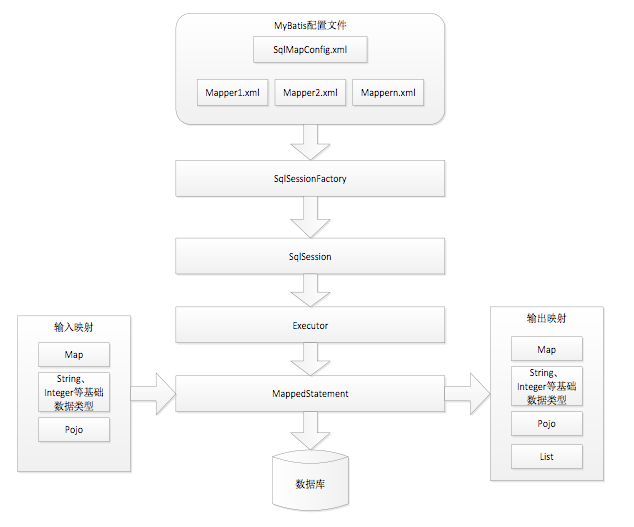
1.mybatis配置
SqlMapConfig.xml,此文件作为mybatis的全局配置文件,配置了mybatis的运行环境等信息。
mapper.xml就是sql映射文件,文件中配置了操作数据库的sql语句。此文件需要在SqlMapConfig.xml中加载。
2.通过mybatis环境等配置信息构造SqlSessionFactory会话工厂
3.由会话工厂创建爱你sqlSeesion会话对象,操作数据库需要通过sqlSession进行。
4.mybatis底层自定义了Executor执行器接口操作数据库,Executor接口中又两个实现,一个是基本执行器,一个是缓存执行器。
5.Mapped Statement 也是mybatis一个底层封装对象,他包装了mybatis配置信息以及sql映射信息等。mapper.xml文件中一个sql对应一个Mapped Statement对象,sql的id就是Mapped statement的id
6.Mapped statement 对sql执行输入的参数进行定义,包括hashmap、基本类型、pojo,Executor通过Mapped statement 在执行sql前将输入的java对象映射到sql中,输入参数映射就是jdbc变成中对preparedStatement设置参数。
7.Mapped Statement 对sql执行输出结果进行定义,包括HashMap、基本类型、pojo,Executor通过Mapped Statement在执行sql后将输出结果映射到java对象中,输出结果映射过程相当于jdbc编程中对结果的解析处理过程。
1.导包. mysql-connector-java-5.1.7-bin.jar数据库驱动包 核心包mybatis-3.2.7.jar 还有依赖包lib/*
2.新建SqlMapConfig.xml全局配置文件。
<?xml version="1.0" encoding="UTF-8" ?>

<!DOCTYPE configuration

        PUBLIC "-//mybatis.org//DTD Config 3.0//EN"

        "http://mybatis.org/dtd/mybatis-3-config.dtd">

<configuration>

    <!-- 和spring整合后 environments配置将废除 -->

    <environments default="development">

        <environment id="development">

            <!-- 使用jdbc事务管理 -->

            <transactionManager type="JDBC" />

            <!-- 数据库连接池 -->

            <dataSource type="POOLED">

                <property name="driver" value="com.mysql.jdbc.Driver" />

                <property name="url" value="jdbc:mysql://localhost:3306/david2018_db?characterEncoding=utf-8" />

                <property name="username" value="root" />

                <property name="password" value="1234" />

            </dataSource>

        </environment>

    </environments>

    <!--加载映射文件 -->

    <mappers>

        <mapper resource="com/mapping/Product.xml"></mapper>

    </mappers>

</configuration>
3.编写mapper.xml
<?xml version="1.0" encoding="UTF-8" ?>

<!DOCTYPE mapper

        PUBLIC "-//mybatis.org//DTD Mapper 3.0//EN"

        "http://mybatis.org/dtd/mybatis-3-mapper.dtd">

<!-- namespace:命名空间 -->

<mapper namespace="test">

    <!--#{} 占位符 -->

    <select id="getProduct" parameterType="Integer" resultType="com.bean.Product">

        select * from Product where Id = #{id}

    </select>

    <!--${} 字符串拼接 必须写value select * from Product where name like '%${value}%' -->

    <select id="getProductListByName" parameterType="String" resultType="com.bean.Product">

        select * from Product where name like "%"#{haha}"%"

    </select>

    <insert id="insertProduct" parameterType="com.bean.Product">

        <!--返回id -->

    <selectKey keyProperty="id" resultType="Integer" order="AFTER">

        select last_insert_id()

    </selectKey>

        insert into Product (name,price) values (#{name},#{price})

    </insert>

    <update id="updateById" parameterType="com.bean.Product">

        update Product set name = #{name} , price=#{price} where id = #{id}

    </update>

    <delete id="deleteById" parameterType="Integer">

        delete from Product where id = #{id}

    </delete>

</mapper>
4.编写实体类
package com.bean;

public class Product {

    private Integer Id;

    private String Name;

    private String price;

    public Product(String name, String price) {

        Name = name;

        this.price = price;

    }

    public Product() {

    }

    public Integer getId() {

        return Id;

    }

    public void setId(Integer id) {

        Id = id;

    }

    public String getName() {

        return Name;

    }

    public void setName(String name) {

        Name = name;

    }

    public String getPrice() {

        return price;

    }

    public void setPrice(String price) {

        this.price = price;

    }

    @Override

    public String toString() {

        return "Product{" +

                "Id=" + Id +

                ", Name='" + Name + '\'' +

                ", price='" + price + '\'' +

                '}';

    }

}
5.编写测试类
package com.company;

import com.bean.Product;

import org.apache.ibatis.session.SqlSession;

import org.apache.ibatis.session.SqlSessionFactory;

import org.apache.ibatis.session.SqlSessionFactoryBuilder;

import java.io.InputStream;

import java.util.List;

public class Main {

    public static void main(String[] args) {

        String resource = "SqlMapConfig.xml";

        InputStream is = Main.class.getClassLoader().getResourceAsStream(resource);

        SqlSessionFactory sessionFactory = new SqlSessionFactoryBuilder().build(is);

        SqlSession session = sessionFactory.openSession();

        //查询一条根据id

        Product p = session.selectOne("test.getProduct",1);

        System.out.println(p);

        //模糊查询列表

        List<Product> list = session.selectList("test.getProductListByName","桃");

        System.out.println(list);

        //添加一条数据

        Product addP = new Product("大樱桃","180");

        int insert = session.insert("test.insertProduct", addP);

        System.out.println(insert+"id:"+addP.getId());

        //修改数据 mybatis默认不是自动提交事务的, 所以其实没有修改数据库, 需要session.commit();

        Product upP = new Product("大核桃","58");

        upP.setId(2);

        int update = session.update("test.updateById",upP);

        System.out.println(update);

        //删除数据

        int delete = session.delete("test.deleteById",30);

        System.out.println(delete);

        session.commit();

    }

}
#{}:表示一个占位符,通过#{}可以实现preparedStatement向占位符中设置值,自动进行java类型和jdbc类型转换,可以防止sql注入,可以接受简单类型或pojo属性值,如果parameterType传输单个简单类型值,#{}括号中可以是value或其他名称。
${}:表示拼接sql字符串,通过${}可以将parameterType传入的内容拼接在sql中且不进行jdbc类型转换,可以接受简单类型或pojo属性值,如果传世单个简单类型值,${}括号中只能是value。
parameterType:指定输入参数类型,mybatis通过ognl从输入对象中获得参数值拼接在sql中。
resultType:指定输出结果类型,mybatis将sql查询结果的一行记录数据映射为resultType指定类型的对象,如果有多条数据,则分别进行映射,并把对象放到List容器中。
selectOne:查询一条记录,如果使用selectOne查询多条记录则抛出异常。
selectList:可以查询一条或多条。
手动开发DAO-编写接口 和实现类
package com.dao;

import com.bean.Product;

public interface IProductDao {

    Product getProductById(Integer id);

}
package com.dao;

import com.bean.Product;

import org.apache.ibatis.session.SqlSession;

import org.apache.ibatis.session.SqlSessionFactory;

public class ProductDaoImpl implements IProductDao {

    private SqlSessionFactory sqlSessionFactory;

    public ProductDaoImpl(SqlSessionFactory sqlSessionFactory){

        this.sqlSessionFactory = sqlSessionFactory;

    }

    @Override

    public Product getProductById(Integer id){

        SqlSession sqlSession = sqlSessionFactory.openSession();

        return sqlSession.selectOne("test.getProduct",id);

    }

}
测试方法:
public class Main {

    public static void main(String[] args) {

        String resource = "SqlMapConfig.xml";

        InputStream is = Main.class.getClassLoader().getResourceAsStream(resource);

        SqlSessionFactory sessionFactory = new SqlSessionFactoryBuilder().build(is);

        IProductDao dao = new ProductDaoImpl(sessionFactory);

        //查询一条根据id

        Product p = dao.getProductById(1);

        System.out.println(p);

    }

}
以上每次有新方法的写入 都要新写一个接口 新写一个方法...多个类的时候就会造成大量的接口和实现类。
Mapper动态代理开发
使用代理帮我们生成这些重复的代码。
开发一个mapper接口,此类需要遵循四大原则,mybatis会自动帮我们生成实现类。
package com.mapper;

import com.bean.Product;

public interface ProductMapper {

    //遵循四个原则

    //1.接口 方法名 == Mapper.xml 中的id名

    //2.返回值类型要与Mapper.xml文件中的返回值类型要一致

    //3.参数的入参类型要与Mapper.xml文件中的入参类型要一致

    //4.命名空间绑定此接口完整类名 <mapper namespace="com.mapper.ProductMapper">

    public Product getProduct(Integer id);

}
测试:
public class Main {

    public static void main(String[] args) {

        String resource = "SqlMapConfig.xml";

        InputStream is = Main.class.getClassLoader().getResourceAsStream(resource);

        SqlSessionFactory sessionFactory = new SqlSessionFactoryBuilder().build(is);

        SqlSession session = sessionFactory.openSession();

        ProductMapper mapper = session.getMapper(ProductMapper.class);

        Product p = mapper.getProduct(1);

        System.out.print(p);

    }

}
SqlMapConfig配置
properties属性-引入外部文件
新建db.properties文件
jdbc.driver=com.mysql.jdbc.Driver

jdbc.url=jdbc:mysql://localhost:3306/david2018_db?characterEncoding=utf-8

jdbc.username=root

jdbc.password=1234
<configuration>

    <!--加载配置文件 -->

    <properties resource="db.properties"></properties>

    <environments default="development">

        <environment id="development">

            <transactionManager type="JDBC" />

            <dataSource type="POOLED">

                <property name="driver" value="${jdbc.driver}" />

                <property name="url" value="${jdbc.url}" />

                <property name="username" value="${jdbc.username}" />

                <property name="password" value="${jdbc.password}" />

            </dataSource>

        </environment>

    </environments>

</configuration>
别名设置typeAliases
<configuration>

    <!--别名设置 -->

    <typeAliases>

        <typeAlias type="com.bean.Product" alias="pro1"></typeAlias>

    </typeAliases>

    <!--加载映射文件 -->

    <mappers>

        <mapper resource="com/mapping/Product.xml"></mapper>

    </mappers>

</configuration>
mapper.xml中可以使用别名来代替完整路径
<mapper namespace="com.mapper.ProductMapper">

    <select id="getProduct" parameterType="Integer" resultType="pro1">

        select * from Product where Id = #{id}

    </select>

</mapper>
还可以批量设置包名
    <!--别名设置 -->

    <typeAliases>

        <package name="com.bean"></package>

    </typeAliases>
mapper.xml中直接写类名即可不用写完整包名了
    <select id="getProduct" parameterType="Integer" resultType="Product">

        select * from Product where Id = #{id}

    </select>
mapper设置-resource要写很多个,packge写一个即可 注意规则 放一个目录下,并且名称相同
<!--加载映射文件 -->

    <mappers>

        <!--

        三选一

         resource:mapper.xml文件路径(推荐)

         class:com.mapper.ProductMapper 需要放在同一目录,并且名称相同

         url:xml的绝对路径

         -->

        <mapper resource="com/mapping/Product.xml" ></mapper>

        <!--需要mapper.xml和mapper类名称相同并且放在同一目录下 -->

        <package name="com.mapping"></package>

    </mappers>
MyBatis新手教程(一)的更多相关文章
- Spring MVC新手教程(二)
第一篇文章宏观讲了Spring MVC概念,以及分享了一个高速入门的样例. 这篇文章主要来谈谈Spring MVC的配置文件. 首先来谈谈web.xml: web项目启动时自己主动载入到内存中的信息, ...
- 【转】mybatis实战教程(mybatis in action),mybatis入门到精通
MyBatis 目录(?)[-] mybatis实战教程mybatis in action之一开发环境搭建 mybatis实战教程mybatis in action之二以接口的方式编程 mybatis ...
- Web项目的发布新手教程
ASP.NET服务器发布新手教程 ——本文仅赠予第一次做Web项目,需要发布的新手们,转载的请注明出处. 首先我们说一下我们的需要的一个环境.我使用的是Visual Studio 2010,版本.NE ...
- mybatis实战教程(mybatis in action),mybatis入门到精通
转自:http://www.yihaomen.com/article/java/302.htm (读者注:其实这个应该叫做很基础的入门一下下,如果你看过hibernate了那这个就非常的简单) (再加 ...
- APP设计尺寸规范大全,APP界面设计新手教程【官方版】(转)
正值25学堂一周年之际,同时站长和APP设计同仁们在群里(APP界面设计 UI设计交流群,APP界面设计⑥群 APPUI设计③群58946771 APP设计资源⑤群 386032923欢迎大家加入交流 ...
- ROS探索总结(三)——ROS新手教程【转】
转自:http://blog.csdn.net/hcx25909/article/details/8811313 版权声明:本文为博主原创文章,未经博主允许不得转载. 目录(?)[-] 一ROS的 ...
- mybatis实战教程(mybatis in action),mybatis入门到精通(转)
转自:http://www.yihaomen.com/article/java/302.htm (读者注:其实这个应该叫做很基础的入门一下下,如果你看过Hibernate了那这个就非常的简单) (再加 ...
- 新手教程之使用Xib自定义UITableViewCell
新手教程之使用Xib自定义UITableViewCell 前言 首先:什么是UITableView?看图 其次:什么是cell? 然后:为什么要自定cell,UITableView不是自带的有cell ...
- MATLAB新手教程
MATLAB新手教程 .MATLAB的基本知识 1-1.基本运算与函数 在MATLAB下进行基本数学运算,仅仅需将运算式直接打入提示号(>>)之後,并按入Enter键就可以.比如 ...
随机推荐
- Unsupported major.minor version 51.0 错误解决方案
jdk1.6工程中使用外部jar包中类出现:Unsupported major.minor version 51.0原因分析:出现上述错误是因为:外部jar包使用jdk1.7(jdk7)编译,而使用此 ...
- profile bashrc bash_profile之间的区别和联系
profile bashrc bash_profile之间的区别和联系 博客分类: Linux 执行顺序为:/etc/profile -> (~/.bash_profile | ~/.bas ...
- access登录窗口校验代码一
Private Sub login_Click()If IsNull(Me.username) ThenMsgBox "请输入用户名!", vbExclamationElseIf ...
- 与班尼特·胡迪一起拿奖学金(HZNU-2273)
与班尼特·胡迪一起拿奖学金 AC Time Limit: 2 s Memory Limit: 256 MB Description 班尼特·胡迪这学期的体测终于上80分了,当期末考试的 ...
- HDU-5706
GirlCat Time Limit: 2000/1000 MS (Java/Others) Memory Limit: 32768/32768 K (Java/Others)Problem Desc ...
- java 操作Excel表格
对于Excel表格的解析.生成,java在 org.apache.poi 包中已经封装好了,使用比较简单. 解析Excel: 首先将File文件转成InputStream InputStream in ...
- [ SSH框架 ] Struts2框架学习之一
一.Struts2框架的概述 Struts2是一种基于MVC模式的轻量级Web框架,它自问世以来,就受到了广大Web开发者的关注,并广泛应用于各种企业系统的开发中.目前掌握 Struts2框架几乎成为 ...
- Coursera-AndrewNg(吴恩达)机器学习笔记——第三周
一.逻辑回归问题(分类问题) 生活中存在着许多分类问题,如判断邮件是否为垃圾邮件:判断肿瘤是恶性还是良性等.机器学习中逻辑回归便是解决分类问题的一种方法.二分类:通常表示为yϵ{0,1},0:&quo ...
- CentOS7搭建LAMP实战
环境配置从官网下载稳定的源码包解压预编译编译编译安装启动服务 环境配置 # yum install -y vim wget links //安装一下基本工具# systemctl stop firew ...
- Selenium2Lib库之鼠标事件常用关键字实战
1.2 鼠标事件常用关键字 1.2.1 Click Button关键字按F5 查看Click Button关键字的说明,如下图: Click Button关键字 是用于点击页面上的按钮.参数locat ...