
Angular CLI 安装和使用
1、背景介绍
关于Angular版本,Angular官方已经统一命名Angular 1.x同一为Angular JS;Angular 2.x及以上统称Angular;
CLI是Command Line Interface的简写,是一种命令行接口,实现自动化开发流程,比如:ionic cli、vue cli等;它可以创建项目、添加文件以及执行一大堆开发任务,比如测试、打包和发布。
官方文档:https://angular.io
官方文档:https://angular.io/guide/quickstart
GitHub:https://github.com/angular/angular-cli
Angular Material:https://material.angular.io/
2、安装Angular CLI
- 首先确认安装了node.js和npm
// 显示当前node和npm版本

$ node -v

$ npm -v

// node 版本高于6.9.3 npm版本高于3.0.0 - 全局安装typescript(可选)
$ npm install -g typescript

// 新建项目的时候会自动安装typescript(非全局)所以这里也可以不用安装。 - 安装Angular CLI
$ npm install -g @angular/cli
经过不算漫长的等待,你的Angular CLI就装好了。确认一下:
$ ng v

// 出现下面画面说明安装成功,如果不成功你可能需要uninstall一下,再重新来过

$ ng v

    _                      _                 ____ _     ___

   / \   _ __   __ _ _   _| | __ _ _ __     / ___| |   |_ _|

  / △ \ | '_ \ / _` | | | | |/ _` | '__|   | |   | |    | |

 / ___ \| | | | (_| | |_| | | (_| | |      | |___| |___ | |

/_/   \_\_| |_|\__, |\__,_|_|\__,_|_|       \____|_____|___|

               |___/

@angular/cli: 1.1.1

node: 7.10.0

os: darwin x64
3、新建Angular项目
$ ng new my-app
这里要等很久啊,大概要下载141M东西。
如果你已经建好了项目文件夹就可以使用ng init my-app来新建项目,ng init和ng new的区别是ng new会帮我们创建一个和项目名称相同的文件夹。
趁着它在下载,来看一下运行ng new之后Angular cli已经帮我们干了什么:
$ ng new helloKeriy

installing ng

  create .editorconfig

  create README.md

  create src/app/app.component.css      // 使用HTML模板、CSS样式和单元测试定义AppComponent组件。 它是根组件,随着应用的成长它会成为一棵组件树的根节点。

  create src/app/app.component.html

  create src/app/app.component.spec.ts

  create src/app/app.component.ts       // 定义AppModule,这个根模块会告诉Angular如何组装该应用

  create src/app/app.module.ts

  create src/assets/.gitkeep            // 这个文件夹下你可以放图片等任何东西,在构建应用时,它们全都会拷贝到发布包中。

  create src/environments/environment.prod.ts

  create src/environments/environment.ts

  create src/favicon.ico        // 每个网站都希望自己在书签栏中能好看一点。 请把它换成你自己的图标。

  create src/index.html         // 宿主页面

  create src/main.ts

  create src/polyfills.ts

  create src/styles.css         // 公共样式

  create src/test.ts            // 这是单元测试的主要入口点

  create src/tsconfig.app.json

  create src/tsconfig.spec.json

  create src/typings.d.ts

  create .angular-cli.json      // Anguar 编译依赖

  create e2e/app.e2e-spec.ts    // e2e 端对端测试目录

  create e2e/app.po.ts

  create e2e/tsconfig.e2e.json

  create .gitignore

  create karma.conf.js

  create package.json           // Angular 的依赖包

  create protractor.conf.js

  create tsconfig.json          // TypeScript 编译器的参数

  create tslint.json

Successfully initialized git.

Installing packages for tooling via npm.

Installed packages for tooling via npm.

Project 'helloKeriy' successfully created.
这里强烈推荐使用淘宝镜像安装:
$ ng new helloKeriy --skip-install  // 先跳过npm安装

$ cd helloKeriy

$ cnpm install                      // 使用淘宝源安装
4、成果展示
安装完成之后就可以启动项目了:
cd helloKeriy

ng serve -open
ng serve命令会启动开发服务器,监听文件变化,并在修改这些文件时重新构建此应用。
使用--open(或-o)参数可以自动打开浏览器并访问http://localhost:4200/。
接下来你将看到:
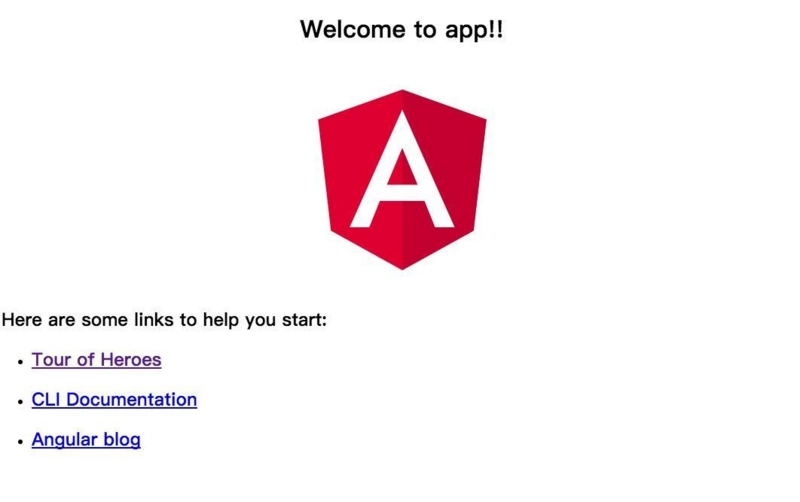
5、安装Angular Material
5.1、安装
官方安装说明:https://material.angular.io/guide/getting-started
npm install --save @angular/material @angular/cdk @angular/animations
然后执行修复
npm audit fix
5.2、配置animations
将BrowserAnimationsModule导入应用程序以启用动画支持。
import {BrowserAnimationsModule} from '@angular/platform-browser/animations';

@NgModule({

  ...

  imports: [BrowserAnimationsModule],

  ...

})

export class PizzaPartyAppModule { }
示例:打开app.module.ts并修改:
import { BrowserModule } from '@angular/platform-browser';

import { NgModule } from '@angular/core';

import { BrowserAnimationsModule } from '@angular/platform-browser/animations';

import { AppComponent } from './app.component';

@NgModule({

  declarations: [

    AppComponent

  ],

  imports: [

    BrowserModule,

    BrowserAnimationsModule

  ],

  providers: [],

  bootstrap: [AppComponent]

})

export class AppModule { }
5.3、导入组件模块(component modules)
import {MatButtonModule, MatCheckboxModule} from '@angular/material';

@NgModule({

  ...

  imports: [MatButtonModule, MatCheckboxModule],

  ...

})

export class PizzaPartyAppModule { }
示例:打开app.module.ts并修改:
import { BrowserModule } from '@angular/platform-browser';

import { NgModule } from '@angular/core';

import { BrowserAnimationsModule } from '@angular/platform-browser/animations';

import {MatButtonModule, MatCheckboxModule} from '@angular/material';

import { AppComponent } from './app.component';

@NgModule({

  declarations: [

    AppComponent

  ],

  imports: [

    BrowserModule,

    BrowserAnimationsModule,

    MatButtonModule,

    MatCheckboxModule

  ],

  providers: [],

  bootstrap: [AppComponent]

})

export class AppModule { }
5.4、添加主题
包含主题是将所有核心和主题样式应用于您的应用程序所必需的。要开始使用预先构建的主题,请在应用程序中全局包含Angular Material的预构建主题之一。如果您正在使用Angular CLI,则可以将其添加到styles.css中。
如果您不使用Angular CLI,则可以通过 index.html 中的<link>元素包含预构建的主题。有关主题的更多信息以及有关如何创建自定义主题的说明,请参阅主题指南。
@import "~@angular/material/prebuilt-themes/indigo-pink.css";
5.5、添加手势支持(Gesture Support)
npm install --save hammerjs
然后在 src/main.ts 中引入
import 'hammerjs';
5.6、添加图标
如果您想将mat-icon组件与正式的材质设计图标一起使用,请在 index.html 中加载图标字体。
<link href="https://fonts.googleapis.com/icon?family=Material+Icons" rel="stylesheet">
Angular CLI 安装和使用的更多相关文章
- Visual Studio Code作为Angular开发工具常用插件安装、json-server安装与使用、angular/cli安装失败问题
前提准备: 搭建好Angular开发环境 1 安装Visual Studio Code 教程简单,不会的去问度娘 2 安装Chrome浏览器 教程简单,不会的趣闻度娘 3 Visual Studio ...
- Angular CLI 安装
安装Angular 官网的教程,因为国内网络环境原因,访问不了服务器,导致安装失败. 1.先安装NodeJs 安装教程:http://blog.csdn.net/zengmingen/article/ ...
- Angular/cli 安装(windows环境)。
1.卸载先前安装的Angular/cli npm uninstall -g angular-clinpm uninstall --save-dev angular-clinpm uninstall - ...
- [转]Angular CLI 安装和使用
本文转自:https://www.jianshu.com/p/327d88284abb 一. 背景介绍: 两个概念: 关于Angular版本,Angular官方已经统一命名Angular 1.x统称为 ...
- Angular CLI 安装和使用以及安装失败的解决方法
背景介绍 关于Angular版本,Angular官方已经统一命名Angular 1.x同一为Angular JS:Angular 2.x及以上统称Angular: CLI是Command Line I ...
- Angular14 Visual Studio Code作为Angular开发工具常用插件安装、json-server安装与使用、angular/cli安装失败问题、emmet安装
前提准备: 搭建好Angular开发环境 1 安装Visual Studio Code 教程简单,不会的去问度娘 2 安装Chrome浏览器 教程简单,不会的趣闻度娘 3 Visual Studio ...
- Windows 安装Angular CLI
1.安装nvm npm cnpm nrm(onenote笔记上有记录) 参考:https://blog.csdn.net/tyro_java/article/details/51232458 提示:如 ...
- Angular/cli的安装
Angular cli 是一个命令行工具,用来创建,打包,发布项目. Angular cli 安装之前必须先安装Node 6.9.0及以上版本,NPM 3 及以上版本. 在cmd控制台窗口执行命令no ...
- angular cli全局版本大于本地版本 把本地版本升级方式
查看 angular 版本 ng version 如出现提示 Your global Angular CLI version (xxx) is greater than your local ver ...
随机推荐
- 一个C++程序中有多个cin输入的情况
在很多C++程序中,我们都会有几次输入的操作.这种情况下,会遇到只有第一个cin语句被执行了,而后面的cin都没有执行.这是因为cin所输入的数据都放在cin缓冲区中,当第一次使用cin后,缓冲区中已 ...
- 「LOJ 2289」「THUWC 2017」在美妙的数学王国中畅游——LCT&泰勒展开
题目大意: 传送门 给一个动态树,每个节点上维护一个函数为$f(x)=sin(ax+b)$.$f(x)=e^{ax+b}$.$f(x)=ax+b$中的一个. 支持删边连边,修改节点上函数的操作. 每次 ...
- 电梯调度设计之初感想——蔡迎盈&&曹玉松
突然拿到这个问题,蒙了好久,索性走一步,再走一步好了,希望在这天下第一庄里,会看到晴空. 查了好多资料,终于还是整理出一个很草稿的版本,这只能算是我们初步的设计. 四部电梯载重和乘客限制不同, ...
- 『zkw线段树及其简单运用』
阅读本文前,请确保已经阅读并理解了如下两篇文章: 『线段树 Segment Tree』 『线段树简单运用』 引入 这是一种由\(THU-zkw\)大佬发明的数据结构,本质上是经典的线段树区间划分思想, ...
- 十分钟学会Java8的lambda表达式和Stream API
01:前言一直在用JDK8 ,却从未用过Stream,为了对数组或集合进行一些排序.过滤或数据处理,只会写for循环或者foreach,这就是我曾经的一个写照. 刚开始写写是打基础,但写的多了,各种乏 ...
- Boosting(提升方法)之GBDT
一.GBDT的通俗理解 提升方法采用的是加法模型和前向分步算法来解决分类和回归问题,而以决策树作为基函数的提升方法称为提升树(boosting tree).GBDT(Gradient Boosting ...
- 面试题-浅谈JavaScript中的This指向问题
各位小伙伴在面试中被面试官问道this指向问题一定不少吧,同时还被问道apply,call和bind的用法区别,现在,就来简单的聊一聊this到底指向何方. 1.基本概念 MDN的官方解释:与其他语言 ...
- Python爬虫使用lxml模块爬取豆瓣读书排行榜并分析
上次使用了BeautifulSoup库爬取电影排行榜,爬取相对来说有点麻烦,爬取的速度也较慢.本次使用的lxml库,我个人是最喜欢的,爬取的语法很简单,爬取速度也快. 本次爬取的豆瓣书籍排行榜的首页地 ...
- 讲解:为什么重写equals时必须重写hashCode方法
一 :string类型的==和equals的区别: 结论:"=="是判断两个字符串的内存地址是否相等,equals是比较两个字符串的值是否相等,具体就不做扩展了,有兴趣的同学可以去 ...
- Error:Execution failed for task ':app:processDebugManifest'.
Attribute meta-data#android.support.VERSION@value value=(26.1.0) from AndroidManifest.xml:28:13-35 i ...