
在react中实现打印功能
最近项目中,前端采用react+antd+dva的组合,已经完成了后头管理类系统产品的更新迭代工作。
今天有一个新需求,需要在后台管理系统中实现点击打印完成指定页面的打印功能。
之前也没接触过,只知道浏览器带有打印功能的实现,window.print()。
问题来了,在react中是没有dom节点的,不过我们也是可以转为dom节点的。
常规js文件打印:https://blog.csdn.net/u014267869/article/details/52539341
在react中,其实同样也是可以获取到节点信息的,在你需要打印的内容部分节点添加一个ID
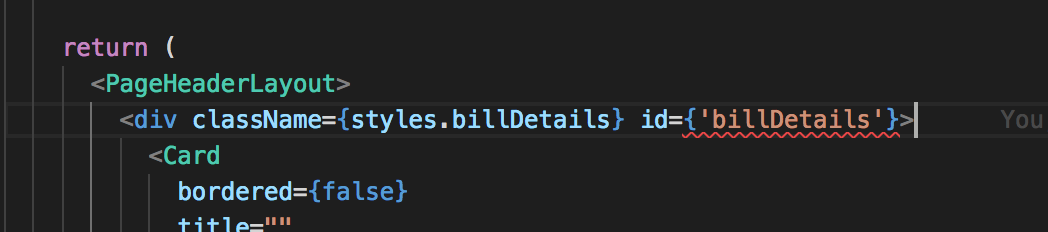
打印按钮点击事件
print = () => {

    window.document.body.innerHTML = window.document.getElementById('billDetails').innerHTML;

    window.print();

    window.location.reload();

}
这样打印出来的内容是没有带样式的,因为一般css文件并不会写到行内去,所以在生成html的文件字符串时,里面没有样式信息,在打印时就会布局混乱。
要想打印出来的效果与网页上显示的效果一致,就需要在生成html的文件字符串时,带上样式信息。
方法1:把样式信息写在行内
在文件信息不复杂时,可以写在行内
方法2:使用react-inline-css
使用这个npm包,可以在配置后把样式自动添加到行内
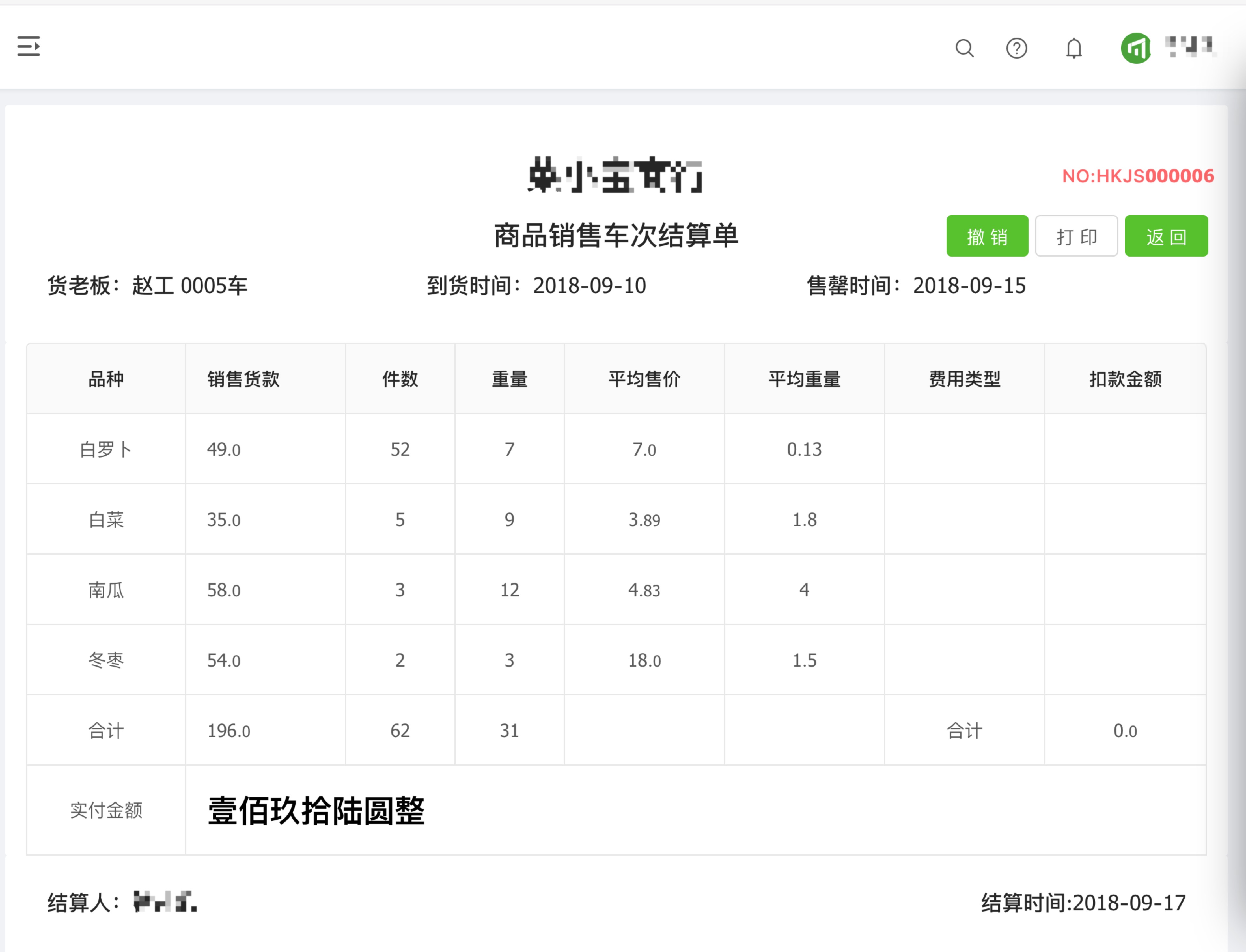
网页效果图:
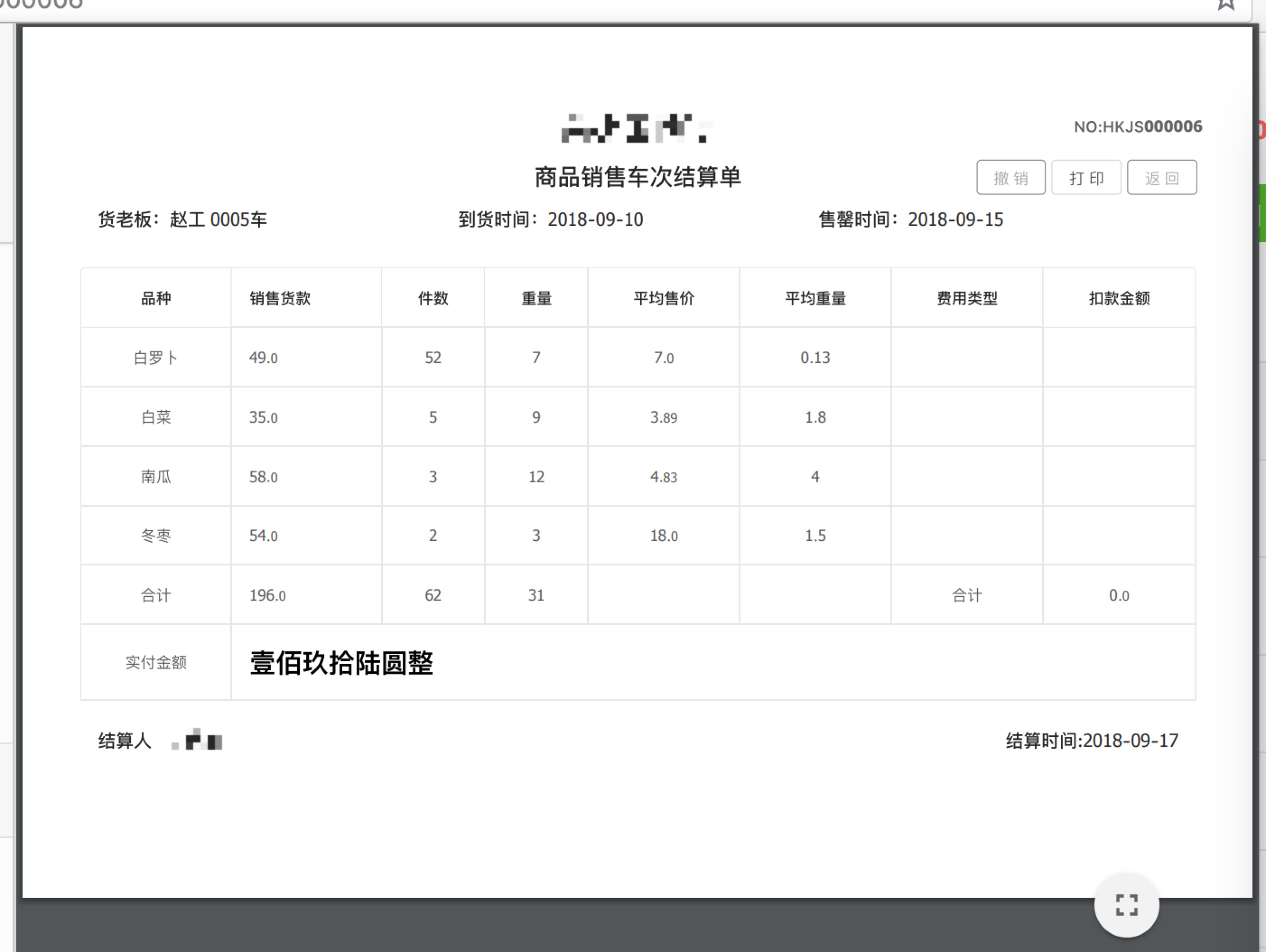
打印预览竖版效果图:

横版效果图:
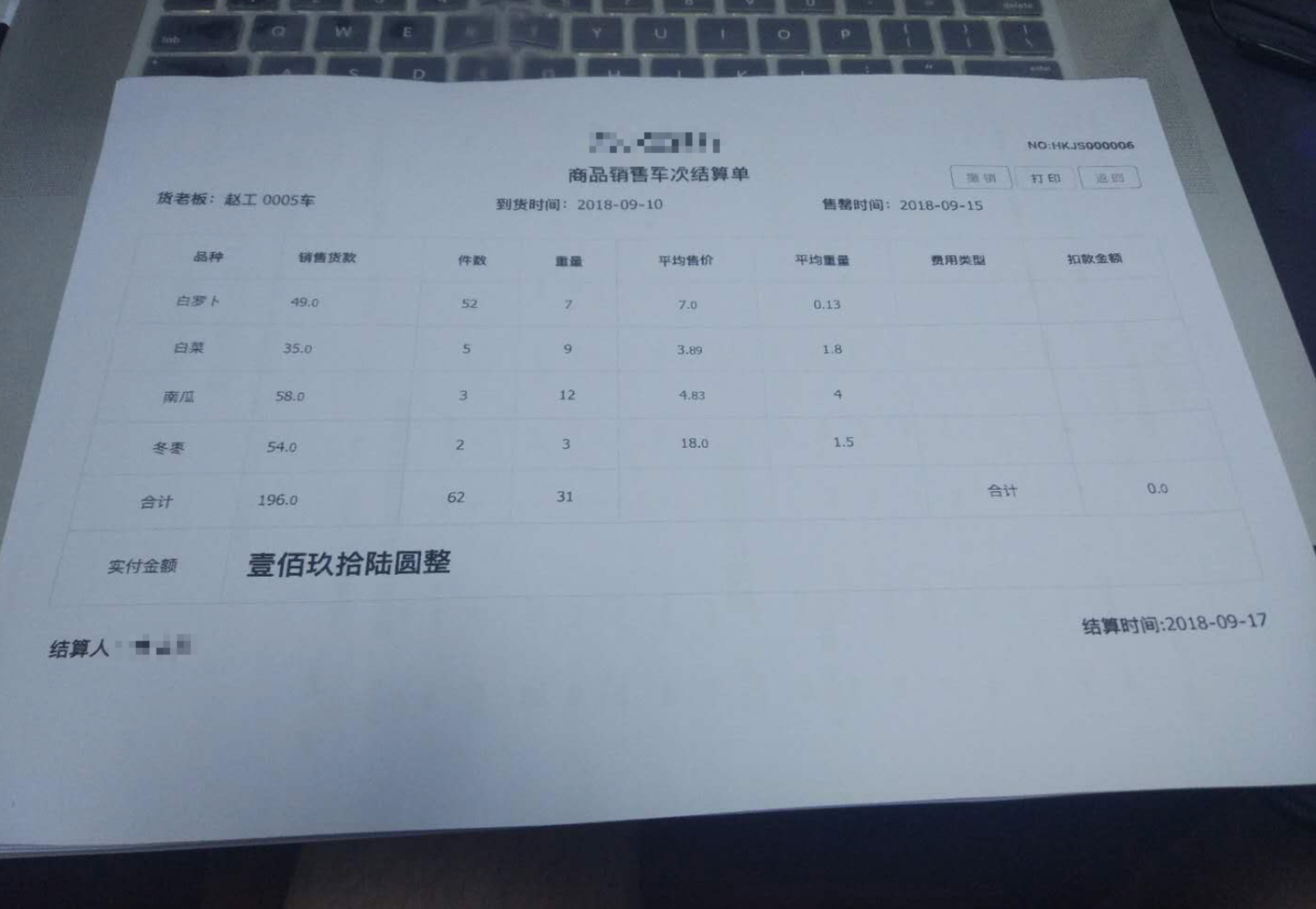
打印效果图:

完整代码:
import React, { PureComponent } from 'react';

import moment from 'moment';

import { connect } from 'dva';

import {

  Card,

  Button,

  Form,

  Table,

  message,

 } from 'antd';

import PageHeaderLayout from '../../layouts/PageHeaderLayout';

import { fixedZeroTo4Bit } from '../../utils/utils';

import styles from './Funds.less';

import { isEmptyObject } from '../../utils/reg';

import { Yuan } from '../../utils/math';

import watermark from '../../assets/icon/revocation.png';

@connect(({ finance, loading }) => ({

  finance,

  loading: loading.models.list,

}))

@Form.create()

export default class LoanSettleMent extends PureComponent {

  constructor(props) {

    super(props);

    this.state = {

      loading: true,

    };

  }

  componentDidMount() {

    const code = !isEmptyObject(this.props.match) ? this.props.match.params.id : 0;

    this.statisticalInfo({ receiptsCode: code });

  }

  // 结算单列表详情

  statisticalInfo(params) {

    this.props.dispatch({

      type: 'finance/statisticalInfo',

      payload: params,

    }).then(() => {

      this.setState({

        loading: false,

      })

    });

  }

  // 撤销操作

  fetchRevocation(params) {

    this.props

      .dispatch({

        type: 'finance/fetchRevocation',

        payload: params,

      })

      .then(() => {

        const { finance: { revocationData } } = this.props;

        const { code } = revocationData;

        if (code === 200) {

          message.info('撤销货款单成功!').then(() => {

            window.location.href = '/funds/loansettlement';

          });

        } else {

          message.info('撤销货款单失败!');

        }

      });

  }

  // 撤销

  cancer = () => {

    const code = !isEmptyObject(this.props.match) ? this.props.match.params.id : 0;

    this.fetchRevocation({

      receiptsCode: code,

    });

  };

  // 返回

  back = () => {

    window.history.back();

  };

  // 打印

  print(){

    window.document.body.innerHTML = window.document.getElementById('billDetails').innerHTML;

    window.print();

    window.location.reload();

  }

  render() {

    const { finance: { statisticalInfo }, loading } = this.props;

    let data = [],

        createName,

        createTime;

    if (statisticalInfo && !Array.isArray(statisticalInfo)) {

      data = statisticalInfo;

      createName = statisticalInfo.createName;

      createTime = statisticalInfo.createTime;

    }

    if (statisticalInfo != undefined) {

      data = statisticalInfo.goodsVos;

    }

    let _data = [],

        receiptsCode;

    if (statisticalInfo && !Array.isArray(statisticalInfo)) {

      _data = statisticalInfo;

      receiptsCode = statisticalInfo.receiptsCode;

    }

    const { supplierName, carNo, stallName, startTime, endTime, enable } = _data;

    const len = data.length;

    const columns = [

      {

        title: '品种',

        dataIndex: 'attrName',

        align: 'center',

      },

      {

        title: '销售货款',

        dataIndex: 'goodsAmount',

        align: 'left',

        render: (text, record, index) => {

          const { goodsAmount, goodsPaymentStr } = record;

          const type = goodsPaymentStr !== null ? goodsPaymentStr.split('负').length : -1;

          if (index < len - 1) {

            return <span>{goodsAmount ? Yuan(goodsAmount, 2) : ''}</span>;

          }

          return {

            children:

              type == 2 ? (

                <span className={styles.neg}>{goodsPaymentStr}</span>

              ) : (

                <span className={styles.bold}>{goodsPaymentStr}</span>

              ),

            props: {

              colSpan: 7,

            },

          };

        },

      },

      {

        title: '件数',

        dataIndex: 'number',

        align: 'center',

        render: (text, record, index) => {

          const { number } = record;

          if (index < len - 1) {

            return <span>{number ? number : ''}</span>;

          }

          return {

            children: '',

            props: {

              colSpan: 0,

            },

          };

        },

      },

      {

        title: '重量',

        dataIndex: 'weight',

        align: 'center',

        render: (text, record, index) => {

          const { weight } = record;

          if (index < len - 1) {

            return <span>{weight ? weight : ''}</span>;

          }

          return {

            children: '',

            props: {

              colSpan: 0,

            },

          };

        },

      },

      {

        title: '平均售价',

        dataIndex: 'averageAmount',

        align: 'center',

        render: (text, record, index) => {

          const { averageAmount } = record;

          if (index < len - 1) {

            return <span>{averageAmount ? Yuan(averageAmount, 2) : ''}</span>;

          }

          return {

            children: '',

            props: {

              colSpan: 0,

            },

          };

        },

      },

      {

        title: '平均重量',

        dataIndex: 'averageWeight',

        align: 'center',

        render: (text, record, index) => {

          const { averageWeight } = record;

          if (index < len - 1) {

            return <span>{averageWeight ? averageWeight : ''}</span>;

          }

          return {

            children: '',

            props: {

              colSpan: 0,

            },

          };

        },

      },

      {

        title: '费用类型',

        dataIndex: 'type',

        align: 'center',

        render: (text, record, index) => {

          const { type } = record;

          if (index < len - 1) {

            return <span>{type}</span>;

          }

          return {

            children: '',

            props: {

              colSpan: 0,

            },

          };

        },

      },

      {

        title: '扣款金额',

        dataIndex: 'amount',

        align: 'center',

        render: (text, record, index) => {

          const { amount } = record;

          if (index < len - 1) {

            return <span>{amount !== null ? Yuan(amount, 2) : ''}</span>;

          }

          return {

            children: '',

            props: {

              colSpan: 0,

            },

          };

        },

      },

    ];

    return (

      <PageHeaderLayout>

        <div className={styles.billDetails} id={'billDetails'}>

          <Card

            bordered={false}

            title=""

          >

            <div className={styles.paymentbill}>

              <div style={{display: 'flex', height: '60px', lineHeight: '60px'}}>

                <h1 style={{flex: 1, textAlign: 'center'}}>{stallName}</h1>

                <span style={{position: 'absolute', right: '10px', color: '#FF6666', fontWeight: '600'}}>{`NO:${receiptsCode !== undefined ? receiptsCode : ''}`}</span>

              </div>

              <div style={{display: 'flex'}}>

                <h2 style={{flex: 1, textAlign: 'center'}}>商品销售车次结算单</h2>

                <div style={{position: 'absolute', right: '10px'}}>

                  <Button type="primary" onClick={this.cancer} disabled={!enable} style={{marginRight: '5px'}}>

                    撤销

                  </Button>

                  <Button onClick={this.print.bind(this)} style={{marginRight: '5px'}}>打印</Button>

                  <Button type="primary" onClick={this.back} style={{marginRight: '5px'}}>

                    返回

                  </Button>

                </div>

              </div>

              <div style={{display: 'flex'}}>

                <h3 style={{flex: 1, textAlign: 'left'}}>{`货老板:${supplierName !== undefined ? supplierName : ''} ${

                  carNo !== undefined ? fixedZeroTo4Bit(carNo, 4) : 0

                }车`}

                </h3>

                <h3 style={{flex: 1}}>{`到货时间:${moment(startTime).format('YYYY-MM-DD')}`}</h3>

                <h3 style={{flex: 1}}>{`售罄时间:${moment(endTime).format('YYYY-MM-DD')}`}</h3>

              </div>

              <img src={watermark} hidden={enable} style={{position: 'absolute', width: '100px', height: '100px', top: '120px', right: '80px',zIndex: 100}} />

            </div>

          </Card>

          <Card

            bordered={false}

            title=""

            bodyStyle={{ padding: '0 16px' }}

          >

            <Table

              dataSource={data}

              columns={columns}

              bordered

              pagination={false}

              loading={this.state.loading}

            />

          </Card>

          <Card style={{ border: 0 }}>

            <div style={{display: 'flex'}}>

              <h3 style={{flex: 1}}>{`结算人:${createName !== undefined ? createName : ''}`}</h3>

              <h3 style={{flex: 1, textAlign: 'right'}}>{`结算时间:${moment(createTime).format(

                'YYYY-MM-DD'

              )}`}</h3>

            </div>

          </Card>

        </div>

      </PageHeaderLayout>

    );

  }

}
后续准备把dom节点转为pdf再加上去...待续
在react中实现打印功能的更多相关文章
- react + antd 实现打印功能(踩了不少坑)
最近在有网页打印需求,尝试了一下react的打印功能,遇到了不少的坑: 1.react本身有一些打印的组件,但都不好用,都是基于window.print(),但是window.print()如果直接打 ...
- vue项目中增加打印功能
export default function printFile(html) { let userAgent = navigator.userAgent; if ( (userAgent.index ...
- Android 各层中日志打印功能的应用
1. HAL层 头文件:#include <utils/Log.h> 对应的级别 打印方法 VERBOSE LOGV()DEBUG LOGD()INFO LOGI()WARN LOGW() ...
- MVC中的打印功能
HTML页面: @{ Layout = "~/Views/Shared/_IframeLayout.cshtml";}@Scripts.Render(ViewBag.ScriptP ...
- vc 实现打印功能
Visual C++6.0是开发Windows应用程序的强大工具,但是要通过它实现程序的打印功能,一直是初学者的一个难点,经常有朋友询问如何在VC中实现打印功能,他们往往感到在MFC提供的框架内实现这 ...
- MFC 实现打印机打印功能
Visual C++6.0是开发Windows应用程序的强大工具,但是要通过它实现程序的打印功能,一直是初学者的一个难点,经常有朋友询问如何在VC中实现打印功能,他们往往感到在MFC提供的框架内实现这 ...
- React Native(十五)——RN中的分享功能
终于,终于,可以总结自己使用RN时的分享功能了-- 为什么呢?且听我慢慢道来吧: 从刚开始接触React Native(2017年9月中旬)就着手于分享功能,直到自己参与公司的rn项目开发中,再到现在 ...
- .NET中使用FastReport实现打印功能
FastReport是功能非常强大的报表工具,在本篇文章中讲解如何使用FastReport实现打印功能. 一.新建一个窗体程序,窗体上面有设计界面和预览界面两个按钮,分别对应FastReport的设计 ...
- Immutable 详解及 React 中实践
本文转自:https://github.com/camsong/blog/issues/3 Shared mutable state is the root of all evil(共享的可变状态是万 ...
随机推荐
- Promise(避免金字塔回调)
前后端分离开发,前端通过接口获取数据,但是有的页面不止一个接口,就会出现金字塔回调,可以通过 Promise 封装请求. request-data.js: function reqData(postu ...
- 立即执行函数 IIFE
立即执行函数表达式IIFE(Immediately-invoked function expression)我们知道,在javascript(ES5)中,是没有块级作用域的概念的.看一个例子 for ...
- 在做关于NIO TCP编程小案例时遇到无法监听write的问题,没想到只是我的if语句的位置放错了位置,哎,看了半天没看出来
在做关于NIO TCP编程小案例时遇到无法监听write的问题,没想到只是我的if语句的位置放错了位置,哎,看了半天没看出来 贴下课堂笔记: 在Java中使用NIO进行网络TCP套接字编程主要以下几个 ...
- cmd实现cab文件的压缩与解压
压缩(makecab): 1.单文件压缩 makecab ip2.txt ip2.txt.cab 2.多文件压缩 makecab /f c:\list.txt /d expresstype=mszip ...
- 在离线环境中安装Visual Stuido 2017
在离线环境中安装Visual Stuido 2017 0x00 写在前面的废话 因为工作上大多数都是在离线环境中进行的,进出离线环境很麻烦,所以之前很长一段时间都在使用VS2010.后来尝试换了VS2 ...
- Java基础——集合(持续更新中)
集合框架 Java.util.Collection Collection接口中的共性功能 1,添加 booblean add(Object obj); 往该集合中添加元素,一次添加一个 boolea ...
- Java实现单链表
真正的动态数据结构(引用和指针) 优点:真正的动态,不需要处理固定容量的问题. 缺点:丧失随机访问的能力. 链表就像寻宝,我们拿到藏宝图开始出发寻宝,每找到一个地方后,里面藏着下一步应该去哪里寻找.一 ...
- javaScript设计模式--观察者模式(observer)
观察者模式(observer):又被称为 发布-订阅者模式或者消息机制,定义了一种依赖关系,解决了主体对象与观察者之间功能耦合. 一.这样的需求 在实现自己的需求,而添加一些功能代码,但是又不想新添加 ...
- Prometheus安装和配置node_exporter监控主机
Node_exporter是可以在* Nix和Linux系统上运行的计算机度量标准的导出器. Node_exporter 主要用于暴露 metrics 给 Prometheus,其中 metrics ...
- 源码安装Nginx加TCP反向代理模块
说明: 安装方式是源码编译安装,因此先安装相关依赖,否则报错. yum -y install gcc* patch openssl openssl-devel 安装步骤: 下载nginx源码包: wg ...