
基于springboot跟poi封装的最便捷的excel导出
概述
详细
一、准备工作
先在pom文件添加依赖如下图所示:
<dependencies>

    <dependency>

      <groupId>junit</groupId>

      <artifactId>junit</artifactId>

      <version>4.11</version>

      <scope>test</scope>

    </dependency>

    <dependency>

			<groupId>javax.servlet</groupId>

			<artifactId>jstl</artifactId>

			<version>1.2</version>

		</dependency>

    	<dependency>

			<groupId>org.springframework.boot</groupId>

			<artifactId>spring-boot-starter-cache</artifactId>

		</dependency>

		<dependency>

			<groupId>org.springframework.boot</groupId>

			<artifactId>spring-boot-starter-web</artifactId>

		</dependency>

		<!-- 使用Jasper引擎解析JSP -->

		<dependency>

			<groupId>org.apache.tomcat.embed</groupId>

			<artifactId>tomcat-embed-jasper</artifactId>

			<scope>provided</scope>

		</dependency>

		<!-- jstl标签 -->

		<dependency>

			<groupId>javax.servlet</groupId>

			<artifactId>jstl</artifactId>

		</dependency>

  	<dependency>

        <groupId>org.apache.commons</groupId>

        <artifactId>commons-lang3</artifactId>

        <version>3.8.1</version>

        </dependency>

      <dependency>

          <groupId>com.google.guava</groupId>

          <artifactId>guava</artifactId>

          <version>27.0-jre</version>

      </dependency>

     	<dependency>

            <groupId>org.apache.poi</groupId>

            <artifactId>poi</artifactId>

            <version>3.17</version>

        </dependency>

        <dependency>

            <groupId>org.apache.poi</groupId>

            <artifactId>poi-ooxml</artifactId>

            <version>3.17</version>

        </dependency>

  </dependencies>
二、程序实现
1、添加excel导出的person-export-config文件
<?xml version="1.0" encoding="UTF-8"?>

<exportFile>

	<fileName>exportConfig</fileName>

	<exportType>0</exportType>

	<cell>

		<title>序号</title>

		<alias>index</alias>

	</cell>

	<cell>

		<title>姓名</title>

		<alias>name</alias>

	</cell>

	<cell>

		<title>年龄</title>

		<alias>age</alias>

	</cell>

	<cell>

		<title>性别</title>

		<alias>sex</alias>

	</cell>

		<cell>

		<title>日期</title>

		<alias>date</alias>

	</cell>

</exportFile>
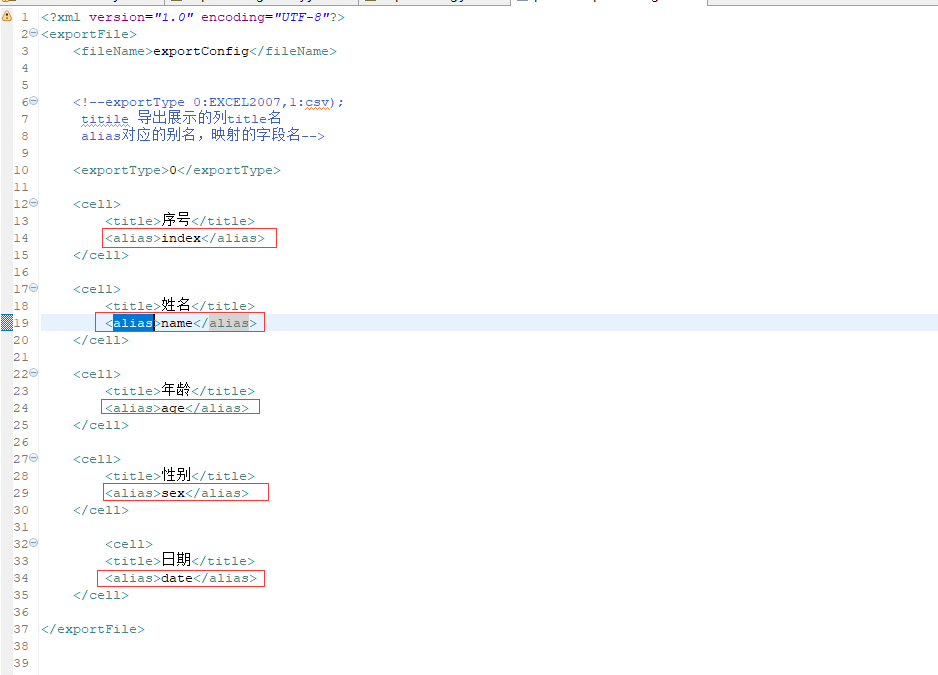
其中exportType:0表示导出EXCEL2007,exportType:1表示导出csv文件
title导出展示列的title名,alias表示映射的字段名
2、从classpath获取person-export-config.xml文件
从classpath获取person-export-coing.xml文件并转为inputStresm
ClassPathResource classPathResource = new ClassPathResource("export/person-export-config.xml");

		InputStream inputStream = classPathResource.getInputStream();

ExportConfig exportConfig = ExportConfigFactory.getExportConfig(inputStream);
3、解析person-export-config.xml文件
主要代码如下:
private static ExportConfig getExportCells(InputStream inputStream) throws FileExportException {

        ExportConfig exportConfig = new ExportConfig();

        DocumentBuilderFactory dbFactory = DocumentBuilderFactory.newInstance();

        DocumentBuilder dBuilder = null;

        Document document = null;

        try {

            dBuilder = dbFactory.newDocumentBuilder();

            document = dBuilder.parse(inputStream);

        } catch (ParserConfigurationException | SAXException | IOException e) {

            throw new FileExportException(e, "pares xml error");

        }

        Element root = document.getDocumentElement();

        NodeList elements = root.getElementsByTagName("cell");

        List<ExportCell> exportCells = initElement(elements);

        String fileName = "";

        String exportType1 = "";

        try {

            fileName = ConfigParser.getNodeText(root, "fileName");

            exportType1 = ConfigParser.getNodeText(root, "exportType");

        } catch (FileImportException e) {

            throw new FileExportException(e);

        }

        if (StringUtils.isEmpty(fileName)) {

            throw new FileExportException("用于导出的xml文档 <fileName> 为空");

        }

        if (StringUtils.isEmpty(exportType1) || !StringUtils.isNumeric(exportType1)) {

            throw new FileExportException("用于导出的xml文档 <exportType> 为空");

        }

        exportConfig.setFileName(fileName);

        ExportType exportType = ExportType.getExportType(Integer.valueOf(exportType1));

        if (exportType == null) {

            throw new FileExportException("找不到相应的ExportType 解析xml得到的exportType 是" + exportType1);

        }

        exportConfig.setExportType(exportType);

        exportConfig.setExportCells(exportCells);

        return exportConfig;

    }
这时我们得到一个ExportConfig对象如下:
public class ExportConfig extends BaseEntity {

    private String fileName;//输出的文件名

    private ExportType exportType;//0 表示 excel, 1 表示csv

    private List<ExportCell> exportCells;
4、添加要输出到excel的list对象
List<Map> lists = new LinkedList<>();

       for (int i = 0; i < 10; i++) {

           Map<String, Object> maps = new HashMap<>();

           maps.put("index", i);

           maps.put("name", "张三" + i);

           maps.put("age", Float.valueOf(i));

           maps.put("sex", "男");

           maps.put("date", new Date());

           lists.add(maps);

       }
在实际项目中map可以是具体的实体类对象比如Person,只要对象里面的字段跟person-export-config里的alias标签对应上即可(如下图所示)。
5、获取ExportResult对象
具体代码如下:
ExportResult exportResult = FileExportor.exportResult(exportConfig, lists);
将exportConfig对象跟要输出到excel的lists对象传入
 public static ExportResult exportResult(ExportConfig exportConfig, List<?> data) throws FileExportException {

        ExportType exportType = exportConfig.getExportType();

        switch (exportType) {

            case EXCEL2007:

                Workbook workbook = new ExcelExportImpl().getExportResult(data, exportConfig.getExportCells());

                ExportExcelResult exportExcelResult = new ExportExcelResult();

                exportExcelResult.setWorkbook(workbook);

                exportExcelResult.setFileName(exportConfig.getFileName());

                return exportExcelResult;

            case CSV:

                StringBuilder stringBuilder = new CSVExportImpl().getExportResult(data, exportConfig.getExportCells());

                ExportCSVResult exportCSVResult = new ExportCSVResult();

                exportCSVResult.setResult(stringBuilder.toString());

                exportCSVResult.setFileName(exportConfig.getFileName());

                return exportCSVResult;

        }

        throw new FileExportException("找不到对应的export type, export type is " + exportType.getNumber());

    }
6、最后将数据通过outputstream导出到excel
       String fileName = "person统计" +".xlsx";

    setResponseHeader(response, fileName);

    OutputStream outputStream = response.getOutputStream();

    exportResult.export(outputStream);
 public void export(OutputStream outputStream) throws FileExportException{

        try {

            workbook.write(outputStream);

            outputStream.close();

        } catch (IOException e) {

            throw new FileExportException("[Error occurred while export excel message is] " + e);

        }

    }
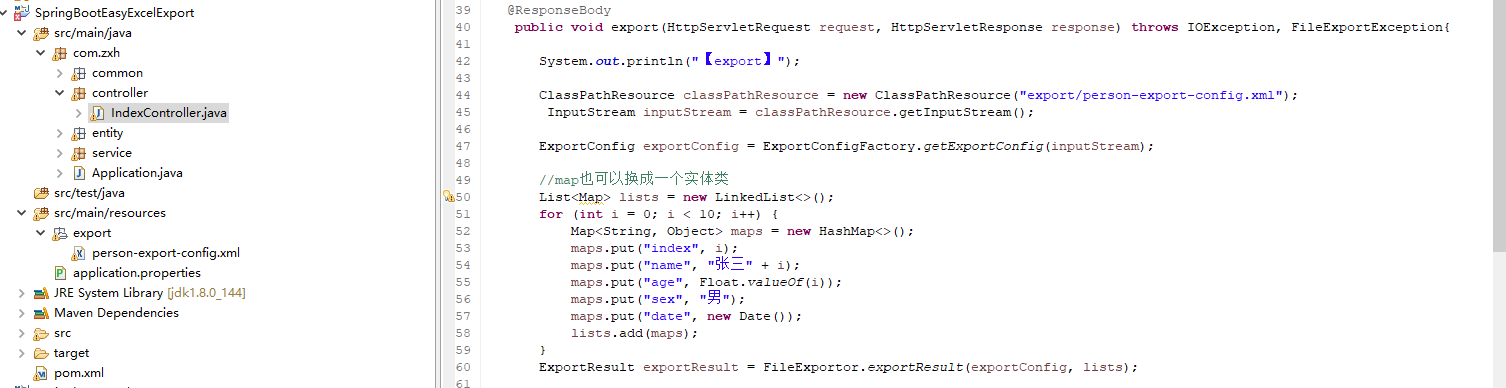
三、项目结构图
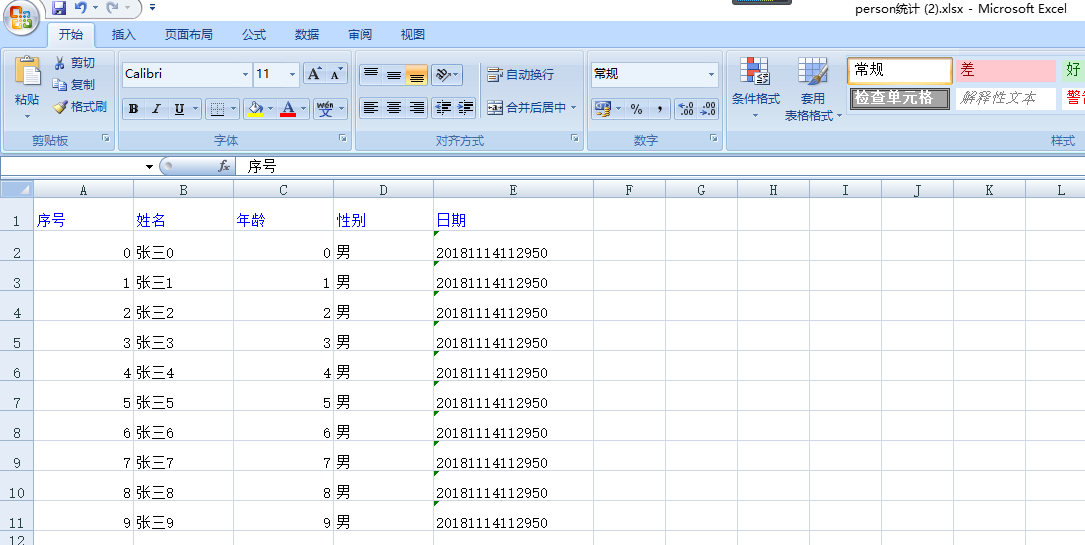
四、运行效果图
五、补充
本例子主要对poi导出excel进行了一个封装,通过xml配置文件配置跟实体类一一对应的字段,可灵活配置,在实际项目中非常实用。
注:本文著作权归作者,由demo大师发表,拒绝转载,转载需要作者授权
基于springboot跟poi封装的最便捷的excel导出的更多相关文章
- 基于 POI 封装 ExcelUtil 精简的 Excel 导入导出
注 本文是使用 org.apache.poi 进行一次简单的封装,适用于大部分 excel 导入导出功能.过程中可能会用到反射,如若有对于性能有极致强迫症的同学,看看就好. 序 由于 poi 本身只是 ...
- 基于SpringBoot+SSM实现的Dota2资料库智能管理平台
Dota2资料库智能管理平台的设计与实现 摘 要 当今社会,游戏产业蓬勃发展,如PC端的绝地求生.坦克世界.英雄联盟,再到移动端的王者荣耀.荒野行动的火爆.都离不开科学的游戏管理系统,游戏管理系 ...
- 基于spring-boot的社区社交微信小程序,适合做脚手架、二次开发
基于spring-boot的社区社交微信小程序,适合做脚手架.二次开发 代码地址如下:http://www.demodashi.com/demo/13867.html 1 概述 笔者做的一个后端基于s ...
- MyBatis 进阶,MyBatis-Plus!(基于 Springboot 演示)
这一篇从一个入门的基本体验介绍,再到对于 CRUD 的一个详细介绍,在介绍过程中将涉及到的一些问题,例如逐渐策略,自动填充,乐观锁等内容说了一下,只选了一些重要的内容,还有一些没提及到,具体可以参考官 ...
- SpringData 基于SpringBoot快速入门
SpringData 基于SpringBoot快速入门 本章通过学习SpringData 和SpringBoot 相关知识将面向服务架构(SOA)的单点登录系统(SSO)需要的代码实现.这样可以从实战 ...
- 基于Springboot集成security、oauth2实现认证鉴权、资源管理
1.Oauth2简介 OAuth(开放授权)是一个开放标准,允许用户授权第三方移动应用访问他们存储在另外的服务提供者上的信息,而不需要将用户名和密码提供给第三方移动应用或分享他们数据的所有内容,OAu ...
- 基于SpringBoot搭建应用开发框架(二) —— 登录认证
零.前言 本文基于<基于SpringBoot搭建应用开发框架(一)——基础架构>,通过该文,熟悉了SpringBoot的用法,完成了应用框架底层的搭建. 在开始本文之前,底层这块已经有了很 ...
- 基于springboot+bootstrap+mysql+redis搭建一套完整的权限架构【六】【引入bootstrap前端框架】
https://blog.csdn.net/linzhefeng89/article/details/78752658 基于springboot+bootstrap+mysql+redis搭建一套完整 ...
- 单点登录系统实现基于SpringBoot
今天的干货有点湿,里面夹杂着我的泪水.可能也只有代码才能让我暂时的平静.通过本章内容你将学到单点登录系统和传统登录系统的区别,单点登录系统设计思路,Spring4 Java配置方式整合HttpClie ...
随机推荐
- SEM(搜索引擎营销)
ylbtech-Miscellaneos:SEM(搜索引擎营销) 搜索引擎营销:英文Search Engine Marketing ,我们通常简称为“SEM”.就是根据用户使用搜索引擎的方式利用用户检 ...
- 转:Logistic regression (逻辑回归) 概述
Logistic regression (逻辑回归)是当前业界比较常用的机器学习方法,用于估计某种事物的可能性.比如某用户购买某商品的可能性,某病人患有某种疾病的可能性,以及某广告被用户点击的可能性等 ...
- Chrome DevTools — Network
Chrome DevTools — Network https://segmentfault.com/a/1190000008407729 chrome DevTools的各种使用: 在dev too ...
- SSAS知识回放之订单数据分析
1:目标 基于已经做好的DW,利用SSAS实现一个多维数据模型的创建,通过浏览可以简单的实现订单数据的分析 2:步骤 2.1:添加数据源 如下图所示,创建一个数据仓库层的数据源连接 2.2:添加数据源 ...
- C语言编程流程
大家都知道,写程序大体步骤为:1.用编辑器编写源代码,如.c文件.2.用编译器编译代码生成目标文件,如.o.3.用链接器连接目标代码生成可执行文件,如.exe.但如果源文件太多,一个一个编译时就会特 ...
- Mysql数据库常用分库和分表方式
http://blog.csdn.net/clevercode/article/details/50877580 1 分库 1.1 按照功能分库 按照功能进行分库.常见的分成6大库: 1 用户类 ...
- PHP传值与传址(引用)
传值和传引用的区别在于,如果一个参数比较大,占用大量的内存空间,那么传引用的话就会节省拷贝空间. 传值:是把实参的值赋值给行参 ,那么对行参的修改,不会影响实参的值 传引用 :真正的以地址的方式传递参 ...
- NameNode的ZKFC机制
转自: http://hackershell.cn/?p=821 NameNode的HA可以个人认为简单分为共享editLog机制和ZKFC对NameNode状态的控制 在此之前,我先提几个问题: 一 ...
- ANT task之Junit、JunitReport
一.ANT任务之Junit: 学习ANT其实主要是学习ANT的task,ANT众多task中有一个Testing Tasks,它下面有两个任务:Junit和JunitReport,主要用来进行单元测试 ...
- 教你轻松计算AOE网关键路径
认识AOE网 有向图中,用顶点表示活动,用有向边表示活动之间开始的先后顺序,则称这种有向图为AOV网络:AOV网络可以反应任务完成的先后顺序(拓扑排序). 在AOV网的边上加上权值表示完成该活动所需的 ...