
jQuery table td可编辑
参考链接:
http://www.freejs.net/
http://www.freejs.net/article_biaodan_34.html
http://www.freejs.net/search.php?keywords=%E7%BC%96%E8%BE%91
效果图:
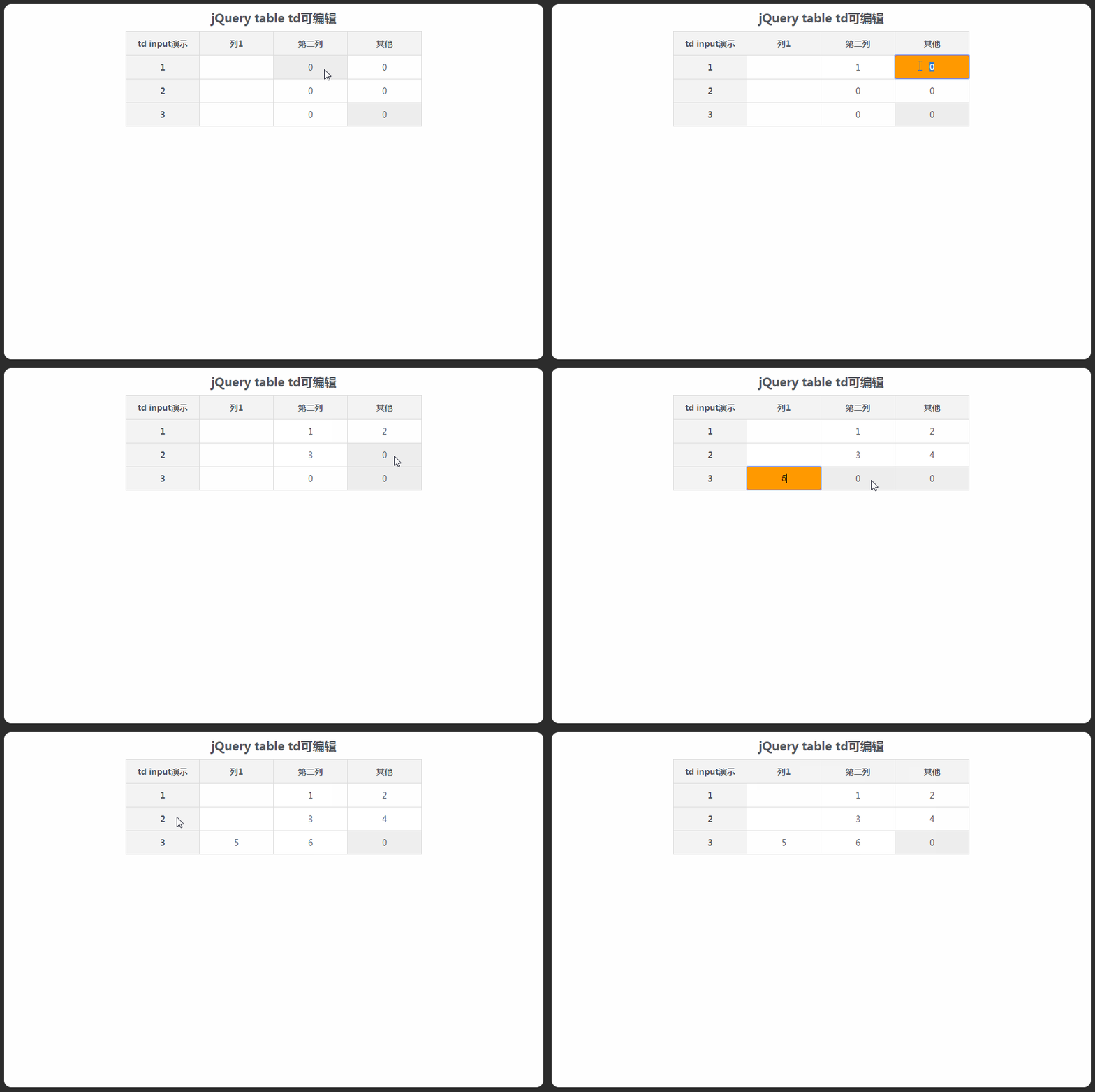
源代码:
<!DOCTYPE html PUBLIC "-//W3C//DTD XHTML 1.0 Transitional//EN" "http://www.w3.org/TR/xhtml1/DTD/xhtml1-transitional.dtd">

<html xmlns="http://www.w3.org/1999/xhtml">

<head>

    <meta http-equiv="Content-Type" content="text/html; charset=UTF-8">

    <title>jQuery table td可编辑</title>

    <style type="text/css">

        /*

         * page css

         */

        a,body,center,code,dd,div,dl,dt,em,fieldset,form,h1,h2,h3,h4,h5,h6,html,i,img,label,li,ol,p,pre,small,span,strong,sub,sup,u,ul {

            margin: auto;

            padding: 0;

            border: 0;

            outline: 0;

            font-size: 100%;

            vertical-align: baseline;

            background: 0 0

        }

        h2 {

            text-align: center;

            padding: 10px;

            font-size: 20px

        }

        a {

            color: #007bc4;

            text-decoration: none

        }

        a:hover {

            text-decoration: underline

        }

        ol,ul {

            list-style: none

        }

        table {

            border-collapse: collapse;

            border-spacing: 0

        }

        body {

            height: 100%;

            font: 12px;

            color: #51555C;

            background: #2C2C2C

        }

        img {

            border: none

        }

        .logo {

            width: 910px

        }

        #main_demo {

            width: 910px;

            min-height: 600px;

            margin: 30px auto 0 auto;

            background: #fff;

            -moz-border-radius: 12px;

            -khtml-border-radius: 12px;

            -webkit-border-radius: 12px;

            border-radius: 12px

        }

        .ad {

            text-align: center;

            margin-top: 25px

        }

        .clear {

            clear: both

        }

        /*

         * demo styles

         */

         table {

            margin: 0 auto;

            border-collapse: collapse

        }

        td,th {

            width: 10%;

            font-size: 14px;

            padding: 10px 0;

            text-align: center;

            border: 1px solid #ddd

        }

        th {

            background-color: #f4f4f4

        }

        /*

         * input

         */

         td.input {

            position: relative

        }

        td input {

            width: 100%;

            border: 1px solid #CF5C74;

            background: #F90;

            border-radius: 4px;

            display: block;

            position: absolute;

            text-align: center;

            font-size: 14px;

            left: 0;

            top: 0;

            padding: 11px 0;

            margin: -1px 0 0 -1px

        }

        td.hover {

            background: #eee

        }

    </style>

</head>

<body>

    <div id="main_demo">

        <h2>jQuery table td可编辑</h2>

        <table border="0" cellpadding="0" cellspacing="0" width="500">

            <tbody>

                <tr>

                    <th>td input演示</a></th>

                    <th scope="col">列1</th>

                    <th scope="col">第二列</th>

                    <th scope="col">其他</th>

                </tr>

            </tbody>

            <tbody>

                <tr>

                    <th>1</th>

                    <td class="content"></td>

                    <td class="text"></td>

                    <td class="position">0</td>

                </tr>

                <tr>

                    <th>2</th>

                    <td class="content"></td>

                    <td class="text">0</td>

                    <td class="position">0</td>

                </tr>

                <tr>

                    <th>3</th>

                    <td class="content"></td>

                    <td class="text"></td>

                    <td class="position hover">0</td>

                </tr>

            </tbody>

        </table>

    </div>

    <!-- JS文件:jQuery-百度CDN -->

    <script src="http://libs.baidu.com/jquery/1.9.1/jquery.min.js"></script>

    <script type="text/javascript">

        $(function() {

            $('table td').click(function() {

                if (!$(this).is('.input')) {

                    $(this).addClass('input').html('<input type="text" value="' + $(this).text() + '" />')

                        .find('input')

                            .focus()

                            .blur(function() {

                                $(this).parent().removeClass('input').html($(this).val() || 0);

                            });

                }

            }).hover(function() {

                $(this).addClass('hover');

            }, function() {

                $(this).removeClass('hover');

            });

        });

    </script>

</body>

</html>
^_^
jQuery table td可编辑的更多相关文章
- 可编辑的表格:jQuery+PHP实现实时编辑表格字段内容
在本例中,我们会通过jQuery实现单击将一个文本信息变为可编辑的表单,你可以对文本内容进行编辑,然后点击“确定”按钮,新的内容将发送到后台PHP程序处理,并保存到数据库:当点击“取消”按钮,则页面恢 ...
- [Web 前端] Jquery实现可直接编辑的表格
cp from :https://www.cnblogs.com/sjqq/p/6392001.html?utm_source=itdadao&utm_medium=referral 文实例讲 ...
- JQuery实现可直接编辑的表格
本文实例讲述了JQuery实现可直接编辑的表格.分享给大家供大家参考.具体分析如下: 功能: 创建一个表格,用户单击某个单元格后,可以直接修改单元格文本.在编辑状态下,用户可按回车键确认修改,按ESC ...
- Jquery easyui开启行编辑模式增删改操作
Jquery easyui开启行编辑模式增删改操作 Jquery easyui开启行编辑模式增删改操作先上图 Html代码: <table id="dd"> </ ...
- [转]Jquery easyui开启行编辑模式增删改操作
本文转自:http://www.cnblogs.com/nyzhai/archive/2013/05/14/3077152.html Jquery easyui开启行编辑模式增删改操作先上图 Html ...
- 点击编辑table变为可编辑状态
简单描述:开发中遇到一个小困难,table展示的数据,需要是可编辑的,点击编辑按钮,页面table可以进行编辑,编辑完成后,点击保存数据就保留下来~~~ 思路:用一个带有input的表去替换不带inp ...
- Jquery改变td内容为1的颜色
Jquery改变td内容为1的颜色<table id="tb" > <tr> <td val="1">1</td> ...
- UIWebView中加载HTML的Table,td设置百分比宽度并且宽度不被里面的内容撑开
正常情况下,iOS使用WebView加载HTML的Table时,为了让Table适应屏幕宽度,会使用百分比设置td的宽度,但是由于td中的内容过多,td会被撑开,导致整个Table的宽度会变宽,超出屏 ...
- [Js/Jquery]table行转列
摘要 在使用ews调用exhange的收件箱的并在h5页面显示邮件详情的时候,因为返回的每封邮件的内容都是htmlbody,没有textbody.每封邮件又没什么规律,用正则表达式来匹配内容并不合适, ...
随机推荐
- Python:sitecustomize 和 usercustomize
Python提供了两个hook用于定制Python:sitecustomize 和 usercustomize,首先需要查看site包目录, 然后就可以在此目录下创建usercustomize.py文 ...
- 因默认包扫描问题导致的SpringBoot项目无法启动问题
启动SpringBoot项目的时候,提示如下信息: -- :: --- [ main] s.c.a.AnnotationConfigApplicationContext : Refreshing or ...
- Ubuntu访问Windows共享目录
你可以选择目录挂载的形式,也可以选择直接使用图形界面的形式. 下面直接在文件浏览器中打开windows共享目录. 1 安装samba sudo apt-get install samba 2 打开一个 ...
- c++之五谷杂粮---1
1. 位运算符,如果运算对象是带符号的且它的值为负,那么位运算符如何处理运算对象的“符号位”依赖于机器.此时左移操作可能会改变符号位的值,因此是一种UB. Best Practices: 关于符号位 ...
- zoj 3762(求三角形的最大高)
给出n个点,要你找到一个三角形,它的高是最长的. 思路:暴力超时了,是用先找出n个点与其他点的最长边,再枚举顶点过的.......具体证明不知道..... #include<algorithm& ...
- curl Array to string conversion 错误
0x00 故障 由于GuzzleHttp在iis上使用错误,于是开始替换其为Unirest,没想到发送了一个curl Array to string conversion 错误 0x01 原因 跟踪调 ...
- python matplotlib 中文显示乱码设置
python matplotlib 中文显示乱码设置 原因:是matplotlib库中没有中文字体.1 解决方案:1.进入C:\Anaconda64\Lib\site-packages\matplot ...
- JAVA读取MongoDB中的二进制图片并在jsp中显示
http://blog.csdn.net/u012138706/article/details/52180665
- 地铁盾构管片姿态测量软件(Excel)
记得11年刚开始从事盾构测量的时候,只知道搬站(倒站),测导线,还有就是测量管片.觉得最麻烦的就是在每个管片上面放个水平长尺,用全站仪测出他的水平位置和高程,但当时是本子记录每个数据,回去在敲到电脑上 ...
- Android——Fragment 真正的完全解析(下)(转)
原文地址:http://blog.csdn.net/lmj623565791/article/details/37992017 上篇博客中已经介绍了Fragment产生原因,以及一些基本的用法和各种A ...