
使用wsHttpBinding构建Message安全模式和UserName授权
http://www.cnblogs.com/artech/archive/2011/05/22/authentication_01.html
https://www.cnblogs.com/Frank-yafeya/p/3283699.html
https://www.cnblogs.com/jfzhu/p/4067873.html
https://www.cnblogs.com/niaowo/p/4727378.html
1. server
a. implement UserNaePasswordValidator
using System;

using System.Collections.Generic;

using System.Linq;

using System.Web;

using System.IdentityModel.Selectors;

using System.ServiceModel;

namespace WcfService1.Common

{

    public class CustomUserNameValidator : UserNamePasswordValidator

    {

        public override void Validate(string userName, string password)

        {

            if (userName != "admin" || password != "abc123")

            {

                throw new FaultException("UserName or Password is incorrect!");

            }

        }

    }

}
b. generate certificate
makecert.exe -sr LocalMachine -ss My -a sha1 -n CN=WcfServerCert -sky exchange –pe
c. config
<?xml version="1.0"?>

<configuration>

  <appSettings>

    <add key="aspnet:UseTaskFriendlySynchronizationContext" value="true" />

  </appSettings>

  <system.web>

    <compilation debug="true" targetFramework="4.7" />

    <httpRuntime targetFramework="4.7"/>

  </system.web>

  <system.serviceModel>

    <services>

      <service name="WcfService1.Service1" behaviorConfiguration="securityBehaviorConfig">

        <endpoint address="" binding="wsHttpBinding" contract="WcfService1.Contract.IService1"

                  bindingConfiguration="wsBindingConfig" />

        <host>

          <baseAddresses>

            <add baseAddress="http://localhost/wcf/Service1" />

          </baseAddresses>

        </host>

      </service>

      <service name="WcfService1.UserService">

        <endpoint address="" behaviorConfiguration="WcfService1.UserServiceAspNetAjaxBehavior"

          binding="webHttpBinding" contract="WcfService1.UserService" />

      </service>

    </services>

    <behaviors>

      <endpointBehaviors>

        <behavior name="WcfService1.UserServiceAspNetAjaxBehavior">

          <webHttp  />

        </behavior>

      </endpointBehaviors>

      <serviceBehaviors>

        <behavior>

          <serviceMetadata httpGetEnabled="true" httpsGetEnabled="true" />

          <serviceDebug includeExceptionDetailInFaults="true" />

        </behavior>

        <behavior name="securityBehaviorConfig">

          <serviceMetadata httpGetEnabled="true" httpsGetEnabled="true" />

          <serviceDebug includeExceptionDetailInFaults="true" />

          <serviceCredentials>

            <serviceCertificate findValue="WcfServerCert" x509FindType="FindBySubjectName" storeLocation="LocalMachine" storeName="My"/>

            <userNameAuthentication

              userNamePasswordValidationMode="Custom"

              customUserNamePasswordValidatorType="WcfService1.Common.CustomUserNameValidator, WcfService1"/>

          </serviceCredentials>

        </behavior>

      </serviceBehaviors>

    </behaviors>

    <bindings>

      <wsHttpBinding>

        <binding name="wsBindingConfig">

          <security mode="Message">

            <message clientCredentialType="UserName" />

          </security>

        </binding>

      </wsHttpBinding>

    </bindings>

    <protocolMapping>

      <add binding="basicHttpsBinding" scheme="https" />

    </protocolMapping>

    <serviceHostingEnvironment aspNetCompatibilityEnabled="true"

      multipleSiteBindingsEnabled="true" />

  </system.serviceModel>

  <system.webServer>

    <modules runAllManagedModulesForAllRequests="true"/>

    <!--

        To browse web app root directory during debugging, set the value below to true.

        Set to false before deployment to avoid disclosing web app folder information.

      -->

    <directoryBrowse enabled="true"/>

  </system.webServer>

  <system.diagnostics>

    <sources>

      <source name="System.ServiceModel"

              switchValue="Information, ActivityTracing"

              propagateActivity="true" >

        <listeners>

          <add name="xml"/>

        </listeners>

      </source>

      <source name="System.ServiceModel.MessageLogging">

        <listeners>

          <add name="xml"/>

        </listeners>

      </source>

      <source name="myUserTraceSource"

              switchValue="Information, ActivityTracing">

        <listeners>

          <add name="xml"/>

        </listeners>

      </source>

    </sources>

    <sharedListeners>

      <add name="xml"

           type="System.Diagnostics.XmlWriterTraceListener"

           initializeData="Error.svclog" />

    </sharedListeners>

  </system.diagnostics>

</configuration>
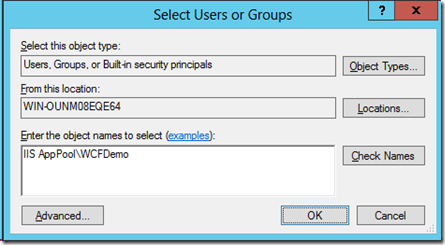
certlm.msc 添加 IIS AppPool\AppPoolName帐号,替换AppPoolName为应用池的名称,这里为WCFDemo。
2. client
         var wsBinding = new WSHttpBinding();

            wsBinding.Security.Mode = SecurityMode.Message;

            wsBinding.Security.Message.ClientCredentialType = MessageCredentialType.UserName;
// for exception: Identity check failed for outgoing message. The expected DNS identity of the remote endpoint was 'localhost' but the remote endpoint provided DNS

            EndpointIdentity identity = EndpointIdentity.CreateDnsIdentity("WcfServerCert");

            EndpointAddress endAddress = new EndpointAddress(new Uri("http://localhost/wcf/Service1.svc"), identity);

            using (var factory = new ChannelFactory<IService1>(wsBinding, endAddress))

            {

                factory.Credentials.UserName.UserName = "admin";

                factory.Credentials.UserName.Password = "abc123";

                factory.Credentials.ServiceCertificate.Authentication.CertificateValidationMode =

                              X509CertificateValidationMode.None;

                var proxy = factory.CreateChannel();

                string result = proxy.GetData();

                Console.WriteLine(result);

            }
使用wsHttpBinding构建Message安全模式和UserName授权的更多相关文章
- [WCF安全3]使用wsHttpBinding构建基于SSL与UserName授权的WCF应用程序
上一篇文章中介绍了如何使用wsHttpBinding构建UserName授权的WCF应用程序,本文将为您介绍如何使用wsHttpBinding构建基于SSL的UserName安全授权的WCF应用程序. ...
- [WCF安全2]使用wsHttpBinding构建UserName授权的WCF应用程序,非SSL
上一篇文章中介绍了如何使用basicHttpBinding构建UserName授权的WCF应用程序,本文将为您介绍如何使用wsHttpBinding构建非SSL的UserName安全授权的WCF应用程 ...
- [WCF安全1]使用basicHttpBinding构建UserName授权的WCF应用程序
最近到了新公司,leader让我研究一下WCF的传输安全机制.以前也做过WCF的应用,但是很少涉及安全方面的东西.所以,花了三天的时间研究了一下如何在WCF的应用程序中配置安全.在这个系列文章中,我会 ...
- WCF安全3-Transport与Message安全模式
概述: WCF的安全传输主要涉及认证.消息一致性和机密性三个主题.WCF采用两种不同的机制来解决这三个涉及传输安全的问题,一般将它们成为不同的安全模式,即Transport安全模式和Message安全 ...
- WCF 内置绑定在不同的传输安全模式下的信道层
basicHttpBinding Transport安全模式信道层 Message安全模式信道层 TransportWithMessageCredential安全模式信道层 TransportCred ...
- 学会WCF之试错法——安全配置报错分析
安全配置报错分析 服务端配置 <system.serviceModel> <bindings> <wsHttpBinding> <binding name = ...
- 快速入门系列--WCF--07传输安全、授权与审核
这部分主要涉及企业级应用的安全问题,一般来说安全框架主要提供3个典型的安全行为:认证.授权和审核.除了典型的安全问题,对于一个以消息作为通信手段的分布式应用,还需要考虑消息保护(Message Pro ...
- 【WCF安全】WCF 自定义授权[用户名+密码+x509证书]
1.x509证书制作(略) 2.直接贴代码 ----------------------------------------------------------------------服务端----- ...
- WCF身份验证一:消息安全模式之<Certificate>身份验证
消息安全模式的证书身份验证方式,基于WSHttpBinding绑定协议的实现过程.主要内容:基本概念,然后是制作证书.服务端配置.客户端配置.总结.这里应该和Transport传输安全模式之证书身份验 ...
随机推荐
- storm并发机制,通信机制,任务提交
一.storm的并发 (1)Workers(JVMs):在一个物理节点上可以运行一个或多个独立的JVM进程.一个Topology可以包含一个或多个worker(并行的跑在不同的物理机上),所以work ...
- php array_rand()函数从数组中随机选择一个或多个元素
php使用array_rand()函数从数组中随机选择一个或多个元素的方法. 使用array_rand() 函数从数组中随机选出一个或多个元素,并返回. array_rand(array,numbe ...
- Mysql查询一个表的所有字段名
select COLUMN_NAME from information_schema.`COLUMNS` -- 这行不变,照抄 where TABLE_SCHEMA = 'xerp' ...
- Summary: Binary Search
Iterative ways: int binarySearch (int[] a, int x) { int low = 0; int high = a.length - 1; int mid; w ...
- linux服务后台管理
把进程放到后台有两种方法 1.cmmand & 2.ctrl+z 暂停到后台 查看后台服务 jobs 把后台进程移到前台 fg %2 工作号 恢复到前台 后台服务继续执行 bg ...
- javascript 判断数据类型
Object.prototype.toString.call(asddfff) //报错asddfff没被定义Object.prototype.toString.call(undefined) //& ...
- unity Texture贴图纹理及相关属性
Texture资源是Unity3d游戏开发中用途最广泛的资源之一,被引用于诸如界面UI. Mesh模型 .粒子效果等.还有一些特殊的Texture资源,如:Movie Texture:视频资源.Ren ...
- 深入理解 Java 内存模型(一)- 内存模型介绍
深入理解 Java 内存模型(一)- 内存模型介绍 深入理解 Java 内存模型(二)- happens-before 规则 深入理解 Java 内存模型(三)- volatile 语义 深入理解 J ...
- 无法在web服务器下启动调试
VS2013 编译时异常 无法在web服务器下启动调试.该Web服务器未及时响应 VS2013 编译时错误 无法在web服务器上启动调试.该Web服务器未及时响应.无法在web服务器上启动调试.该 ...
- Java设计模式应用——工厂模式
工厂模式有三种:简单工厂.工厂方法.抽象工厂 一. 抽象工厂 1. 一个可以生产多种产品的工厂: 2. 不改变工厂无法生产新的产品. package com.coshaho.learn.factory ...