
最近一年多我总结的常用mate标签-常用mate标签
昨天开始上班 ,今天晚上不是太忙 ,来写篇博客了
meta元素共有三个可选属性(http-equiv、name和scheme)和一个必选属性(content),content定义与 http-equiv 或 name 属性相关的元信息
可选属性
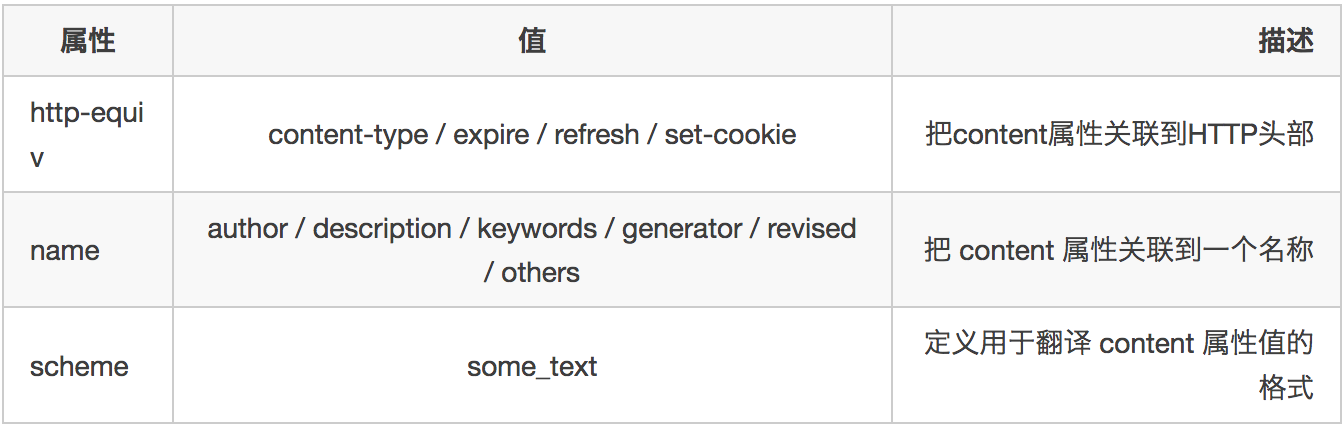
必选属性

name属性
<!-- 页面作者 -->

<meta name="author" content="yangzai" />

<!-- 页面描述 -->

<meta name="description" content="meta元素共有三个可选属性(不超过150字符)" />

<!-- 页面关键词 -->

<meta name="keywords" content="meta标签总结,meta标签" />

<!-- 页面生成器 -->

<meta name="generator" content="hexo" />

<!-- 页面修改信息 -->

<meta name="revised" content="story,2015/07/22" />

<!-- 版权信息 -->

<meta name="copyright" content="All Rights Reserved" />

<!-- 页面爬虫设置 -->

<meta name="robots" content="index,follow" />

<!-- robots的content取值 -->

<!-- all:文件将被检索,且页面上的链接可以被查询 -->

<!-- none:文件将不被检索,且页面上的链接不可以被查询 -->

<!-- index:文件将被检索 -->

<!-- follow:页面上的链接可以被查询 -->

<!-- noindex:文件将不被检索,但页面上的链接可以被查询 -->

<!-- nofollow:文件将被检索,但页面上的链接不可以被查询 -->
http-equiv
<!-- 字符编码 -->

<meta http-equiv="content-type" content="text/html;charset=UTF-8" />

<!-- 页面到期时间 -->

<meta http-equiv="expire" content="Wed,22Jul201511:11:11GMT" />

<!-- 页面重刷新,0秒后刷新并跳转 -->

<meta http-equiv="refresh" content="0;URL=''" />

<!-- cookie设置 -->

<meta http-equiv="set-cookie" content="cookie value=xxx;expires=Wed,22-Jul-201511:11:11GMT;path=/" />

<!-- 脚本类型 -->

<meta http-equiv="Content-Script-Type"Content="text/javascript">

<!-- 禁止从本地缓存中读取页面 -->

<meta http-equiv="Pragma"content="no-cache">
移动端
<meta name="viewport" content="width=device-width, initial-scale=1.0,maximum-scale=1.0, user-scalable=no"/>

<!-- viewport的content取值 -->

<!-- width:宽度(数值 / device-width)(200~10000,默认为980px) -->

<!-- height:高度(数值 / device-height)(223~10000) -->

<!-- initial-scale:初始缩放比例 (0~10) -->

<!-- minimum-scale:允许用户缩放到的最小比例 -->

<!-- maximum-scale:允许用户缩放到的最大比例 -->

<!-- user-scalable:是否允许用户缩放 (no/yes)  -->

<!-- uc强制竖屏 -->

<meta name="screen-orientation" content="portrait">

<!-- QQ强制竖屏 -->

<meta name="x5-orientation" content="portrait">

<!-- UC强制全屏 -->

<meta name="full-screen" content="yes">

<!-- QQ强制全屏 -->

<meta name="x5-fullscreen" content="true">

<!-- UC应用模式 -->

<meta name="browsermode" content="application">

<!-- QQ应用模式 -->

<meta name="x5-page-mode" content="app">

<!-- IOS启用 WebApp 全屏模式 -->

<meta name="apple-mobile-web-app-capable" content="yes" />

<!-- IOS全屏模式下隐藏状态栏/设置状态栏颜色 content的值为default | black | black-translucent  -->

<meta name="apple-mobile-web-app-status-bar-style" content="black-translucent" />

<!-- IOS添加到主屏后的标题 -->

<meta name="apple-mobile-web-app-title" content="标题">

<!-- IOS添加智能 App 广告条 Smart App Banner -->

<meta name="apple-itunes-app" content="app-id=myAppStoreID, affiliate-data=myAffiliateData, app-argument=myURL">

<!-- 去除iphone 识别数字为号码 -->

<meta name="format-detection" content="telephone=no">

<!-- 不识别邮箱 -->

<meta name="format-detection" content="email=no">

<!-- 禁止跳转至地图 -->

<meta name="format-detection" content="adress=no">

<!-- 可以连写-->

<meta name="format-detection" content="telephone=no,email=no,adress=no">
欢迎补充 还望大神指点一二
最近一年多我总结的常用mate标签-常用mate标签的更多相关文章
- 总结js常用函数和常用技巧(持续更新)
学习和工作的过程中总结的干货,包括常用函数.常用js技巧.常用正则表达式.git笔记等.为刚接触前端的童鞋们提供一个简单的查询的途径,也以此来缅怀我的前端学习之路. PS:此文档,我会持续更新. Aj ...
- eclipse 常用设置,常用快捷键修改
eclipse 常用设置,常用快捷键,myeclipse和eclipse类似' 首先打开eclipse的首选项-->搜索 keys' 常用的一些快捷键: Ctrl+1 快速修复(最经典的快捷键, ...
- HTML常用标签与表格标签
超链接标签: <a href="超链接地址" target="_blank">超链接的文字</a> _blank或new是在新网页中打开 ...
- (转载)StringGrid常用属性和常用操作
Delphi StringGrid常用属性和常用操作 StringGrid组件用于建立显示字符串的网格,与电子表格相似.它可使表格中的字符串和相关对象操作简单化.StringGrid组件提供了许多可控 ...
- (转载)Delphi StringGrid常用属性和常用操作
Delphi StringGrid常用属性和常用操作 StringGrid组件用于建立显示字符串的网格,与电子表格相似.它可使表格中的字符串和相关对象操作简单化.StringGrid组件提供了许多可控 ...
- 常用类型转换 一.常用int和string类型转换
常用类型转换 一.常用int类型转换1. int.parse(string) 这个类型只支持string类型 2.double doubleType = Int32.MaxValue + 1; i ...
- Android Studio 常用快捷键及常用设置
Android Studio 常用快捷键及常用设置 一.常用快捷键 快捷键 描述 Ctrl + Alt + L 格式化代码 Ctrl + ( +/- ) 展开/折叠 代码块 Ctrl + Shift ...
- 第二天(就业班) html的引入、html常用标签、实体标签、超链接标签、图片标签、表格、框架标签、表单[申明:来源于网络]
第二天(就业班) html的引入.html常用标签.实体标签.超链接标签.图片标签.表格.框架标签.表单[申明:来源于网络] 第二天(就业班) html的引入.html常用标签.实体标签.超链接标签. ...
- python正则表达式模块re:正则表达式常用字符、常用可选标志位、group与groups、match、search、sub、split,findall、compile、特殊字符转义
本文内容: 正则表达式常用字符. 常用可选标志位. group与groups. match. search. sub. split findall. compile 特殊字符转义 一些现实例子 首发时 ...
- java struts2入门学习--OGNL语言常用符号和常用标签学习
一.OGNL常用符号(接上一篇文章): 1.#号 1)<s:property value="#request.username"/> 作用于struts2的域对象,而不 ...
随机推荐
- POJ 2686 Traveling by Stagecoach
状压DP dp[s][p]用了哪几张票,到哪个节点的最小费用. 注意:G++ %.3lf输出会WA,但C++能过:改成%.3f,C++,G++都能AC #include<cstdio> # ...
- html-div-css
用CSS实现拉动滚动条时固定网页背景不动 body{ background-image: url(./inc/bgbk.jpg); background-attachm ...
- S3C2440 ADC详解
S3C2440拥有八通道的十位ADC, 最大转换率为2.5MHz A/D转换器时钟下的500KSPS.A/D转换器支持片上采样-保持功能和掉电模式的操作. 八个通道中有四个通道适用于电阻屏的触摸屏触摸 ...
- NRF24L01无线通讯模块驱动
NRF24L01 无线模块,采用的芯片是 NRF24L01,该芯片的主要特点如下: )2.4G 全球开放的 ISM 频段,免许可证使用. )最高工作速率 2Mbps,高校的 GFSK 调制,抗干扰能力 ...
- STM32F103外部中断编程
STM32F103外部中断编程 中断,顾名思义就是停下手头的活,去干另外一件急活,干完急活然后回来继续干手头的活. 单片机和人一样,有时候也有更急的程序需要执行,执行完之后再回来执行之前正在执行的 ...
- 浅谈一个网页打开的全过程(涉及DNS、CDN、Nginx负载均衡等)
1.概要 从用户在浏览器输入域名开始,到web页面加载完毕,这是一个说复杂不复杂,说简单不简单的过程,下文暂且把这个过程称作网页加载过程.下面我将依靠自己的经验,总结一下整个过程.如有错漏,欢迎指正. ...
- FAB、TextInputLayout及Snackbar笔记
FloatingActionButton 由于FloatingActionButton是重写ImageView的,所有FloatingActionButton拥有ImageView的一切属性. 控制F ...
- delphi下实现控制其它窗体中的控件代码模板(delphi 7安装程序)
unit Unit1; interface uses Windows, Messages, SysUtils, Variants, Classes, Graphics, Controls, Forms ...
- PHP中PDO错误/异常(PDOException)处理
PDO 提供了三种不同的错误处理模式,以满足不同风格的应用开发: PDO::ERRMODE_SILENT 此为默认模式. PDO 将只简单地设置错误码,可使用 PDO::errorCode() 和 P ...
- Mac下使用Brew搭建PHP(LNMP/LAMP)开发环境
Mac下搭建lamp开发环境很容易,有xampp和mamp现成的集成环境.但是集成环境对于经常需要自定义一些配置的开发者来说会非常麻烦,而且Mac本身自带apache和php,在brew的帮助下非常容 ...