
cropper手机使用实例
cropper手机使用实例
一、总结
一句话总结:
启示:还是要多个相关的实例交叉使用,相互印证,查漏补缺,可以更加高效和方便和节约时间
二、Cropper.js从前台到后台的完整实例应用
转自或参考:Cropper.js从前台到后台的完整实例应用
https://blog.csdn.net/chenlkissmm/article/details/80787871
先是html主体
<html lang="zh-CN">

<head>

<link href="../../assets/plugins/bootstrap/css/bootstrap.min.css" rel="stylesheet">

<link href="../../assets/plugins/sweetalert/sweetalert.css" rel="stylesheet">

<link href="../../assets/plugins/cropper/cropper.min.css" rel="stylesheet">

</head>

<body>

	<div id="main-wrapper">

		<div class="page-wrapper">

			<div class="container-fluid">

				<div class="card">

					<div class="row p-10">

						<div class="col-md-8 p-b-10">

							<div class="img-container">

								<img id="image" src="${sessionScope.headimageurl}" alt="Picture">

							</div>

						</div>

						<div class="col-md-4 docs-buttons">

							<div class="docs-preview clearfix">

								<div class="img-preview preview-lg"></div>

								<div class="img-preview preview-md"></div>

								<div class="img-preview preview-sm"></div>

								<div class="img-preview preview-xs"></div>

							</div>

							<div class="btn-group">

								<label class="btn btn-primary btn-upload" for="inputImage"> <input type="file"

									class="sr-only" id="inputImage" name="file"

									accept=".jpg,.jpeg,.png,.gif,.bmp,.tiff"> <span

										class="fa fa-upload"> 选择图片</span>

								</label>

							</div>

							<div class="btn-group btn-group-crop">

								<button type="button" class="btn btn-success"

									data-method="getCroppedCanvas"

									data-option="{ "width": 520, "height": 520 }">

									<span>

									</span> <span class="fa fa-search"> 预览头像</span>

								</button>

							</div>

							<div class="modal fade docs-cropped" id="getCroppedCanvasModal"

								aria-hidden="true" aria-labelledby="getCroppedCanvasTitle"

								role="dialog" tabindex="-1">

								<div class="modal-dialog">

									<div class="modal-content">

										<div class="modal-header">

											<h5 class="modal-title" id="getCroppedCanvasTitle">您的头像</h5>

											<button type="button" class="close" data-dismiss="modal"

												aria-label="Close">

												<span aria-hidden="true">×</span>

											</button>

										</div>

										<div class="modal-body"></div>

										<div class="modal-footer">

											<button type="button" class="btn btn-secondary"

												data-dismiss="modal">取消</button>

											<button type="button" class="btn btn-info" id="download"

												data-dismiss="modal" οnclick="submitForm()">保存头像</button>

										</div>

									</div>

								</div>

							</div>

						</div>

					</div>

				</div>

			</div>

		</div>

	</div>

	<script src="../../assets/plugins/jquery/jquery.min.js"></script>

	<script src="../../assets/plugins/bootstrap/js/popper.min.js"></script>

	<script src="../../assets/plugins/bootstrap/js/bootstrap.min.js"></script>

	<script src="../../assets/plugins/sweetalert/sweetalert.min.js"></script>

	<script	src="../../assets/plugins/sweetalert/jquery.sweet-alert.custom.js"></script>

	<script src="../../assets/plugins/cropper/cropper.js"></script>

	<script src="../../assets/plugins/cropper/main.js"></script>

	<script>

		function submitForm() {

			var cas = $('#image').cropper('getCroppedCanvas', {

				width : 520,

				height : 520

			});// 获取被裁剪后的canvas

			var base64 = cas.toDataURL('image/jpeg'); // 转换为base64

			var data = encodeURIComponent(base64);//作为URI编码

			$.ajax({

				url : ".uploadHeadImageServlet",

				type : 'POST',

				data : "file=" + data,

				async : true,

				success : function(data) {

					sweetAlert({

						title : "已保存 !",

						text : "Your headimage file has been updated.",

						type : "success"

					}, function() {

						window.location.href = "myprofile.jsp";

					});

				}

			});

		}

	</script>

</body>

</html>
ajax调用servlet
	protected void doPost(HttpServletRequest request, HttpServletResponse response) throws ServletException, IOException {

		//获取用户ID

		HttpSession session = request.getSession();

		String userid = (String) session.getAttribute("id");

		//收到AJAX的data

		String imagefile = request.getParameter("file");

		//执行图片上传方法,并获得头像图片地址

		String path = uploadbiz.UploadHeadImage(userid, imagefile);

		//更新session中的头像地址

		session.setAttribute("headimageurl", path);

	}
上传方法
package sin.service;

import java.io.FileOutputStream;

import sin.dao.UserInfoDao;

import sin.plugins.NewAFileName;

import sun.misc.BASE64Decoder;

@SuppressWarnings("restriction")

public class UploadHeadImageBiz {

	@SuppressWarnings("unused")

	public String UploadHeadImage(String userid, String imagefile) {

		NewAFileName newname = new NewAFileName();

		UserInfoDao userinfodao = new UserInfoDao();

		String path = null;

        BASE64Decoder decoder = new BASE64Decoder();

        try {

        	//去掉头data:image/jpeg;base64,

        	String imagebasefile = imagefile.substring(23);

            // Base64解码

            byte[] bytes = decoder.decodeBuffer(imagebasefile);

            for (int i = 0; i < bytes.length; ++i) {

                if (bytes[i] < 0) {// 调整异常数据

                    bytes[i] += 256;

                }

            }

            //生成JPEG图片输出流,名字,保存路径

            String filename = userid + newname.getFileName();

            path = "../../../../sin/upload/headimages/" + filename;

            FileOutputStream out = new FileOutputStream(path);

            //更新用户头像URL

            Boolean result = userinfodao.updateUserHeadImageById(userid, path);

            out.write(bytes);

            out.flush();

            out.close();

            } catch (Exception e) {

            }

        return path;

    }

}
附手机上使用的效果图
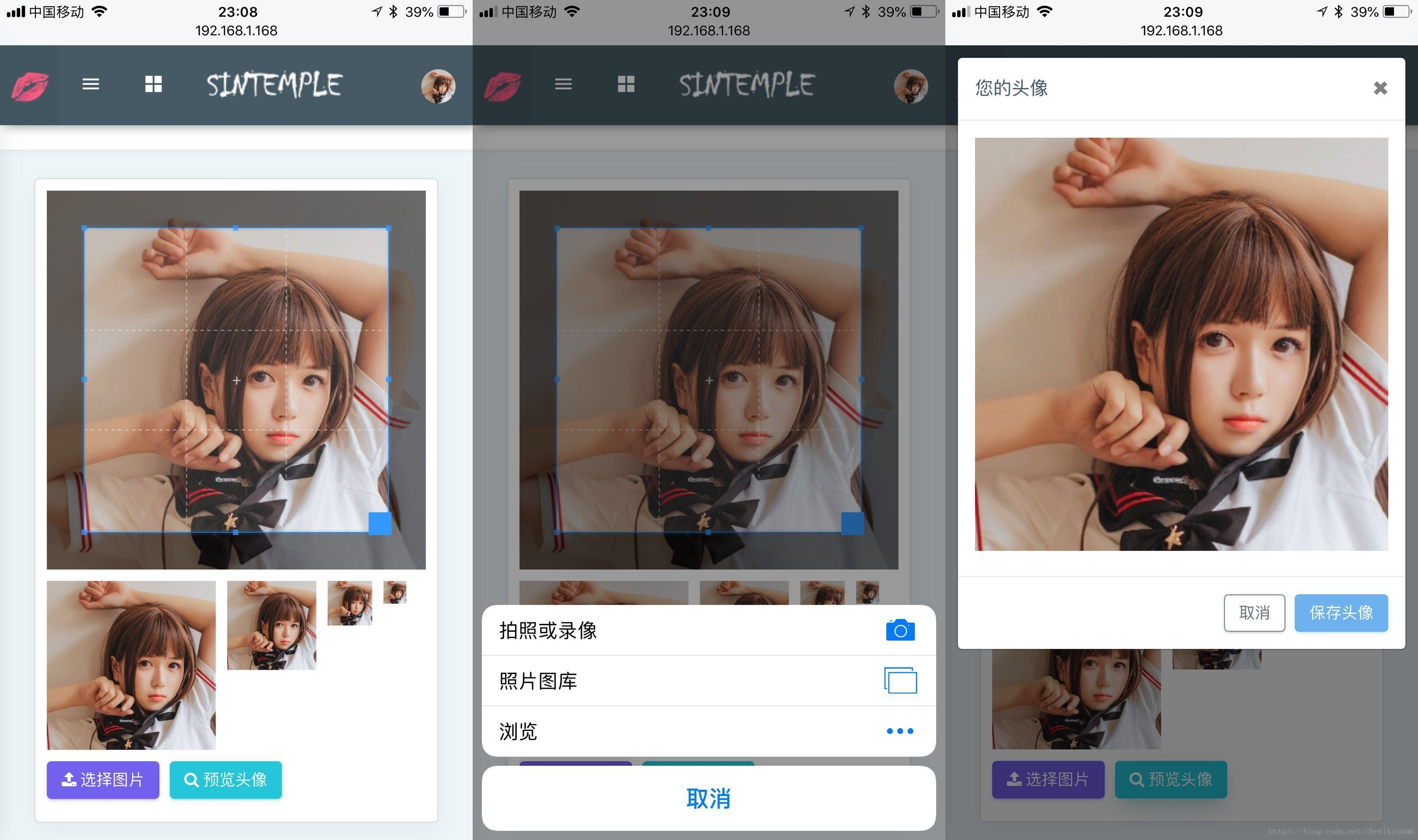
cropper手机使用实例的更多相关文章
- 一个完整的Appium手机自动化测试实例
实现过程: 1.使用环境 appium .安卓SDK .python 本文重点是自动化实例,环境搭建过程省略. 2.找到被测APP的包名和Activity Name 手机连接上电脑后,在DOS环境先使 ...
- AudioManager音频管理器控制手机音频实例
import android.media.AudioManager;import android.media.MediaPlayer;import android.os.Bundle;import a ...
- 润乾V5手机报表说明文档
1.手机报表实例页面简要说明 index.jsp 是报表资源列表页面: mbReport.jsp 是报表展现页面: mbParam.jsp是参数报表展现页面: echarts.jsp是带有echart ...
- javascript模式 (3)——工厂模式和装饰模式
上节我们讲解了单例模式,这节我们将继续讲解工厂模式和迭代器模式 工厂模式: 工厂模式的目的是为了方便的创建对象(可以在不知道构造的情况下),通过静态方法来实现,在java或c#等静态编译语言中需要通过 ...
- 【源代码】基于Android和蓝牙的单片机温度採集系统
如需转载请标明出处:http://blog.csdn.net/itas109 QQ技术交流群:129518033 STC89C52单片机通过HC-06蓝牙模块与Android手机通信实例- 基于And ...
- 关于JAVA中抽象类和接口的区别辨析
今天主要整理一下新学习的有关于Java中抽象类和接口的相关知识和个人理解. 1 抽象类 用来描述事物的一般状态和行为,然后在其子类中去实现这些状态和行为.也就是说,抽象类中的方法,需要在子类中进行重写 ...
- Spring:AOP面向切面编程
AOP主要实现的目的是针对业务处理过程中的切面进行提取,它所面对的是处理过程中的某个步骤或阶段,以获得逻辑过程中各部分之间低耦合性的隔离效果. AOP是软件开发思想阶段性的产物,我们比较熟悉面向过程O ...
- Material Design 常用控件
Material Design Material Design (原质化/材料化设计) 是在2014年Google I/O大会上推出的一套全新的界面设计语言. 意在解决Android平台界面风格不统一 ...
- 工厂模式&策略模式。
抽象.封装,具体事情做得越多,越容易犯错误.这每个做过具体工作的人都深有体会,相反,官做得越高,说出的话越抽象越笼统,犯错误可能性就越少.好象我们从编程序中也能悟出人生道理.(百度百科) 不断抽象封装 ...
随机推荐
- 关于linux的档案随笔
刚才在看鸟哥的linux的私房菜,然后看到的部分是关于linux的档案配置部分,之前就强调过,在linux中所有的一切都是以档案的形式存在的,不过不同的文件有一定的区别,linux中是有副档案这个说法 ...
- centos7 安装Virtualenv
若想在同一个服务器上,存在多个不同的解析器版本,使用虚拟环境 1.安装虚拟环境 pip3 install virtualenv 2.创建虚拟环境 virtualenv --no-site-packag ...
- 高效内存池的设计方案[c语言]
一.前言概述 本人在转发的博文<内存池的设计和实现>中,详细阐述了系统默认内存分配函数malloc/free的缺点,以及进行内存池设计的原因,在此不再赘述.通过对Nginx内存池以及< ...
- [转] 雷电三和typec傻傻分不清
原文:https://club.lenovo.com.cn/thread-4921715-1-1.html 因为形状完全一致,所以很多人都误以为Type-C=雷电3. 实际上,雷电3只是采用了Type ...
- java加密算法-SHA1
public class SHAUtil { /*** * SHA加密 生成40位SHA码 * @param 待加密字符串 * @return 返回40位SHA码 */ public static S ...
- 自定义jsr-269注解处理器 Error:服务配置文件不正确,或构造处理程序对象javax.annotation.processing.Processor: Provider not found
出现的原因 自定义处理器还没有被编译就被调用,所以报 not found在根据配置寻找自定义的注解处理器时,自定义处理器还未被编译12解决方式 maven项目可以配置编译插件,在编译项目之前先编译处理 ...
- typescript 模块
模块:模块可以帮助开发者将代码分割为重用的单元.开发者可以自己决定将模块中的哪些资源(类,方法,变量)暴露出去供外部使用,哪些资源只在模块内使用 在ts里面,一个文件就是一个模块,并没有什么特殊的标识 ...
- 基于Java+Selenium的WebUI自动化测试框架(十)-----读取Excel文件(JXL)
之前,我们使用了读取XML文件的方式来实现页面元素的读取,并做成了基础页面类.下面,我们来进行一些扩展,通过Excel来读取页面元素. Excel的使用,大多数人应该都不陌生.那么Java读取Exce ...
- linux系统编程之文件与io(五)
上一节中已经学习了文件描述符的复制,复制方法有三种,其中最后一种fcntl还并未使用到,关于这个函数,不光只有复制文件描述符的功能,还有其它一些用法,本节就对其进行一一剖析: fcntl常用操作: 这 ...
- 《你说对就队》第八次团队作业:Alpha冲刺
<你说对就队>第八次团队作业:Alpha冲刺 项目 内容 这个作业属于哪个课程 [教师博客主页链接] 这个作业的要求在哪里 [作业链接地址] 团队名称 <你说对就队> 作业学习 ...