
使用Java Xpath 爬取某易云歌曲
本文使用Java xpath 爬取某易云歌曲,并下载至本地。
代码仅用于个人学习使用,欢迎各位大佬提出建议。
1、添加依赖
        <dependency>

            <groupId>cn.wanghaomiao</groupId>

            <artifactId>JsoupXpath</artifactId>

            <version>2.2</version>

        </dependency>

        <dependency>

            <groupId>cn.hutool</groupId>

            <artifactId>hutool-all</artifactId>

            <version>5.8.9</version>

        </dependency>
2、获取音乐id和url
    /**

     * 获取歌曲信息

     *

     * @param url

     * @return

     */

    public Map<String, Object> getMusicInfo(String url) {

        Map<String, Object> result = new HashMap<>();

        url = url.replace("/#", "");

        Map<String, Object> header = new HashMap<>();

        header.put("User-Agent", "Mozilla/5.0 (Macintosh; Intel Mac OS X 10_13_6) AppleWebKit/537.36 (KHTML, like Gecko) Chrome/68.0.3440.106 Safari/537.36");

        header.put("Referer", "https://music.163.com/");

        header.put("Host", "music.163.com");

        String res = HttpUtil.get(url, header);

        JXDocument jxDocument = JXDocument.create(res);

        //歌曲列表

        List<JXNode> songs = jxDocument.selN("//ul[@class=\"f-hide\"]/li/a");

        //歌单名称

        JXNode jxsonglistName = jxDocument.selNOne("//h2[contains(@class,\"f-ff2\")]/text()");

        //歌手名

        JXNode jxsingerName = jxDocument.selNOne("//h2[@id=\"artist-name\"]/text()");

        String songlistName = null != jxsonglistName ? jxsonglistName.toString() : "";

        String singerName = null != jxsingerName ? jxsingerName.toString() : "";

        System.out.println(String.format("=======================%s=======================", StrUtil.isBlank(songlistName) ? singerName : songlistName));

        List<Map<String, Object>> musics = new ArrayList<>();

        result.put("title", StrUtil.isBlank(songlistName) ? singerName : songlistName);

        for (JXNode song : songs) {

            Element element = song.asElement();

            String songName = element.text();

            String songId = element.attr("href").split("=")[1];

            String songUrl = OUT_LINK + songId;

            Map<String, Object> map = new HashMap<>();

            map.put("songId", songId);

            map.put("songName", songName);

            map.put("songUrl", songUrl);

            map.put("title", StrUtil.isBlank(songlistName) ? singerName : songlistName);

            //map.put("lyric", getMusicLyric(songId));

            musics.add(map);

            //单线程下载歌曲

            //downloadSong(songName, songUrl, result.get("title").toString());

        }

        musics.forEach(x -> System.out.println(x));

        //多线程下载歌曲

        //multiDownload(musics);

        result.put("songs", musics);

        //System.out.println(result);

        return result;

    }
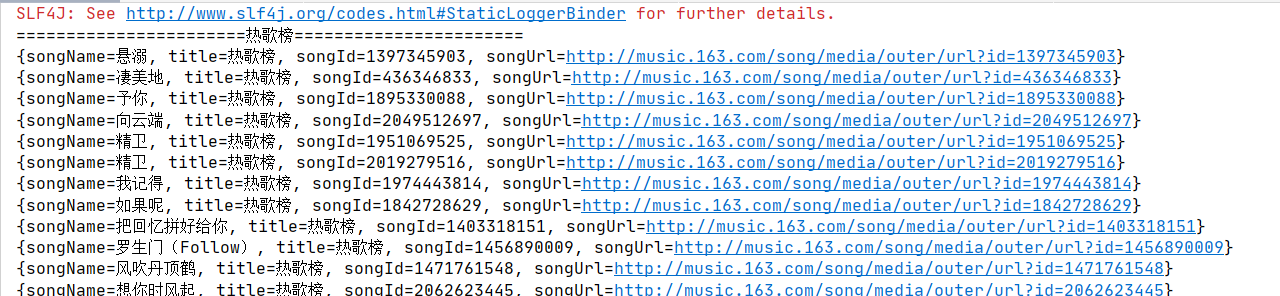
3、获取歌词
    /**

     * 获取歌词

     *

     * @param songId

     * @return

     */

    public String getMusicLyric(String songId) {

        String url = String.format("http://music.163.com/api/song/lyric?id=%s&lv=-1&kv=-1&tv=-1", songId);

        Map<String, Object> header = new HashMap<>();

        header.put("User-Agent", "Mozilla/5.0 (Macintosh; Intel Mac OS X 10_13_6) AppleWebKit/537.36 (KHTML, like Gecko) Chrome/68.0.3440.106 Safari/537.36");

        header.put("Referer", "https://music.163.com/");

        header.put("Host", "music.163.com");

        String res = HttpUtil.get(url, header);

        return JSONObject.parseObject(res).getJSONObject("lrc").getString("lyric");

    }
4、完整代码
加入多线程下载歌曲代码
import cn.hutool.core.io.FileUtil;

import cn.hutool.core.lang.Console;

import cn.hutool.core.util.StrUtil;

import cn.hutool.http.HttpUtil;

import com.alibaba.fastjson.JSONObject;

import org.jsoup.nodes.Element;

import org.seimicrawler.xpath.JXDocument;

import org.seimicrawler.xpath.JXNode;

import java.util.ArrayList;

import java.util.HashMap;

import java.util.List;

import java.util.Map;

import java.util.concurrent.CountDownLatch;

import java.util.concurrent.ExecutorService;

import java.util.concurrent.Executors;

public class Music163 {

    //下载地址

    private static String OUT_LINK = "http://music.163.com/song/media/outer/url?id=";

    //本地下载目录

    private static String DOWNLOAD_PATH = "E:\\music\\";

    public static void main(String[] args) {

        String musicUrl;

        //歌曲清单

        // 热歌 3778678 原创 2884035  新歌 3779629 飙升 19723756

        musicUrl = "https://music.163.com/#/playlist?id=3778678";

        // 歌手歌曲榜单  8325->梁静茹

        //musicUrl = "https://music.163.com/#/artist?id=8325";

        //搜索列表

        // musicUrl = "https://music.163.com/#/search/m/?order=hot&cat=全部&limit=435&offset=435&s=梁静茹";

        Music163 music163 = new Music163();

        music163.getMusicInfo(musicUrl);

    }

    /**

     * 获取歌曲信息

     *

     * @param url

     * @return

     */

    public Map<String, Object> getMusicInfo(String url) {

        Map<String, Object> result = new HashMap<>();

        url = url.replace("/#", "");

        Map<String, Object> header = new HashMap<>();

        header.put("User-Agent", "Mozilla/5.0 (Macintosh; Intel Mac OS X 10_13_6) AppleWebKit/537.36 (KHTML, like Gecko) Chrome/68.0.3440.106 Safari/537.36");

        header.put("Referer", "https://music.163.com/");

        header.put("Host", "music.163.com");

        String res = HttpUtil.get(url, header);

        JXDocument jxDocument = JXDocument.create(res);

        //歌曲列表

        List<JXNode> songs = jxDocument.selN("//ul[@class=\"f-hide\"]/li/a");

        //歌单名称

        JXNode jxsonglistName = jxDocument.selNOne("//h2[contains(@class,\"f-ff2\")]/text()");

        //歌手名

        JXNode jxsingerName = jxDocument.selNOne("//h2[@id=\"artist-name\"]/text()");

        String songlistName = null != jxsonglistName ? jxsonglistName.toString() : "";

        String singerName = null != jxsingerName ? jxsingerName.toString() : "";

        System.out.println(String.format("=======================%s=======================", StrUtil.isBlank(songlistName) ? singerName : songlistName));

        List<Map<String, Object>> musics = new ArrayList<>();

        result.put("title", StrUtil.isBlank(songlistName) ? singerName : songlistName);

        for (JXNode song : songs) {

            Element element = song.asElement();

            String songName = element.text();

            String songId = element.attr("href").split("=")[1];

            String songUrl = OUT_LINK + songId;

            Map<String, Object> map = new HashMap<>();

            map.put("songId", songId);

            map.put("songName", songName);

            map.put("songUrl", songUrl);

            map.put("title", StrUtil.isBlank(songlistName) ? singerName : songlistName);

            //map.put("lyric", getMusicLyric(songId));

            musics.add(map);

            //单线程下载歌曲

            //downloadSong(songName, songUrl, result.get("title").toString());

        }

        musics.forEach(x -> System.out.println(x));

        //多线程下载歌曲

        //multiDownload(musics);

        result.put("songs", musics);

        //System.out.println(result);

        return result;

    }

    /**

     * 获取歌词

     *

     * @param songId

     * @return

     */

    public String getMusicLyric(String songId) {

        String url = String.format("http://music.163.com/api/song/lyric?id=%s&lv=-1&kv=-1&tv=-1", songId);

        Map<String, Object> header = new HashMap<>();

        header.put("User-Agent", "Mozilla/5.0 (Macintosh; Intel Mac OS X 10_13_6) AppleWebKit/537.36 (KHTML, like Gecko) Chrome/68.0.3440.106 Safari/537.36");

        header.put("Referer", "https://music.163.com/");

        header.put("Host", "music.163.com");

        String res = HttpUtil.get(url, header);

        return JSONObject.parseObject(res).getJSONObject("lrc").getString("lyric");

    }

    /**

     * 歌曲下载

     *

     * @param songName

     * @param songUrl

     * @param title

     */

    public void downloadSong(String songName, String songUrl, String title) {

        HttpUtil.downloadFile(songUrl,

                FileUtil.file(DOWNLOAD_PATH + title + "\\", songName + ".mp3"));

        Console.log("下载完成!" + "==》" + songName);

    }

    /**

     * 多线程下载

     *

     * @param list

     */

    public void multiDownload(List<Map<String, Object>> list){

        //使用多线程优化查询速度

        int threadNum = 10;

        if (list.size() < 10) {

            threadNum = 1;

        }

        ExecutorService executorService = Executors.newFixedThreadPool(threadNum);

        CountDownLatch countDownLatch = new CountDownLatch(threadNum);

        int perSize = list.size() / threadNum;

        for (int i = 0; i < threadNum; i++) {

            int start = i * perSize;

            int end = (i + 1) * perSize;

            if (i == threadNum - 1) {

                end = list.size();

            }

            List<Map<String, Object>> maps = list.subList(start, end);

            MultiThread thread = new MultiThread();

            thread.setProjectList(maps);

            thread.setCountDownLatch(countDownLatch);

            executorService.submit(thread);

        }

        try {

            countDownLatch.await();

        } catch (InterruptedException e) {

            e.printStackTrace();

        }

        executorService.shutdown();

    }

    class MultiThread extends Thread {

        private List<Map<String, Object>> projectList;

        private CountDownLatch countDownLatch;

        private List<Map<String, Object>> result;

        public void setResultList(List<Map<String, Object>> result) {

            this.result = result;

        }

        public void setProjectList(List<Map<String, Object>> projectList) {

            this.projectList = projectList;

        }

        public void setCountDownLatch(CountDownLatch countDownLatch) {

            this.countDownLatch = countDownLatch;

        }

        @Override

        public void run() {

            try {

                for (Map<String, Object> map : projectList) {

                    downloadSong((String)map.get("songName"),(String)map.get("songUrl"),(String)map.get("title"));

                }

            } catch (Exception e) {

                e.printStackTrace();

            } finally {

                if (countDownLatch != null) {

                    countDownLatch.countDown();

                }

            }

        }

    }

}
使用Java Xpath 爬取某易云歌曲的更多相关文章
- 如何用Python网络爬虫爬取网易云音乐歌曲
今天小编带大家一起来利用Python爬取网易云音乐,分分钟将网站上的音乐down到本地. 跟着小编运行过代码的筒子们将网易云歌词抓取下来已经不再话下了,在抓取歌词的时候在函数中传入了歌手ID和歌曲名两 ...
- 使用Xpath爬取酷狗TOP500的歌曲信息
使用xpath爬取酷狗TOP500的歌曲信息, 将排名.歌手名.歌曲名.歌曲时长,提取的结果以文件形式保存下来.参考网址:http://www.kugou.com/yy/rank/home/1-888 ...
- Python爬取网易云音乐歌手歌曲和歌单
仅供学习参考 Python爬取网易云音乐网易云音乐歌手歌曲和歌单,并下载到本地 很多人学习python,不知道从何学起.很多人学习python,掌握了基本语法过后,不知道在哪里寻找案例上手.很多已经做 ...
- python网络爬虫&&爬取网易云音乐
#爬取网易云音乐 url="https://music.163.com/discover/toplist" #歌单连接地址 url2 = 'http://music.163.com ...
- Python爬取网易云歌单
目录 1. 关键点 2. 效果图 3. 源代码 1. 关键点 使用单线程爬取,未登录,爬取网易云歌单主要有三个关键点: url为https://music.163.com/discover/playl ...
- 用Python爬取网易云音乐热评
用Python爬取网易云音乐热评 本文旨在记录Python爬虫实例:网易云热评下载 由于是从零开始,本文内容借鉴于各种网络资源,如有侵权请告知作者. 要看懂本文,需要具备一点点网络相关知识.不过没有关 ...
- python爬虫:了解JS加密爬取网易云音乐
python爬虫:了解JS加密爬取网易云音乐 前言 大家好,我是"持之以恒_liu",之所以起这个名字,就是希望我自己无论做什么事,只要一开始选择了,那么就要坚持到底,不管结果如何 ...
- java爬虫爬取的html内容中空格( )变为问号“?”的解决方法
用java编写的爬虫,使用xpath爬取内容后,发现网页源码中的 全部显示为?(问号),但是使用字符串的replace("?", ""),并不能替换,网上找了一 ...
- python爬虫+词云图,爬取网易云音乐评论
又到了清明时节,用python爬取了网易云音乐<清明雨上>的评论,统计词频和绘制词云图,记录过程中遇到一些问题 爬取网易云音乐的评论 一开始是按照常规思路,分析网页ajax的传参情况.看到 ...
- 爬虫实战(二) 用Python爬取网易云歌单
最近,博主喜欢上了听歌,但是又苦于找不到好音乐,于是就打算到网易云的歌单中逛逛 本着 "用技术改变生活" 的想法,于是便想着写一个爬虫爬取网易云的歌单,并按播放量自动进行排序 这篇 ...
随机推荐
- 2023-05-27:给你一个只包含小写英文字母的字符串 s 。 每一次 操作 ,你可以选择 s 中两个 相邻 的字符,并将它们交换。 请你返回将 s 变成回文串的 最少操作次数 。 注意 ,输入数据
2023-05-27:给你一个只包含小写英文字母的字符串 s . 每一次 操作 ,你可以选择 s 中两个 相邻 的字符,并将它们交换. 请你返回将 s 变成回文串的 最少操作次数 . 注意 ,输入数据 ...
- celery笔记二之建立celery项目、配置及几种加载方式
本文首发于公众号:Hunter后端 原文链接:celery笔记二之建立celery项目.配置及几种加载方式 接下来我们创建一个 celery 项目,文件夹及目录如下: proj/__init__.py ...
- 从 Blast2GO 本地化聊一聊 Linux 下 MySQL 的源码安装
Blast2GO 是一个基于序列相似性搜索的 GO 注释和功能分析工具,它可以直接统计分析基因功能信息,并可视化 GO 有向非循环图(DAG)上的相关功能特征,分析 BLAST.GO-mapping. ...
- [汽车]车架号(VIN)的设计与规范
1 车架号概述 VIN是英文Vehicle Identification Number(车辆识别代码)的缩写,也就是我们平时所说的车架号.大架号. 总共由17位字符组成,是汽车唯一的身份识别信息,好比 ...
- 【HarmonyOS】详解低代码端云一体化开发之连接器
[关键字] 元服务.低代码平台.端云一体化开发.连接器.拖拽式UI [1.写在前面] 前面我们写了两篇文章分别介绍了低代码平台的基本使用和端云一体化开发中数据模型的使用,有需要的可以了解一下,文章地 ...
- 现代C++学习指南-方向篇
C++是一门有着四十年历史的语言,先后经历过四次版本大升级(诞生.98.11.17(20),14算小升级).每次升级都是很多问题和解决方案的取舍.了解这些历史,能更好地帮助我们理清语言的发展脉络.所以 ...
- 流程挖掘里程碑:国产RPA首次入选顶级行业报告
正在成为组织运营标配的流程挖掘,到底有哪些商业价值? 作为超级自动化的重要先驱,流程挖掘正在成为组织运营标配 文/王吉伟 AIGC正在影响越来越多的行业,流程挖掘领域亦不例外. Mindzie首先宣布 ...
- Dash应用页面整体布局技巧
本文示例代码已上传至我的Github仓库:https://github.com/CNFeffery/dash-master 大家好我是费老师,对于刚上手dash应用开发的新手朋友来说,如何进行合理且美 ...
- 用R语言实现并行计算:基于R的数据处理和分析工具
目录 引言 随着数据量的爆炸式增长,数据处理和分析的需求也越来越大.传统的批处理计算已经无法满足高效的数据处理和分析需求,因此,并行计算成为了一个重要的技术方向.然而,R语言作为一种开源.可视化能力强 ...
- 寻找一个好的工程师不只是看ta的刷题能力
面试一个工程师,该考察什么能力,如果单单背诵一些概念.题目好像是在考察记忆力,最终项目里还是得解决实际问题.但解决实际问题的能力真的不易考察,导致大部分公司面试前期都只能通过试题来筛选求职者,到面试后 ...