
CS231N Assignment1 softmax 笔记
- -为Softmax分类器实现完全矢量化的损失函数
- -实现解析梯度完全矢量化的表达式
- 使用数值梯度检查实现结果
- 使用验证集调整学习率和正则化强度
- 使用SGD优化损失函数
- 可视化最终学习的权重
softmax.ipynb
库、绘图设置和数据的导入和SVM一样
Train data shape:  (49000, 3073)

Train labels shape:  (49000,)

Validation data shape:  (1000, 3073)

Validation labels shape:  (1000,)

Test data shape:  (1000, 3073)

Test labels shape:  (1000,)

dev data shape:  (500, 3073)

dev labels shape:  (500,)
Softmax Classifier
def softmax_loss_naive(W, X, y, reg):

    # Initialize the loss and gradient to zero.

    loss = 0.0

    dW = np.zeros_like(W) #创建一个与W具有相同形状的全零数组。

    N = X.shape[0]

    for i in range(N):

        score = X[i].dot(W) #长度为C?

        exp_score = np.exp(score - np.max(score)) #防止溢出

        loss += -np.log(exp_score[y[i]]/np.sum(exp_score)) / N #复刻公式

        #loss += (-np.log(exp_score[y[i]])+ np.log(np.sum(exp_score))) / N #展开

        dexp_score = np.zeros_like(exp_score)

        dexp_score[y[i]] -= 1/exp_score[y[i]]/N

        dexp_score += 1 /np.sum(exp_score) / N

        dscore = dexp_score *exp_score

        dW += X[[i]].T.dot([dscore])

    loss +=reg*np.sum(W**2)

    dW += 2*reg*W

    # *****END OF YOUR CODE (DO NOT DELETE/MODIFY THIS LINE)*****

    return loss, dW
注意使用exp避免数值溢出之后要用本地梯度乘上游梯度得到梯度值。
向量化的softmax_loss_vectorized
def softmax_loss_vectorized(W, X, y, reg):

    # Initialize the loss and gradient to zero.

    loss = 0.0

    dW = np.zeros_like(W)

                                                      #

    scores = X.dot(W)

    #exp_score = np.exp(score - np.max(score))

    scores -= np.max(scores, axis=1, keepdims=True)#保持dim

    exp_scores = np.exp(scores)

    probs = exp_scores / np.sum(exp_scores, axis=1, keepdims=True)

    # Compute the loss

    N = X.shape[0]  #有点不熟悉这个维度012的顺序

    loss = np.sum(-np.log(probs[np.arange(N), y])) / N

    loss +=  reg * np.sum(W * W) #正则化强度的系数其实无所谓?只要不太小应该效果都差不多

    # Compute the gradient

    dscores = probs

    dscores[np.arange(N), y] -= 1

    dscores /= N

    dW = X.T.dot(dscores)

    dW += reg * W

    return loss, dW
超参数调试
# Use the validation set to tune hyperparameters (regularization strength and

# learning rate). You should experiment with different ranges for the learning

# rates and regularization strengths; if you are careful you should be able to

# get a classification accuracy of over 0.35 on the validation set.

from cs231n.classifiers import Softmax

results = {}

best_val = -1

best_softmax = None

################################################################################

# TODO:                                                                        #

# Use the validation set to set the learning rate and regularization strength. #

# This should be identical to the validation that you did for the SVM; save    #

# the best trained softmax classifer in best_softmax.                          #

################################################################################

# Provided as a reference. You may or may not want to change these hyperparameters

learning_rates = [3e-7,4e-7,5e-7]

regularization_strengths = [0.5e4, 1e4,1.5e4,2e4]

# *****START OF YOUR CODE (DO NOT DELETE/MODIFY THIS LINE)*****

# Iterate over all hyperparameter combinations

for lr in learning_rates:

    for reg in regularization_strengths:

        # Create a new Softmax classifier

        softmax = Softmax()

        # Train the classifier on the training set

        softmax.train(X_train, y_train, learning_rate=lr, reg=reg, num_iters=1000)

        # Evaluate the classifier on the training and validation sets

        train_accuracy = np.mean(softmax.predict(X_train) == y_train)

        val_accuracy = np.mean(softmax.predict(X_val) == y_val)

        # Save the results for this hyperparameter combination

        results[(lr, reg)] = (train_accuracy, val_accuracy)

        # Update the best validation accuracy and best classifier

        if val_accuracy > best_val:

            best_val = val_accuracy

            best_softmax = softmax

# *****END OF YOUR CODE (DO NOT DELETE/MODIFY THIS LINE)*****

# Print out results.

for lr, reg in sorted(results):

    train_accuracy, val_accuracy = results[(lr, reg)]

    print('lr %e reg %e train accuracy: %f val accuracy: %f' % (

                lr, reg, train_accuracy, val_accuracy))

print('best validation accuracy achieved during cross-validation: %f' % best_val)
目前调出来比较好一点的是
lr 5.000000e-07 reg 5.000000e+03 train accuracy: 0.386000 val accuracy: 0.392000
最后看看在test上的准确率
# evaluate on test set

# Evaluate the best softmax on test set

y_test_pred = best_softmax.predict(X_test)

test_accuracy = np.mean(y_test == y_test_pred)

print('softmax on raw pixels final test set accuracy: %f' % (test_accuracy, ))
softmax on raw pixels final test set accuracy: 0.384000
对比一下不同步数的权重图像差异
|
|
|
|
| 100 | 500 | 1000 |
|
|
|
|
| 1500 | 3000 | 5000 |
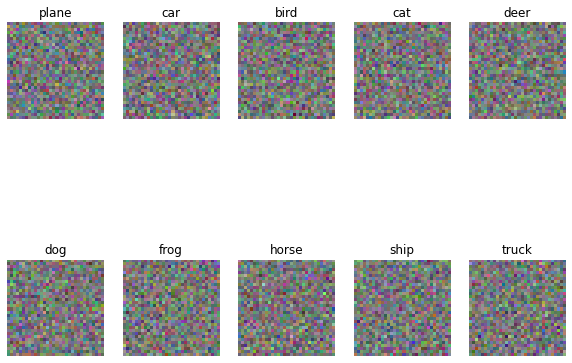
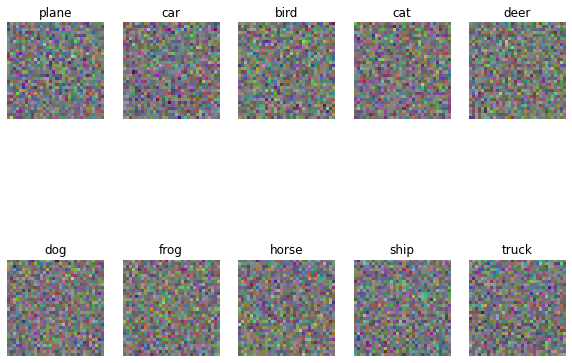
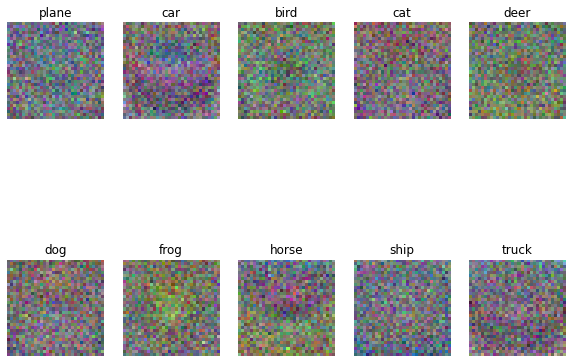

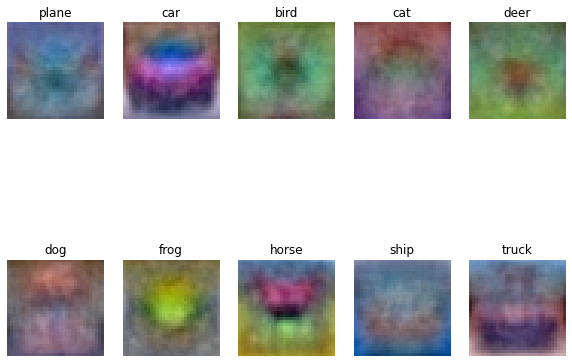

(多整了一些)噪点的减少还是非常明显的,虽然1500之后准确率没太大区别
CS231N Assignment1 softmax 笔记的更多相关文章
- cs231n assignment1 KNN
title: cs231n assignment1 KNN tags: - KNN - cs231n categories: - 机器学习 date: 2019年9月16日 17:03:13 利用KN ...
- 笔记:CS231n+assignment1(作业一)
CS231n的课后作业非常的好,这里记录一下自己对作业一些笔记. 一.第一个是KNN的代码,这里的trick是计算距离的三种方法,核心的话还是python和machine learning中非常实用的 ...
- 【cs231n】神经网络笔记笔记2
) # 对数据进行零中心化(重要) cov = np.dot(X.T, X) / X.shape[0] # 得到数据的协方差矩阵 数据协方差矩阵的第(i, j)个元素是数据第i个和第j个维度的协方差. ...
- 【cs231n】最优化笔记
): W = np.random.randn(10, 3073) * 0.0001 # generate random parameters loss = L(X_train, Y_train, W) ...
- cs231n官方note笔记
本文记录官方note中比较新颖和有价值的观点(从反向传播开始) 一 反向传播 1 “反向传播是一个优美的局部过程.在整个计算线路图中,每个门单元都会得到一些输入并立即计算两个东西:1. 这个门的输出值 ...
- [基础]斯坦福cs231n课程视频笔记(三) 训练神经网络
目录 training Neural Network Activation function sigmoid ReLU Preprocessing Batch Normalization 权重初始化 ...
- 【Python 代码】CS231n中Softmax线性分类器、非线性分类器对比举例(含python绘图显示结果)
1 #CS231n中线性.非线性分类器举例(Softmax) #注意其中反向传播的计算 # -*- coding: utf-8 -*- import numpy as np import matplo ...
- CS231n 2017 学习笔记01——KNN(K-Nearest Neighbors)
本博客内容来自 Stanford University CS231N 2017 Lecture 2 - Image Classification 课程官网:http://cs231n.stanford ...
- 【cs231n】图像分类笔记
前言 首先声明,以下内容绝大部分转自知乎智能单元,他们将官方学习笔记进行了很专业的翻译,在此我会直接copy他们翻译的笔记,有些地方会用红字写自己的笔记,本文只是作为自己的学习笔记.本文内容官网链接: ...
- [基础]斯坦福cs231n课程视频笔记(一) 图片分类之使用线性分类器
线性分类器的基本模型: f = Wx Loss Function and Optimization 1. LossFunction 衡量在当前的模型(参数矩阵W)的效果好坏 Multiclass SV ...
随机推荐
- 动手实践丨使用华为云IoT边缘体验“边云协同”
摘要:"边云协同",即云端与边缘的协同.通过边云通道,部署在边缘节点上,并实现在云端远程管理应用,保障部署在边缘的应用能够正常运行,并通过与云端的连线,将业务执行结果在云端呈现. ...
- 原来的 service 命令与 systemctl 命令对比
service [服务] start systemctl start [unit type] 启动服务 #启动网络服务 systemctl start network.servicese ...
- Chrome 英文翻译插件,沙拉查词
下载: https://pan.baidu.com/s/1VRaZzKgyPKc0Qt6Gufk3yw 提取码: chbm 下载: https://pan.baidu.com/s/1VRaZzKgyP ...
- Netty ChannelFuture 监听三种方法
以下是伪代码 方法一 前后代码省略 //绑定服务器,该实例将提供有关IO操作的结果或状态的信息 ChannelFuture channelFuture = bootstrap.bind(); this ...
- 白嫖:GPT-4
众所周知,GPT-4需要充OpenAI 的 Plus才能使用,Plus则需要每月20美金. 很多同学很想体验GPT-4,但一方面不想花钱,一方面想花也没那么容易花出去(懂的都懂) 我看到有人分享可以免 ...
- MIGO BAPI_GOODSMVT_CREATE创建及增强
1.MIGO过账BAPI新增字段 BAPI新增收货行号字段,保存外围系统的数据 1.1.MATDOC表新增收货行号 1.2.MSEG表新增收货行号 创建DDL视图用于扩展NSDM_E_MSEG 1.3 ...
- 【Git使用】代码拉取及用户名初始化
代码拉取及用户名初始化
- 【每日一题】25.「火」皇家烈焰 (字符串DP)
补题链接:Here 转移方程的具体含义我在代码注释里写出来了, 很好理解 这道题的难点在于如何表示状态, 一旦找到状态表示方法 只要根据题意做转移就行了 最后的答案就是 \(dp[n][0][0] + ...
- 函数计算 FC 3.0 发布,全面降价,最高幅度达93%,阶梯计费越用越便宜
作为国内最早布局 Serverless 的云厂商之一,阿里云在 2017 年推出函数计算 FC,开发者只需编写代码并上传,函数计算就会自动准备好相应的计算资源,大幅简化开发运维过程.阿里云函数计算持续 ...
- 如何让 Llama2、通义千问开源大语言模型快速跑在函数计算上?
本文是"在Serverless平台上构建AIGC应用"系列文章的第一篇文章. 前言 随着ChatGPT 以及 Stable Diffusion,Midjourney 这些新生代 A ...