
【Azure Redis 缓存】定位Java Spring Boot 使用 Jedis 或 Lettuce 无法连接到 Redis的网络连通性步骤
问题描述
Java Spring Boot的代码在IDE里面跑可以连上 Azure 的 Redis服务,打包成Image放在容器里面跑,就连不上azure的redis服务,错误消息为:
Unable to connect to Redis; nested exception is org.springframework.data.redis.connection.PoolException:
Could not get a resource from the pool; nested exception is io.lettuce.core.RedisConnectionException: Unable to connect to xxxxxxxxxxxxx.redis.cache.chinacloudapi.cn:6380
问题分析
第一步: 因为容器是Linux的机器上运行,所以第一步是确认客户端与Azure Redis服务之间的网络连通性。可以通过PsPing或者PaPing 测试。
#PsPing

psping xxxxxxxxxxxxx.redis.cache.chinacloudapi.cn:6380

#PaPing

./paping -p 6380 -c 500 xxxxxxxxxxxxx.redis.cache.chinacloudapi.cn
PsPing:https://docs.microsoft.com/zh-cn/sysinternals/downloads/psping
PaPing:https://code.google.com/archive/p/paping/downloads
PS:在windows的机器上,可以使用 tcping xxxxxxxxxxxxx.redis.cache.chinacloudapi.cn:6380
第二步: 抓取网络包
sudo tcpdump -i en0 -w xxxx.pcap
从网络包中验证是否是与TLS协议,版本错误相关。如果能够查看TCP及TLSv1.2的Application Data传递,则表明网络连通性,TLS协议都没有问题。
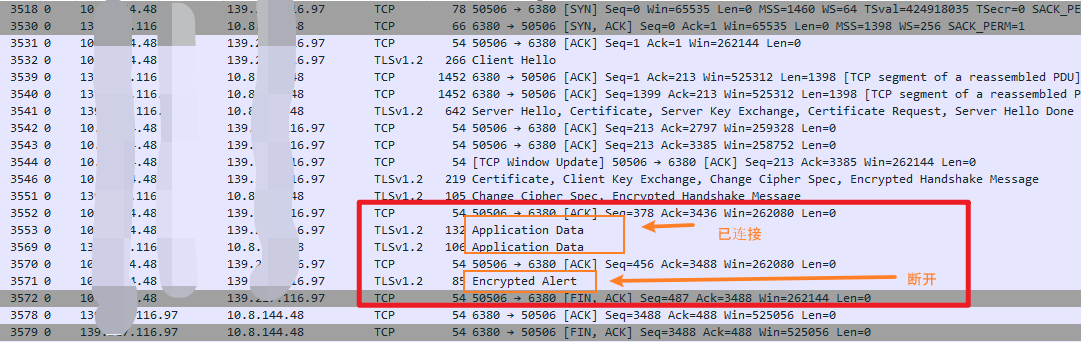
经过以上分析后,就可以定位问题一定发生在应用代码中,然后就是通过Demo来复现及定位问题。比如:排除项目中各种组件间的相互干扰,使用Azure官网中的简单Demo来测试联通问题。如上Jedis连接Redis的代码片段:
App.java
package example.demo;

import redis.clients.jedis.Jedis;

import redis.clients.jedis.JedisShardInfo;

/**

 * Redis test

 *

 */

public class App

{

    public static void main( String[] args )

    {

        boolean useSsl = true;

        String cacheHostname = "redis host";

        String cachekey = "key";

        // Connect to the Azure Cache for Redis over the TLS/SSL port using the key.

        JedisShardInfo shardInfo = new JedisShardInfo(cacheHostname, 6380, useSsl);

        shardInfo.setPassword(cachekey); /* Use your access key. */

        Jedis jedis = new Jedis(shardInfo);

        // Perform cache operations using the cache connection object...

        // Simple PING command

        System.out.println( "\nCache Command  : Ping" );

        System.out.println( "Cache Response : " + jedis.ping());

        // Simple get and put of integral data types into the cache

        System.out.println( "\nCache Command  : GET Message" );

        System.out.println( "Cache Response : " + jedis.get("Message"));

        System.out.println( "\nCache Command  : SET Message" );

        System.out.println( "Cache Response : " + jedis.set("Message", "Hello! The cache is working from Java!"));

        // Demonstrate "SET Message" executed as expected...

        System.out.println( "\nCache Command  : GET Message" );

        System.out.println( "Cache Response : " + jedis.get("Message"));

        // Get the client list, useful to see if connection list is growing...

        System.out.println( "\nCache Command  : CLIENT LIST" );

        System.out.println( "Cache Response : " + jedis.clientList());

        jedis.close();

    }

}
pom.xml
<?xml version="1.0" encoding="UTF-8"?>

<project xmlns="http://maven.apache.org/POM/4.0.0" xmlns:xsi="http://www.w3.org/2001/XMLSchema-instance"

  xsi:schemaLocation="http://maven.apache.org/POM/4.0.0 http://maven.apache.org/xsd/maven-4.0.0.xsd">

  <modelVersion>4.0.0</modelVersion>

  <groupId>example.demo</groupId>

  <artifactId>redistest</artifactId>

  <version>1.0</version>

  <name>redistest</name>

  <!-- FIXME change it to the project's website -->

  <url>http://www.example.com</url>

  <properties>

    <project.build.sourceEncoding>UTF-8</project.build.sourceEncoding>

    <maven.compiler.source>1.7</maven.compiler.source>

    <maven.compiler.target>1.7</maven.compiler.target>

  </properties>

  <dependencies>

    <dependency>

      <groupId>redis.clients</groupId>

      <artifactId>jedis</artifactId>

      <version>3.2.0</version>

      <type>jar</type>

      <scope>compile</scope>

    </dependency>

  </dependencies>

  <build>

    <pluginManagement><!-- lock down plugins versions to avoid using Maven defaults (may be moved to parent pom) -->

      <plugins>

        <plugin>

          <artifactId>maven-clean-plugin</artifactId>

          <version>3.0.0</version>

        </plugin>

        <!-- see http://maven.apache.org/ref/current/maven-core/default-bindings.html#Plugin_bindings_for_jar_packaging -->

        <plugin>

          <artifactId>maven-resources-plugin</artifactId>

          <version>3.0.2</version>

        </plugin>

        <plugin>

          <artifactId>maven-compiler-plugin</artifactId>

          <version>3.7.0</version>

        </plugin>

        <plugin>

          <artifactId>maven-surefire-plugin</artifactId>

          <version>2.20.1</version>

        </plugin>

        <plugin>

          <artifactId>maven-jar-plugin</artifactId>

          <version>3.0.2</version>

        </plugin>

        <plugin>

          <artifactId>maven-install-plugin</artifactId>

          <version>2.5.2</version>

        </plugin>

        <plugin>

          <artifactId>maven-deploy-plugin</artifactId>

          <version>2.8.2</version>

        </plugin>

      </plugins>

    </pluginManagement>

  </build>

</project>
参考资料
使用 PsPing & PaPing 进行 TCP 端口连通性测试: https://docs.azure.cn/zh-cn/articles/azure-operations-guide/virtual-network/aog-virtual-network-tcp-psping-paping-connectivity#paping
【Azure Redis 缓存】定位Java Spring Boot 使用 Jedis 或 Lettuce 无法连接到 Redis的网络连通性步骤的更多相关文章
- 【Azure 应用服务】App Service For Linux 部署Java Spring Boot应用后,查看日志文件时的疑惑
编写Java Spring Boot应用,通过配置logging.path路径把日志输出在指定的文件夹中. 第一步:通过VS Code创建一个空的Spring Boot项目 第二步:在applicat ...
- Java Spring Boot VS .NetCore (一)来一个简单的 Hello World
系列文章 Java Spring Boot VS .NetCore (一)来一个简单的 Hello World Java Spring Boot VS .NetCore (二)实现一个过滤器Filte ...
- Java Spring Boot VS .NetCore (二)实现一个过滤器Filter
Java Spring Boot VS .NetCore (一)来一个简单的 Hello World Java Spring Boot VS .NetCore (二)实现一个过滤器Filter Jav ...
- Java Spring Boot VS .NetCore (三)Ioc容器处理
Java Spring Boot VS .NetCore (一)来一个简单的 Hello World Java Spring Boot VS .NetCore (二)实现一个过滤器Filter Jav ...
- Java Spring Boot VS .NetCore (四)数据库操作 Spring Data JPA vs EFCore
Java Spring Boot VS .NetCore (一)来一个简单的 Hello World Java Spring Boot VS .NetCore (二)实现一个过滤器Filter Jav ...
- Java Spring Boot VS .NetCore (五)MyBatis vs EFCore
Java Spring Boot VS .NetCore (一)来一个简单的 Hello World Java Spring Boot VS .NetCore (二)实现一个过滤器Filter Jav ...
- Java Spring Boot VS .NetCore (六) UI thymeleaf vs cshtml
Java Spring Boot VS .NetCore (一)来一个简单的 Hello World Java Spring Boot VS .NetCore (二)实现一个过滤器Filter Jav ...
- Java Spring Boot VS .NetCore (七) 配置文件
Java Spring Boot VS .NetCore (一)来一个简单的 Hello World Java Spring Boot VS .NetCore (二)实现一个过滤器Filter Jav ...
- Java Spring Boot VS .NetCore (八) Java 注解 vs .NetCore Attribute
Java Spring Boot VS .NetCore (一)来一个简单的 Hello World Java Spring Boot VS .NetCore (二)实现一个过滤器Filter Jav ...
- Java Spring Boot VS .NetCore (九) Spring Security vs .NetCore Security
Java Spring Boot VS .NetCore (一)来一个简单的 Hello World Java Spring Boot VS .NetCore (二)实现一个过滤器Filter Jav ...
随机推荐
- 解决刷新SwaggerUi控制台报错
一.问题描述 在浏览器刷新SwaggerUI的页面,控制台就报错: java.lang.NumberFormatException: For input string: "" at ...
- Vue3中readonly 和 shallowReadonly和toRaw
1.readonly 深度只读 被readonly包裹的数据只能够读取. 是一个深度只读,不能够修改. 我们看一下面的代码. 我们想修改值,但是修改后视图无响应. 并且控制台警告目标为只读 reado ...
- 纯c#运行开源本地大模型Mixtral-8x7B
先看效果图,这是一个比较典型的逻辑推理问题,以下是本地运行的模型和openai gpt3.5的推理对比 本地运行Mixtral-8x7B大模型: chatgpt3.5的回答: 关于Mixtral 8x ...
- 【JS 逆向百例】如何跟栈调试?某 e 网通 AES 加密分析
关注微信公众号:K哥爬虫,QQ交流群:808574309,持续分享爬虫进阶.JS/安卓逆向等技术干货! 声明 本文章中所有内容仅供学习交流,抓包内容.敏感网址.数据接口均已做脱敏处理,严禁用于商业用途 ...
- Centos7把home目录下多余的空间转移到/根目录下
通过df-h发现,根目录只有32G,而home目录可用的,居然有142G.我现在想分出70G给根目录 把你需要挂载的机器的逻辑卷记住(上面的图,左边是逻辑卷,右边是虚拟磁盘) /dev/mapper/ ...
- PGO前瞻
原文在这里. 原文发布于2023年2月8日 在构建Go二进制文件时,Go编译器会进行优化,以尽可能生成性能最佳的二进制文件.例如,常量传播可以在编译时对常量表达式进行求值,避免了运行时的计算开销:逃逸 ...
- 1.基于Label studio的训练数据标注指南:信息抽取(实体关系抽取)、文本分类等
文本抽取任务Label Studio使用指南 1.基于Label studio的训练数据标注指南:信息抽取(实体关系抽取).文本分类等 2.基于Label studio的训练数据标注指南:(智能文档) ...
- Python 使用SQLAlchemy数据库模块
SQLAlchemy 是用Python编程语言开发的一个开源项目,它提供了SQL工具包和ORM对象关系映射工具,使用MIT许可证发行,SQLAlchemy 提供高效和高性能的数据库访问,实现了完整的企 ...
- Eslint 的rules一些配置 (.eslintrc.js文件中的rules选项)
rules: { // off=0, warn=1, error=2, 如果是数组, 第二项表示参数option // indent: [2, 2], // 控制缩进为2 eqeqeq: 1, // ...
- (C语言)每日代码||2024.1.10||scanf("%6f",&a)
#include <stdio.h> int main() { float a; scanf("%.3f", &a);//输入1234 printf(" ...