
Spingboot整合Redis,用注解(@Cacheable、@CacheEvict、@CachePut、@Caching)管理缓存
背景:项目从头开始,需结合Springboot和Redis
需求:用注解管理缓存
方法:
一、用Redis取代Springboot原有缓存
1、pom引入依赖

2、application.yml配置

3、启动类开启注解
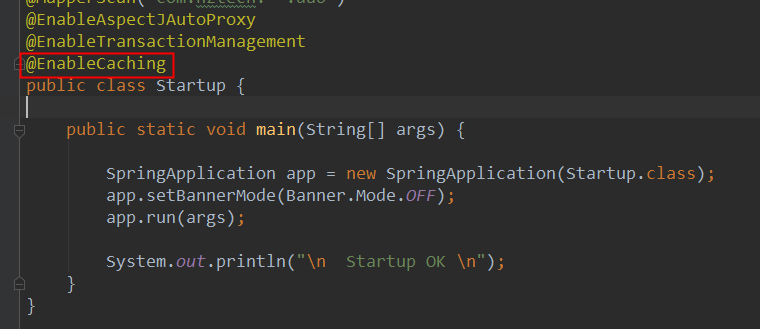
4、RedisConfig配置
import com.fasterxml.jackson.annotation.JsonAutoDetect;

import com.fasterxml.jackson.annotation.PropertyAccessor;

import com.fasterxml.jackson.databind.ObjectMapper;

import org.springframework.cache.annotation.CachingConfigurerSupport;

import org.springframework.cache.interceptor.*;

import org.springframework.context.annotation.Bean;

import org.springframework.context.annotation.Configuration;

import org.springframework.data.redis.connection.RedisConnectionFactory;

import org.springframework.data.redis.core.RedisTemplate;

import org.springframework.data.redis.serializer.Jackson2JsonRedisSerializer;

import org.springframework.data.redis.serializer.StringRedisSerializer;

import org.springframework.cache.CacheManager;

import org.springframework.data.redis.cache.RedisCacheManager;

import javax.annotation.Resource;

@Configuration

public class RedisConfig extends CachingConfigurerSupport {

    @Resource

    private RedisConnectionFactory factory;

    /**

     * 自定义生成redis-key

     *

     * @return

     */

    @Override

    @Bean

    public KeyGenerator keyGenerator() {

        return (o, method, objects) -> {

            StringBuilder sb = new StringBuilder();

            sb.append(o.getClass().getName()).append(".");

            sb.replace(0,21,"");

            sb.append(method.getName()).append(".");

            for (Object obj : objects) {

                if (null!=obj){

                    sb.append(obj.toString());

                }

            }

            System.out.println("keyGenerator=" + sb.toString());

            return sb.toString();

        };

    }

    /*

     * 要启用spring缓存支持,需创建一个 CacheManager的 bean,CacheManager 接口有很多实现,这里Redis 的集成,用

     * RedisCacheManager这个实现类 Redis 不是应用的共享内存,它只是一个内存服务器,就像 MySql 似的,

     * 我们需要将应用连接到它并使用某种“语言”进行交互,因此我们还需要一个连接工厂以及一个 Spring 和 Redis 对话要用的

     * RedisTemplate, 这些都是 Redis 缓存所必需的配置,把它们都放在自定义的 CachingConfigurerSupport 中

     */

    @Bean

    public CacheManager cacheManager(RedisConnectionFactory connectionFactory) {

        RedisCacheManager rm = RedisCacheManager.create(connectionFactory);

        /*rm.setDefaultExpiration(30L);// 设置缓存时间*/

        return rm;

    }

    /*@Bean

    @Override

    public CacheResolver cacheResolver() {

        return new SimpleCacheResolver(cacheManager());

    }*/

    @Bean

    @Override

    public CacheErrorHandler errorHandler() {

        // 用于捕获从Cache中进行CRUD时的异常的回调处理器。

        return new SimpleCacheErrorHandler();

    }

    // 1.项目启动时此方法先被注册成bean被spring管理,如果没有这个bean,则redis可视化工具中的中文内容(key或者value)都会以二进制存储,不易检查。

    @Bean

    public RedisTemplate<String, Object> redisTemplate(RedisConnectionFactory factory) {

        RedisTemplate<String, Object> template = new RedisTemplate<String, Object>();

        template.setConnectionFactory(factory);

        Jackson2JsonRedisSerializer jackson2JsonRedisSerializer = new Jackson2JsonRedisSerializer(Object.class);

        ObjectMapper objectMapper = new ObjectMapper();

        objectMapper.setVisibility(PropertyAccessor.ALL, JsonAutoDetect.Visibility.ANY);

        objectMapper.enableDefaultTyping(ObjectMapper.DefaultTyping.NON_FINAL);

        jackson2JsonRedisSerializer.setObjectMapper(objectMapper);

        StringRedisSerializer stringRedisSerializer = new StringRedisSerializer();

        // key采用String的序列化方式

        template.setKeySerializer(stringRedisSerializer);

        // hash的key也采用String的序列化方式

        template.setHashKeySerializer(stringRedisSerializer);

        // value序列化方式采用jackson

        template.setValueSerializer(jackson2JsonRedisSerializer);

        // hash的value序列化方式采用jackson

        template.setHashValueSerializer(jackson2JsonRedisSerializer);

        template.afterPropertiesSet();

        return template;

    }

}
二、用注解管理缓存(注意实体类序列化)
package com.hztech.framework.dict.ctl;

import com.baomidou.mybatisplus.mapper.EntityWrapper;

import com.baomidou.mybatisplus.plugins.Page;

import com.hztech.framework.cache.DictCache;

import com.hztech.framework.core.BaseController;

import com.hztech.framework.dict.entity.Dict;

import com.hztech.framework.dict.entity.DictItem;

import com.hztech.framework.dict.service.DictItemService;

import com.hztech.framework.dict.service.DictService;

import com.hztech.framework.dict.vo.ItemListResp;

import com.hztech.framework.dict.vo.ItemResp;

import com.hztech.framework.util.CommonConst;

import com.hztech.framework.util.RedisUtil;

import io.swagger.annotations.*;

import org.springframework.beans.factory.annotation.Autowired;

import org.springframework.cache.annotation.CacheEvict;

import org.springframework.cache.annotation.CachePut;

import org.springframework.cache.annotation.Cacheable;

import org.springframework.cache.annotation.Caching;

import org.springframework.data.redis.core.RedisTemplate;

import org.springframework.transaction.annotation.Transactional;

import org.springframework.transaction.interceptor.TransactionAspectSupport;

import org.springframework.util.StringUtils;

import org.springframework.web.bind.annotation.*;

import javax.validation.Valid;

import java.util.ArrayList;

import java.util.List;

import java.util.Set;

/**

 * 字典及字典项管理接口

 */

@RestController

@RequestMapping(path = "接口路径")

@Api(tags = "字典及字典项管理")

public class DictItemCtl extends BaseController {

    public DictItemCtl() {

        setLog(DictItemCtl.class);

        cols.put("code", "c_code");

        cols.put("name", "c_name");

        cols.put("seq","n_seq");

    }

    @Autowired

    private DictService dictService;

    @Autowired

    private DictItemService itemService;

    @Autowired

    private RedisUtil redisUtil;

    @ApiOperation("添加字典")

    @ApiImplicitParam(name = "dict",value = "字典",dataType = "Dict",paramType = "body",required = true)

    @PostMapping(name = "添加字典")

    @Transactional

    @Caching(evict = {@CacheEvict(value = "dict:list",allEntries = true)},put = {@CachePut(value = "dict",key = "#result")} )

    public String add(@RequestBody @Valid Dict dict) {

        log.info("添加字典【{}】", dict.getName());

        dictService.insert(dict);

        /*if (!redisUtil.set("dict:"+dict.getCode(),dict)){

            TransactionAspectSupport.currentTransactionStatus().setRollbackOnly();

        }*/

        return dict.getId();

    }

    @ApiOperation("删除字典")

    @ApiImplicitParam(name = "id",value = "字典id",dataType = "String",paramType = "path",required = true)

    @DeleteMapping(path = "{id}", name = "删除字典")

    @Transactional

    @Caching(

            evict = {@CacheEvict(value = "dict",key = "#id"),@CacheEvict(value = "dict:list",allEntries = true)}

    )

    public void delete(@PathVariable(name = "id") String id) {

        Dict dict = dictService.selectById(id);

        if (dict == null) {

            return;

        }

        log.info("删除字典【{}】", dict.getName());

        dictService.deleteById(id);

        EntityWrapper<DictItem> ew = new EntityWrapper<>();

        ew.eq("c_dict_id", id);

        //需要同时删除下面包含的字典项

        itemService.delete(ew);

        /*//采用事件通知方式更新缓存

        redisUtil.delete("dict:"+dict.getCode());

        redisUtil.deleteStart("item:"+dict.getId()+"#");*/

    }

    @ApiOperation("更新字典")

    @ApiImplicitParams({

            @ApiImplicitParam(name = "id",value = "字典id",dataType = "String",paramType = "path",required = true),

            @ApiImplicitParam(name = "dict",value = "字典",dataType = "Dict",paramType = "body",required = true)

    })

    @Transactional

    @PutMapping(path = "{id}", name = "更新字典")

    @CachePut(value = "dict",key = "#id")

    @Caching(

            evict = {@CacheEvict(value = "dict:list",allEntries = true)},

            put = {@CachePut(value = "dict",key = "#id")}

    )

    public void update(@PathVariable String id, @RequestBody @Valid Dict dict) {

        Dict old = dictService.selectById(id);

        if (old == null) {

            return;

        }

        log.info("更新字典【{}】", old.getName());

        dictService.updateById(dict);

        /*//采用事件通知方式更新缓存

        if(!redisUtil.set("dict:"+dict.getCode(),dict)){

            TransactionAspectSupport.currentTransactionStatus().setRollbackOnly();

        }*/

    }

    @ApiOperation("查询字典列表")

    @ApiImplicitParams({

            @ApiImplicitParam(name = "pageNo",value = "当前页(默认第一页)",dataType = "Integer",paramType = "header",required = true),

            @ApiImplicitParam(name = "pageSize",value = "每页显示条数(默认15条)",dataType = "Integer",paramType = "header",required = true),

            @ApiImplicitParam(name = "codeOrName",value = "编号或者名称",dataType = "String",paramType = "query"),

            @ApiImplicitParam(name = "sort",value = "排序方式",dataType = "String",paramType = "query"),

            @ApiImplicitParam(name = "asc",value = "升序(默认升序)",dataType = "boolean",paramType = "query"),

    })

    @GetMapping(name = "查询字典列表")

    @Cacheable(value = "dict:list")

    public List<Dict> query(@RequestHeader(name = "pageNo", defaultValue = "1") Integer pageNo,

                            @RequestHeader(name = "pageSize", defaultValue = "15") Integer pageSize,

                            @RequestParam(name = "codeOrName", required = false) String codeOrName,

                            @RequestParam(name = "sort", defaultValue = "code", required = false) String sort,

                           @RequestParam(name = "asc", defaultValue = "true", required = false) boolean asc) {

        log.info("查询字典列表");

        EntityWrapper<Dict> ew = new EntityWrapper<>();

        if (!StringUtils.isEmpty(codeOrName)) {

            ew.like("c_code", codeOrName);

            ew.or();

            ew.like("c_name", codeOrName);

        }

        ew.orderBy(cols.get(sort), asc);

        Page<Dict> page = new Page<>(pageNo, pageSize);

        page = dictService.selectPage(page, ew);

        log.info("总数:{}", page.getTotal());

        response.setIntHeader(CommonConst.RECORD_TOTAL, (int) page.getTotal());

        return page.getRecords();

    }

    @ApiOperation("添加字典项")

    @ApiImplicitParam(name = "item",value = "字典项",dataType = "DictItem",paramType = "body",required = true)

    @PostMapping(path = "items", name = "添加字典项")

    @Transactional

    @Caching(

            evict = {@CacheEvict(value = "item:list",allEntries = true)},

            put = {@CachePut(value = "item",key = "#result")}

    )

    public String addItem(@RequestBody @Valid DictItem item) {

        itemService.insert(item);

        //采用事件通知方式更新缓存

        /*if(!redisUtil.set("item:"+item.getDictId()+"#"+item.getCode(),item)){

            TransactionAspectSupport.currentTransactionStatus().setRollbackOnly();

        }*/

        return item.getId();

    }

    @ApiOperation("删除字典项")

    @ApiImplicitParam(name = "itemId",value = "删除字典项",dataType = "String",paramType = "path",required = true)

    @DeleteMapping(path = "items/{itemId}", name = "删除字典项")

    @Transactional

    @Caching(

            evict = {@CacheEvict(value = "item",key = "#itemId"),@CacheEvict(value = "item:list",allEntries = true)}

    )

    public void deleteItem(@PathVariable(name = "itemId") String itemId) {

        DictItem dictItem=itemService.selectById(itemId);

        itemService.deleteById(itemId);

        //采用事件通知方式更新缓存

        /*redisUtil.delete("item:"+dictItem.getDictId()+"#"+dictItem.getCode());*/

    }

    @ApiOperation("更新字典项")

    @ApiImplicitParams({

            @ApiImplicitParam(name = "id",value = "字典项id",dataType = "String",paramType = "path",required = true),

            @ApiImplicitParam(name = "item",value = "字典项",dataType = "DictItem",paramType = "body",required = true)

    })

    @PutMapping(path = "items/{id}", name = "更新字典项")

    @Transactional

    @Caching(

            evict = {@CacheEvict(value = "item:list",allEntries = true)},

            put = {@CachePut(value = "item",key = "#id")}

    )

    public String updateItem(@PathVariable(name = "id") String id,@RequestBody @Valid DictItem item) {

        item.setId(id);

        DictItem dictItem=itemService.selectById(id);

        itemService.updateById(item);

        //采用事件通知方式更新缓存

        /*if(!redisUtil.set("item:"+dictItem.getDictId()+"#"+dictItem.getCode(),item)){

            TransactionAspectSupport.currentTransactionStatus().setRollbackOnly();

        }*/

        return item.getId();

    }

    @ApiOperation("查询字典项")

    @ApiImplicitParams({

            @ApiImplicitParam(name = "pageNo",value = "当前页(默认第一页)",dataType = "Integer",paramType = "header",required = true),

            @ApiImplicitParam(name = "pageSize",value = "每页显示条数(默认15条)",dataType = "Integer",paramType = "header",required = true),

            @ApiImplicitParam(name = "dictId",value = "字典项id",dataType = "String",paramType = "query",required = true),

            @ApiImplicitParam(name = "codeOrName",value = "编号或名称",dataType = "String",paramType = "query"),

            @ApiImplicitParam(name = "sort",value = "排序方式(默认seq)",dataType = "String",paramType = "query"),

            @ApiImplicitParam(name = "asc",value = "(默认升序)",dataType = "boolean",paramType = "query")

    })

    @GetMapping(path = "items", name = "查询字典项")

    @Cacheable(value = "item:list")

    public List<DictItem> queryItem(@RequestHeader(name = "pageNo", defaultValue = "1") Integer pageNo,

                                    @RequestHeader(name = "pageSize", defaultValue = "15") Integer pageSize,

                                    @RequestParam(name = "dictId") String dictId,

                                    @RequestParam(name = "codeOrName", required = false) String codeOrName,

                                    @RequestParam(name = "sort", defaultValue = "seq", required = false) String sort,

                                    @RequestParam(name = "asc", defaultValue = "true", required = false) boolean asc) {

        log.info("查询字典项列表");

        EntityWrapper<DictItem> ew = new EntityWrapper<>();

        ew.eq("c_dict_id",dictId);

        if (!StringUtils.isEmpty(codeOrName)) {

            ew.like("c_code", codeOrName);

            ew.or();

            ew.like("c_name", codeOrName);

        }

        ew.orderBy(cols.get(sort), asc);

        Page<DictItem> page = new Page<>(pageNo, pageSize);

        page = itemService.selectPage(page, ew);

        log.info("总数:{}", page.getTotal());

        response.setIntHeader(CommonConst.RECORD_TOTAL, (int) page.getTotal());

        return page.getRecords();

    }

    /**

     * 此方法用于页面填充字典项,其内容从缓存中提取。

     *

     * @param dictCode

     * @return

     */

    @ApiOperation("下拉列表获取字典项")

    @ApiImplicitParam(name = "dictCode",value = "字典项名称",dataType = "String",paramType = "path",required = true)

    @GetMapping(path = "common/items/{dictCode}",name = "下拉列表获取字典项")

    @Cacheable(value = "item:list")

    public ItemListResp getDictItems(@PathVariable String dictCode){

        ItemListResp resp=new ItemListResp();

        //List<DictItem> items=DictCache.getItems(dictCode);

        Set<String> set = redisUtil.keysStart("item:"+((Dict)redisUtil.get("dict:"+dictCode)).getId()+"#");

        if(set.isEmpty()){

            return resp;

        }

        for (String k:set){

            DictItem item = (DictItem) redisUtil.get(k);

            ItemResp ir=new ItemResp();

            ir.setCode(item.getCode());

            ir.setName(item.getName());

            resp.getItems().add(ir);

            if (item.getSelected() == 1 &&

                    StringUtils.isEmpty(resp.getDefaultValue())) {

                // 设置默认选中项

                resp.setDefaultValue(item.getCode());

            }

        }

        /*for(DictItem item : items){

            ItemResp ir=new ItemResp();

            ir.setCode(item.getCode());

            ir.setName(item.getName());

            resp.getItems().add(ir);

            if (item.getSelected() == 1 &&

                    StringUtils.isEmpty(resp.getDefaultValue())) {

                // 设置默认选中项

                resp.setDefaultValue(item.getCode());

            }

        }*/

        return resp;

    }

}
Spingboot整合Redis,用注解(@Cacheable、@CacheEvict、@CachePut、@Caching)管理缓存的更多相关文章
- spring整合redis缓存,以注解(@Cacheable、@CachePut、@CacheEvict)形式使用
maven项目中在pom.xml中依赖2个jar包,其他的spring的jar包省略: <dependency> <groupId>redis.clients</grou ...
- 八、springboot整合redis
整合Redis 一. 注解方式实现添加缓存 1.在pom.xml加入依赖 <!-- 配置使用redis启动器 --> <dependency> <groupId>o ...
- 002-spring cache 基于声明式注解的缓存-02-CachePut、CacheEvict、Caching、CacheConfig、EnableCaching、自定义
1.2.CachePut annotation 在支持Spring Cache的环境下,对于使用@Cacheable标注的方法,Spring在每次执行前都会检查Cache中是否存在相同key的缓存元素 ...
- SpringBoot进阶教程(二十五)整合Redis之@Cacheable、@CachePut、@CacheEvict的应用
在上一篇文章(<SpringBoot(二十四)整合Redis>)中,已经实现了Spring Boot对Redis的整合,既然已经讲到Cache了,今天就介绍介绍缓存注解.各家互联网产品现在 ...
- Spring-Cache 注解 @Cacheable,@CachePut , @CacheEvict
1.自动生成key @Bean public KeyGenerator keyGenerator() { return new KeyGenerator() { @Override public Ob ...
- Spring缓存注解@Cacheable、@CacheEvict、@CachePut使用(转)
原文地址:https://www.cnblogs.com/fashflying/p/6908028.html 从3.1开始,Spring引入了对Cache的支持.其使用方法和原理都类似于Spring对 ...
- Spring缓存注解@Cacheable、@CacheEvict、@CachePut使用
从3.1开始,Spring引入了对Cache的支持.其使用方法和原理都类似于Spring对事务管理的支持.Spring Cache是作用在方法上的,其核心思想是这样的:当我们在调用一个缓存方法时会把该 ...
- 详解Spring缓存注解@Cacheable,@CachePut , @CacheEvict使用
https://blog.csdn.net/u012240455/article/details/80844361 注释介绍 @Cacheable @Cacheable 的作用 主要针对方法配置,能够 ...
- 缓存注解@Cacheable、@CacheEvict、@CachePut使用及注解失效时间
从3.1开始,Spring引入了对Cache的支持.其使用方法和原理都类似于Spring对事务管理的支持.Spring Cache是作用在方法上的,其核心思想是这样的:当我们在调用一个缓存方法时会把该 ...
随机推荐
- Codeforces #576 Rectangle Painting 1 | div1D | div2F | DP | Rustlang
原题链接 大意 n*n正方形 有黑有白 每次可以选择一个 矩形把它全变成白色,代价是max(长,宽) 求吧 整个正方形 全变白 的最小代价 数据范围 n <= 50 题解 首先如果 我们刷了两个 ...
- FastReport.net 使用 Winform WebForm打印
delphi用的fastreport比较多 所以.net中也研究一下用法,这个打印控件还是很简单的 只要手动设计一下写少许代码就可以打印了 甚至可以写成通用代码 以后就可以不用写代码 安装demo会同 ...
- matploylib之热力图
刚学我也不熟,做个笔记吧 # coding:utf-8 import numpy as np import matplotlib.pyplot as plt dx = 0.01 dy = 0.01 # ...
- Java面试宝典(4)Java基础部分
71.说出一些常用的类,包,接口,请各举5个 要让人家感觉你对java ee开发很熟,所以,不能仅仅只列core java中的那些东西,要多列你在做ssh项目中涉及的那些东西.就写你最近写的那些程序中 ...
- sass的语法及其用法
1.sass语法 1.1 css的编译模式 css --- 普通 sass / scss --- 高效 // ********* less --- 高效 1.2 sass介绍 来源: ruby语言 基 ...
- 拓展练习--find查找、打包压缩、服务器、磁盘挂载
目录 find查找.打包压缩 服务器部分 磁盘挂载及单用户模式 find查找.打包压缩 1.超级用户(管理员用户)提示符是_#,普通用户提示符是$_. 2.如何快速返回上一次所在的目录? cd - 3 ...
- (原)centos 防火墙开放端口命令
centos 防火墙默认是关闭非系统端口的,所以用到非系统端口首先开放,命令如下 firewall-cmd --zone=public --add-port=1935/tcp --permanent ...
- UVA1411 Ants
想出的一道题竟然是原题QAQ 非常有趣的一个题 根据三角形两边之和大于第三边 所以相交的线段一定是比不相交的线段要长的 所以直接二分图构图 最小费用最大流即可 (我不管我不管我要把这个出到NOIP膜你 ...
- JavaSE---Runtime类
1.概述 1.1 Runtime类 代表 java程序运行时环境: 1.2 Runtime类 提供的类方法: getRuntime():获取Runtime实例: gc():通知垃圾回收器回收资源: ...
- go(一)基础知识
一.第一个程序 基本程序结构 package main // 包 import "fmt" // 引入依赖代码 // 功能实现 func main() { fmt.Println( ...