
Html5 学习笔记 【PC固定布局】 实战5 咨询页面 侧栏
最终效果图:
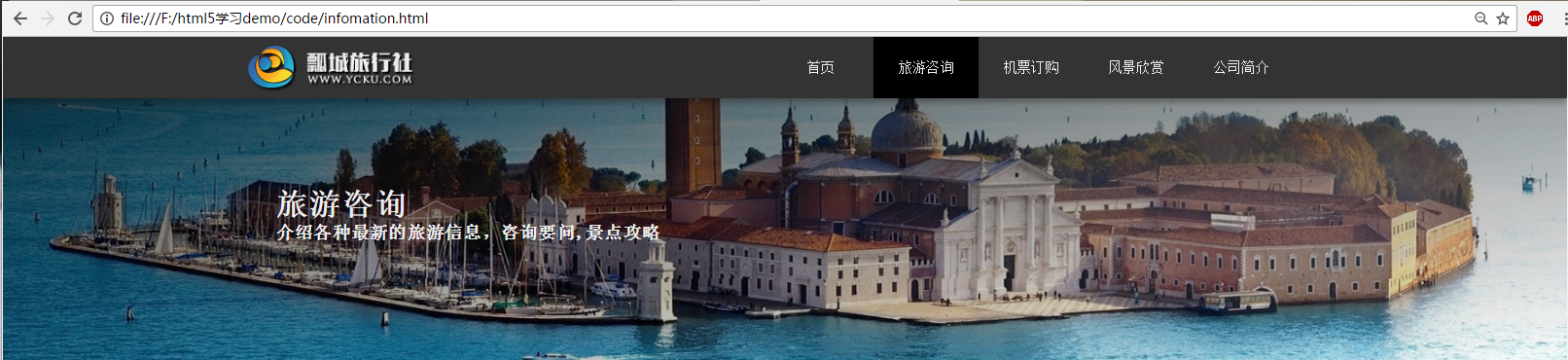
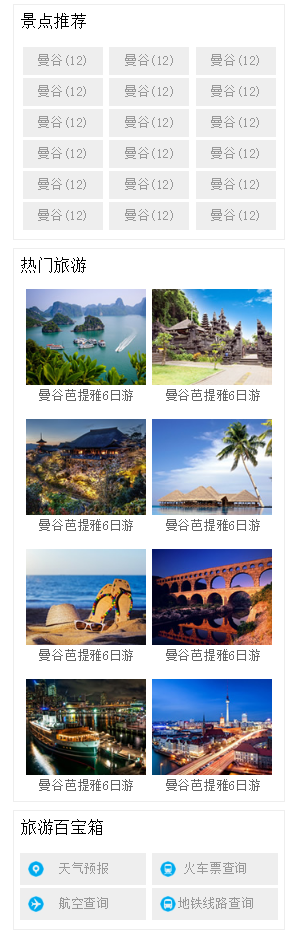
提出公共页脚和导航部分:
新建infomatino.html (旅游咨询)页面
<!DOCTYPE html>

<html lang="zh-cn">

<head>

    <meta charset="UTF-8">

    <title>项目实战 PC端固定布局</title>

    <link rel="stylesheet" href="css/basic.css">

    <link rel="stylesheet" href="css/column.css">

</head>

<body>

    <!-- 导航了部分 -->

    <!-- body nav section 需要h1~h6标题大纲 div header不需要  -->

    <header id="header">

        <div class="center">

            <!-- 一个页面最好就一个h1 让搜索引擎能更好的抓取关键字 -->

            <h1 class="logo">旅行社</h1>

            <nav class="link">

                <h2 class="none">网站导航</h2>

                <ul>

                    <li><a href="index.html">首页</a></li>

                    <li class="active"><a href="infomation.html">旅游咨询</a></li>

                    <li><a href="###">机票订购</a></li>

                    <li><a href="###">风景欣赏</a></li>

                    <li><a href="###">公司简介</a></li>

                </ul>

            </nav>

        </div>

    </header>

    <div id="headline">

        <div class="center">

            <hgroup>

                <h2>旅游咨询</h2>

                <h3>介绍各种最新的旅游信息,咨询要问,景点攻略</h3>

            </hgroup>

        </div>

    </div>

    <div id="container">

        <aside class="sidebar">

            <div class="sidebox recommend">

                <h2>景点推荐</h2>

                <div class="tag">

                    <a href="###">曼谷(12)</a>

                    <a href="###">曼谷(12)</a>

                    <a href="###">曼谷(12)</a>

                    <a href="###">曼谷(12)</a>

                    <a href="###">曼谷(12)</a>

                    <a href="###">曼谷(12)</a>

                    <a href="###">曼谷(12)</a>

                    <a href="###">曼谷(12)</a>

                    <a href="###">曼谷(12)</a>

                    <a href="###">曼谷(12)</a>

                    <a href="###">曼谷(12)</a>

                    <a href="###">曼谷(12)</a>

                    <a href="###">曼谷(12)</a>

                    <a href="###">曼谷(12)</a>

                    <a href="###">曼谷(12)</a>

                    <a href="###">曼谷(12)</a>

                    <a href="###">曼谷(12)</a>

                    <a href="###">曼谷(12)</a>

                </div>

            </div>

            <div class="sidebox hot">

                <h2>热门旅游</h2>

                <figure class="figure">

                    <img src="img/hot1.jpg" alt="曼谷芭提雅6日游">

                    <figcaption>曼谷芭提雅6日游</figcaption>

                </figure>

                <figure class="figure">

                    <img src="img/hot2.jpg" alt="曼谷芭提雅6日游">

                    <figcaption>曼谷芭提雅6日游</figcaption>

                </figure>

                <figure class="figure">

                    <img src="img/hot3.jpg" alt="曼谷芭提雅6日游">

                    <figcaption>曼谷芭提雅6日游</figcaption>

                </figure>

                <figure class="figure">

                    <img src="img/hot4.jpg" alt="曼谷芭提雅6日游">

                    <figcaption>曼谷芭提雅6日游</figcaption>

                </figure>

                <figure class="figure">

                    <img src="img/hot5.jpg" alt="曼谷芭提雅6日游">

                    <figcaption>曼谷芭提雅6日游</figcaption>

                </figure>

                <figure class="figure">

                    <img src="img/hot6.jpg" alt="曼谷芭提雅6日游">

                    <figcaption>曼谷芭提雅6日游</figcaption>

                </figure>

                <figure class="figure">

                    <img src="img/hot7.jpg" alt="曼谷芭提雅6日游">

                    <figcaption>曼谷芭提雅6日游</figcaption>

                </figure>

                <figure class="figure">

                    <img src="img/hot8.jpg" alt="曼谷芭提雅6日游">

                    <figcaption>曼谷芭提雅6日游</figcaption>

                </figure>

            </div>

            <div class="sidebox treasure">

                <h2>旅游百宝箱</h2>

                <div class="box">

                    <a href="###" class="trea1">天气预报</a>

                    <a href="###" class="trea2">火车票查询</a>

                    <a href="###" class="trea3">航空查询</a>

                    <a href="###" class="trea4">地铁线路查询</a>

                </div>

            </div>

        </aside>

        <div class="list">

            list

        </div>

    </div>

    <!-- 页脚部分 -->

    <footer id="footer">

        <div class="top">

            <div class="block left">

                <h2>合作伙伴</h2>

                <!-- 水平线 -->

                <hr>

                <ul>

                    <li>途牛旅游网</li>

                    <li>驴妈妈旅游网</li>

                    <li>携程旅游网</li>

                    <li>去哪旅游网</li>

                </ul>

            </div>

            <div class="block center">

                <h2>旅游咨询QA</h2>

                <!-- 水平线 -->

                <hr>

                <ul>

                    <li>旅游合同签订方式</li>

                    <li>儿童机票价格</li>

                    <li>旅游线路定制</li>

                    <li>单房差是什么</li>

                    <li>旅游保险种类</li>

                </ul>

            </div>

            <div class="block right">

                <h2>联系方式</h2>

                <!-- 水平线 -->

                <hr>

                <ul>

                    <li>微博:weibo.com/lvyou</li>

                    <li>邮件:lvyou@lvyou.com</li>

                    <li>地址:沈阳铁西金桂路123号</li>

                </ul>

            </div>

        </div>

        <div class="bottom">

            Copyright© jjjj | ICP 备 131313312112号 | 旅行社经营许可证 : L-YC-BB12313212

        </div>

    </footer>

</body>

</html>
页面column.css 内容:
@charset "utf-8";

/*-------------------------------咨询页面 侧栏主页---------------------------------------*/

#headline {

    width: 100%;

    /*缩小页面滚动条右侧出现白色区域*/

    min-width: 1263px;

    height: 300px;

    /*渐变 方位 颜色 透明度 rgba */

    /*向右下方 黑色渐变 透明度0.7 - 全透明*/

    background: linear-gradient(to right bottom, rgba(0,0,0,0.7), rgba(0,0,0,0)), url(../img/headline.jpg) no-repeat center;

}

#headline .center {

    width: 1263px;

    height: 300px;

    margin: 0 auto;

}

#headline hgroup {

    padding: 100px 0 0 50px;

}

#headline h2 {

    color: #eee;

    font-size: 36px;

    letter-spacing: 1px;

}

#headline h3 {

    color: #eee;

    font-size: 20px;

    letter-spacing: 1px;

}

#container {

    width: 1263px;

    margin: 30px auto;

}

#container .sidebar {

    width: 340px;

    /*background-color: #eee;*/

    float: right;

}

#container .sidebox {

    border: 1px solid #eee;

    /*下面的边距10px 上右下左*/

    margin: 0 0 10px 0;

    text-align: center;

}

#container .sidebox h2 {

    font-size: 20px;

    font-weight: normal;

    letter-spacing: 1px;

    /*首行缩进*/

    text-indent: 8px;

    height: 40px;

    line-height: 40px;

    background-color: #fafafa

    color: #666;

    text-align: left;

}

#container .tag {

    margin: 10px 0;

}

#container .tag a {

    background-color: #eee;

    display: inline-block;

    width: 100px;

    height: 35px;

    line-height: 35px;

    margin: 2px 0;

    color: #999;

}

#container .tag a:hover {

    background-color: #458b00;

    color: white;

}

#container .figure {

    padding: 10px 0;

}

#container figure {

    display: inline-block;

    padding: 4px;

    color: #666;

}

#container .box {

    margin: 10px 0;

}

#container .box a {

    background-color: #eee;

    display: inline-block;

    width: 157px;

    height: 40px;

    line-height: 40px;

    margin: 2px 0;

    color: #999;

}

#container .box a:hover {

    color: green;

}

/*旅游百宝箱背景图片*/

#container .box a.trea1 {

    background: #eee url(../img/trea1.png) no-repeat 10px center;

}

#container .box a.trea2 {

    background: #eee url(../img/trea2.png) no-repeat 10px center;

}

#container .box a.trea3 {

    background: #eee url(../img/trea3.png) no-repeat 10px center;

}

#container .box a.trea4 {

    background: #eee url(../img/trea4.png) no-repeat 10px center;

}

#container .list {

    width: 900px;

    /*background-color: #ccc;*/

    float: left;

}
抽取基础css文件内容 basic.css:
@charset "utf-8";

/*------------------------------------第一节 导航栏部分------------------------------------*/

/*本身外边距*/

body, h1, ul, h2, p, figure, h3{

    margin:;

    padding:;

}

ul {

    list-style: outside none none;

}

/* a 标签不需要下划线 */

a {

    text-decoration: none;

}

.none {

    display: none;

}

#header {

    width: 100%;

    min-width: 1263px;

    height: 70px;

    background: #333;

    /*header做个阴影*/

    box-shadow: 0 5px 10px rgba(0,0,0,0.3);

    position: relative;

    z-index:;

}

#header .center {

    width: 1263px;

    height: 70px;

    margin: 0 auto;

}

#header .logo {

    width: 240px;

    height: 70px;

    background-image: url(../img/logo.png);

    /* h1中的字向左移动到不能看到 */

    text-indent: -9999px;

    float: left;

}

#header .link {

    width: 650px;

    height: 70px;

    float: right;

    /* 字体淡灰 */

    color: #eee;

    /* 文字垂直居中 设定高度和 ul高度相同即可 */

    line-height: 70px;

}

#header .link li {

    width: 120px;

    /* li 文字横向铺平 */

    float: left;

    text-align: center;

}

#header .link a {

    color: #eee;

    display: block;

}

#header .link a:hover,

#header .active a {

    background-color: #000;

}

#footer {

    min-width: 1263px;

    height: 360px;

    background-color: #222;

    clear: both;

    position: relative;

    top: 20px;

}

#footer .top {

    width: 1263px;

    height: 280px;

    /*background-color: red;*/

    /*居中水平*/

    margin: 0 auto;

    text-align: center;

}

/*footer 合作伙伴等信息*/

#footer .left {

}

#footer .center {

}

#footer .right {

}

#footer .block {

    width: 410px;

    height: 280px;

    /*background-color: green;*/

    display: inline-block;

    text-align: left;

    color: #ccc;

    vertical-align: top;

}

#footer h2 {

    font-size: 24px;

    font-weight: normal;

    padding: 20px 0 0 20px;

}

#footer hr {

    width: 90%;

    border: 1px dashed;

}

#footer ul {

    font-size: 18px;

    color: #777;

    /*文本首行缩进*/

    text-indent: 20px;

    line-height:;

}

/*所有权*/

#footer .bottom {

    height: 80px;

    color: #777;

    text-align: center;

    line-height: 80px;

    background-color: #000;

    /*距上边框的一条线 好看*/

    border-top: 1px solid #444;

}
将style.css basic.css 抽取出来的部分进行删除
Html5 学习笔记 【PC固定布局】 实战5 咨询页面 侧栏的更多相关文章
- CSS学习笔记--Div+Css布局实战(入门)
基本页面布局 本教程带着大家做一个简单的页面布局 最重效果如下: 1.第一部,先创建上下左右4个DIV <!DOCTYPE html> <html> <head lang ...
- [html5] 学习笔记-响应式布局
1.响应式布局介绍 响应式布局是2010年5月份提出的一个概念,简而言之,就是一个网站能够兼容多个终端——而不是每一个终端做一个特定的版本.这个概念是为了兼容移动互联网浏览而诞生的,其目的是为用户提供 ...
- HTML5学习笔记(二):用于构建页面的语义元素
1.语义元素 大多数HTML5语义元素的用途是标识页面中的一个内容区块,为标注的内容赋予额外的含义,不真正做任何事. 2.使用语义元素的原因 容易修改和维护: 无障碍性(现代Web设计的一个重要主题) ...
- Html5 学习笔记 【PC固定布局】 实战7 风景欣赏 联系我们
风景欣赏最终效果: 关于公司最终效果: 风景欣赏Html代码: <!DOCTYPE html> <html lang="zh-cn"> <head&g ...
- Html5 学习笔记 【PC固定布局】 实战7 机票预订页面
最终实际效果: HTML代码: <!DOCTYPE html> <html lang="zh-cn"> <head> <meta char ...
- Html5 学习笔记 【PC固定布局】 实战6 咨询页面
最终效果: Html页面代码: <!DOCTYPE html> <html lang="zh-cn"> <head> <meta char ...
- amazeui学习笔记--css(布局相关3)--辅助类Utility
amazeui学习笔记--css(布局相关3)--辅助类Utility 一.总结 1.元素清除浮动: 添加 am-cf 这个 class 即可 2.水平滚动: .am-scrollable-horiz ...
- amazeui学习笔记--css(布局相关1)--网格Grid
amazeui学习笔记--css(布局相关1)--网格Grid 一.总结 基本使用 1.div+class布局:amaze里面采取的就是div+class的布局方式 <div class=&q ...
- html5学习笔记一
HTML5学习笔记 <video>标记:定义视频,Ogg.MPEG4.WebM三种格式 <video src=”movie.ogg” controls=”controls”> ...
随机推荐
- LR为什么用极大似然估计,损失函数为什么是log损失函数(交叉熵)
首先,逻辑回归是一个概率模型,不管x取什么值,最后模型的输出也是固定在(0,1)之间,这样就可以代表x取某个值时y是1的概率 这里边的参数就是θ,我们估计参数的时候常用的就是极大似然估计,为什么呢?可 ...
- MyEclipse停止自带插件的启动
MyEclipse启动时因为自身带有很多的插件,所以在启动时运行的速度特别慢,所以可以选择一下启动时的插件,将不使用的插件选择在MyEclipse启动时不起动. 步骤如下: windows->p ...
- Node总结
一. 基本概念 1.1 DOM DOM(Document Object Model), 把网页转换成JS对象,可以用脚本进行各种操作.浏览器将结构化文档(HTML/XML)解析成一系列的节点形成DOM ...
- 水题(三角形与扇形面积计算sin()应用)
J - Sincerely Gym - 101350J Physics cat likes to draw shapes and figure out their area. He starts by ...
- linq函数All,Any,Aggregate说明
int[] arrInt; arrInt = ,,,,,,}; );// 所有元素都满足条件,false );// 有任一元素满足条件,true , , , , , , , , }; var quer ...
- JavaScript中的方法和属性
书读百遍其义自见 学习<JavaScript设计模式>一书时,前两个章节中的讲解的JavaScript基础知识,让我对属性和方法有了清晰的认识.如下是我的心得体会以及部分摘录的代码. 不同 ...
- macos Item2 添加 Shell Integration (ftp传输)
macos系统 的item2软件 的 Shell Integration (ftp传输) 功能强大,无需 安装其他ftp软件,也是为了保证 密码安全 在使用时报错如下(因为本地 ping不通): ...
- 【LeetCode】抽样 sampling(共4题)
第一部分 水塘抽样 reservoir sampling 水塘抽样的原理:(应该开一篇新文章)pssss [382]Linked List Random Node (2018年11月15日,新算法) ...
- Sass-除法
Sass的乘法运算规则也适用于除法运算.不过除了除法运算还有一个特殊之处.众所周知“/”符号在css中已作为一种符号使用,因此在sass中做除法运算时,直接使用"/" 符号作为除号 ...
- TCP协议之三次握手四次挥手
一.TCP协议简述 TCP协议位于传输层用来建立传输数据的通道以及传输数据,那么在这一层的tcp协议就涉及到客户端与服务端通信的连接,数据的传输.关闭连接. 通信的连接使用的就是客户端与服务端的三次握 ...