
Network Connection Lost When Windows 8 Goes To Sleep
http://www.kapilarya.com/fix-network-connection-lost-when-windows-8-goes-to-sleep
http://superuser.com/questions/579405/no-network-connection-after-resume-on-windows-8
If your network connection lost when Windows 8 goes to sleep or hibernate mode, then this article will show you how to fix it.
Windows has the capabilities to turn off a device when going to sleep mode, in order to save energy. The setting to save energy is embedded in the device properties by its manufacturer. Few day back, we have seen that on some computers running Windows 8or later, when the system goes to sleep or hibernate mode, the network connectivity is lost. And when the computer is waked up, system regains the lost connectivity.
During this transition period, if you’re having a download progressing in the background, it would not work since network connectivity was lost. If it has pause and resumesupport, then when system wakes up, it will proceed from the point where it was stopped. But if it doesn’t has pause and resume support, the download will be restarted when system regains connectivity, which is odd. So if you want that the network connectivity shouldn’t be lost when system goes to sleep or hibernate mode, then you can try these simple steps to fix it:
FIX : Network Connection Lost When Windows 8 Goes To Sleep
1. Press  + R and put devmgmt.msc in Run dialog box and hit Enter to open Device Manager.

2. Moving on, in the Device Manager window, click on Network Adapters. Now here, find the wireless driver/adapter for your system and right click over it. Select Properties.

3. Finally, in the Properties window, switch to Power Management tab and uncheck the option Allow the computer to turn off this device to save power. Click OK.
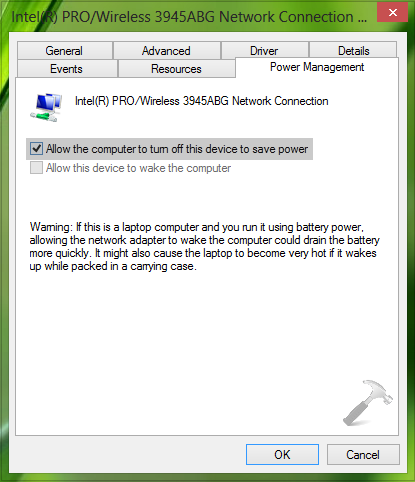
Follow this procedure also for the Ethernet driver/adapter installed on your system. Close the Device Manager, restart the machine to make changes effective.
That’s it! Go here if your WiFi Connectivity Lost After Screen Times Out In Windows Phone 8.
Network Connection Lost When Windows 8 Goes To Sleep的更多相关文章
- This network connection does not exist
This network connection does not exist 在windows server 2008上面map了一个磁盘,共享的folder被我停止共享后,点击该磁盘的disconn ...
- RobotFramework自动化测试框架-移动手机自动化测试Get Network Connection Status和Set Network Connection Status关键字的使用
Get Network Connection Status关键字用来获取手机的网络连接状态.在获取到连接状态后,会返回不同的数字. Set Network Connection Status关键字用来 ...
- 初次使用git就遭遇不测,提示没有这个服务连接和需要配置git的一个http参数 NO network connection,SSl host could not be verified ...
第一次使用git 拉取服务上的项目到本地,结果,在拿到访问的url地址后,输入用户名密码,失败了. --eclispe 4.5.3 继承了git客户端插件的版本 ------下一步后,报错 NO n ...
- Learning Experience of Big Data:The First Day-Try to set up a network connection on my virtural machine
After we install our virtual machine,the first thing we should do is to set up a network connection ...
- The network connection was lost 文件下载错误提示
假设出现这种错误,可能是模拟器断网,重新启动下模拟器就能够:The network connection was lost
- Adjusting Network Connection
Adjusting Network Connection The Selenium Mobile JSON Wire Protocol Specification supports an API fo ...
- 使用putty连接虚拟机上的centos提示Network:connection refused
转自:https://yeyuan.iteye.com/blog/1266484 今天早上开机之后,像往常一样使用putty连接linux的时候,突然提示Network:connection refu ...
- MATLAB实例:构造网络连接图(Network Connection)及计算图的代数连通度(Algebraic Connectivity)
MATLAB实例:构造网络连接图(Network Connection)及计算图的代数连通度(Algebraic Connectivity) 作者:凯鲁嘎吉 - 博客园 http://www.cnbl ...
- There appears to be trouble with your network connection. Retrying…
yarn 错误There appears to be trouble with your network connection. Retrying- 原因:yarn超时 解决途径: #查看代理 yar ...
随机推荐
- jsonp解析 html
https://jsoup.org/cookbook/ 官网的教程, 很详细! <dependency> <groupId>org.jsoup</groupId> ...
- .NET的PE文件结构篇(转)
一.开篇 开篇我要讲述一个关于PE文件结构的文章,这篇文章动手能力比较强,希望大家能够动手进行操作,这边文章篇幅有可能会长一些,为了方便大家阅读我可以将其分为几个部分进行讲解,主要分为以下几个部分: ...
- 【Foreign】置换 [数论][置换]
置换 Time Limit: 10 Sec Memory Limit: 256 MB Description Input Output Sample Input 4 2 1 4 3 Sample O ...
- [FZU2261]浪里个浪
TonyY是一个喜欢到处浪的男人,他的梦想是带着兰兰姐姐浪遍天朝的各个角落,不过在此之前,他需要做好规划. 现在他的手上有一份天朝地图,上面有n个城市,m条交通路径,每条交通路径都是单行道.他已经预先 ...
- java对象内存大小评估
Java对象的内存布局:对象头(Header).实例数据(Instance Data)和对齐填充(Padding).无论是32位还是64位的HotSpot,使用的都是8字节对齐.也就是说每个java对 ...
- SVN被锁定解决办法
转自:https://blog.csdn.net/strwangfan/article/details/78748393: 今天用SVN的时候出现被锁定的情况,既不能更新代码也不能提交. 解决方法如下 ...
- python模块之copy
提供浅拷贝和深拷贝两种模式. =>copy(x):返回x的浅拷贝 =>deepcopy(x):返回x的深拷贝 浅拷贝和深拷贝: 浅拷贝复制不变对象,引用可变对象(如列表和字典): 深拷贝复 ...
- java中final修饰符的使用
1.final修饰符的用法: final可以修饰变量,被final修饰的变量被赋初始值之后,不能对它重新赋值. final可以修饰方法,被final修饰的方法不能被重写. final可以修饰类,被fi ...
- 在 C# 中通过 P/Invoke 调用Win32 DLL
在 C# 中通过 P/Invoke 调用Win32 DLL 发布日期 : 1/13/2005 | 更新日期 : 1/13/2005 Jason Clark 下载本文的代码: NET0307.exe ( ...
- Selenium2+python自动化74-jquery定位【转载】
转至博客:上海-悠悠 前言 元素定位可以说是学自动化的小伙伴遇到的一道门槛,学会了定位也就打通了任督二脉,前面分享过selenium的18般武艺,再加上五种js的定位大法. 这些还不够的话,今天再分享 ...