
Learning Experience of Big Data:The First Day-Try to set up a network connection on my virtural machine
After we install our virtual machine,the first thing we should do is to set up a network connection on it.After searching in the browser,I found that the settings of network are placed in a file named ifcfg-eth,so we use the vi editor to edit it like this.
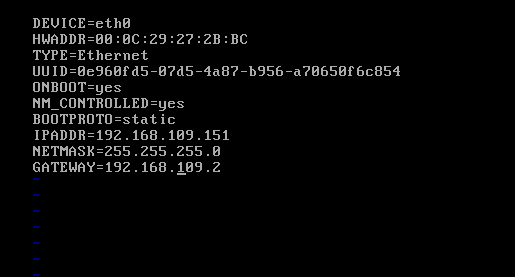
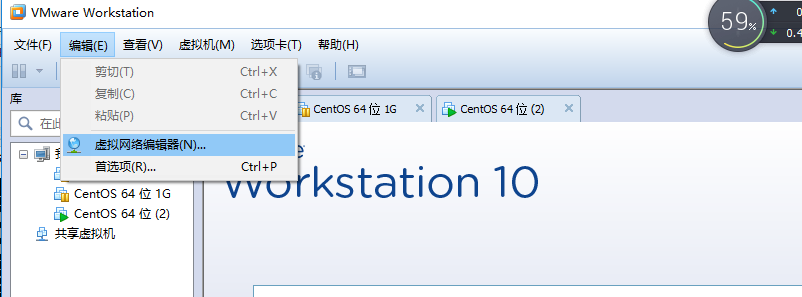
There are something we should set for it--ONBOOT to yes,BOOTPROTO to static,IPADDR to your id,NETMASK to your netmask and GATEWAY to your gateway.You may ask that where can I find them or get them.Just Look at your VM and there will be a edit option in its tool bar.You click it and you will find an option with "editor of virtural network" just like this:
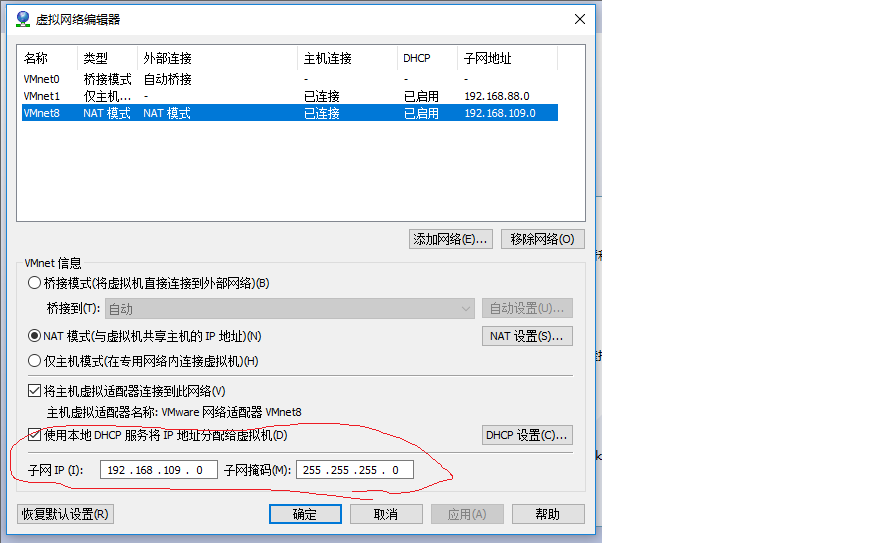
Click into and choose your virtual machine, then you will find your IP and your Netmask.
Then your gateway is in the button which called "settings of NAT"
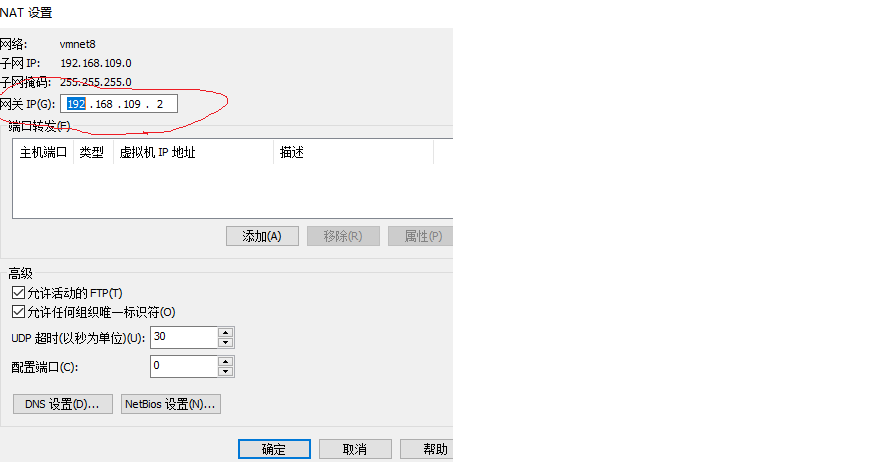
Remember,The ip you find in the editor is x.x.x.0,when you set it,you should change 0 to other address.
Next, press esc and insert :wq to save your written.Then you shuold restart the network service by insert the instruction:service network restartAfter that ,insert :ping 192.168.109.151(This is your ip address which is divided by yourself) to see if the local connection is connectedIf your local connection is connected,the next step is to add the nameserver.You can choose varies of servers,insert:vi /etc/resolv.conf to edit the file.I used the server which is established by Microsoft and Ali Cloud:
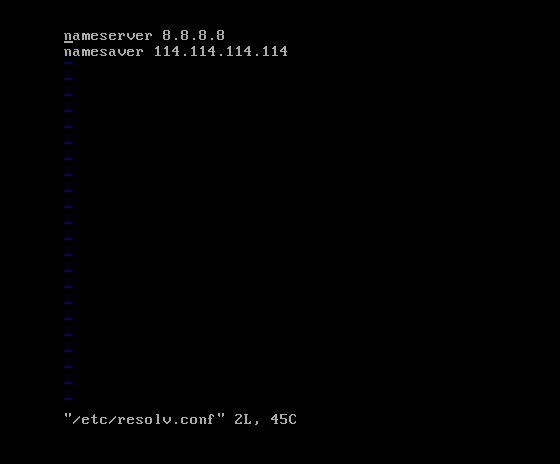
The press esc and insert :wq to save as the same.Then you should check if your network connection is connected,so you insert:ping www.baidu.com(It can be a random website) to see if your network is connected.
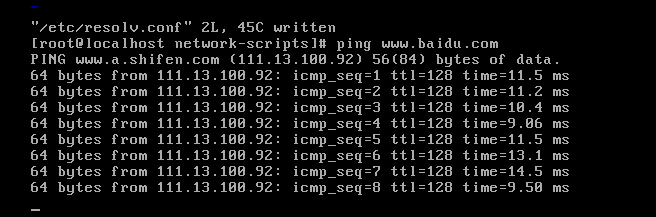
Tips:There are some steps easy to mistake,the first time I tried to set the IP address I just set 0 for the last address.Definitely,the network was'n connected.So,be careful to these settings,once you make a mistake on it,you will spend hours and even more to check for it!
Learning Experience of Big Data:The First Day-Try to set up a network connection on my virtural machine的更多相关文章
- Learning Experience of Big Data: Learn to install CentOs 6.5 on my laptop
I have learnt some experience about Big Data during my summer vocation,I was told that The first thi ...
- Learning Experience of Big Data: Deploying Tomcat 8.0 and connect ssh without password
This mission seems to be easier--we can just decompression Tomcat to our virtural machine and deploy ...
- Learning Experience of Big Data: Connect CentOs to Xshell and set Java environment on CentOS
1.set up connections between vitural machine and Xshell: After we connect the virtural machine to ne ...
- Learning Spark: Lightning-Fast Big Data Analysis 中文翻译
Learning Spark: Lightning-Fast Big Data Analysis 中文翻译行为纯属个人对于Spark的兴趣,仅供学习. 如果我的翻译行为侵犯您的版权,请您告知,我将停止 ...
- 少标签数据学习:宾夕法尼亚大学Learning with Few Labeled Data
目录 Few-shot image classification Three regimes of image classification Problem formulation A flavor ...
- data mining,machine learning,AI,data science,data science,business analytics
数据挖掘(data mining),机器学习(machine learning),和人工智能(AI)的区别是什么? 数据科学(data science)和商业分析(business analytics ...
- Vue learning experience
一.内置指令[v-ref] Official-document-expression: 父组件在子组件上注册的索引,便于直接访问.不需要表达式,必须提供参数ID,可以通过父组件的$ref对象访问子组件 ...
- Bayesian machine learning
from: http://www.metacademy.org/roadmaps/rgrosse/bayesian_machine_learning Created by: Roger Grosse( ...
- Saving structured data with json
Strings can easily be written to and read from a file. Numbers take a bit more effort, since the rea ...
随机推荐
- xcode选择开发者时"The Apple Developer Program License Agreement has been updated"
解决方法:进入开发者中心查看红色提示信息,同意就行
- Microsoft Translator:打破语言障碍 拓展全球沟通新机遇
作者:Olivier Fontana, 微软研究院Microsoft Translator产品战略总监 世界越来越小,全球协作.共同创新已经成为常态.在微软研究院,我们对此尤为感同身受——从北京到雷德 ...
- SQL 创建自定义方法,匹配正则
C#代码 using System.Text.RegularExpressions; public class FunctionRegex { [Microsoft.SqlServer.Server. ...
- 动态获取Drawable图片资源
比如Drawable中有一系列连续的图片,img_0.png, img_1.png, img_2.png ... 如果要动态获取这些图片,通过"R.drawable.img_x"的 ...
- 【Leetcode】【Easy】Remove Element
Given an array and a value, remove all instances of that value in place and return the new length. T ...
- Linux xclock打不开时钟终端
一般执行该操作的都是在安装oracle数据库或其他应用时,需要测试是否可以正常弹层执行的: 网络关于这个的描述和处理大片片的,但是符合自己实际情况的,还是需要直接去确认: 两步处理: 第一步: 使用r ...
- TCP的建立和关闭
一.TCP头信息 简单的至少应该知道,源端口,目的端口,序号,确认号,标志位,校验和 二.TCP的建立 1.客户端将SYN标志位置1,同时生成随机的序号,确认号是0. 2.服务器接收到SYN,知道有人 ...
- 整个ssd的网络和multibox_loss_layer
总结说来prior_box层只完成了一个提取anchor的过程,其他与gt的match,筛选正负样本比例都是在multibox_loss_layer完成的 http://www.360doc.com/ ...
- JAVA程序员常用软件类库下载地址整理
IT行业是个发展更新特别快的领域,每个程序员在职业生涯中都会经历各类技术和工具的更新迭代. 俗话说:工欲善其事,必先利其器.本着独乐乐不如众乐乐的精神(其实是自己健忘)本人把经常要用到的软件工具官方下 ...
- 【洛谷P1582】倒水
倒水 题目链接 显然,2^x个杯子里的水可以倒在一个杯子里 所以我们可以贪心地每次将N中最大的2^x减掉 减k次(若中途已经为0,直接输出0) 若大于0,用最小的比N大的2^x减剩下的N,即为答案 # ...